Shop Samsung
- 27.66K
- 4.5
- Installs
- 5.00M
- Price
- Free

Screenshots


Analysis by Reviewed
When I shop for electronics, clear presentation matters as much as the products themselves. Shop Samsung is Samsung Electronics Co. Ltd’s free shopping app, and its focus is the company’s own phones, appliances, and other products. I see it as a useful starting point when I already know I’m considering something from Samsung, rather than a general marketplace for comparing every brand. Its 4.5 average from around 91,000 ratings and over 5 million installs suggest that many shoppers find a reason to keep it handy, though my decision would still come down to whether its shopping flow suits me.
Finding your way around the store
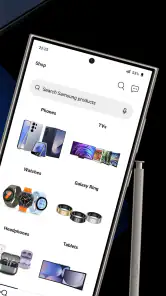
From the moment you download the Shop Samsung app, you’re greeted with a sleek and intuitive interface. It’s like Samsung took its design philosophy and poured it right into the app. The layout is clean, with easy navigation that makes finding what you need a breeze. The main menu is straightforward, and everything is just a tap away. Honestly, I felt like I was gliding through a well-organized digital store.
Readability and navigation
That tidy first impression is most useful when I have a specific shopping task: checking a product, looking through options, or returning to an order. A brand-focused shop can reduce the clutter of a broad marketplace, where unrelated sellers and products compete for attention. The trade-off is that it is not a neutral comparison tool. If I’m choosing between Samsung and another manufacturer, I would use this app to understand Samsung’s offering, then compare the alternatives elsewhere before deciding.
For shoppers who prefer a clear task rather than open-ended browsing, I’d start with a product category and keep a short checklist nearby: the feature I need, the space or device it must work with, and the amount I’m comfortable spending. This makes it easier to distinguish a useful upgrade from a tempting extra. It also helps when several models look similar on a small screen, because I can compare the details that matter to me instead of relying on whichever product image catches my eye first.
Shopping experience
The shopping experience on this app is top-notch. You can browse through a wide range of products, from the latest smartphones to home appliances. And, if you’re like me and love a good deal, the app’s exclusive offers are a real treat. I found myself spending more time than I probably should, just exploring all the discounts and bundles available. Plus, with the option to purchase directly from the app, it’s super convenient.
For a more deliberate purchase, I’d treat a bundle as a prompt to check what is actually included and whether each item fits my needs, rather than assuming a larger offer is automatically better value. I also find it helpful to compare the product details with the device or appliance I already own before checking out. That small pause can prevent an appealing promotion from distracting me from compatibility or features that matter in everyday use.
Useful detail before buying
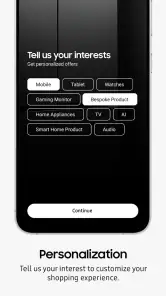
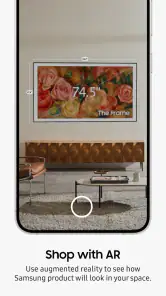
One of the standout features of the app is the ability to check out product reviews and ratings directly from other users. It’s like having a mini community within the app, where you can find honest opinions before making a purchase. Another cool feature is the augmented reality (AR) view – you can see how that new TV or fridge would look in your living room! It’s these little things that make the shopping experience feel personalized and fun.
You May Like

Clash of Clans Is Won Between the Battles

Android Auto Makes the Case for Quieter Car Software

MobiOffice: Transforming Mobile Productivity with Seamless Integration

EA SPORTS FC™ Mobile Soccer: Redefining Mobile Sports Gaming

How Microsoft OneDrive Became a Mobile Productivity Giant

How Google Translate Breaks Language Barriers Effortlessly
I would use reviews to look for repeated themes, not to let one glowing or unhappy comment decide a purchase. For a large appliance, the AR view can help me think about placement and scale in my room, but I would still measure the space and check the product dimensions. A screen preview can make a layout easier to imagine; it cannot replace the practical checks that determine whether an item will fit through a doorway or work in the spot I have chosen.
There’s also a useful distinction between imagining a product and verifying that it suits a household. Before ordering a television, I’d note the viewing distance and where the screen will sit; for a refrigerator, I’d check the opening direction and the route into the kitchen as well as the intended space. The AR preview is best treated as an early planning aid, not a final measurement tool. That extra step matters most for bulky purchases, where returning to reconsider the choice can be much more inconvenient than taking a few minutes to measure first.
Motor and sensory considerations
Shopping on a phone can be easier than travelling to a store for someone who prefers to browse at their own pace, but the usefulness of any interface depends on how comfortably a person can read and tap it. I would take time to inspect product pages before committing, especially when a decision depends on fine print, variant choices, or several accessory options. The app’s straightforward layout helps keep the task focused, while the amount of visual product information may still feel tiring for someone who finds screen-based browsing overwhelming.
Not to mention, the app also offers a seamless checkout process. You can store your payment methods securely, and with Samsung Pay integration, your purchases are just a fingerprint away. It’s efficient, and I appreciate not having to type in my card details every time.
For anyone who finds repeated tapping difficult, I’d keep the purchase focused: decide on the model and options first, then move through checkout without browsing back and forth. A saved payment method can reduce typing, but it does not remove the need to review the order carefully. I would check the selected model, quantity, delivery details, and total before confirming, since convenience is most helpful when it does not rush the final decision.
For sensory comfort, I’d use the app in a setting where I can pause and return to a product page rather than trying to make a complicated decision while distracted. Product imagery, promotions, and detailed specifications are helpful when I’m comparing choices, but they can also make a session feel busy. Breaking the task into stages—research first, checkout later—keeps the decision from becoming a scroll-and-tap marathon. If reading small text is uncomfortable, a larger device or another way of viewing the product details may be a better fit than forcing the whole process on a phone.
Situational access and support
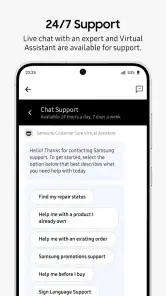
One thing I always look for in a shopping app is customer support, and the Shop Samsung app doesn’t disappoint. There’s a dedicated support section where you can chat with representatives, track your orders, and even schedule repairs. It’s like having a personal assistant who’s got your back, ensuring your shopping experience is smooth from start to finish.
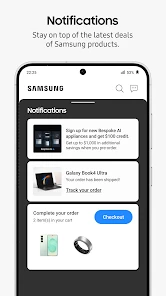
In addition, the app keeps you updated with notifications about your orders, promotions, and even new product launches. So, you’re always in the loop and can snag those deals before they’re gone.
Those functions make the app useful beyond the moment of purchase. For example, after ordering a replacement appliance part or a new phone, I could use the app to check the order’s progress rather than searching through old messages. Notifications can be handy when I’m waiting for a delivery, although I would not rely on promotional alerts to make a time-sensitive decision. If I prefer fewer interruptions, I can simply open the app when I’m ready to shop instead of treating every notification as something that needs an immediate response.
A practical routine I’d use is to browse when I have time, save the key product details for comparison, and return to the order area when I need to check progress. That separates the decision from the wait: I don’t have to keep reopening product pages just to manage an existing purchase. If I’m helping a family member choose an appliance, I’d also make sure we agree on the exact model and options before ordering; a shared conversation can be more reliable than trying to interpret a product page together under time pressure.
Where it fits—and where it doesn’t
A realistic use for me would be comparing a Samsung phone during a quiet moment at home: I could read owner feedback, check the available product information, consider whether an offer suits my budget, and then place an order if I’m satisfied. The same approach works for a television or appliance, where the AR view may help me picture the item in the room before I decide. For a quick price comparison across several brands, though, a general retailer or comparison service is a better first stop.
The app is most worthwhile for people who already own Samsung products, are considering an upgrade, or want a direct route to Samsung’s product and order support. I would skip it if I only want one place to compare competing brands or if I rarely shop for Samsung items; a broad shopping app will be more practical in that case. I also wouldn’t choose a phone-based storefront if I find small-screen browsing uncomfortable and have access to a larger screen or in-person help that works better for me.
It is also worth deciding what kind of shopping problem I’m trying to solve. If I know I want a Samsung product and want to inspect the company’s own range, this focused storefront saves me from sorting through unrelated listings. If I’m still open to several manufacturers, a multi-brand retailer makes it easier to compare prices and specifications in one place. I wouldn’t use the Samsung app as my only source for a major purchase: I’d use it for Samsung-specific details and then check competing options elsewhere, especially when a particular feature or budget is non-negotiable.
For a busy household, the strongest everyday use may be less about browsing for fun and more about keeping a purchase organized. Imagine replacing a phone after work: I can review the model options on the commute only if I have enough attention, then wait until I’m home to check the final configuration and place the order. If I’m shopping for an appliance, I can use the product information and AR view to narrow the choice before discussing delivery logistics with anyone who shares the space. In both cases, the app is most helpful when it supports a decision I’ve already begun, rather than trying to create urgency through offers.
One trade-off is that a direct brand store naturally presents Samsung’s products in their own context. That is convenient for learning what the company sells, but it can make the range feel more complete than the wider market. I’d therefore write down the two or three requirements that would make me choose a product—such as a particular size or connection need—and use those to compare outside the app. This simple habit helps keep brand familiarity from turning into an assumption that the first suitable-looking option is automatically the best one.
Remaining barriers in everyday use
Even a well-organized shopping flow can create friction when a purchase involves many details. Product variants, accessories, delivery information, and payment choices all require attention, and a phone interface may not be comfortable for someone who needs more room to read or more time to make selections. I’d avoid rushing through checkout in a noisy place or while multitasking. The app can bring shopping and order follow-up together, but it cannot make a complex decision simple if the product information itself is difficult for me to interpret.
Likewise, the AR view is not a substitute for hands-on inspection. A digital preview can help me picture an item at home, but a person who needs to assess texture, controls, sound, or other physical qualities may prefer to see the product in person when that option is available. Reviews can offer clues about owners’ experiences, yet they are still individual accounts rather than a guarantee that the same product will suit my needs. I’d treat these tools as aids to judgement, not as replacements for it.
Accessibility also depends on the individual and the context. Someone who can comfortably read and tap on a phone may find a quick product check easy, while someone with limited dexterity, low vision, or sensitivity to busy screens may need another device, assistance, or a slower route through the purchase. I would not assume that a simple-looking interface works equally well for everyone. The sensible test is to try a low-stakes browsing task first and see whether the text, controls, and amount of information feel manageable before relying on the app for an important order.
Inclusive verdict
Overall, the Shop Samsung app is more than just a shopping platform; it’s an engaging experience that blends convenience with innovation. Whether you’re a tech enthusiast or just someone looking to upgrade your gadgets, this app is definitely worth checking out. It’s like having a Samsung store at your fingertips, 24/7. So go ahead, dive into the world of Samsung and see what catches your eye!
My recommendation is more specific: try it if you want to shop Samsung’s own catalogue, review feedback, and keep order-related tasks together on your phone. It is free, rated for Everyone, and its current version is 2.0.35495, with Android 8.0 or later required. The app has been available since November 17, 2016, and has around 28,000 written reviews alongside its ratings. I’d regard it as a convenient brand store, not a substitute for cross-brand research or careful checks of product details. For shoppers whose needs match that focus, it can make browsing and follow-up feel more connected; for everyone else, a general retailer may be the more inclusive and flexible choice.
Shop Samsung Frequently Asked Questions
Is Shop Samsung available in my country, and will the products suit my region?
Shop Samsung is a shopping app focused on Samsung products, but the experience may depend on the market where you use it. Product availability, offers, delivery options, and services can vary by region. Before placing an order, check the app’s product details and checkout information for your location so you can make sure the items and purchasing options suit your needs.
What should I check before creating an account or placing an order?
Before shopping, make sure you have installed the official Shop Samsung app and that your device meets its operating system requirements. Review the product description, selected options, and checkout details carefully before confirming a purchase. Keeping your account and contact information current can also help you manage orders and receive relevant updates through the app.
Is Shop Samsung free to download, and what devices can install it?
Shop Samsung is a free shopping app from Samsung Electronics Co. Ltd. It is available for Android and iOS, and the Android version requires Android 8.0 or later. The app is rated Everyone, making it suitable for a broad audience. Before downloading, check that your device runs a supported operating system and that you are installing the official app.
Who publishes Shop Samsung, and what is the app intended for?
Shop Samsung is published by Samsung Electronics Co. Ltd and is designed for shopping for Samsung products. Its short description is simply “Shop Samsung,” while its store summary highlights the next generation of Samsung products. The app has been available since November 17, 2016, and its current version is 2.0.35495. It is a dedicated retail app rather than a general-purpose shopping marketplace.
What features does the Shop Samsung app offer?
The Shop Samsung app offers a comprehensive shopping experience, allowing users to browse and purchase the latest Samsung products directly from their mobile device. It provides access to exclusive deals, promotions, and the latest product launches. Users can also track orders, manage purchases, and utilize Samsung's trade-in service for discounts on new products.
Pros
- User-friendly interface with easy navigation
- Exclusive discounts and offers on Samsung products
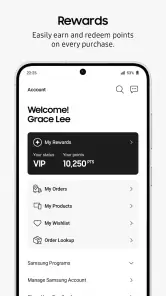
- Loyalty rewards for frequent shoppers
- Wide range of Samsung products available
- Secure payment options
Cons
- Limited to Samsung products only
- Requires Samsung account for full access
- Occasional app crashes reported
- Shipping can be slow for some regions
- Notifications can be overwhelming

- Category
- Shopping
- Version
- 2.0.35495