Sam’s Club: Shopping made easy
- 121.41K
- 4.8
- Installs
- 10.00M
- Price
- Free

Screenshots
Analysis by Reviewed
My most useful Sam’s Club trips start before I leave home: I have a list, a rough idea of what I need, and limited patience for doubling back through a large store. The Sam’s Club: Shopping made easy app is built for that kind of errand. It brings shopping tools, savings, gas and grocery essentials into one place, and I find it most valuable when I use it to plan a trip rather than treat it as a digital catalogue.
Begin with the list, not the offers
I’d start by separating must-buys from things I’m merely curious about. That’s especially useful at a warehouse club, where a larger pack can look like a bargain but may not suit a small household or limited storage. I check whether an item is something I use regularly, whether I have room for it, and whether buying more now will actually save me another trip. The app works best as a planning aid when those decisions come first.
For a realistic example, imagine I’m shopping for a family gathering after work. I can check my list at home, then use in-store search to locate a missing ingredient instead of walking every aisle. If I’m also picking up routine household staples, I can keep those in mind for the same trip and avoid making a second visit. The practical win is not simply finding products; it’s making the trip feel more deliberate.
Search is most useful when the trip has a purpose
When I know the exact item I came for, searching in the app can help me focus on that errand instead of browsing the entire store. I’d use it before leaving if I’m trying to decide whether a stop is worth making, then search again in the club if I need help finding something. That two-stage habit—plan at home, confirm while shopping—keeps the app tied to a real decision rather than turning it into another place to scroll.
There is a trade-off: an in-store search can narrow the hunt, but it doesn’t make every product choice automatic. If I’m comparing sizes, ingredients, or pack quantities, I still need to use my judgment at the shelf. I wouldn’t treat an app result as a substitute for checking the product in front of me, particularly when the exact variety or quantity matters to my plans.
Aisle Navigation Made Simple
One of the coolest features of the Sam’s Club app is its in-store navigation. Seriously, it's like having a personal GPS for your shopping cart. You can search for items and find out exactly where they are located in the store. No more aimlessly wandering around trying to find that elusive jar of pickles. Just type it in, and bam, you're on your way.
Use navigation to avoid the second lap
I’d group searched items into a loose route instead of treating each search as a separate mission. If several things are on the list, checking them together can help me avoid crossing the warehouse repeatedly. It’s a small planning trick, but it matters when I’m shopping with a time limit or pushing a full cart. I still expect to adjust if I see something has moved or if a crowded aisle makes another route easier.
More From Our News Desk

Weather by Xiaomi Review: Clear at a Glance, Less Clear Up Close

X Under Pressure: Can It Recover When Posting Goes Wrong?

Clash of Clans Is Won Between the Battles

Android Auto Makes the Case for Quieter Car Software

MobiOffice: Transforming Mobile Productivity with Seamless Integration

EA SPORTS FC™ Mobile Soccer: Redefining Mobile Sports Gaming
That makes the navigation most valuable for targeted shopping, not for replacing every bit of browsing. If I’m looking for one specific item, it can save wandering. If I’m shopping for inspiration or want to compare what is available in person, I may prefer to take my time and explore. The app’s strength is reducing uncertainty about where to start, while the final choice remains mine.
Scan & Go: A Game Changer
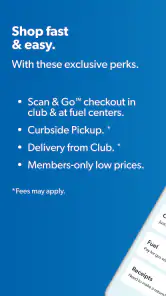
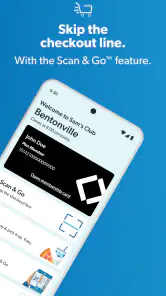
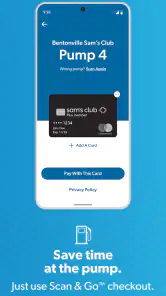
If there's one thing I absolutely adore about this app, it's the Scan & Go feature. Imagine this: you're cruising through the store, scanning items with your phone as you go, and then just heading straight for the exit. No lines, no waiting. It's like being a VIP shopper every time you visit. This feature alone has saved me so much time and hassle.
Plus, the app keeps track of your scanned items and gives you a real-time total, so you can keep an eye on your budget while you shop. It's like having your own personal accountant in your pocket!
Make the phone part of the routine
For a quick run, I’d keep my phone accessible and scan each product as it goes into the cart, rather than leave everything until the end. That makes the running total more useful and gives me a chance to catch an item I added by mistake. It also puts the phone at the center of the checkout routine, so I’d arrive with enough battery and avoid burying it under bags or bulky purchases.
Scan & Go is most compelling when I’m buying a manageable number of items and want to keep moving. For a cart full of mixed groceries, I’d still take a moment to check the scanned list before finishing; speed is only a benefit if the cart and the phone’s tally match. If I’d rather not handle a phone while shopping, the conventional checkout remains the more comfortable choice.
Know when a faster checkout is not worth the fuss
The phone-based flow asks me to pay attention as I shop. That is a fair exchange when I want the running total and a quicker exit, but less appealing if I’m juggling children, bags, or a complicated list. I’d also avoid leaving scanning until the last minute: a missed item or a scan that needs checking can turn a supposedly simple finish into extra work. For an unfamiliar trip, I’d try the process with a smaller basket first and see whether it fits my pace.
This is one place where Sam’s Club’s app differs from a basic supermarket app. A conventional store app may be enough for checking a short list or planning a small neighborhood grocery run; this one is more compelling when its warehouse search, club shopping routine, and phone-based checkout all solve a problem I actually have. The extra tools are useful, but they are not a reason to change a checkout habit that already works well for me.
Exclusive Savings at Your Fingertips
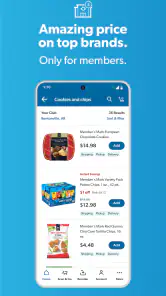
Let's talk about savings, because who doesn't love a good deal? The Sam’s Club app is loaded with exclusive discounts and instant savings that you won't find anywhere else. And the best part? You don’t have to clip any coupons. The app automatically applies these savings to your purchase, so you can walk out knowing you got the best deal possible.
Another nifty feature is the personalized offers. Based on your purchase history, the app suggests deals that are tailored to your shopping habits. It's like they know exactly what you need before you even realize it. Creepy? Maybe a little. Useful? Absolutely.
Keep savings connected to real needs
I’d treat personalized deals as a reason to check an item I already buy, not as a reason to add something unfamiliar. A discount only helps if the product fits the household and the quantity makes sense. Before heading out, comparing the offers with my actual list keeps the app’s suggestions in their proper role: a possible bonus, not a shopping plan.
This is also where Sam’s Club differs from a standard grocery-store app. A typical supermarket app may be the easier choice for a small, highly specific basket or a shop built around a nearby branch. Sam’s Club makes more sense when I want club-sized staples, member-oriented savings, or a combined warehouse errand. It is not automatically the cheapest or simplest answer for every single item, so I’d compare what I genuinely need rather than assume a promotion makes a bulk purchase worthwhile.
Make a fair comparison before buying in bulk
For me, the useful comparison is the cost and practicality of the amount I will actually use, not just the displayed offer. A smaller pack from a regular grocery store may be a better fit if I’m testing a product, have little storage space, or need only one ingredient for tonight. On the other hand, a repeat household staple can make a club-sized purchase more sensible if I know it will be used. I’d use the app to spot possible value, then make the decision based on quantity, routine, and waste.
Gas can also make a Sam’s Club stop part of a broader errand, but I’d keep the trip convenient rather than adding a detour just because the app includes gas in its shopping tools. A combined stop is attractive when I already need to shop nearby; it is less persuasive if it sends me out of my way. The best savings are the ones that survive the travel and time involved.
Easy Reordering and Pick-Up Services
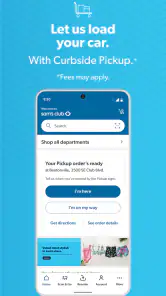
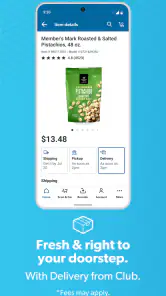
If you're a creature of habit and tend to buy the same items regularly, the app makes reordering a breeze. Just check your order history, select the items you need, and schedule a pick-up. It's that simple. And for those of us who are always on the go, the pick-up service is a lifesaver. Just order ahead, swing by the club, and they'll load everything into your car. It's shopping made easy, alright!
Choose the right handoff
Pickup is a good handoff between planning at home and getting on with the day: I can place a repeat order, then collect it without browsing the whole warehouse. I’d use that for familiar essentials when time is tight. For a shop where I want to inspect options, browse current shelves, or decide in person what makes sense in a larger pack, walking in gives me more control.
That distinction helps answer a common practical question: do I need to use the app for every Sam’s Club visit? I wouldn’t. It is most useful when I want to find a product, track a Scan & Go basket, check relevant savings, or arrange a pickup. If I’m making an occasional visit and prefer a paper list and staffed checkout, the app’s extra steps may not improve the experience.
Repeat orders reward a little review
Order history is handy when I’m replenishing familiar items, but I wouldn’t repeat a previous basket without looking through it. Household needs change, and a past quantity may not be right this time. I’d use the history as a shortcut, remove anything I no longer need, and check the final selection before arranging collection. That keeps convenience from becoming an excuse to buy on autopilot.
Pickup also changes where the decision-making happens. With an in-store visit, I can reconsider a pack or choose something different at the shelf; with an order placed ahead, I do more of that thinking before I arrive. I’d choose pickup for predictable essentials and an in-person shop for uncertain choices. That simple distinction helps prevent a rushed collection from becoming the wrong kind of shortcut.
Who gets the most from it
I’d recommend it to regular Sam’s Club shoppers who already buy recurring household or grocery staples, especially people trying to fit a warehouse stop between other errands. It can also suit someone who wants a running total while shopping or would rather have a repeat order ready for collection. If you rarely visit the club, dislike managing errands on a phone, or mainly need a few items from an ordinary supermarket, another shopping routine may be simpler.
It is also a better match for someone comfortable making bulk-buy decisions. If storage is tight, household consumption is unpredictable, or I’m shopping for just one meal, a smaller local shop can be the more practical option even when a club offer catches my eye. I’d skip the app if its tools would add another task to an already simple visit; a handwritten list and regular checkout are perfectly reasonable alternatives.
A grounded verdict on the workflow
Sam’s Club is a free shopping app from Sam’s Club, and its 4.8 average across around 699,000 ratings suggests that many shoppers find it useful. It has been available since September 24, 2010, and has passed 10 million installs. The current version is 25.11.40, it is rated for Everyone, and it requires Android 9 or later. Those details make it easy to judge whether it fits your device and household, but the real question is whether its club-specific tools match the way you shop.
For a first visit, I’d keep the plan simple: prepare a short list, search for one or two items, and decide whether I want to scan purchases or use a staffed checkout. That gives me a clear read on the parts that matter without requiring me to change my whole routine at once. If I’m buying familiar staples, I might later try reordering and pickup; if the trip is exploratory, I’d leave more room to browse.
In conclusion, the Sam’s Club: Shopping made easy app truly lives up to its name. With features that simplify navigation, streamline the checkout process, and deliver personalized savings, it's a must-have for any frequent shopper. Whether you're stocking up for a family gathering or just doing your weekly grocery run, this app transforms the way you shop at Sam's Club. So, next time you head out for a shopping trip, make sure your phone is loaded with this app. Trust me, you won't want to shop without it.
Sam’s Club: Shopping made easy Frequently Asked Questions
How much storage space should I allow for the Sam’s Club app?
The Sam’s Club app is a shopping app for browsing and managing purchases, so you may want to leave enough room for the app itself and its updates. Its current version is 25.11.40. The download is free, but the amount of storage it uses can vary by device and as the app is updated. Checking your phone’s available space before installing is a simple way to avoid interruptions.
Who publishes the Sam’s Club app, and is it intended for a general audience?
Sam’s Club develops the app, which is focused on shopping, including grocery essentials, fuel, and other needs. It is marked for Everyone, making it suitable for a general audience. The app is free to download, and it is available for Android and iOS. If you plan to use member-focused shopping tools, an active Sam’s Club membership may be needed for access to those features.
Is the Sam’s Club app compatible with my phone, and what does it cost to download?
Sam’s Club: Shopping made easy is a free shopping app for Android and iOS. The current version is 25.11.40, and the Android minimum OS requirement is version 9. It has an Everyone age rating, so it is designed for a general audience. Checking your device’s operating-system version before downloading can help you avoid compatibility surprises.
What is Sam's Club app and how does it make shopping easier?
Sam's Club app is a convenient tool designed to simplify your shopping experience, whether in-store or online. It allows you to browse a vast selection of products, compare prices, and check availability at your local club. With features like Scan & Go, you can skip the checkout lines by scanning items as you shop and paying directly through the app. The app also offers easy access to exclusive member deals, personalized recommendations, and the ability to reorder your favorite items quickly.
How does the Scan & Go feature work in the Sam's Club app?
The Scan & Go feature in the Sam's Club app revolutionizes the way you shop by allowing you to bypass traditional checkout lines. As you shop, simply scan the barcode of each item with your phone's camera. Once you're done shopping, you can pay for your items through the app. After payment, a digital receipt is generated, and you can show it at the exit as proof of purchase. This feature is designed to save time and enhance your shopping efficiency.
Pros
- User-friendly interface
- Wide product range
- Exclusive member deals
- Efficient order tracking
- Secure payment options
Cons
- Membership required
- Limited physical stores
- App occasionally crashes
- Delivery fees apply
- Limited customer support hours
- Category
- Shopping
- Version
- 25.11.40











