Route: Package Tracker
- 13.99K
- 4.7
- Installs
- 1.00M
- Price
- Free

Screenshots



Analysis by Reviewed
I find Route: Package Tracker most useful when several orders are on the way and I don’t want to keep a collection of carrier pages open. It’s a free shopping app from Route App Inc, and its central appeal is bringing package updates together rather than making me remember which company is handling each delivery. That convenience is real, though I’d treat it as a handy organizer—not a replacement for every retailer or carrier’s own support tools.
Where it fits in a delivery routine
Route’s current version is 2.173.0, and the app has been available since April 3, 2020. Its track record is reflected in a 4.7 average rating from around 182,000 ratings, with more than a million installs. Those figures suggest it has found a broad audience, but they don’t guarantee that every shipment will display identical detail: tracking information still depends on what the carrier makes available.
A practical way to use it is to add orders as soon as you receive confirmation, then check the consolidated view when you’re planning errands or deciding whether someone needs to be home. For example, if I’m expecting a parcel while heading out, I can look for a status change in one place instead of opening separate carrier pages. I’d still check the carrier directly when the delivery is urgent or a status looks unclear, since the carrier remains the source for its own scan and service options.
Who will get the most from it
This setup suits people who shop from several online stores, receive parcels through different services, or simply lose track of order emails. It is particularly useful when multiple deliveries overlap: one app can help me see which orders are moving and which deserve a closer look. Route is rated Teen, so it may not be the right choice for a younger child to use independently.
If you usually have only one delivery at a time, your retailer’s order page or the carrier’s own app may already be enough. Those direct tools can be a better choice when you need to change delivery instructions, contact a carrier, or resolve a specific shipment problem. Route’s advantage is convenience across orders; it shouldn’t be confused with a guarantee that every carrier action can be completed inside one place.
Useful habits and realistic limits
A small but useful habit is to compare an unexpected status with the original order email before taking action. That helps distinguish a carrier update from a retailer’s order-stage message and reduces the chance of chasing the wrong source. I’d also keep the confirmation email until the parcel arrives: a consolidated tracker is convenient, while the retailer’s receipt is still useful context if an order needs attention.
Notifications can save repeated checking, but they can also become noise if every movement prompts an alert. I’d enable only the updates that help me make a decision, then use the app for a quick overview rather than treating each notification as a reason to open it. The key trade-off is simple: Route can make tracking less scattered, but it cannot make a carrier scan appear sooner or remove uncertainty when tracking information pauses.
More From Our News Desk

Clash of Clans Is Won Between the Battles

Android Auto Makes the Case for Quieter Car Software

MobiOffice: Transforming Mobile Productivity with Seamless Integration

EA SPORTS FC™ Mobile Soccer: Redefining Mobile Sports Gaming

How Microsoft OneDrive Became a Mobile Productivity Giant

How Google Translate Breaks Language Barriers Effortlessly
Tracking in practice
The moment I installed Route: Package Tracker, I knew I was in for a treat. The user interface is sleek, modern, and incredibly intuitive. Gone are the days of juggling between different carrier websites; this app brings all your tracking needs under one roof. You simply input your tracking number, and voilà, the app takes care of the rest. It supports a wide range of carriers, so whether you’re waiting for a local delivery or an international package, Route has got your back.
Real-Time Updates
What truly sets Route apart is its real-time updates. I’ve always found it frustrating when updates are delayed or not in sync with the actual status of the package. With Route, I receive notifications the moment there’s a change in status, ensuring I’m always in the loop. This feature is a lifesaver, especially for those of us who are a bit impatient (guilty as charged!).
Visual Tracking
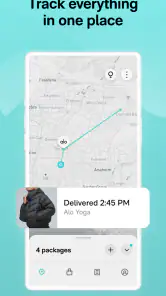
Now, here’s a feature I didn’t know I needed until I used it – visual tracking. Route doesn’t just provide a list of updates; it also offers a map view of where your package is in real-time. It’s like having your very own package GPS! This visual representation adds an extra layer of excitement and assurance as you can see your package inching closer to your doorstep.
Easy Claim Process
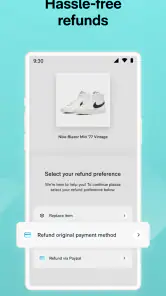
We’ve all been there – a package goes missing or arrives damaged. Route makes the claim process straightforward and hassle-free. With just a few taps, you can file a claim directly through the app, and Route takes it from there. This peace of mind is invaluable, knowing that you have an ally if things go awry.
Shop and Track
Beyond just tracking, Route also offers a shopping feature where you can explore new products and deals. While I initially thought this was just an extra gimmick, it turned out to be quite handy. I’ve discovered some great deals and products that I wouldn’t have stumbled upon otherwise. It’s like having a personal shopper and tracker all in one app!
The developer continues to build the product, but the version number alone doesn’t tell me which features changed or how a particular update affects an existing account. I’d install the current release for the combined tracking workflow, while judging the app by whether it recognizes the carriers and orders I actually use. For an existing user, the sensible approach is to keep relying on familiar carrier pages for exceptions rather than assuming an update has changed how claims or delivery controls work.
What I’d watch before relying on it
My main reservation is that a single dashboard can make separate delivery systems look more unified than they really are. A map or alert is useful when it adds context, but I wouldn’t treat a displayed location as a precise promise about arrival time. If an order has stopped moving, is marked delivered unexpectedly, or needs a delivery change, I’d verify the details with the relevant carrier or retailer before deciding what to do.
Route is free, which makes it easy to try as a companion to the tools I already use. The app has also accumulated around 14,000 written reviews, another sign that people use it for more than a one-off tracking check. Still, the best test is personal: add a few current orders and see whether its combined view reduces effort without hiding the direct options you need. I’d recommend it to frequent online shoppers who value a shared overview; I’d skip it if I prefer handling every delivery directly through its carrier and rarely have multiple parcels in flight.
Making the shared view useful
The most practical benefit is less about watching a parcel move and more about planning around several deliveries at once. If I have a workday with limited breaks, I can check the overview before leaving home, notice which orders have meaningful progress, and decide whether I need to keep an eye on one in particular. I wouldn’t use a general status as proof that a package will arrive at a specific hour, but it can help me avoid checking three inboxes just to learn that nothing has changed.
For a household that orders from different stores, the shared view can also make handoffs easier. One person can tell another which parcel is expected without forwarding several confirmation messages. I’d still keep order details accessible, especially for expensive or time-sensitive purchases, because the tracking summary and the purchase record serve different purposes. That distinction is easy to overlook when everything appears in one app.
Choosing how to add and check parcels
If an order doesn’t appear as expected, I’d start with the retailer’s confirmation and make sure the shipment has actually been handed to a carrier. A purchase confirmation and a carrier scan are different stages; a quiet tracking screen early on does not necessarily mean something is wrong. When adding a shipment manually, checking the number against the original message before saving it is a simple way to avoid following a typo or the wrong parcel.
I’d also give the app a short trial with ordinary deliveries before relying on it for an urgent one. That lets me see whether the services I commonly receive from show useful updates in my routine, and whether alerts are timely enough for how I plan my day. This is more informative than judging the app from a single parcel: one shipment may have sparse scans simply because the carrier has little new information to report.
How it compares with carrier and retailer apps
Carrier apps have the advantage when I need service-specific actions or the clearest explanation of a carrier’s own tracking events. A retailer’s order page is usually the better place to confirm what was purchased, review the order stage, or ask the seller about a problem. Route’s strength is the middle ground: it can make a mixed set of shipments easier to glance at without requiring me to open each company’s app first.
That makes it a companion rather than a universal replacement. If I receive packages from just one carrier, its own app may offer a more direct workflow with less duplication. If I shop across multiple stores and services, Route’s consolidated approach is more appealing. I’d keep whichever direct tool is useful for exceptions and use Route for the day-to-day overview; there’s little benefit in forcing every delivery task through a single interface.
Claims, delays, and sensible expectations
A claim option can be reassuring, but I’d treat it as a route into a process rather than a promise of a particular outcome. When a package is missing or damaged, I would first collect the order confirmation and check the latest carrier status, then follow the relevant claim steps. Keeping those details together makes it easier to explain the issue accurately, whether I begin in Route or need to contact the retailer or carrier directly.
Delivery tracking can go quiet between scans, and a location display can look more definite than the underlying information really is. I would not rearrange an important appointment based solely on a map marker or a broad status. If the parcel matters that day, use the carrier’s own page for the latest official detail and look for available service options there. Route can reduce the effort of monitoring, but it cannot remove the uncertainty built into a shipment’s journey.
A good fit, with a clear boundary
I’d choose Route if I regularly have orders from different shops in transit and want one place to spot changes, especially when I’m coordinating errands or sharing delivery awareness with someone at home. Its free entry point makes it reasonable to test alongside existing tools, and the shopping section may appeal to people who like browsing as well as tracking. I’d be more cautious if I rarely order online, strongly prefer keeping all activity inside a carrier’s own system, or need precise delivery control rather than a combined status view.
For a first try, I’d add a handful of current orders, leave the original emails easy to find, and see whether the app saves me real checking time. If alerts become distracting, I’d narrow them to changes that affect my plans. If an order looks wrong, I’d verify it at the source before acting. Those habits let Route do what it does best—organize a scattered delivery routine—without asking it to replace the people and systems responsible for the shipment.
In conclusion, Route: Package Tracker has truly transformed the way I manage my deliveries. It’s reliable, easy to use, and packed with features that cater to every need I didn’t even know I had. If you’re tired of traditional tracking methods and want a more engaging and efficient way to track your packages, I highly recommend giving Route a try. Trust me, once you go Route, you’ll never go back!
Route: Package Tracker Frequently Asked Questions
How can I check whether Route: Package Tracker will work on my device?
Before installing Route, check your device’s operating system and make sure it meets the app’s minimum requirement. Route: Package Tracker is available on Android and iOS, so the exact compatibility details depend on which device you use. Checking the app store page on your phone is a practical way to confirm that the version offered there is suitable for your device.
Do I need a Route account to track my packages?
Route is designed to bring package and online-order tracking together in one app, with support for Amazon, FedEx, and USPS. If you are considering a download, think about how you currently manage delivery updates and whether consolidating them in an app suits you. Follow the sign-in or setup steps shown in the app when you first open it, and review its prompts before sharing information.
Can I track Amazon, FedEx, and USPS deliveries in Route?
Yes. Route: Package Tracker is described as a way to track packages and online orders from Amazon, FedEx, and USPS in one app. That can make it easier to keep supported deliveries together instead of checking each service separately. If your orders use other carriers, check coverage for those services before relying on Route as your only tracking tool.
Is Route: Package Tracker free to download?
Yes. Route: Package Tracker is free to download, so you can try its package-tracking experience without paying for the app itself. It is described as a shopping app for bringing package and online-order tracking together, including orders handled by Amazon, FedEx, and USPS. Before downloading, check that your device meets the minimum operating-system requirement.
What Android version do I need to use Route: Package Tracker?
Route: Package Tracker requires Android 8.0 or later, so it may not install on devices running an older version of Android. If your phone or tablet meets that requirement, you can look for the app in the Android app store and review its current compatibility details there. The app is also available on iOS, giving users another way to access Route.
Pros
- User-friendly interface
- Real-time package tracking updates
- Supports multiple carriers
- Customizable notifications
- Secure data handling
Cons
- Limited free features
- Occasional tracking delays
- Ads in free version
- No offline access
- Battery drain issues

- Category
- Shopping
- Version
- 2.173.0











