ReShoot: AI Photos & Edits
- 265.00
- 4.6
- Installs
- 100.00K
- Price
- Free

Screenshots
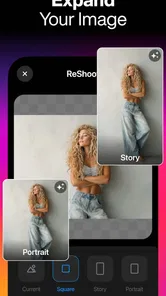
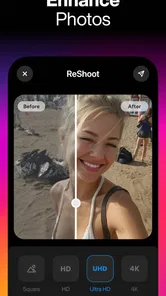
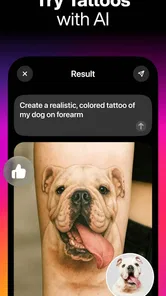
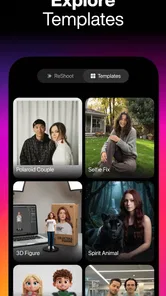
Analysis by Reviewed
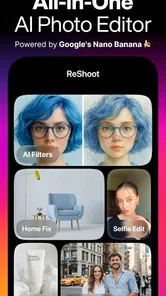
I spent time with ReShoot: AI Photos & Edits as a lifestyle app for turning ordinary pictures into more polished, playful, or experimental images. Its focus is broad: AI-generated photos, edits, filters, tattoos, hairstyles, and professional-looking portraits all sit under one roof. That makes it appealing when I want to try a visual idea quickly instead of learning several separate editing tools.
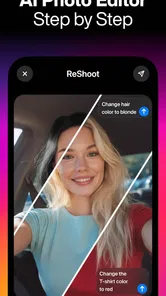
My first impression was that ReShoot is aimed at people who want results without a complicated editing lesson. I could approach it with a simple goal—refresh a profile picture, test a new hairstyle, imagine a tattoo, or create a more formal-looking portrait—and let the app guide the transformation. The experience feels closer to choosing a visual direction than manually adjusting every technical detail.
That convenience is also the central trade-off. ReShoot is strongest when I want inspiration and speed. It is less convincing as a replacement for a full photo editor where I can control every mask, layer, color value, and retouching decision. If you understand that difference before installing it, the app’s strengths become much easier to appreciate.
How clearly the app presents its creative tools
I’ll look at how the app’s visual choices communicate what each tool is meant to do, and how a clear goal can make that broad menu easier to navigate. I’ll also consider where previews help users make informed decisions—and where it still pays to pause and inspect the image before moving on.
Readability and navigation
The range of options can be exciting, but it can also make the first session feel like a browsing exercise. I found it helpful to begin with one specific intention rather than opening every creative category at once. For example, deciding that I wanted a professional portrait gave me a clearer path than casually jumping between filters, hairstyles, and tattoo concepts.
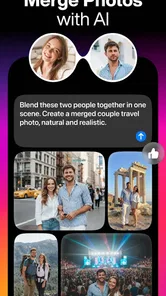
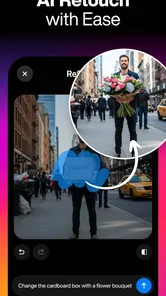
The app’s appeal comes from visual choices, so the images themselves do much of the explanatory work. That is useful for anyone who does not enjoy reading technical instructions. A preview communicates the intended effect faster than a paragraph about artificial intelligence or image processing. In my experience, this makes the product approachable for casual users who might avoid a traditional editor.
At the same time, visual menus can become less clear when several effects look similar. I recommend comparing options slowly instead of tapping through them rapidly. A dramatic preview may look impressive at first but may not suit the original lighting, pose, or expression in your photo. The more time I spent judging the relationship between the source image and the proposed style, the better my choices became.
More From Our News Desk

Weather by Xiaomi Review: Clear at a Glance, Less Clear Up Close

X Under Pressure: Can It Recover When Posting Goes Wrong?

Clash of Clans Is Won Between the Battles

Android Auto Makes the Case for Quieter Car Software

MobiOffice: Transforming Mobile Productivity with Seamless Integration

EA SPORTS FC™ Mobile Soccer: Redefining Mobile Sports Gaming
The most useful habit is to choose the purpose of the image before choosing the effect. A picture intended for a work profile needs a different level of restraint from one made for a social post or a private style experiment. ReShoot gives me room to explore both, but it does not remove the need for that judgment.
What the editing approach does well
ReShoot works particularly well as an idea generator. I can use it to see possibilities that I would not have considered while looking at the original photograph. Hairstyle changes and tattoo concepts are good examples: even when I do not use the final image, the preview can help me decide what kind of look I actually like.
The professional-shot direction is also practical for people who have a usable portrait but lack the time, budget, or opportunity for a formal photo session. I would still inspect the result carefully before using it for an important application. AI styling can improve presentation, but a polished image should still resemble me closely enough to feel honest and appropriate.
Filters are the easiest place to experiment because the consequences are usually low. I can compare a softer treatment with a more dramatic one and quickly decide whether the original face and expression remain natural. For more substantial changes, such as hair or tattoos, I treat the output as a concept rather than a promise of how I would look in real life.
Making the interface easier to use
For a smoother session, I would prepare a small set of photos rather than relying on one picture. A clear face, even lighting, and an uncomplicated background give the app a better starting point than a dark group photo or a heavily blurred snapshot. This is not a guarantee of a perfect result, but it reduces the number of variables I have to judge.
I also recommend saving the original image separately before experimenting. That simple step matters because creative edits can make it easy to lose track of what changed. Comparing the source and result side by side helps me notice whether the app improved the presentation or merely made it more artificial.
For users who find dense visual interfaces tiring, a short, single-purpose workflow is more manageable than a long exploration session. I would choose one category, review a few results, and stop when the output meets the goal. ReShoot is more enjoyable when it feels like a focused creative tool rather than an endless stream of options.
Using ReShoot across different abilities and situations
I’ll consider how the same image-editing workflow may feel different depending on a person’s vision, comfort with touch controls, or available time. From there, I’ll turn to practical ways to keep experimentation focused and manageable, including when another kind of photo tool may be a better fit.
Motor and sensory considerations
One advantage of an AI-first editor is that it can reduce the amount of precise finger work normally required for a polished image. Instead of repeatedly drawing around hair, adjusting tiny points, or balancing many sliders, I can begin with a broader visual idea. That may suit people who find fine touch gestures uncomfortable or tiring.
However, reduced manual editing does not mean every interaction is effortless. Browsing visual choices still requires repeated taps, and comparing several previews can become tiring for users with limited stamina or hand control. I found that working in short sessions and making a decision before opening another category helped keep the process manageable.
People with visual sensitivities may want to approach dramatic filters cautiously. Strong transformations, high-contrast previews, or sudden changes between styles can make the browsing experience uncomfortable, especially when rapidly switching from one result to another. I would lower the pace, review one image at a time, and avoid treating every striking preview as a recommendation.
For users with low vision, the practical question is whether the visual result can be judged comfortably on their device. ReShoot’s purpose depends heavily on seeing facial detail, hair placement, skin texture, and the boundaries of an effect. A larger screen or system-level display adjustments may make comparison easier, but the app’s usefulness still depends on being able to inspect the image clearly.
People who are color-blind should be especially careful with edits where the main difference is a subtle color shift. A hairstyle or tattoo concept may still be useful because shape and placement remain visible, while a filter based mainly on tone may be harder to evaluate. In those cases, I would ask someone I trust for a second opinion before sharing the result.
Situational access in everyday life
A realistic use case is preparing a profile image after work, when I have only a few minutes and no interest in opening a desktop editor. I can start with a recent portrait, test a restrained professional treatment, and decide whether the result looks more presentable than the original. This is where ReShoot feels most convenient: it turns a vague wish for a better photo into a quick visual comparison.
Another useful situation is planning a change before committing to it. Someone considering a new hairstyle or tattoo can use the app to discuss a general direction with a stylist or artist. I would not treat the generated image as an exact preview, because real hair texture, body placement, lighting, and personal features can change the outcome. Still, it can make an abstract idea easier to explain.
The app can also help when social circumstances make a traditional photo session difficult. A person working irregular hours, caring for family, or feeling uncomfortable in front of a camera may prefer experimenting privately with an existing image. That does not make the result equivalent to professional photography, but it lowers the effort needed to explore a more formal presentation.
For people who are cautious about public self-presentation, the private nature of experimenting can be valuable. I can try an unusual look without immediately booking an appointment or asking friends to take photos. The trade-off is that AI-generated polish can encourage unrealistic expectations, so I use the result as a creative reference rather than a standard I must match.
Where another tool may be better
If my goal is detailed retouching, a conventional editor remains the better choice. Manual tools are usually preferable when I need exact control over a small blemish, a specific background object, a precise crop, or a carefully matched color. ReShoot’s appeal is the speed of a broad transformation, not the patience of pixel-level correction.
A dedicated portrait app may also be a better fit for someone who wants a narrow, repeatable workflow. ReShoot’s mixture of photos, filters, tattoos, hairstyles, and professional looks encourages exploration. That variety is useful for creative users, but it may feel unnecessary to someone who only wants one consistent headshot treatment.
Likewise, people who need a document-style image should be careful. A professional-looking AI portrait is not automatically suitable for identification, official paperwork, or any situation where an unaltered likeness is expected. I would use an ordinary camera image for those purposes and reserve ReShoot for personal, social, or exploratory work.
Costs and expectations
ReShoot is free to install, which makes trying the basic experience relatively easy. The app includes optional purchases ranging from a few dollars to considerably more per item, so I would pay attention to the purchase screen before committing to a particular effect or workflow. The free entry point is helpful, but it does not mean every creative possibility is included without payment.
My advice is to decide what kind of result I actually need before spending money. If I only want to test a hairstyle idea once, a purchase may not be worthwhile. If the app becomes part of a recurring content routine, the convenience could feel more valuable. Either way, I would judge the result at full size before paying for it, because a small preview can hide odd edges, unnatural details, or changes to facial features.
The app is rated for Everyone, which suits its general lifestyle and creative focus. That rating should not be confused with universal suitability for every image-making situation. Adults and younger users may approach appearance editing differently, and I think it is healthy to discuss whether a result is playful, realistic, or overly idealized before treating it as a personal standard.
Technical context and ongoing use
ReShoot comes from HubX and currently appears as version 1.4.2, with support beginning at Android 9. It has reached over one hundred thousand installs and holds a 4.6 average from around four thousand ratings, which suggests that many users find the overall concept appealing. Those figures tell me the app has attracted attention, but they do not replace my own inspection of whether a particular output looks convincing.
The app was released on September 8, 2025, so I would keep expectations realistic about an evolving product. AI image tools can change noticeably as developers refine categories and generation behavior. A result that looks excellent in one session may not be equally strong with every photo, and I would avoid building an important deadline around an untested transformation.
For everyday use, I would keep a simple workflow: select a clear source photo, choose one purpose, compare a few restrained options, and inspect the final image closely. I would then keep the original and the edited version separate. This approach prevents the app from becoming a source of confusion when I later need to remember which image reflects reality.
Remaining barriers to consider
The biggest barrier is not the idea of AI editing itself; it is the gap between an attractive preview and a dependable final image. Faces, hairlines, hands, jewelry, and patterned clothing can become distracting when an effect is too ambitious. Users who need predictable, repeatable results may become frustrated if they have to regenerate or reject several options before finding one that feels usable.
Another barrier is decision fatigue. A large creative menu sounds generous, but it can make the app less accessible to someone who wants a direct answer. I would like a clear personal rule before starting: natural enhancement, playful transformation, or visual planning. Without that rule, it is easy to spend more time browsing than editing.
There is also an emotional barrier around appearance. Filters, professional portraits, and simulated changes can be fun, but they may encourage constant comparison with an idealized version of oneself. I think ReShoot is healthiest when used for experimentation and communication, not as a daily test of whether my real face is good enough.
Finally, people should be selective about where they use edited images. A creative profile picture may be perfectly reasonable in a social setting, while a heavily transformed image could create confusion in a professional or personal context. The app gives me the ability to change presentation quickly; responsibility for choosing an honest context remains with me.
An inclusive verdict for the right kind of user
I recommend ReShoot to anyone who wants a low-effort way to explore appearance ideas, refresh casual portraits, or create a more polished image without learning a complex editor. Its broad creative range is especially useful for people who are curious about hairstyles, tattoos, filters, and professional presentation but want to experiment privately first.
I would be more cautious about recommending it to users who require exact visual control, consistent identity preservation, or official-quality photography. Those needs are better served by a camera workflow, a manual editor, or a professional photographer. ReShoot can support the early idea stage, but it should not be treated as a universal replacement for those alternatives.
For accessibility, I see its strongest point in reducing fine editing work and making visual experimentation less intimidating. Its weaker points are the need to compare images carefully, the possible strain of repeated browsing, and the difficulty of judging subtle changes for some users. A focused session, a suitable source photo, and a second pair of eyes when color or realism matters can make a meaningful difference.
Overall, I find ReShoot most valuable as a creative companion rather than a precision retouching studio. It helps me answer questions such as “Would this style suit me?” or “Can this ordinary portrait look more professional?” quickly and visually. If that is the kind of help you want, the free starting point makes it worth trying. Just keep the original photo, watch the purchase prompts, and remember that the best result is not always the most dramatic one.
After using it, my final view is that ReShoot: AI Photos & Edits earns its place among lifestyle photo apps because it lowers the barrier to creative experimentation. It is not perfect, and it cannot guarantee that every transformation will look natural or work for every situation. But when I use it with a clear purpose and realistic expectations, it gives me a fast, approachable way to explore how I want to present myself.
ReShoot: AI Photos & Edits Frequently Asked Questions
Is ReShoot: AI Photos & Edits suitable for beginners?
Yes. ReShoot is designed for people who want to create or alter images without relying on complex desktop editing software. Its AI-focused approach can make experimenting with different looks feel more approachable than editing every detail manually. Beginners should still review each result before saving or sharing it, since generated effects may not match the original image or their expectations perfectly.
What is ReShoot: AI Photos & Edits and what can I do with it?
ReShoot: AI Photos & Edits is an AI-powered photo editing app designed to transform ordinary images into more creative, polished, or stylized pictures. Its tools can generate AI photos and help you try edits, filters, tattoos, hairstyles, and professional-looking shots. It is aimed at both casual users and creators who want quick results without using complex desktop editing software.
Is ReShoot: AI Photos & Edits free to download and use?
ReShoot is free to download, but some features are available through in-app purchases, which range from $2.99 to $69.99 per item. Before making a purchase, check the price and terms shown in the app so you understand what you are paying for. The app is rated for Everyone, though users should still consider whether its editing tools and purchase options suit their needs.
Does ReShoot require an internet connection to edit photos?
Because many AI photo features rely on cloud-based processing, ReShoot may require an active internet connection for certain edits, image generation tools, or high-resolution exports. Basic functions could work differently depending on the version installed and your device. Processing time may also vary with connection quality, image size, and server demand, so users should avoid closing the app while an AI edit is being generated.
Are my photos and personal data safe when using ReShoot?
Before uploading personal or sensitive images, it is important to read ReShoot’s privacy policy and the permissions requested by the app. AI editing services may temporarily process photos on remote servers, and the handling of uploaded content can vary by feature. Avoid using confidential documents or images of other people without permission, and check whether the app provides controls for deleting uploaded images or managing stored projects.
Pros
- Creates polished AI portraits with minimal editing effort.
- Offers creative photo transformations for social media posts.
- Simple interface makes tools easy for beginners to explore.
- Can refresh older photos with new visual styles.
- Useful for experimenting with different looks before sharing.
Cons
- AI results may look artificial
- especially around faces and hands.
- Some features or styles may require a subscription or credits.
- Processing can take longer for high-resolution images.
- Results depend heavily on clear
- well-lit source photos.
- Uploading personal images may raise privacy and data-use concerns.













