Remote for Apple TV
- 96.00
- 4.3
- Installs
- 10.00K
- Price
- Free
Screenshots
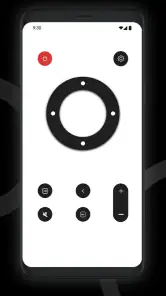
Analysis by Reviewed
My first piece of advice is to decide what job you want a phone remote to do before you reach for one. I wouldn’t treat it as an automatic replacement for the Apple TV remote; I’d keep it ready for the moments when a phone is genuinely easier, especially searching or stepping in as a backup. That distinction makes the experience feel useful rather than making every tap compete with familiar buttons.
Start with a simple viewing routine
Before settling down, I’d open the app and make sure the phone and Apple TV are on the same Wi-Fi network. Then I’d leave the phone somewhere easy to reach and use it for the task it suits best: finding a title, entering text, or taking over if the physical remote is out of reach. It’s a small routine, but doing the connection check before a show starts is less annoying than troubleshooting once everyone is waiting.
A realistic example is choosing a film while dinner is on the table. I can use the phone keyboard to enter a title instead of navigating letter by letter, then put the phone aside and use the physical remote for ordinary playback if that feels more natural. If the remote has disappeared into the sofa, I can keep using the phone rather than interrupting the evening to search for it. The useful part is having a second way to control the TV, not needing to use the phone for every action.
Check the connection before changing anything
If the TV doesn’t appear or controls don’t respond, I’d check the network on both devices first. Being connected to the same Wi-Fi is central to the setup, so a phone that has moved to a different network can make the app seem broken when the issue is simply the connection. I’d verify that before restarting devices or reinstalling the app; repeated tapping is unlikely to fix a network mismatch.
It also helps to remember that a phone is not always an ideal remote to keep active. If the battery is low, or the phone is needed for a call or another task, the dedicated remote remains the more dependable choice for a long viewing session. I’d use this app as a convenient tool that is ready when needed, not as a reason to leave the phone running in my hand all evening.
Choose shortcuts according to the room
Keyboard entry and voice input solve different problems. For a specific title with an unusual name, typing is usually the approach I’d reach for because it lets me correct the query quietly and precisely. Voice control is more appealing for a quick request when speaking aloud is comfortable. In a shared room, a quiet household, or a situation where I don’t want to say a search term out loud, the keyboard is the better fit.
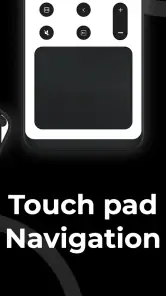
That choice is one of the small habits that makes a phone controller less fiddly: use the input method that suits the moment instead of treating every feature as a shortcut. I’d also avoid assuming that touch navigation will feel as accurate as physical buttons for repeated selections. When I’m moving quickly through menus, tactile controls can be easier to operate without looking down at the phone.
More From Our News Desk

Clash of Clans Is Won Between the Battles

Android Auto Makes the Case for Quieter Car Software

MobiOffice: Transforming Mobile Productivity with Seamless Integration

EA SPORTS FC™ Mobile Soccer: Redefining Mobile Sports Gaming

How Microsoft OneDrive Became a Mobile Productivity Giant

How Google Translate Breaks Language Barriers Effortlessly
Know when another option makes more sense
For someone who rarely searches and already has the Apple TV remote nearby, the usual physical controller may be all they need. It is designed for quick, familiar button presses and does not depend on reaching for a phone. A phone’s built-in remote option can also be a better fit for someone who prefers not to add a separate app. The dedicated app makes most sense to me when its layout feels comfortable and the phone’s keyboard or backup role fills a real gap.
There are practical trade-offs, too. A shared Wi-Fi connection is part of the setup, so this isn’t a good choice when the phone and TV can’t join the same network. It is also an Android app, so it won’t meet the needs of someone looking specifically for an iPhone controller. And while volume control can reduce the need to switch remotes, it doesn’t mean touch controls will feel as immediate as hardware buttons in every situation.
Who will get the most from it
I’d recommend trying it if you often misplace the remote, search for shows by title, or want a spare way to control the TV without getting up. It is especially useful in a household where the physical remote is sometimes in someone else’s hands: the phone gives you another route for a quick search without having to take over the original controller. If you live alone and keep the remote in the same place, the benefit may be smaller, though keyboard entry can still make searches easier.
For a more repeatable setup, I’d connect before viewing, use typing for precise searches, and keep the physical remote close for navigation that feels better with buttons. That division of labor avoids the common frustration of expecting a touchscreen to behave exactly like a dedicated controller. The app is at its best when it supports a familiar routine rather than forcing you to change one.
Hey there! If you’re like me, who loves lounging on the couch and binge-watching all the latest shows, then having a handy remote for your Apple TV is a must. Let me tell you about an app that’s been a game-changer in my TV watching experience: the Remote for Apple TV app.
When a phone remote earns its place
I find this kind of remote most useful as a backup that becomes part of the routine. It is handy when the physical remote has slipped between cushions, when someone else is holding it, or when I want to search for a title without pecking at an on-screen keyboard. Shadow soft’s app is free, sits in the Libraries & Demo category, and is rated for Everyone. It has a 4.3 average from over 500 ratings and more than 10K installs, so it has found an audience among people looking for a simple phone-based control option.
Seamless Control at Your Fingertips
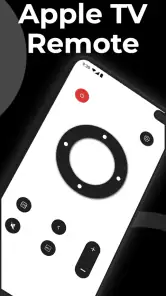
First off, let’s talk about how convenient it is to have this app on your smartphone. You know those moments when you’re comfortably tucked under a blanket, and your physical remote is nowhere to be found? Well, with the Remote for Apple TV app, all you need is your phone, which is probably already in your hand. This app turns your smartphone into a fully functional remote control, and I have to say, it works like a charm!
Easy Setup and User-Friendly Interface
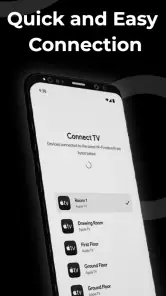
Setting up the app is a breeze. Just download it, ensure that your smartphone and Apple TV are connected to the same Wi-Fi network, and you’re good to go. The interface is super intuitive, making it easy even for those who aren’t very tech-savvy. There’s something incredibly satisfying about swiping through your TV options with just a flick of your finger.
A repeatable routine for everyday viewing
In daily use, I’d keep the phone remote close before starting a show rather than wait until the original remote goes missing. For example, if I’m settling in with dinner and want to find a specific title, I can use the phone for text entry, then leave the physical remote nearby for anything that feels quicker with buttons. That small division of labor is more practical than expecting one controller to be best at every task.
The same-network setup is worth treating as the first troubleshooting check. If the app cannot find the TV, I would confirm that both devices are on the same Wi-Fi before repeatedly tapping controls or reinstalling anything. A guest network or a phone that has switched to mobile data can interrupt the simple connection routine, so checking the network first can save time. I’d also keep the phone charged if I expect to use it for a long viewing session; a remote is only convenient while the device is available.
Enhanced Features for a Better Experience
Now, let’s dive into some of the app’s cool features. One feature I absolutely love is the keyboard function. Typing with a traditional remote can be a pain, but with this app, you can type effortlessly using your phone’s keyboard. Plus, the voice control feature is a lifesaver when you’re too lazy to type or swipe. Just speak into your phone, and voilà, there’s your show!
Another nifty feature is the ability to adjust your TV’s volume directly from the app. No more juggling between the TV remote and your phone. It’s all in one place, making life just a little bit simpler.
Where the convenience has limits
Those shortcuts help most when the phone is already within reach, but they do not make every task equally comfortable. I would use the keyboard for a long search and voice input for a quick request, while keeping in mind that speaking aloud is not ideal in a quiet room or around other people. Touch controls can also be less satisfying than physical buttons when I need to make repeated, precise selections. The app’s appeal is convenience, not a promise that a phone will replace every part of the usual remote experience.
Compared with relying on the Apple TV’s usual physical remote, this app is a useful second route for text entry and a spare controller, while the dedicated remote may feel more direct for quick navigation. A phone’s built-in remote option may also suit someone who wants fewer apps, but a separate remote app can be appealing if its layout and controls fit their habits. I would choose based on the task: phone for searching and backup, physical controls for tactile, frequent button presses.
Final Thoughts: A Must-Have for Apple TV Users
In conclusion, the Remote for Apple TV app is one of those little innovations that you never knew you needed until you tried it. It’s incredibly practical, easy to use, and makes managing your Apple TV so much more enjoyable. Whether you’re an avid TV watcher or just someone who appreciates a bit of convenience, this app is definitely worth checking out.
The app’s current version is 14.0, and it runs on Android 8.0 or later. That makes it a straightforward option for compatible Android phones, but it is not the right pick if you need an iPhone app or want a controller that works without the shared Wi-Fi setup. I’d also skip it if you strongly prefer tactile buttons and already have a reliable remote that does everything you need. For someone who often searches for programs, misplaces the remote, or wants a backup close at hand, the free price makes trying it an easy decision.
So, next time you’re ready to dive into a marathon of your favorite series, make sure your phone is equipped with this app. Trust me, once you start using it, you’ll wonder how you ever managed without it!
Remote for Apple TV Frequently Asked Questions
Is Remote for Apple TV free to download, and what age group is it for?
Remote for Apple TV is free to download and is rated Everyone, so it is suitable for a general audience. It is listed in the Libraries & Demo category and is developed by Shadow soft. Before installing, check that your device meets the app’s minimum operating-system requirement and that you are downloading the intended remote-control app.
What is Remote for Apple TV and how does it work?
Remote for Apple TV is an application that allows users to control their Apple TV directly from their smartphone or tablet. By connecting to the same Wi-Fi network, the app transforms your device into a fully functional remote control. Users can navigate through menus, play or pause content, and even use the keyboard for text input, enhancing the overall experience of using Apple TV.
Is Remote for Apple TV compatible with all Apple TV models?
Remote for Apple TV is designed to be compatible with most Apple TV models, including the latest versions. However, compatibility may vary depending on the specific features of your Apple TV. It's advisable to check the app's compatibility listing in the app store or the developer's website to ensure it supports your model before downloading.
Does the Remote for Apple TV app require an internet connection?
Yes, the Remote for Apple TV app requires an internet connection to function properly. The app connects to your Apple TV via Wi-Fi, meaning both your Apple TV and smartphone or tablet need to be on the same network. Without an internet connection, the app will not be able to communicate with the Apple TV.
Are there any costs associated with using the Remote for Apple TV app?
The Remote for Apple TV app is free to download. However, there might be in-app purchases or premium versions that offer additional features like an ad-free experience, advanced navigation options, or customization settings. Users are encouraged to review the pricing details on the app store before downloading.
Pros
- User-friendly interface
- Quick setup process
- Seamless device connectivity
- Customizable control layout
- Works with multiple Apple devices
Cons
- Requires stable Wi-Fi connection
- Limited to Apple ecosystem
- Occasional connectivity drops
- No voice control functionality
- Ads in free version
- Category
- Libraries & Demo
- Version
- 14.0











