

RainAware
- 88.00
- 3.5
- Installs
- 10.00K
- Price
- $4.99

Screenshots
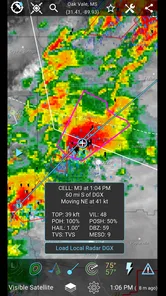
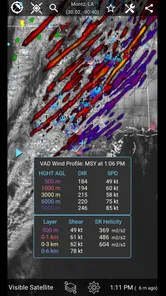
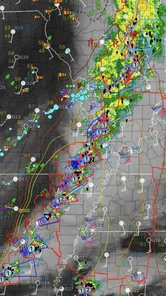
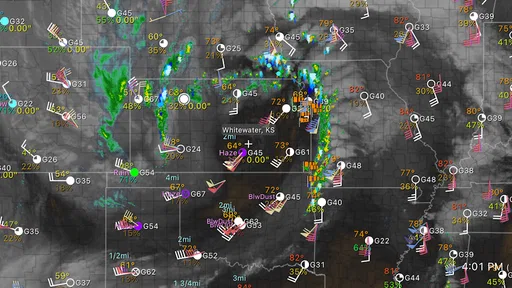
Analysis by Reviewed
RainAware is the kind of weather app I would open when “rain later” is not a useful enough answer. Its focus is much narrower and more practical: helping me judge when precipitation may reach my immediate area, while also putting radar, satellite imagery, lightning information, and storm alerts in one place. That makes it different from the standard weather app that mainly shows an hourly forecast and a temperature curve.
After spending time with it, I see the appeal clearly. The app is built for decisions measured in minutes rather than broad parts of the day: whether I can walk the dog now, leave a bike outside, start a short drive, or wait before heading to an outdoor appointment. It is not a complete replacement for every weather service, but its specialized approach can be genuinely useful when timing matters more than a long forecast.
How RainAware feels when timing matters
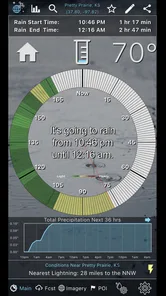
The first thing I noticed is that the experience is centered on immediate weather awareness instead of a large collection of unrelated forecast panels. That focus helps the app feel purposeful. I do not have to mentally translate a general hourly forecast into an answer to “Will the rain reach me before I get home?” The radar and timing-oriented information are intended to support that exact judgment.
RainAware is developed by RainAware and sits in the weather category. It has been available since December 18, 2013, and the current version is 2.1.7. Those details matter less than the app’s continuing identity: this is a focused tool for people who care about approaching precipitation and storms, not simply a decorative forecast screen.
In normal use, I would expect the app to feel quick when checking a current situation because the task is direct. Open it, look at the local rain picture, and decide what to do. The experience is less about exploring many menus and more about interpreting a small number of weather signals. That makes it easier to use in a hurry, especially when I am already standing by the door or planning a short trip.
There is an important distinction between perceived speed and forecast certainty, though. A weather screen can load promptly while the atmosphere remains unpredictable. RainAware can help me understand the movement and proximity of weather, but it cannot turn a changing storm into a perfectly scheduled event. I would use its timing guidance as a practical estimate, not as a promise that rain will begin at an exact minute.
What makes the timing approach useful
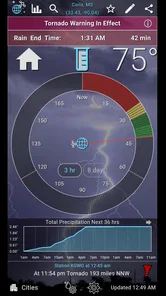
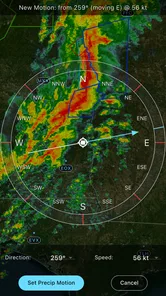
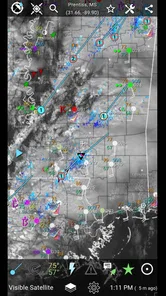
The most valuable workflow is to combine the immediate timing view with the visual layers rather than relying on one number or message. I can first check the local rain outlook, then use radar to see whether the approaching area is compact, widespread, or breaking apart. Satellite imagery adds a broader view of cloud cover, while lightning and storm alerts help distinguish an ordinary shower from a situation that deserves more caution.
More From Our News Desk

 Gmail
GmailGmail in a Busy Inbox: Who Benefits Most?
From first account to crowded workday, Gmail earns its place through dependable search and flexible sorting—but its best fit depends on how much inbox maintenance you can tolerate.

 Prime Video
Switching to Prime Video: What Changes in Your Viewing Routine
Prime Video can make a compelling second home for streaming, but switching means learning a different catalog, rental layer, and route from browsing to playback.

 Universal TV Remote Control
Universal TV Remote Control Works Best as a Reliable Backup
A phone remote earns its place through quick setup and reliable habits. Here is how to get more from Universal TV Remote Control—and where its limits show.

 Weather - By Xiaomi
Weather by Xiaomi Review: Clear at a Glance, Less Clear Up Close
Xiaomi’s weather app makes everyday forecasts quick to scan, but its calm surface can leave useful details and recovery paths harder to find than they should be.

 X
XX Under Pressure: Can It Recover When Posting Goes Wrong?
A resilience-focused review of X, examining setup, mistaken posts, interruptions, weak connections, and the gaps that matter when recovery needs to be dependable.

 Clash of Clans
Clash of Clans Is Won Between the Battles
Its raids are quick; its community is a long-term project of coordination, teaching, rivalry, and shared responsibility—with all the friction that entails.
Latest News



That combination creates a useful habit: check the timing, inspect the movement, then decide whether the plan needs changing. It is more reliable than looking out of the window alone, particularly when the sky near me appears calm but precipitation is moving in from a nearby direction.
A less obvious benefit is that this workflow can reduce unnecessary cancellations. If the radar view shows a narrow band that is moving through, I may choose to delay a walk briefly instead of abandoning it. Conversely, if the wider picture suggests repeated storm activity, waiting for the first gap may not be enough. The app is most helpful when I use it to compare short-term options, not when I expect it to make the decision for me.
Using it during a real everyday plan
Imagine I am about to cycle home after work and the route takes roughly half an hour. A normal forecast might tell me that rain is possible during the afternoon, but that still leaves a practical question: should I leave immediately, wait, or find another way home? With RainAware, I would check the local timing view and then look at the radar direction. If the rain is approaching quickly, leaving early may be a bad gamble. If it is moving away or appears limited, I may have enough information to start the trip.
I would also check the storm and lightning information before choosing an outdoor route. A light shower is an inconvenience; nearby lightning changes the decision entirely. This is where the app’s collection of layers becomes more useful than a simple rain icon. It encourages me to consider the character of the weather, not only whether a forecast symbol is blue or gray.
The same process works for gardening, outdoor photography, school pickup, short deliveries, and washing a car. The key is that the activity has a flexible start time and a meaningful exposure to weather. For a fixed flight, a long-distance journey, or a full-day event, I would still consult a broader forecast because immediate rain timing is only one part of the planning problem.
Where heavier use can expose friction
RainAware becomes more demanding when I repeatedly switch between radar, satellite, lightning, and storm information while following a changing system. Map-based weather views naturally involve more visual content than a simple text forecast, and frequent checking can make the experience feel busier than opening a basic weather widget. I would not judge that as a flaw by itself; it is the trade-off for getting more context.
For a quick glance, I prefer the simplest view that answers the question. For a developing storm, I am willing to spend more time moving through the layers. That distinction is important because the app’s strengths are easiest to appreciate when I use the detailed tools selectively. Leaving every view open or repeatedly refreshing out of anxiety would make any weather app feel unnecessarily heavy, even if the underlying application is stable.
The practical tip I would give a new user is to decide what question needs answering before opening the app. “Can I leave now?” calls for timing and radar. “Is this safe for an outdoor activity?” calls for storm and lightning information. “What is the broader cloud pattern?” makes satellite imagery more relevant. This small habit keeps the interface from becoming a stream of maps with no clear purpose.
Reliability in changing weather
Reliability here has two sides. The first is whether the app remains useful as conditions change; the second is whether I interpret its information responsibly. RainAware’s focus on live weather context gives it a strong role during fast-moving situations, because I can revisit the same area and compare what is happening rather than relying only on an earlier forecast.
Still, a live view is not automatically a perfect view. Small showers can develop, weaken, or shift. Local geography can also make the experience different from one neighborhood to another. I would therefore treat the app as a decision aid with a short horizon. If I need confidence about tomorrow morning, I would pair it with a conventional forecast. If I need to know whether rain is moving toward me soon, this is where RainAware makes more sense.
Alerts can be useful when I am busy and not actively watching the screen, especially for storms or lightning. At the same time, alerts should not become my only safety system. I would keep normal awareness of the sky and local conditions, particularly when outdoors. The app can bring important information to my attention, but it should not encourage me to ignore visible warning signs or official emergency guidance.
One strength of the design is that it supports verification. If an alert appears, I can inspect the radar and satellite context instead of reacting to a single notification without understanding the situation. That extra step is valuable because it helps me distinguish an isolated burst of weather from a larger pattern that may affect my plans for longer.
Device limits, cost, and practical expectations
The app supports devices running iOS 10 or later, which gives it a relatively broad compatibility range for Apple hardware that can use that system requirement. I would still keep the operating system updated where possible, because weather maps and alerts are more useful when the device itself is supported and dependable. Older hardware may also make map movement feel less comfortable than newer phones, even when the app remains usable.
Its content rating is Everyone, so the subject matter is suitable for a general audience. That does not mean every situation is equally suitable for every user: children, for example, should not treat a storm alert as permission to remain outdoors. The app presents information; adults still need to provide judgment and supervision when safety is involved.
RainAware costs $4.99, with optional in-app purchases ranging from $0.99 to $69.99 per item. That pricing structure makes the decision more deliberate than downloading a typical free weather utility. I would want to spend enough time with the core experience to decide whether hyperlocal timing is something I will actually use. If I only want temperature, a weekly forecast, and a small chance-of-rain icon, the built-in weather app on my phone is likely better value.
The app has a 3.5 average from around 154 ratings, with around 88 written reviews, and has passed 10K installs. I read that as a sign of a specialized product with a smaller audience rather than a universal weather choice. The numbers do not change my personal assessment, but they do reinforce the idea that this app is aimed at users who specifically value precipitation timing and storm context.
Who should use it, and who should skip it
I would recommend RainAware to commuters who can adjust departure times, people who work outdoors, runners who plan short sessions, parents managing pickups, and anyone whose day is repeatedly interrupted by sudden rain. It is particularly appealing if the question “When will the rain get here?” comes up more often than “What will the temperature be next week?”
I would also consider it for travel within one local area, where a short-term radar view can be more useful than a broad regional forecast. For example, if I am deciding whether to walk between two nearby locations, a current precipitation picture may help me choose a route or wait for a gap. The value comes from the narrow geography and immediate decision, not from replacing every other source of weather information.
I would skip it if my expectations are centered on long-range planning, detailed climate information, or a minimalist glanceable widget. Someone who wants a simple forecast with almost no interpretation may find the radar and storm layers more than necessary. Likewise, people who rarely change their plans because of weather may not get enough practical benefit from a paid, specialized app.
It is also not the right tool to use as a sole source for severe-weather safety. Lightning and storm information can improve awareness, but serious conditions call for official warnings and sensible behavior. I would never use a favorable-looking rain estimate to justify staying outside when conditions visibly appear dangerous.
My performance verdict after regular checking
My overall impression is that RainAware is strongest when speed means reaching a useful answer quickly, rather than loading the largest possible forecast. Its focused purpose helps me move from opening the app to making a decision without wandering through unrelated information. During heavier use, the multiple visual layers naturally require more attention, but that is connected to the detail the app is trying to provide.
I also appreciate that its usefulness does not depend on treating a forecast as absolute. The best results come from checking the timing view, confirming the movement on radar, and using storm or lightning information when the situation calls for it. That workflow is more thoughtful than simply glancing at an icon, and it gives the app a clear role beside—not necessarily instead of—a standard weather service.
The main friction is the specialized value proposition. The purchase price and optional in-app purchases make more sense for someone who repeatedly needs local rain timing than for a casual user. A person looking for a general-purpose weather dashboard may prefer a familiar free alternative with broader forecast coverage. RainAware asks me to pay for a narrower experience, so the decision depends heavily on whether that narrow problem is one I actually face.
For me, the app earns consideration because it turns an ordinary weather check into a practical near-term plan. I would keep it available for outdoor decisions, short commutes, and unsettled days when the difference between leaving now and waiting matters. Its real strength is not predicting every part of the week; it is helping me make a better choice about the next stretch of time.
If that is the kind of weather information you need, RainAware is a focused and worthwhile option to examine. If your needs are broader or simpler, I would stay with a conventional weather app and use official alerts for serious conditions. In my experience, choosing between them comes down to one honest question: do you need a general forecast, or do you need a clearer idea of when rain is likely to affect you right now?
RainAware Frequently Asked Questions
What does RainAware show besides rain timing?
RainAware’s weather tools include live radar, satellite imagery, lightning information, and storm alerts, alongside its focus on hyperlocal rain timing. This can make it useful when you want to check nearby conditions as well as estimate when rain may arrive. The app is intended to support everyday weather decisions, while urgent weather risks should still be taken seriously and checked against official local alerts.
What devices and operating systems can run RainAware?
RainAware is available for Android and iOS, and its current version is 2.1.7. On Android, the minimum operating-system requirement is Android 10, so check your device’s software version before downloading. The app is rated Everyone, making its stated age classification suitable for a general audience. As with any app, make sure you download the version offered for your device through its official app store.
What is RainAware, and how does it work?
RainAware is a weather app designed to provide highly localized rain forecasts and alerts. After installation, it can use your location or a manually selected place to estimate when rain may begin, how long it may last, and when conditions are likely to improve. Its main focus is short-term precipitation timing rather than being a complete long-range weather service.
How accurate are RainAware’s rain predictions?
RainAware can be especially useful for planning activities over the next few hours, such as commuting, walking, exercising, or outdoor events. However, no weather app can guarantee perfect accuracy because forecasts depend on radar coverage, local geography, changing atmospheric conditions, and data availability. Users should treat its predictions as helpful guidance and confirm serious weather concerns through official local alerts.
Does RainAware require access to my location?
Location access is useful but not always mandatory. Allowing the app to use your location lets it provide forecasts and rain timing for your current area automatically. If you prefer greater privacy, you may be able to search for or select a location manually, depending on the version and platform. Review the permission request carefully and choose the option that suits you.
Pros
- Provides precise rain timing forecasts for your current location.
- Useful for planning commutes
- walks
- outdoor work
- and events.
- Interactive radar helps visualize approaching precipitation.
- Location search makes it easy to check weather elsewhere.
- Clean interface presents forecast information without unnecessary clutter.
Cons
- Advanced forecast features may require an in-app purchase or subscription.
- Accuracy can vary with local radar coverage and weather conditions.
- Rain forecasts are less useful in areas with limited data availability.
- Frequent location access may affect battery life during extended use.
- The app focuses on precipitation rather than providing a complete weather suite.











