

RadarScope
- 2.79K
- 3.9
- Installs
- 100.00K
- Price
- $9.99
Screenshots
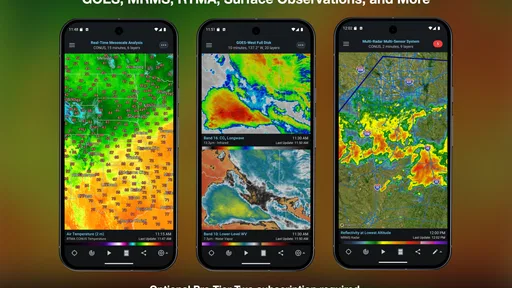
Analysis by Reviewed
I judge radar apps by how quickly they help me answer a practical question: is the weather moving toward me, and do I need to change what I’m doing? RadarScope is aimed at people who want to inspect radar rather than just glance at a rain icon. That difference makes it useful for storm watchers and curious weather fans, but it also means it can feel more involved than an everyday forecast app.
Quick checks versus close inspection
For a brief check before leaving home, a conventional weather app is often faster to interpret: it usually puts the forecast and current conditions front and center. RadarScope is more valuable when I want to follow a storm’s shape and movement on a map. Its appeal is not simply seeing whether rain is nearby, but having radar products available for closer examination.
A practical routine is to start zoomed out, locate the weather system relative to your area, then zoom in only when a local decision depends on it. That keeps the map readable and avoids treating every color change as a meaningful threat. Radar imagery supports situational awareness; it does not replace official warnings or a broader forecast.
Where the extra detail earns its keep
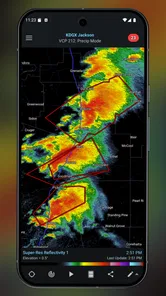
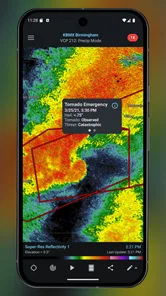
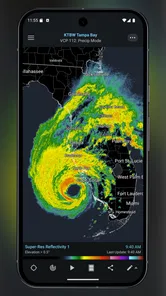
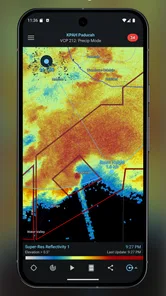
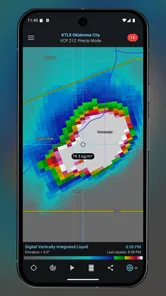
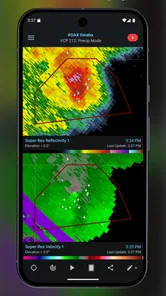
The app comes from DTN LLC and sits firmly in the weather category. Its radar tools include base reflectivity, velocity, and dual-polarization products, with NEXRAD Level 3 and Super-Resolution data for users who want more than a simplified precipitation view. Severe-weather details such as hail size and rotation detection can help experienced users investigate a storm, though interpreting those signals takes some familiarity.
Layer choice is a useful habit, not just a customization preference. I would begin with one radar product that answers the question at hand, then add storm tracks, warnings, or lightning only when they clarify the picture. Stacking several overlays at once can make a map harder to read, especially on a small screen. Changing the color scheme or selecting a preferred radar site can also make repeat checks quicker and more comfortable.
Speed, stability, and limits in the field
The map interactions are designed for direct use: pinch to zoom and swipe to move around. High-resolution radar views and frequent updates make the experience feel more like a monitoring tool than a lightweight forecast glance. In practice, perceived speed can depend on the connection and the amount of detail being viewed, so I would avoid assuming that every map will appear instantly in every setting.
For a heavy-use moment, such as watching a line of storms while deciding whether to postpone a drive, I would keep the map focused on the route and nearby warnings rather than continually switching products. That reduces unnecessary tapping and makes it easier to notice changes. If an image seems slow to refresh, I would check the connection and reorient the map before drawing conclusions from a single frame.
More From Our News Desk

 Gmail
GmailGmail in a Busy Inbox: Who Benefits Most?
From first account to crowded workday, Gmail earns its place through dependable search and flexible sorting—but its best fit depends on how much inbox maintenance you can tolerate.

 Prime Video
Switching to Prime Video: What Changes in Your Viewing Routine
Prime Video can make a compelling second home for streaming, but switching means learning a different catalog, rental layer, and route from browsing to playback.

 Universal TV Remote Control
Universal TV Remote Control Works Best as a Reliable Backup
A phone remote earns its place through quick setup and reliable habits. Here is how to get more from Universal TV Remote Control—and where its limits show.

 Weather - By Xiaomi
Weather by Xiaomi Review: Clear at a Glance, Less Clear Up Close
Xiaomi’s weather app makes everyday forecasts quick to scan, but its calm surface can leave useful details and recovery paths harder to find than they should be.

 X
XX Under Pressure: Can It Recover When Posting Goes Wrong?
A resilience-focused review of X, examining setup, mistaken posts, interruptions, weak connections, and the gaps that matter when recovery needs to be dependable.

 Clash of Clans
Clash of Clans Is Won Between the Battles
Its raids are quick; its community is a long-term project of coordination, teaching, rivalry, and shared responsibility—with all the friction that entails.
Latest News



RadarScope is rated for Everyone, and the app has a 3.9 average from around 6,200 ratings, with over 100,000 installs. It costs $9.99, and in-app purchases range from $0.99 to $99.99 per item. That upfront cost is a meaningful trade-off: if you only need a simple daily forecast, a free general-purpose weather app is likely a better fit. The app has been available since August 24, 2011, and its focused approach makes the most sense for someone who will return to radar regularly.
Interface and Usability
First things first, let's talk about the interface. It's clean, straightforward, and user-friendly. Even if you're not a meteorologist, you'll find your way around with ease. The app offers a variety of radar products, including base reflectivity, velocity, and dual-polarization data. It’s like having a mini weather station in your pocket!
What I love the most is how responsive the app is. You can pinch to zoom, swipe to move around, and it all feels intuitive. The developers have done a great job in ensuring that the app runs smoothly, even when displaying high-resolution radar images. Plus, it updates in real-time, so you're always looking at the most current data available.
Features Galore
Now, onto the features. RadarScope offers a plethora of them. You can view radar data from NEXRAD Level 3 and Super-Resolution radar products, which is pretty cool if you're into detailed weather information. For storm chasers and weather nerds, the app provides severe weather alerts, hail size, and rotation detection.
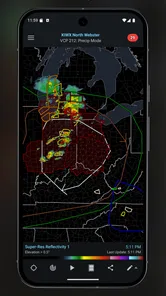
One standout feature is the ability to overlay different types of data. Whether you want to see storm tracks, warnings, or even lightning strikes, the app has got you covered. And let's not forget the customization options. You can change the color scheme, choose your preferred radar site, and even set up notifications for specific weather events.
Reliability and sensible expectations
Radar is a snapshot of conditions, not a promise about what will happen next. I treat a single frame as a clue and look at the sequence of movement before making a decision. If a storm is near, I also check official warnings and the wider forecast; a detailed map is most useful when it supports, rather than replaces, those sources.
That distinction matters when the weather is changing quickly. A radar return can help me understand where precipitation is and how a system appears to be moving, but it cannot tell me everything about local conditions or guarantee what I will encounter on a particular street. For decisions involving safety, I would not use an isolated color patch or a notification as my only source.
Notifications are most helpful when they reduce the need to keep reopening the map, but they are not a substitute for a deliberate check before a high-stakes trip. I would choose only the events that matter to my routine and avoid turning every possible alert into background noise. The useful question is not how many layers or alerts I can switch on, but which ones help me act sooner without making the display harder to interpret.
A realistic storm-day workflow
Imagine I have an outdoor appointment later in the day and notice showers developing nearby. I would first look at the broader radar view to see whether the system is isolated or part of a larger band, then focus on my area and watch how the returns move over successive checks. If the appointment involves driving, I would check the route and relevant warnings, rather than assuming conditions at my starting point apply everywhere along the way.
If the map suggests the rain is approaching, I would use that as a prompt to revisit the timing and check the forecast, not as a precise countdown. That is a practical strength of a radar-first tool: it can make the weather’s direction easier to understand than a single daily icon. The trade-off is that I need to interpret what I see, and the app is less convenient when all I want is a quick yes-or-no answer.
For someone who checks storms repeatedly, a saved routine of familiar map settings can make those checks more consistent. I would keep a preferred radar site and a restrained set of layers, then change the view only when a specific question calls for it. This is more useful than exploring every option during an active storm, when the priority should be understanding the situation rather than tuning the display.
Who will get the most from it
I would recommend this app to people who deliberately follow storms, outdoor workers who need to keep an eye on developing weather, and weather enthusiasts who want to examine radar products rather than rely on a simplified forecast screen. It can also suit someone who already knows the difference between a radar image and a forecast and is willing to spend a little time learning which product answers which question.
I would steer casual users toward a simpler weather app if their main needs are checking tomorrow’s temperature, seeing a basic chance of rain, or getting a quick forecast before leaving home. That is not a knock on RadarScope; it is a difference in purpose. The specialist detail is valuable only when you have a reason to inspect it, and the paid entry price is difficult to justify if you rarely open radar.
It is also not a tool I would choose as my only source for severe-weather safety. Its detailed view can add context, but people who do not want to interpret radar should prioritize clear official alerts and straightforward forecasts. The best fit is someone who values extra visual information and understands that more detail brings more responsibility to read it carefully.
How it differs from ordinary weather apps
Most general weather apps are built around a forecast summary: current conditions, upcoming temperatures, and a quick indication of rain. That design is better for routine planning because it answers common questions with little effort. RadarScope takes the opposite emphasis, giving the map and its specialist products a larger role. I find it more informative when I am following a storm, but less efficient for an everyday glance.
Compared with checking a radar map in a browser, a dedicated app can make repeated zooming, panning, and returning to a chosen view feel more natural. The compromise is that a rich mobile map asks more of the screen and of the person using it. A compact phone display can make overlays compete for space, so I would remove anything that is not helping with the current decision rather than trying to show every available detail at once.
There is no need to treat it as an either-or choice. I would keep a simple forecast app for routine planning and turn to RadarScope when a developing weather system makes closer inspection worthwhile. That pairing makes more sense to me than expecting one radar-focused product to be the best answer for every weather question.
Learning the map without overreading it
The learning curve is less about mastering complicated controls than building good habits. I would change one layer at a time and ask what it adds: does it clarify the storm’s movement, or merely add another visual element? That simple test keeps the map usable and helps a new user learn the purpose of reflectivity, velocity, and dual-polarization views without confusing them as interchangeable pictures of the same thing.
Color choices matter more than they might seem. If I use a different scheme from the one I am accustomed to, I would take time to understand how it presents returns before relying on it during a fast-moving situation. Familiarity makes comparisons between checks easier; frequent cosmetic changes can make it harder to spot whether a pattern itself has changed.
Likewise, selecting a preferred radar site can make repeat viewing more straightforward, but I would not assume one site tells the whole story in every situation. When weather is spread across a wide area, I would zoom out and consider the broader pattern before focusing on the nearest view. The useful trade-off is local detail versus regional context, and switching between those scales is often more informative than staying tightly zoomed in.
Device constraints and recovery
Detailed maps are naturally more demanding to view than a static forecast card, so screen size and connection quality affect comfort. On a smaller phone, I would keep the display uncluttered and use zoom deliberately; on a larger screen, it is easier to retain context while inspecting an area. I would also avoid judging the app’s responsiveness from a single moment when the network itself may be slow.
If a view appears stale or takes longer than expected, my first step would be to check connectivity and refresh my orientation rather than immediately assuming the radar signal has changed. I would then compare the broader map with the local view and consult current warnings where appropriate. That recovery routine is simple, but it prevents a temporary loading delay from becoming a mistaken weather conclusion.
As with any map-heavy app, extended monitoring can be less comfortable than occasional checks, especially if you are outdoors or moving between places. I would plan a glance before setting off and pull over safely before interacting with the map; pinching and swiping demand attention. The app can support a decision, but it should not become a distraction while driving or a reason to ignore official safety guidance.
Performance and Reliability
Performance-wise, the app is pretty solid. It handles data-heavy tasks without a hitch, and I haven't experienced any crashes during my time using it. The developers seem to be on top of updates, constantly improving and fixing any bugs that pop up.
Reliability is key when it comes to weather apps, and RadarScope delivers. The information provided is accurate and timely, which is crucial when you're planning your day or chasing storms. It’s one of those apps that you can trust to give you the lowdown on what's happening in the sky above.
Final Thoughts
In conclusion, if you're passionate about weather or just want a reliable app to keep you informed, RadarScope is definitely worth a look. Its range of features, coupled with its performance and reliability, make it a standout choice in the realm of weather apps. Whether you're a seasoned storm chaser or just someone who likes to keep an eye on the skies, this app is sure to impress.
So, go ahead and give it a try. Who knows? You might just find yourself becoming a bit of a weather buff too!
RadarScope Frequently Asked Questions
Is RadarScope available on Android and iOS, and what does it cost?
RadarScope is a weather app from DTN LLC, available for Android and iOS. It costs $9.99, and the app is rated for Everyone. The store summary describes it as “Professional weather radar and more,” which reflects its focus on detailed radar views rather than a simple daily forecast. In-app purchases are also offered, so check the purchase details in your app store before downloading.
What is RadarScope and how does it work?
RadarScope is a specialized weather app designed for meteorologists and weather enthusiasts. It provides access to high-resolution radar data, allowing users to view NEXRAD Level 3 and Level 2 data, which includes reflectivity, velocity, and more. The app is known for offering real-time severe weather warnings, making it an invaluable tool for tracking storms and other weather phenomena on both iOS and Android devices.
Is RadarScope suitable for casual weather app users?
RadarScope is primarily designed for professionals and serious weather enthusiasts who need detailed and accurate radar data. While casual users can certainly use the app, its depth and complexity might be overwhelming for those who are simply looking for basic weather information. Its features are tailored more towards individuals who have a strong interest in meteorology.
What platforms are supported by RadarScope?
RadarScope is available on multiple platforms, including iOS, Android, macOS, and Windows. This broad compatibility allows users to access detailed weather radar data on their preferred device, whether it's a smartphone, tablet, or computer. The app ensures that users can stay updated with weather developments across various devices.
Does RadarScope require a subscription for all features?
RadarScope offers a tiered subscription model, where some advanced features require a Pro subscription. The basic version of the app provides access to essential radar data, but to unlock additional features like dual-pane displays, lightning data, and more, users need to subscribe to RadarScope Pro. This allows users to choose the level of detail and functionality that suits their needs.
Pros
- Detailed radar data for weather enthusiasts.
- High-resolution radar imagery available.
- Real-time storm tracking features.
- Customizable radar layers and settings.
- Frequent updates with the latest weather info.
Cons
- Paid subscription for premium features.
- Complex interface for casual users.
- Limited functionality without internet.
- No free trial for premium features.
- Occasional app crashes reported.











