

RadarOmega: Doppler Radar App
- 1.01K
- 3.2
- Installs
- 100.00K
- Price
- $8.99
Screenshots
Analysis by Reviewed
I approach RadarOmega as a tool for looking closely at weather, rather than as a quick glance at a temperature and a sun icon. That difference shapes who will get the most from it: I’d consider it when radar detail matters to a plan, but not necessarily as the only app I open to decide whether to bring a jacket. Its focus is useful, though it also asks more of the person using it than a simple forecast screen does.
Who benefits from a radar-first approach
I can see the appeal for people who spend time outdoors, follow storms as a hobby, or need to judge changing conditions across a route. A runner deciding whether to head out now or wait, for example, may find a radar view more helpful than a daily forecast summary. The practical trick is to check the map at the scale of the actual decision: a broad view can show a system’s direction, while a closer look is more relevant to whether rain is approaching a particular neighborhood.
For a routine such as planning a commute, I’d use the radar as one piece of evidence rather than treating it as a promise about exactly when rain will begin. Weather changes, and a map is most useful when I check it again before leaving. If I only want a fast answer about the day’s general outlook, a conventional weather app may be easier to read and less involved.
How I would use the layers
The choice between reflectivity and velocity is a good example of the app’s learning curve. Reflectivity is the more approachable starting point when I want to see where precipitation is showing up. Velocity is more specialized, so I would switch to it when I already have a reason to inspect wind movement rather than tapping through every available view. That keeps the screen purposeful instead of turning a useful map into a collection of colors I can’t interpret.
Storm attributes can add context to a cell, but I would treat those details as clues, not a personal safety assessment. A severe-weather alert or official local guidance should carry more weight than my own reading of a radar feature. That distinction matters most when plans involve driving, hiking, or being outside far from shelter: the app can help me notice a developing situation, but it should not be the sole basis for deciding to stay in a dangerous area.
What the price and history mean in practice
RadarOmega is a paid weather app from SDS Weather INC, with a listed price of $4.99 and in-app purchases ranging from $4.99 to $359.99 per item. I’d check which purchase, if any, matches the features I actually intend to use before paying for extras; someone who only wants occasional precipitation checks may not need to invest in a more involved setup. The app is rated for Everyone, but the presence of advanced radar tools does not mean every screen will feel effortless to a first-time user.
It arrived on May 27, 2018, and its current version is 5.5.3. Those facts establish that it has a long release history and a current version to assess, but they do not by themselves tell me what changed between releases or guarantee how it will behave on every device. For someone already using it, the sensible question is whether the present tools still fit their routine; for a newcomer, I’d begin with the basic map and learn one layer at a time.
More From Our News Desk

 Gmail
GmailGmail in a Busy Inbox: Who Benefits Most?
From first account to crowded workday, Gmail earns its place through dependable search and flexible sorting—but its best fit depends on how much inbox maintenance you can tolerate.

 Prime Video
Switching to Prime Video: What Changes in Your Viewing Routine
Prime Video can make a compelling second home for streaming, but switching means learning a different catalog, rental layer, and route from browsing to playback.

 Universal TV Remote Control
Universal TV Remote Control Works Best as a Reliable Backup
A phone remote earns its place through quick setup and reliable habits. Here is how to get more from Universal TV Remote Control—and where its limits show.

 Weather - By Xiaomi
Weather by Xiaomi Review: Clear at a Glance, Less Clear Up Close
Xiaomi’s weather app makes everyday forecasts quick to scan, but its calm surface can leave useful details and recovery paths harder to find than they should be.

 X
XX Under Pressure: Can It Recover When Posting Goes Wrong?
A resilience-focused review of X, examining setup, mistaken posts, interruptions, weak connections, and the gaps that matter when recovery needs to be dependable.

 Clash of Clans
Clash of Clans Is Won Between the Battles
Its raids are quick; its community is a long-term project of coordination, teaching, rivalry, and shared responsibility—with all the friction that entails.
Latest News



Unveiling the Power of RadarOmega
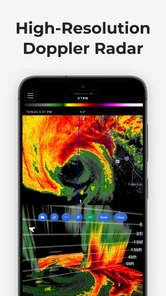
Right off the bat, RadarOmega strikes you with its sleek interface. The app is designed to cater to both weather enthusiasts and professionals alike. As soon as I launched it, I was greeted with a vibrant, real-time radar display. It’s like having a meteorologist right in your pocket!
Features That Stand Out
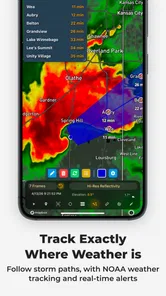
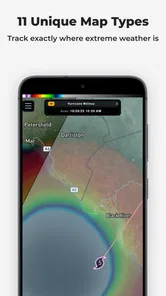
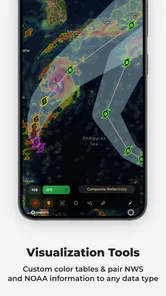
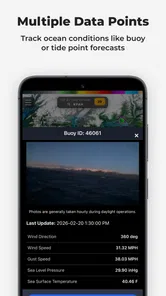
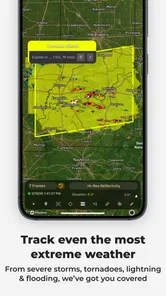
One of the first things I noticed is how comprehensive the radar data is. The app provides high-resolution radar imagery that updates swiftly, ensuring you’re always in the loop. Whether it's tracking a storm’s trajectory or checking out precipitation levels, RadarOmega has got you covered.
Another neat feature is the storm attributes analysis. This little gem gives detailed insights into storm cells, including their intensity and potential hail size. It’s as if you’re getting inside information from the weather gods themselves!
What really blew me away was the customization options. You can tweak the settings to view different radar products, like velocity and reflectivity, according to your needs. It’s like molding the app to fit your personal weather-watching style.
The User Experience
Now, onto the user experience. The app runs smoothly, no glitches or lagging. Navigating through the features felt intuitive and straightforward. Even for someone like me, who isn’t a tech whiz, the learning curve was practically non-existent. Just tap, swipe, and get the info you need.
Plus, the app sends out timely alerts, so you’re always prepared for what’s coming. Whether it’s a thunderstorm warning or a tornado watch, you’ll get the heads-up you need to stay safe. And let’s be honest, peace of mind is priceless when it comes to weather unpredictability.
What I’d weigh before relying on it
My own takeaway is that a detailed radar app is most valuable when I know what question I’m asking. Am I checking whether rain is nearing my route, comparing the movement of a storm, or looking for a quick overview before heading out? Picking that question first helps me avoid overreading a colorful map or mistaking a single snapshot for a dependable forecast.
The 3.5 average from around 1.5 thousand ratings, alongside over 100 thousand installs, suggests a real audience but also a range of experiences. I’d treat that as a reason to try the app with a specific use in mind, not as proof that it suits everyone. Its minimum OS requirement is 7.0, so I’d check that a device meets it before planning to use the app.
Wrapping It Up
All in all, my experience with RadarOmega was nothing short of impressive. It’s more than just a weather app; it’s a reliable companion for all your weather-related needs. Whether you’re a storm chaser, a weather nerd, or just someone who likes to stay informed, this app is worth checking out.
So next time you’re planning a picnic, a hike, or just your daily commute, you might want to consult RadarOmega first. Trust me, you’ll thank yourself later!
A practical routine for checking a changing forecast
For a realistic use case, imagine I have a picnic planned and clouds are building while I’m packing. I would first use the broad radar view to see whether precipitation is nearby and how the pattern appears to be moving. Then I’d zoom toward the park rather than basing the decision on what is happening across the whole region. Before leaving, I’d check again and compare what I see with an official forecast or alert. That sequence makes the map useful without pretending it can settle every question about timing or safety.
For a commute, I’d use a similar but quicker habit: check the route area shortly before departure, note whether rain appears to be approaching, and avoid interpreting a single frame as an exact arrival time. If I need a simple answer about whether the afternoon looks wet, a forecast-focused app may be more efficient. If I’m trying to understand the movement of a nearby storm, the radar-first approach is the more useful part of this experience.
Small habits that make the map easier to read
One useful discipline is to change only one thing at a time. I’d start with reflectivity, choose the location and zoom level that match my plan, and watch how the display changes before opening specialized products. If I jump between layers, colors, and storm details without a specific question, it becomes easy to confuse added visual information with added certainty. A focused check is faster and usually more informative.
I’d also make a distinction between tracking precipitation and making a broader weather decision. Radar can help me inspect what is showing up and where, while travel choices may depend on conditions beyond the map, including official warnings and local guidance. This is especially important on a hike or when driving through unfamiliar areas: I would check conditions before setting out, but keep a trusted source of alerts in the decision-making process rather than relying on my interpretation alone.
Where it sits beside everyday weather apps
Many general weather apps are built around a location’s current conditions, forecast summaries, and a quick glance at the day ahead. That is a better fit when I want to know whether to dress warmly or plan an outdoor lunch. RadarOmega’s appeal is different: it gives more attention to inspecting radar products and storm details, which can reward a curious user willing to spend time interpreting them. I wouldn’t expect that depth to make it automatically better for every ordinary forecast question.
The trade-off is convenience. A simpler app can put the forecast answer first, while a detailed radar tool asks me to decide which display is relevant and what it means. I’d keep both styles in mind when choosing: someone who routinely watches storms or plans around changing precipitation may value the extra control, while someone who checks the weather only once each morning may find a conventional forecast view less demanding.
Who may want to pass
I’d hesitate to recommend it as a first or only weather app for someone who dislikes layered maps, wants a plain-language forecast, or has no interest in learning radar terminology. It may also be the wrong choice for someone expecting a radar display to provide a precise guarantee about when rain will reach one street. The map can support a judgment, but it cannot remove uncertainty from changing weather.
The cost deserves a deliberate look as well. The app has a purchase price and optional in-app purchases, so I’d decide what I want to do with it before buying extras. Occasional checks may not justify a more involved setup; frequent radar use is a stronger reason to explore whether the available options fit. I would not treat every paid feature as essential simply because it appears alongside the core experience.
What existing users and newcomers should consider
For someone who already uses the app, a newer version number alone is not a reason to change a familiar workflow. I’d assess whether the current radar tools still answer my usual questions and whether the app remains comfortable on my device. The release history shows that the product has been around for years, but that fact by itself does not establish which capabilities changed along the way. I’d separate what I can verify in the current experience from hopes about future improvements.
A newcomer can keep the first session manageable by learning the basic map before exploring velocity or storm attributes. Once the display makes sense, I’d try one specialized layer in a situation where it has a clear purpose, rather than browsing every setting at once. That gives me a better sense of whether the added detail is genuinely helpful or simply more information to process.
What to watch as you decide
The app’s current version is 5.5.3, and I’d judge it by how well its present tools fit my routine rather than assuming that a version number tells the whole story. The practical questions are whether the map is clear on my device, whether I can interpret the products I care about, and whether the purchase and optional extras make sense for how often I’ll use them. Those are more useful checkpoints than expecting an update to solve a need I have not identified.
My overall view is that RadarOmega suits people who want to examine weather rather than just receive a short forecast summary. I’d recommend it to a radar-curious user who is willing to learn the displays and use official guidance for safety decisions. If all I need is a quick daily outlook, I’d choose a simpler weather app instead. That distinction makes the decision straightforward: pay for depth only if I expect to put that depth to work.
RadarOmega: Doppler Radar App Frequently Asked Questions
What does RadarOmega cost, and are there additional in-app purchases?
RadarOmega is a paid weather app, priced at $4.99, and it also offers in-app purchases ranging from $4.99 to $359.99 per item. Before downloading, consider whether its advanced radar and storm-analysis tools match what you need, since the app is geared toward detailed weather monitoring rather than only quick forecasts. The purchase options may affect the overall cost of using its features.
What is RadarOmega and what makes it unique compared to other weather apps?
RadarOmega is a specialized weather application from SDS Weather INC that provides advanced radar analysis tools, ideal for both meteorologists and weather enthusiasts. Unlike standard weather apps, RadarOmega offers high-resolution radar data and a suite of professional-grade tools for storm tracking and analysis. It stands out because of its detailed storm attributes, velocity data, and various radar products that are typically available only to professionals. Its store summary describes it as an advanced weather toolkit for detailed weather information in any season.
Is RadarOmega suitable for everyday weather monitoring?
While RadarOmega is designed with professional meteorologists and storm chasers in mind, it can also be used by everyday users who are interested in detailed weather data. However, its complex interface and advanced features may be overwhelming for those who just need basic weather updates. Users who appreciate in-depth weather analysis will find it particularly beneficial.
Does RadarOmega provide real-time weather alerts?
Yes, RadarOmega provides real-time alerts and notifications about severe weather conditions. The app offers customizable alert settings, allowing users to receive notifications for specific weather events like tornadoes, thunderstorms, and flash floods. This feature ensures that users are well-informed and can take timely action during adverse weather situations.
What platforms is RadarOmega available on, and is there a free version?
RadarOmega is available on both Android and iOS platforms. The app is priced at $4.99, and it offers in-app purchases for access to additional features. Users considering it should account for those costs when deciding whether its detailed radar data and advanced storm-tracking capabilities are worthwhile for their needs.
Pros
- Detailed radar imagery available
- Advanced storm tracking features
- User-friendly interface
- Customizable alert settings
- Real-time weather updates
Cons
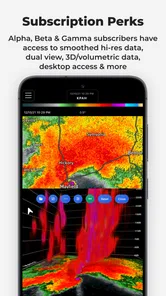
- Subscription required for full features
- Large app size
- Consumes significant battery power
- Limited offline functionality
- Requires stable internet connection











