

Radar Alive Pro Weather Radar
- 321.00
- 4.3
- Installs
- 10.00K
- Price
- $7.99
Screenshots
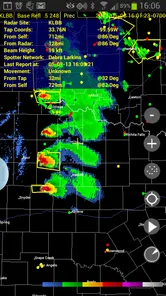
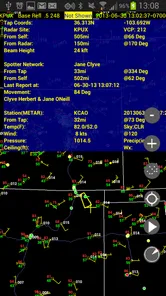
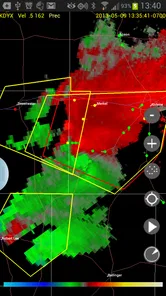
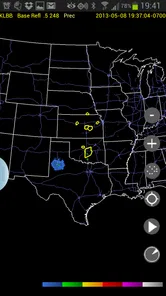
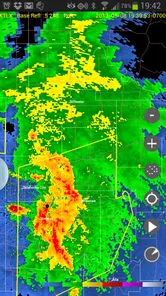
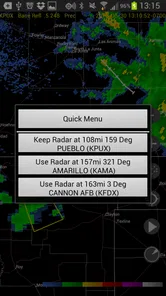
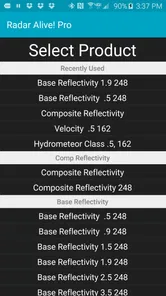
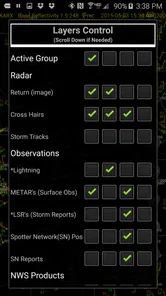
Analysis by Reviewed
When a normal weather app says rain is possible, I usually want one more layer of detail: where the rain is now, which direction it is moving, and whether it is likely to affect the route I am about to take. That is the situation where Radar Alive Pro Weather Radar makes the most sense. It is a dedicated weather app from Tiny Vital Systems, LLC, built around radar rather than a broad collection of forecasts, headlines, and lifestyle extras.
I approached it as a practical tool rather than something to open casually for a quick temperature check. The experience is aimed at people who want to watch developing weather and make decisions from what the radar is showing. Its store summary calls it a choice for storm chasers and serious users, and that focus is clear in the way the app presents itself. This is a radar-first tool, not a general-purpose weather dashboard.
The app costs $7.99, carries an Everyone age rating, and runs on Android 6.0 or later. It has been available since April 24, 2011, which gives it a much longer history than many newer weather utilities. The current version is 60.0.0.18, and its audience is established rather than enormous: it has passed ten thousand installs, with an average rating of 4.3 from more than five hundred ratings and over three hundred written reviews.
Following a weather decision from first check to final call
Before I commit to a weather-dependent plan, I find it useful to treat the first radar check as the start of a decision rather than the answer itself. I look for whether the pattern is changing and what choices I still have, then check again before the situation becomes urgent. That simple pause helps me turn a visual update into a more considered final call.
Starting with the actual problem
My useful starting point with this app is not “What is the weather today?” It is a more specific question: “Is this weather system relevant to me during the next part of my day?” That difference matters. A standard forecast app is often better when I need a clean hourly outlook, a weekly view, sunrise information, or a simple temperature glance. Radar Alive is more valuable when the answer depends on the movement and shape of precipitation.
Imagine planning an outdoor event while a line of storms is somewhere west of town. A general forecast may show a percentage chance of rain, but that percentage does not tell me whether the most active part of the system is approaching, weakening, splitting, or passing north. A radar view gives me a visual starting condition. I can see the weather as a moving pattern instead of treating a forecast number as a complete answer.
That makes the app especially relevant to storm watchers, outdoor workers, travelers, boaters, hikers, event organizers, and anyone who needs to decide whether to leave now or wait. It can also suit a weather enthusiast who enjoys following systems closely. On the other hand, someone who only wants tomorrow’s high temperature may find the dedicated radar approach more effort than it is worth.
More From Our News Desk

 Gmail
GmailGmail in a Busy Inbox: Who Benefits Most?
From first account to crowded workday, Gmail earns its place through dependable search and flexible sorting—but its best fit depends on how much inbox maintenance you can tolerate.

 Prime Video
Switching to Prime Video: What Changes in Your Viewing Routine
Prime Video can make a compelling second home for streaming, but switching means learning a different catalog, rental layer, and route from browsing to playback.

 Universal TV Remote Control
Universal TV Remote Control Works Best as a Reliable Backup
A phone remote earns its place through quick setup and reliable habits. Here is how to get more from Universal TV Remote Control—and where its limits show.

 Weather - By Xiaomi
Weather by Xiaomi Review: Clear at a Glance, Less Clear Up Close
Xiaomi’s weather app makes everyday forecasts quick to scan, but its calm surface can leave useful details and recovery paths harder to find than they should be.

 X
XX Under Pressure: Can It Recover When Posting Goes Wrong?
A resilience-focused review of X, examining setup, mistaken posts, interruptions, weak connections, and the gaps that matter when recovery needs to be dependable.

 Clash of Clans
Clash of Clans Is Won Between the Battles
Its raids are quick; its community is a long-term project of coordination, teaching, rivalry, and shared responsibility—with all the friction that entails.
Latest News



Reading the display without rushing to a conclusion
The first habit I recommend is to avoid treating one radar image as a prediction. The useful information comes from comparing the weather pattern over time. I look for the direction of movement, changes in the size of the precipitation area, and whether the strongest-looking parts of the system are moving toward the place I care about.
This is one of the app’s practical strengths: it encourages observation rather than passive acceptance. Instead of opening a forecast, seeing an icon, and closing the app, I can inspect the situation and form a more informed judgment. That is particularly helpful when conditions are changing quickly and a forecast written earlier in the day feels too broad.
There is also a trade-off here. Radar is visually useful, but it asks me to interpret what I see. Color intensity, gaps, movement, and coverage all need context. The app can support a decision, but it does not remove the need for common sense or official warnings. I would never use a radar image alone to make a safety-critical decision.
A realistic everyday workflow
Suppose I am leaving work to drive across town for an outdoor appointment. Before heading out, I open Radar Alive and check the current precipitation pattern around the route. I do not only look at my starting point. I inspect the direction of the larger weather area and consider whether the route crosses it during the time I expect to be traveling.
If the system is moving away, I may continue with the plan while keeping the app available for another check. If it is approaching, I compare the apparent movement with the timing of the appointment and decide whether leaving earlier, delaying, or changing the route makes more sense. The handoff here is from the app’s visual information to my own schedule. The app does not make that decision for me, and that is both its value and its responsibility.
A useful tip is to check before the decision becomes urgent. Looking at the radar while I still have options is much more helpful than opening it after I am already outside in heavy rain. I also prefer to compare the display with what I can see locally. A radar pattern may look impressive at a distance but have a different practical effect at street level, especially when the system is scattered.
Turning the radar view into a handoff
Weather information often has to move between people. An event organizer may check the radar, then message volunteers. A driver may check conditions, then tell a passenger that the departure time should change. A family member may watch the system while someone else is traveling. In these situations, the most useful handoff is not a vague statement such as “It looks bad.” It is a concise explanation of what the pattern is doing and what action follows.
For example, I might say that the main precipitation area is approaching from one side and that I am waiting before leaving. That is more actionable than forwarding a generic forecast icon. The app’s radar-centered design supports this kind of conversation because the visual pattern gives the discussion a concrete reference point.
Still, the handoff can break down if the recipient does not understand radar. A bright area on the screen does not automatically translate into a precise arrival time or a guaranteed level of danger. If I am sharing what I see, I need to explain the decision, not pretend the image is a perfect timetable. This is an important limitation for households or teams that want automatic, plain-language alerts instead of a tool that requires interpretation.
What the workflow produces
The result is not a polished daily briefing. It is a better-informed short-term choice. I can decide whether to carry rain gear, pause an outdoor activity, leave before a system arrives, or keep monitoring while conditions develop. For me, that is where Radar Alive earns its place: it gives the weather situation more visual context than a simple current-condition screen.
Its long availability also helps explain why it feels like a specialized utility rather than a fashionable redesign of the weather category. Tiny Vital Systems, LLC has kept the product focused on the radar use case. The current release number indicates that the app is still maintained as a living product, while the modest install base suggests a narrower audience than the major free weather platforms.
The paid price changes how I judge it. I am not comparing it only with other paid radar products; I am also comparing it with the many free weather apps that include radar as one tab among several. To justify the purchase, I would need to use radar often enough that a dedicated interface feels more useful than a free all-in-one app. Occasional users may reasonably prefer the free option.
Where the flow becomes less comfortable
The first friction is the learning curve. A radar-first app can feel less welcoming than a forecast app that immediately shows a large temperature, a weather icon, and a simple hourly timeline. If I want a quick answer before walking out the door, I may need to spend more time interpreting the display than I would with a conventional weather service.
The second issue is that radar is strongest for precipitation monitoring, not every weather question. It is not the natural first choice when I need a detailed multi-day plan, clothing advice, pollen information, or a broad seasonal overview. A general weather app remains more convenient for those tasks. I would use Radar Alive alongside another source rather than expecting it to replace every weather tool on my phone.
The third friction is decision confidence. Watching a storm pattern can make me feel informed, but the display still represents a changing atmosphere. Local effects, timing uncertainty, and gaps in precipitation can make a visual estimate less precise than I hope. For ordinary planning, that is manageable. For dangerous storms, I would add official alerts and local guidance rather than relying on this app as the sole authority.
There is also a practical question about who will appreciate the paid model. The $7.99 purchase is easier to defend for someone who checks radar repeatedly, follows storms as a hobby, or uses weather information as part of outdoor work. It is harder to defend for a person who opens a weather app a few times each week to check whether an umbrella is needed. The app’s Everyone rating makes it broadly accessible by age, but accessibility in the everyday sense depends more on how comfortable the user is with radar interpretation.
Small habits that make the tool more useful
I found three habits particularly valuable. First, I would establish a baseline before the weather becomes urgent. A quiet-weather check helps me understand the local view, so a later storm pattern is easier to interpret. Second, I would watch movement rather than focusing on a single color patch. The direction and persistence of a system are often more useful for planning than one isolated moment. Third, I would separate observation from action: check the app, compare it with the route or activity, then make a decision that includes time, shelter, and alternatives.
A fourth useful habit is to use the app as a monitoring companion during an activity, not as a substitute for preparation. If I am organizing a picnic, I can use the radar to decide when to pause or pack up, but I should already know where shelter is. If I am driving, I should not interact with the display in a way that distracts me. Checking before departure or having a passenger monitor it is the sensible workflow.
These details are easy to overlook because the basic appeal of a radar app is obvious. The real benefit appears when the information is connected to a prepared plan. Without that connection, I am only watching colored weather movement. With it, the app becomes part of a repeatable decision process.
Who should choose it, and who should skip it
I would recommend Radar Alive Pro Weather Radar to someone who routinely asks whether a storm is moving toward a particular place. It is a good fit for serious weather hobbyists, people who spend time outdoors, and users who prefer to inspect radar directly instead of relying on a simplified forecast summary. The focused design is also appealing if I already know that radar is the feature I will use most.
I would skip it if my main needs are a weekly forecast, a polished glanceable home screen, or automatic plain-language guidance. I would also hesitate if I rarely check precipitation patterns, because the purchase is difficult to justify when a free general weather app already covers occasional needs. Users who are uncomfortable interpreting radar may be happier with an app that turns weather information into simpler notifications.
For safety-sensitive situations, I would treat it as one input in a larger process. Official warnings, local emergency information, and direct observation still matter. Radar Alive can improve awareness of precipitation movement, but it should not encourage anyone to ignore a warning simply because the screen looks calm at one moment.
My final view after following the complete process
Radar Alive Pro Weather Radar is a specialized weather app with a clear purpose: help me watch radar and use that view to make short-term plans. I like that it does not try to be everything at once. When the starting condition is uncertain rain or a developing storm, the app gives me a more useful visual basis for deciding what to do next.
Its weaknesses come from the same focus. It requires interpretation, it is less convenient for broad forecast needs, and its paid price makes more sense for frequent radar users than casual weather checkers. The handoff from radar to real-world action is mine to manage, and that means the app rewards attention rather than replacing judgment.
After weighing those trade-offs, I see it as a worthwhile choice for a specific audience rather than a universal recommendation. If I regularly monitor storms, plan around outdoor conditions, or want a dedicated radar workflow, I can understand the appeal. If I simply want tomorrow’s forecast in a few seconds, a conventional alternative will probably be easier. Choose this app for the radar workflow, not merely for the word “weather.”
Radar Alive Pro Weather Radar Frequently Asked Questions
Is Radar Alive Pro Weather Radar available for my device?
Radar Alive Pro Weather Radar is listed for devices running Android 6.0 or later. Before downloading, check your device’s operating-system version and make sure you have enough storage available. The app is categorized as Weather and is rated Everyone, so its content is intended for a general audience. Compatibility and availability can still depend on your device and app store.
How much does Radar Alive Pro Weather Radar cost, and what should I know before purchasing?
Radar Alive Pro Weather Radar is priced at $7.99. Check the purchase details shown in your app store before completing the download, and review which version or features are included so you know what you are buying. If you are comparing it with other weather tools, consider whether live radar and storm-tracking capabilities are useful for the way you plan to monitor weather.
What is Radar Alive Pro Weather Radar?
Radar Alive Pro Weather Radar is a weather-monitoring app designed to provide live radar imagery, forecasts, storm tracking, and location-based weather information. It can help users follow rain, snow, thunderstorms, and other changing conditions through animated radar maps and weather alerts. The app is intended for everyday planning, travel preparation, and keeping an eye on developing weather systems.
Does Radar Alive Pro Weather Radar provide accurate real-time weather information?
The app presents radar and forecast data from available meteorological sources, but accuracy can vary depending on your location, local coverage, data updates, and the type of weather being tracked. Radar images are particularly useful for observing precipitation movement, while forecasts are estimates rather than guarantees. Users should consult official emergency services during severe or dangerous weather.
Can I use the app to track storms and receive weather alerts?
Radar Alive Pro Weather Radar may support animated radar views, severe-weather information, and notifications depending on the features enabled in your region and your device settings. Before relying on alerts, check that notifications, location access, and background permissions are properly configured. Alert availability and timing can differ by country, so the app should supplement—not replace—official warnings.
Pros
- Detailed radar maps help track rain
- storms
- and snowfall in real time.
- Supports multiple weather layers for a more complete local forecast.
- Useful alerts can warn you about approaching severe weather.
- Weather animations make storm movement easy to understand.
- Pro version offers a cleaner experience with fewer interruptions.
Cons
- Some advanced radar features may require a paid subscription.
- Radar accuracy depends on available data in your region.
- The app can use significant battery while tracking location and radar.
- Heavy map animations may feel slow on older phones.
- Forecast information may vary between regions and weather providers.











