Qeepsake: Family Photo Album
- 1.08K
- 4.5
- Installs
- 100.00K
- Price
- Free

Screenshots

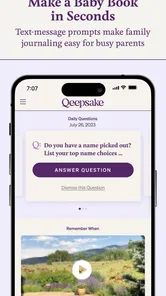
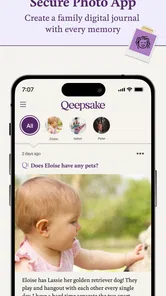
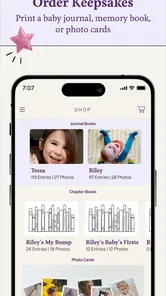
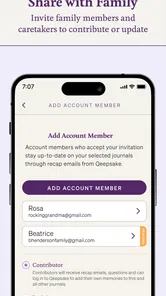
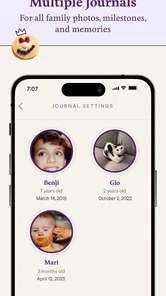
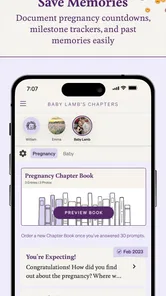
Analysis by Reviewed
In the first week, Qeepsake: Family & Baby Book can feel like a welcome answer to a familiar parenting problem: the camera roll fills up, but the details behind the pictures start to blur. I like the idea of getting a prompt instead of having to invent a journaling routine from scratch. That small nudge can turn a spare moment into a record of what happened, what your child was doing, and why you wanted to remember it.
Why the first week feels easy
The app is a parenting memory journal from Qeepsake, built around prompts that invite you to record milestones and ordinary moments with text, photos, and videos. It is free to start, rated for Everyone, and has a 4.5 average from around 4.9K ratings. The first-week appeal is practical: a question gives you a starting point when you have a photo but no caption, or when a small milestone feels worth saving but not worth building a whole scrapbook page around.
A useful way to try it is to answer only the prompts that make you pause. If a question brings a specific moment to mind, add a short detail that a photo cannot show: what made you laugh, what your child was trying to do, or who else was there. I would not treat every prompt as an assignment. The app works best when it helps you notice a memory, rather than adding another daily task to an already full schedule.
That selective approach also makes it easier to decide whether the app fits your family before you invest much effort. Try saving a mix of moments: a milestone, a funny exchange, and an ordinary routine you expect to forget. If the prompts help you tell those stories more clearly than a quick caption would, that is a useful sign. If you keep dismissing them because you already know what you want to record, a notes app or paper journal may feel more natural.
Keeping Memories at Your Fingertips
Have you ever found yourself drowning in a sea of photos, videos, and memorable moments that you wish you could organize into a beautiful memory book? Well, that's exactly where Qeepsake: Family & Baby Book steps in to make your life a whole lot easier. I've been using this app for quite some time now, and let me tell you, it's like having a personal assistant dedicated to preserving your family's precious moments.
Intuitive and User-Friendly
One of the things I love most about Qeepsake is its intuitive design. Navigating through the app is a cinch, and everything you need is right at your fingertips. The interface is clean and straightforward, which is perfect for busy parents who don’t have time to learn a complex app. Plus, the prompts are incredibly helpful if you’re not sure where to start or what to record. It's like having a creative guide that gently nudges you to capture those unforgettable moments.
For example, after a rushed bedtime, you might remember that your child tried a new word or insisted on reading the same book again. A quick note while the moment is fresh can preserve the detail that a photo alone misses. This is where prompts can beat a plain photo album: they encourage a sentence about the story, not just another image in a crowded camera roll. If you already keep a paper journal, though, the app may feel like a second place to maintain the same record unless you decide which one will be your main home for memories.
More From Our News Desk

 Gmail
Gmail in a Busy Inbox: Who Benefits Most?
From first account to crowded workday, Gmail earns its place through dependable search and flexible sorting—but its best fit depends on how much inbox maintenance you can tolerate.

 Prime Video
Switching to Prime Video: What Changes in Your Viewing Routine
Prime Video can make a compelling second home for streaming, but switching means learning a different catalog, rental layer, and route from browsing to playback.

 Universal TV Remote Control
 Works Best as a Reliable Backup
A phone remote earns its place through quick setup and reliable habits. Here is how to get more from Universal TV Remote Control—and where its limits show.

 Weather - By Xiaomi
Weather by Xiaomi Review: Clear at a Glance, Less Clear Up Close
Xiaomi’s weather app makes everyday forecasts quick to scan, but its calm surface can leave useful details and recovery paths harder to find than they should be.

 X
X Under Pressure: Can It Recover When Posting Goes Wrong?
A resilience-focused review of X, examining setup, mistaken posts, interruptions, weak connections, and the gaps that matter when recovery needs to be dependable.

 Clash of Clans
 Is Won Between the Battles
Its raids are quick; its community is a long-term project of coordination, teaching, rivalry, and shared responsibility—with all the friction that entails.
Latest News



A practical workflow is to use the prompt as a cue, not as the finished entry. I would jot down the one detail that gives the moment its shape, then attach a photo only when it adds something. For instance, a picture of a messy kitchen may be less meaningful later than a sentence explaining that your child insisted on helping make breakfast. This keeps the record personal without turning every small event into a writing project.
Customization at Its Best
Now, if you’re anything like me, you love to personalize everything! Qeepsake offers a variety of customization options, allowing you to tailor your memory book to reflect your family's unique story. You can choose from different themes and layouts, ensuring that your memory book is as special as the memories it holds. And when you're ready, you can even order a printed version of your book, which makes for a fabulous keepsake or gift.
The print option gives the journaling a tangible destination, but I would think about it as a finishing step rather than a reason to record everything. A manageable collection of meaningful entries is easier to revisit and shape into a book than a backlog of half-remembered moments. If your family prefers an unedited archive of every picture, a general photo-storage tool may suit you better; this app’s stronger appeal is pairing selected memories with written context and a keepsake format.
That distinction matters when deciding what to save. A photo library is usually better for finding a particular image or keeping a broad record, while a journal is better for preserving why an image mattered. Qeepsake sits closer to the second use: it asks you to choose and explain, rather than simply collect. I would avoid duplicating your entire camera roll here. Save the pictures that support a story, and leave routine snapshots where you already manage them.
If a printed keepsake is your goal, think about the story you want a relative to understand without you there to explain it. A few specific notes can make a collection more vivid than a pile of images alone. On the other hand, if you need a highly flexible scrapbook with exact page-by-page control, a dedicated design tool may be a better fit. The appeal here is the guided path from everyday recollection to a book, not unlimited control over every design decision.
Comprehensive and Secure
Qeepsake doesn’t just stop at capturing memories; it ensures that they are stored safely. The app backs up all your entries securely, so you never have to worry about losing those precious memories. And for those tech-savvy parents, Qeepsake offers a seamless sync across devices, which means you can update your memory book from anywhere, at any time.
For month-to-month value, I would judge it by whether the prompts keep drawing out memories you would otherwise forget, not by how many entries you accumulate. A light routine—answering when a prompt genuinely fits, then adding a detail or image—can be easier to sustain than setting a strict daily target. The trade-off is that prompts can become repetitive or feel like one more notification competing for attention. When that happens, it is reasonable to pause and return when you have something you want to preserve; a memory journal should not make family life feel like a reporting schedule.
One everyday option is a short weekly catch-up rather than a daily check-in. A parent might add a note after the weekend about a new favorite game, a funny phrase, or a visit with relatives, then choose one photo that anchors the memory. This is especially useful when the week has been too busy to respond in the moment. The downside is that details fade, so I would keep a quick note elsewhere if something feels important and transfer it later, rather than trusting memory to reconstruct the whole story.
For a family with more than one caregiver, it helps to agree on what belongs in the journal. One person might add milestone notes while another chooses photos, but a shared routine works only if it stays simple and everyone knows where the finished memory should live. Otherwise, the same event can end up in several places—or not be recorded because each person assumes the other will do it. A clear division is a small bit of setup that can prevent the archive from becoming one parent’s invisible chore.
Who will keep using it
I can see this working especially well for parents who take plenty of photos but rarely write down the story behind them, or for relatives who want a shared keepsake to look back on. It may be less useful for someone who already enjoys keeping a detailed paper diary, dislikes prompts, or wants a general-purpose photo organizer rather than a guided family record. Before building a long-term habit, I would also check the current purchase choices in the app: it is free to download, with in-app purchases listed from about $48 to $95 per item. That makes it sensible to try the basic routine first and decide later whether printed books or other paid options fit your plans.
The app has passed 100K installs, and its current version is 4.9.12; it requires Android 7.0 or later. Those details make it accessible to many Android users, but the more important question is whether its workflow suits your household. If multiple family members contribute, agree on a simple division—one person can add quick notes while another saves photos—so the record does not depend on one parent remembering every milestone. Even without a strict system, choosing a regular moment, such as a quiet end-of-week check-in, can help you catch entries you meant to add without turning the habit into a chore.
Qeepsake is a stronger match for someone who wants a guided family record than for someone seeking a complete digital filing system. It is also worth considering whether the person who will use it most enjoys writing short recollections. A partner may love taking pictures but have no interest in prompts; in that case, one enthusiastic contributor can still make a useful record, but expecting equal participation may create frustration. The app should support the family’s existing habits, not become a test of who remembers to document everything.
As a parenting app developed by Qeepsake, it focuses on preserving family moments rather than managing schedules, feeding routines, or household tasks. That focus is a strength if your goal is to make a keepsake, but it means it will not replace a calendar, a shared photo library, or a practical parenting tracker. Its Everyone content rating makes the age classification broad, while the actual value is aimed at adults recording a child’s story. I would choose it for reflection and memory-making, not for day-to-day coordination.
Before paying for any option, I would first use the free experience long enough to learn whether you return to it without forcing yourself. The in-app purchases are about $48 to $95 per item, so the decision is more meaningful than casually trying another free utility. Ask whether you have a set of entries you genuinely want to revisit, whether a printed format would be useful to your family, and whether the app’s way of shaping the record suits you. If those answers are unclear, there is no need to rush toward a purchase.
A keepsake, not another obligation
In conclusion, if you’re looking for a simple yet effective way to document your family’s journey, Qeepsake: Family & Baby Book is definitely worth checking out. It's more than just an app; it's a treasure chest of memories waiting to be filled. I personally find it incredibly rewarding to look back at the entries and see how much my family has grown. So, go ahead and give it a try – after all, these are the moments you'll want to remember forever.
My lasting verdict is positive, with one condition: let the app serve the memories you actually want to keep, rather than letting prompts dictate how often you record them. Its mix of questions, media, and a possible printed book offers more narrative than a camera roll, while a notebook may still be preferable if you want complete control without a digital routine. If you enjoy being gently prompted and can keep the habit light, it has a real chance of earning space on your phone after the first-week novelty wears off.
The clearest sign that it has earned that space is not a long streak or a packed timeline; it is whether you occasionally open an old entry and learn something you would otherwise have lost. A prompt-based journal can make small details easier to retrieve later, but only if you save them in language that will still make sense to you. Names, context, and the reason a moment stood out are often more valuable than a polished caption. Keeping entries specific is a simple way to increase their future value.
I would also be realistic about the kind of fatigue this format can create. A prompt can be helpful when your mind is blank, yet less welcome when it arrives during a hectic stretch or asks about a moment you do not care to record. Skipping a prompt is not a failure, and a quiet period does not erase what you have already saved. If the app starts to feel like another inbox, step back and use it only when you have a memory worth keeping; that restraint is more sustainable than trying to answer everything.
For parents who want a guided way to turn selected family moments into a written keepsake, I think it is worth trying. For people who prefer an unfiltered photo archive, dislike being prompted, or already have a journal routine they love, another tool may fit better. The lasting value comes from its particular combination of a gentle cue and a book-oriented record, not from making documentation effortless every day. Used at your own pace, it can help turn scattered moments into a family history you can actually revisit.
Qeepsake: Family Photo Album Frequently Asked Questions
What devices and operating systems can I use Qeepsake on?
Qeepsake is a parenting app for preserving family and baby memories on a mobile device. Before downloading, check that your device runs a compatible operating system; the app’s minimum OS requirement is version 7.0. Keeping the system and app updated can also help you get the best experience when saving entries and photos.
What is Qeepsake and how does it work?
Qeepsake is a digital journaling app designed to help parents effortlessly capture memories of their children’s lives. It works by sending daily prompts via text message, which users can respond to with stories, photos, or memories. These responses are saved in the app, allowing parents to build a comprehensive and personalized family and baby book over time.
Is Qeepsake free to use?
Qeepsake is free to download and offers both free and premium subscription plans. The free version provides limited access to features, while the premium subscription unlocks additional functionalities such as more frequent prompts, unlimited photo uploads, and the ability to customize questions. In-app purchases range from $47.99 to $94.99 per item, so review the available options in the app before choosing a plan.
Can I use Qeepsake offline?
While Qeepsake primarily functions online to send and receive prompts and store data, users can still access saved memories offline. However, to ensure all new entries and photos are backed up and synchronized, an internet connection is required. It’s recommended to regularly connect to the internet to avoid losing any data entries.
How secure is my data on Qeepsake?
Qeepsake takes user privacy and data security seriously. The app utilizes encryption to protect user information and complies with data protection regulations. Users can rest assured that their personal stories and photos are stored securely. Additionally, Qeepsake provides options to download and backup data to ensure users have control over their content.
Pros
- Easy to use interface for new parents.
- Secure cloud storage for memories.
- Supports multiple family members accounts.
- Automated prompts to capture moments.
- Allows photo and video uploads.
Cons
- Limited customization options.
- Subscription required for premium features.
- Occasional app crashes reported.
- No offline access to entries.
- Limited export options for printed books.