PUMA | Clothes & Shoes App
- 3.44K
- 4.9
- Installs
- 5.00M
- Price
- Free

Screenshots


Analysis by Reviewed
When I first open PUMA | Clothes & Shoes, I want to get to a useful choice quickly: a pair of trainers, a layer for everyday wear, or a small accessory I already know I need. This is PUMA SE’s free shopping app, built around browsing the brand’s own shoes, clothing, and accessories. It makes most sense if you already like PUMA or want to compare its range in one place, rather than browse lots of labels at once.
What to expect from a brand-focused shop
The app is devoted to PUMA, so its main advantage over a general fashion retailer is focus. I can look across the brand’s assortment without sorting through competing labels, which is handy when I have a particular PUMA item in mind. The trade-off is just as clear: if I’m comparing different brands for the best price or fit, a multi-brand shop is the better starting point.
It has a 4.9 average from around 158,000 ratings, and more than five million installs. That suggests it has found an audience, but popularity can’t tell me whether a shoe will fit my feet or whether a particular style suits me. I still treat product details and my own preferences as the deciding factors.
Getting started without overthinking it
After installing, I’d begin with the item I’m actually shopping for instead of browsing every section. If I need running shoes, I’d look at footwear first; if I’m replacing a basic top, I’d head to clothing. That simple approach keeps a large brand catalog from turning into an aimless scroll. The app is rated for Everyone, and the current version is 2.6.0; it requires Android 7.0 or later.
Before committing to a purchase, I recommend checking the product information carefully and comparing the available options on the item page. For shoes in particular, think about what you’ll use them for and how you prefer them to fit. A familiar brand name is not a substitute for checking whether a particular model works for your routine.
From browsing to a useful shortlist
My first meaningful task would be to identify one or two candidates, then pause and compare them rather than adding the first appealing image to a cart. For example, if I’m shopping after work for shoes I can wear on errands and casual days, I’d narrow the choice by intended use and appearance, then revisit the details before deciding. That makes the app a practical place to explore PUMA options, even if I’m not ready to buy immediately.
For a first-time user, the key question is whether the app helps with discovery or simply repeats a product catalog. I find it most useful when I arrive with a broad need but not a specific model: browsing the brand’s range can help me see alternatives I might not have searched for by name. If I already know exactly what I want, going straight to that item is more efficient than exploring unrelated categories.
You May Like

Clash of Clans Is Won Between the Battles

Android Auto Makes the Case for Quieter Car Software

MobiOffice: Transforming Mobile Productivity with Seamless Integration

EA SPORTS FC™ Mobile Soccer: Redefining Mobile Sports Gaming

How Microsoft OneDrive Became a Mobile Productivity Giant

How Google Translate Breaks Language Barriers Effortlessly
A smoother way to shop PUMA
Browsing and shopping made easy
The moment I fired up the PUMA | Clothes & Shoes app, I was greeted with a sleek and intuitive interface. It’s got this minimalist vibe that makes navigation a breeze. Whether you’re hunting for the latest sneaker drop or a comfy hoodie for the weekend, finding what you need is super straightforward. Plus, the app is well-optimized for both Android and iOS platforms, so kudos to the developers for that smooth user experience!
One of the coolest features has to be the personalized recommendations. The app seems to know my style better than I do! It's like having a personal shopper who’s always on the lookout for the latest trends and deals. You can easily filter through categories, check out detailed product descriptions, and even see what sizes are in stock.
Adding items to the cart is a seamless experience. I love how the app saves my preferences, so I don’t have to start from scratch every time I log in. And let’s talk about the checkout process – it’s as smooth as butter. Multiple payment options, quick transactions, and prompt order confirmations make for a hassle-free shopping spree.
Keeping an eye on new arrivals
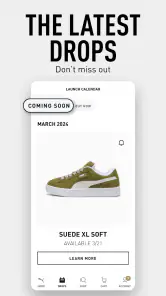
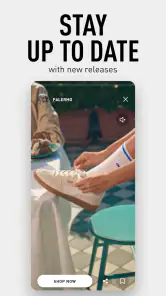
If you’re the type who loves staying ahead in the fashion game, this app has got you covered. With regular updates on new arrivals, exclusive collections, and upcoming sales, you’ll never miss out on what’s hot. Plus, the push notifications ensure you’re always in the loop, whether it’s a flash sale or a new release.
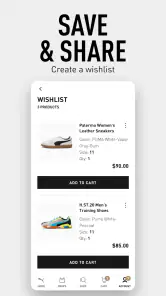
One feature I absolutely adore is the ability to create a wishlist. It’s perfect for those “maybe later” items that you’re on the fence about. Plus, it’s a great way to subtly hint at gift ideas for birthdays or holidays!
Ideas and inspiration beyond the product grid
The PUMA app isn’t just about shopping; it’s about connecting. They have this cool section where you can check out lookbooks and style guides curated by fashion experts. It’s like getting a peek into the fashion world from your couch. And if you’re into fitness, there are loads of tips and articles to keep you motivated and stylish at the same time.
I also enjoy the community vibe, where users can share their style shots and inspire each other. It’s like a mini Instagram, but focused solely on PUMA lovers. The ability to engage with other users adds a social element that makes the app feel lively and engaging.
Making the most of a wishlist
I’d use the wishlist as a decision tool, not just a place to collect attractive products. Saving a few options lets me compare them later when I have time to look closely, and it can keep a possible gift idea separate from something I’m actively planning to buy. It also helps avoid treating an appealing photo as an instant purchase decision.
There is a practical limitation to that approach: saving an item does not mean I should assume it will remain available or that its details will stay unchanged. I’d return to the item and check its current options before placing an order. For a shopper who prefers to decide only after trying things on in person, browsing on a phone may be useful for ideas, but a physical store or a retailer with a convenient try-on process may be a better fit.
Who will get the most from it
I’d recommend the app to PUMA regulars, sneaker fans who want to keep an eye on the brand’s range, and anyone shopping for a PUMA gift who wants to browse shoes, apparel, and accessories together. It can also suit someone who is still working out what style they want, since browsing a single label can make comparisons feel more manageable than a broad marketplace.
I’d skip it as my main shopping app if I’m focused on finding the lowest price across many brands, need a broad range of labels, or want to compare independent reviews and alternatives side by side. A general shopping app is better for those jobs. PUMA’s own app is strongest when the brand itself is the point, not when I’m trying to survey the whole market.
Everyday use, with a sensible final check
Picture me noticing that my everyday trainers are wearing out while getting ready for the next day. I can open the app, browse PUMA footwear, save a couple of candidates, and come back later to check which feels most suitable for my routine. If I’m buying for someone else, I’d use the same shortlist approach and confirm their preferred style and size before checkout instead of guessing from a product photo.
The app is free to download, but I still approach shopping with a budget in mind and review the final item and order details before confirming anything. PUMA SE is the developer, and the app is firmly a shopping destination rather than a general fitness tool. That distinction matters: I’d use its brand-focused browsing for product discovery, not expect it to replace a wider marketplace or a dedicated training app.
My recommendation
In conclusion, the PUMA | Clothes & Shoes app is a fashionista’s dream come true. It combines style, convenience, and community in a way that makes shopping a delight. Whether you’re a sneakerhead or just someone looking to upgrade your wardrobe, this app is worth a download. So, go ahead, give it a try, and step up your fashion game with PUMA!
My more practical take is that it’s most worthwhile when you already have some interest in PUMA and want an easy place to browse its products. Start with a clear need, shortlist instead of rushing, and check the details again before buying. If your priorities are comparing brands or trying something on first, use another route; if you want to explore PUMA specifically, this is a straightforward place to begin.
PUMA | Clothes & Shoes App Frequently Asked Questions
Can I browse PUMA products without creating an account?
The PUMA | Clothes & Shoes App is built around browsing and shopping for the brand’s sneakers, apparel, and accessories. You can explore its product collections to see what is available and decide whether the app suits your shopping needs. An account can be useful for features such as managing personal details, purchases, or a wishlist, but you can start by exploring the app first.
Is the PUMA app limited to shoes, or can I shop for other products too?
The app covers more than footwear. It is designed for shopping across PUMA sneakers, clothing, and accessories, making it relevant if you want to browse a range of products from the brand in one place. Its focus is PUMA rather than a multi-brand fashion marketplace, so it is best suited to shoppers specifically interested in PUMA’s collections.
Does the PUMA app help me discover new collections and releases?
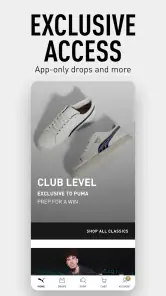
Yes. The PUMA app is intended to help shoppers explore the brand’s latest collections, including shoes and apparel, along with special releases. Its shopping-focused format makes it easier to browse products from a phone and keep an eye on items that interest you. If you enjoy following PUMA’s offerings, the app provides a dedicated place to explore them.
Is the PUMA app free to download, and what devices can run it?
The PUMA | Clothes & Shoes App is free to download and is intended for Android and iOS shoppers. On Android, it requires version 7.0 or later, so it is worth checking your device’s software before installing. The app is rated for Everyone and focuses on browsing and shopping for PUMA products.
What features does the PUMA | Clothes & Shoes App offer?
The PUMA app provides users with a seamless shopping experience, allowing them to browse the latest collections, exclusive releases, and limited editions of clothes and shoes. It offers personalized recommendations based on your preferences, a wishlist feature, and easy checkout options. Users can also track their orders and receive notifications about upcoming sales and promotions.
Pros
- User-friendly interface enhances shopping experience
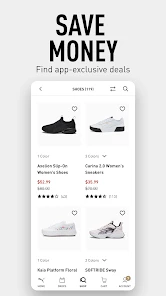
- Exclusive discounts for app users
- Wide range of products available
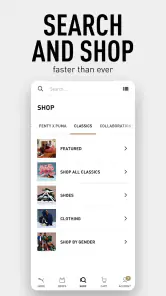
- Easy navigation and search functionality
- Seamless checkout process
Cons
- App requires frequent updates
- Limited customer support options
- Occasional slow loading times
- Notifications can be overwhelming
- Some features need internet connection

- Category
- Shopping
- Version
- 2.6.0