Pregnant Guide - Baby Tracker
- 1.00
- 2.6
- Installs
- 100.00K
- Price
- Free

Screenshots



Analysis by Reviewed
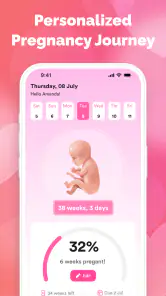
I approached Pregnant Guide - Baby Tracker as a simple pregnancy companion rather than a complete medical or appointment-management system. Its purpose is easy to understand: help you follow pregnancy progress by week, keep an eye on the expected due date, and give you a quick place to check where you are in the journey. That narrow focus can be useful, especially when you want something uncomplicated, but it also means the quality of your experience depends heavily on entering the starting information correctly.
The app is a free parenting app from SVVN-RU, available to a general audience and rated for Everyone. It has passed the hundred-thousand-install mark, which suggests that the basic idea appeals to many expecting parents. Still, its average rating of 2.6 from roughly 157 ratings is a clear reason to approach it with realistic expectations. I would not install it expecting a polished replacement for medical guidance. I would treat it as a lightweight reference tool that may be handy between appointments.
Where the experience can become confusing
The first place I would expect users to get stuck is the pregnancy starting point. A week-by-week tracker is only as helpful as the date or pregnancy information behind its calculation. If the wrong date is entered, the app can appear to be giving an incorrect week or due-date countdown when the real problem is simply the initial setup. This is the most important practical detail to check before judging the rest of the app.
I recommend pausing during setup instead of tapping through quickly. Confirm the date you intend to use, check whether the resulting week looks sensible, and compare the displayed estimate with the date already discussed with your healthcare professional. A tracker can organize information, but it cannot determine a medically accurate due date for every pregnancy. Cycle variation, clinical dating, and changes identified during an appointment can all make a simple calendar estimate less suitable.
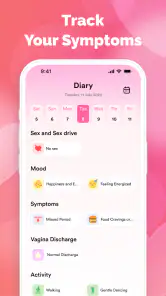
Another possible source of frustration is expecting more than the app’s central purpose. The store summary focuses on baby growth by week and a due-date counter. That makes it reasonable to look for a progress view, but not to assume that it includes a complete record of symptoms, appointments, nutrition, medication, or clinical measurements. If you need a detailed pregnancy journal, you may find the experience too limited even when the week calculation works properly.
I also would not read the modest rating as proof that every installation is unreliable. Ratings can reflect different phones, different expectations, and different interpretations of what a pregnancy guide should provide. However, it is useful warning information. Before making this your only pregnancy app, spend a little time checking whether the main screen updates correctly and whether the information is clear enough for your daily routine.
What to check before blaming the calculation
If the week display looks wrong, first return to the date you entered rather than repeatedly reinstalling the app. Reinstallation may remove your local setup without solving the underlying mistake. Write down the date you believe you used, compare it with the date shown in the app, and then review the result after making one change at a time. Changing several details together makes it difficult to identify what fixed the problem.
It is also worth checking the phone’s date and time settings. A date-based application can behave unexpectedly when the device calendar is incorrect, especially around a date change or after travel. I would make sure the phone is using the correct current date, then reopen the app and inspect the countdown again. This is a simple check, but it is more useful than assuming the pregnancy information itself has been lost.
Keep the app updated to version 1.0.7 when that version is offered for your device. Updates can address compatibility or stability problems, but I would still verify the displayed pregnancy week after updating. A practical habit is to take a private note of the date and week you expect before performing an update, so you have something concrete to compare afterward.
Setup checks that prevent avoidable errors
I would begin by entering the information in a quiet moment, not while distracted in a waiting room or while someone is asking you questions. Pregnancy dates can be emotionally important and easy to mistype. After saving, close the app and open it again. If the same week and due-date information remain visible, that gives you a basic indication that the setup has been retained during ordinary use.
Do not use the countdown as a substitute for the date recorded by your maternity team. A useful workflow is to keep the clinical estimate in your appointment notes and use Pregnant Guide as a quick visual reminder. If the two differ, the professional estimate should guide your decisions. The app is most helpful when it reduces mental arithmetic, not when it becomes the authority for medical planning.
For people sharing a phone, I would create a small written reminder of whose pregnancy information is currently entered. A simple tracker can become confusing if a partner, relative, or friend tests it using different details and then leaves the altered setup in place. This is an easy-to-miss household issue: the app may appear broken when it is actually showing the last information entered by another person.
Another useful check is to test the app with normal use rather than searching for every possible screen immediately. Open it, review the current week, look at the due-date counter, and then return later to see whether the same information remains coherent. That short test tells you more about whether it fits your routine than a quick glance at the store description.
Recovering a disrupted workflow
If the app stops showing the expected progress, I would use a gradual recovery process. First close and reopen it. Then confirm the phone’s date and time, check the entered pregnancy date, and install any available update. Only after those steps would I consider clearing app data or reinstalling, because those actions can remove information you may need to enter again.
Before clearing anything, record the date you used and the result you expect. This is especially important if you no longer have the original calculation in front of you. After reinstalling, enter the information carefully and compare the result with your note. If the display is still inconsistent, the issue may be compatibility or an app defect rather than a mistake on your part.
When the problem is a blank or incomplete screen, I would avoid repeatedly tapping buttons without knowing what changed. Move back to the main pregnancy overview, reopen the relevant view, and give the app a moment to refresh. If the phone is low on storage or running many applications, closing unused apps can also be a sensible general maintenance step. These are ordinary troubleshooting measures, not guarantees, but they keep the recovery process controlled.
One of the less obvious trade-offs with a small tracker is that simplicity can make errors harder to diagnose. A large health platform may show a detailed history, explanatory labels, or several ways to confirm a date. In a focused app like this, there may be fewer clues when the output seems wrong. That is why keeping your own reference note is worthwhile. It turns a vague concern into a straightforward comparison.
If you use the app during a busy day, consider checking it at a consistent time rather than constantly refreshing the countdown. A once-daily glance is enough for a general progress reminder and avoids turning a simple tool into a source of unnecessary worry. The exact day-to-day movement is less important than having a clear, stable reference for conversations and personal planning.
When the app is not the cause
Not every disagreement between the app and your pregnancy timeline is a software fault. Due dates are estimates, and the date used for a basic calculation may not match the date a clinician chooses after reviewing your history or examination. If your healthcare professional gives you a revised estimate, update your personal records accordingly and do not force the app to win the argument.
The same applies to symptoms and physical changes. A week tracker can tell you where a calendar calculation places you, but it cannot assess pain, bleeding, reduced movement, high blood pressure, or any other concern. If something feels urgent or unusual, contact an appropriate healthcare professional instead of waiting for the app to provide an explanation. This boundary is central to using a parenting app safely.
Phone behavior can also create misleading impressions. An older device, an incorrect system clock, limited storage, or an interrupted update can affect many apps at once. If other date-based applications are also behaving strangely, investigate the phone settings before concluding that Pregnant Guide is the sole problem. Conversely, if only this app is affected after the basic checks, that is stronger evidence that the issue belongs to the app itself.
There is also a difference between missing content and broken content. Someone looking for detailed baby-development articles, reminders, or a personal health record may describe the app as incomplete because it does not match their needs. That is a valid criticism, but it is not necessarily a technical failure. I would decide first whether the core week-and-countdown function is enough for you, then judge the app on that basis.
Who will find it useful, and who should choose something else
I can see this app working well for an expecting parent who wants a free, uncomplicated way to check pregnancy progress without building a detailed digital journal. It may also suit someone who prefers a quick visual reference and already receives medical information elsewhere. The lack of a purchase cost makes it easy to try, and the Everyone age rating keeps the presentation broadly accessible.
It is less suitable for someone who wants one central place for appointments, symptoms, questions for a midwife, medication notes, and long-term records. For that kind of workflow, a more comprehensive pregnancy platform or a secure notes system may be the better option. I would also look elsewhere if you need extensive educational material or a carefully structured daily routine. The narrow focus is convenient for some people and restrictive for others.
Compared with a paper calendar, Pregnant Guide can be faster when you want to check the current week or countdown. Compared with a full-featured pregnancy service, it is likely to feel more focused and less useful for record keeping. That trade-off is the key comparison: you gain a simple reference point, but you should not expect the surrounding tools found in larger alternatives.
A realistic everyday scenario would be checking the app before a prenatal appointment, using the displayed week as a prompt, and then comparing it with the information in your clinical notes. You might also use the countdown when planning a practical task, such as discussing leave or organizing household preparations. In both cases, the app supports planning without becoming the source of medical decisions.
Another sensible use is sharing the current week during a conversation with a partner, provided everyone understands that the figure is a calendar estimate. If the app’s result changes unexpectedly, stop and verify the original date rather than passing along the new number. This small discipline prevents a simple calculation error from spreading through family planning.
My practical verdict after weighing the trade-offs
My view is cautiously positive for the right user. Pregnant Guide - Baby Tracker has a clear, modest purpose, and a free week-and-due-date reference can be genuinely convenient. I like the idea of keeping the daily interaction small: open the app, check the progress, and get back to the rest of the day. That simplicity is its strongest quality when your needs are equally simple.
At the same time, I would not recommend relying on it alone. The average rating of 2.6 is too low to ignore, and the app’s focused design leaves little room for error if the initial date is entered incorrectly. Install it as a supplementary tracker, test the calculation immediately, and keep your clinically confirmed information somewhere separate. Those steps make the experience safer and make troubleshooting much easier.
SVVN-RU’s app is best viewed as a lightweight companion rather than a complete pregnancy system. The current version, 1.0.7, is worth trying if you want a free and straightforward reference on a compatible Android device, but I would move to a broader alternative if you need detailed records, richer guidance, or stronger planning tools. For a friend, my recommendation would be: try it, verify the setup, use it only for general tracking, and keep your healthcare professional’s advice at the center of the pregnancy journey.
Pros
- Simple week-by-week pregnancy information for quick reference.
- Baby growth updates make pregnancy milestones easier to follow.
- Helpful tracking tools keep key pregnancy details in one place.
- Clean interface is approachable for first-time parents.
- Useful reminders can help users stay organized during pregnancy.
Cons
- Some features may require a subscription or in-app purchases.
- Medical content should not replace advice from a qualified healthcare provider.
- Information may feel too general for high-risk or complex pregnancies.
- Reminder options may be limited compared with dedicated health apps.
- Privacy terms should be reviewed before entering personal pregnancy data.

- Category
- Parenting
- Version
- 1.0.7











