Pregnancy Track - Bump Journey
- 0.00
- 0.0
- Installs
- 100.00K
- Price
- Free

Screenshots

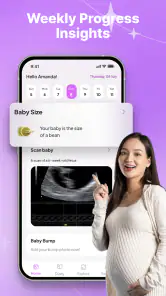
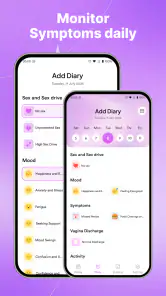
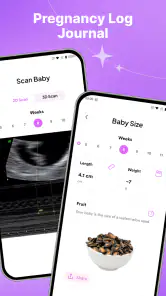
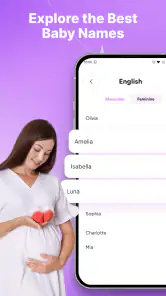
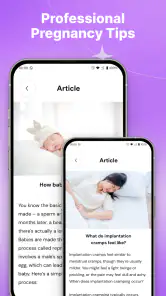
Analysis by Reviewed
Pregnancy Track - Bump Journey is the kind of parenting app I would open when I want a calm, practical overview rather than a crowded collection of medical tools. Its focus is straightforward: follow pregnancy week by week, keep an eye on the expected due date, work through a checklist, and record how the bump is changing. I found that combination more useful than it may sound, because pregnancy information can quickly become scattered between notes, calendar reminders, screenshots, and conversations with a midwife or doctor.
The app is free, carries an Everyone age rating, and is made by LUONG HONG QUANG. It belongs to the parenting app category, and its central appeal is organization. Instead of asking the user to build a system from scratch, it brings several familiar pregnancy-tracking tasks into one place. That makes it especially approachable for someone who wants a simple companion during the months ahead without committing to a more elaborate health platform.
How Pregnancy Track fits into an everyday pregnancy routine
My first impression is that this is an app designed for short, regular visits. I would not treat it as something to leave open all day. The more natural routine is to check the current week when a new stage begins, review the checklist when planning appointments or purchases, and add a bump entry when there is something worth remembering. That rhythm keeps the app useful without turning it into another source of notifications or digital clutter.
The week-by-week structure gives the experience a clear starting point. Rather than presenting every pregnancy topic at once, it encourages the user to think about the current stage. This matters when attention is limited. A person dealing with tiredness, work, appointments, and changing routines usually benefits more from a focused view than from a large dashboard packed with unrelated options.
The due-date area is also more useful when treated as a planning anchor instead of a promise. I would use it to organize appointments, prepare a hospital bag, and discuss timing with family, while remembering that an estimated date is not a medical guarantee. That distinction is important: the app can help structure personal planning, but it should sit beside professional care rather than replace it.
The checklist has a practical advantage over an ordinary notes app. Notes are flexible, but they require the user to remember what to write down. A pregnancy checklist creates a visible sense of progress and can reduce the mental load of recalling small preparations. I would use it for tasks that are easy to postpone, such as gathering documents, preparing essentials, or writing questions before an appointment.
The bump log adds a more personal layer. It is not only about tracking change; it can become a private timeline of a period that passes surprisingly quickly. A useful habit would be to make entries under similar conditions, such as roughly the same time of day and with similar clothing, so the record feels more consistent. That is a small workflow improvement, but it prevents the log from becoming a random collection of impressions.
What feels fast, and what may take more patience
Because the app concentrates on a small set of pregnancy tasks, I would expect normal navigation to feel lighter than a large all-in-one health application. Moving between the current week, due-date planning, checklist items, and bump notes should be a relatively direct experience. The value here is not flashy complexity; it is the reduced number of decisions needed to get to the information or action I want.
That simplicity also shapes expectations. Users looking for extensive medical reference material, detailed symptom analysis, appointment booking, or a broad family-health dashboard may find the experience intentionally narrow. A focused app can feel faster because it avoids unnecessary layers, but it cannot answer every pregnancy-related question. I see that as a trade-off rather than a defect.
When I imagine using it during a busy morning, the strongest workflow is a quick check followed by one small action. I might open the current week, review a preparation item, and add a short note to the bump log. Trying to turn every visit into a complete journal entry would make the routine feel like work. The app is better suited to small updates that remain manageable over time.
Heavy use is more likely to happen during planning moments than during ordinary browsing. For example, before a prenatal appointment, I could review the checklist, note questions in a separate place if needed, and update the bump record afterward. Before a trip, I might use the due-date view and checklist to think through timing and essentials. These are concentrated sessions, and the app’s focused design should be more comfortable for them than a general notes application with no pregnancy structure.
One non-obvious benefit of that focused workflow is that it separates memory from action. The week view helps me understand where I am, the due-date feature gives planning context, and the checklist turns preparation into visible tasks. The bump log serves a different purpose: it records personal experience. Keeping those roles distinct makes the app easier to use than a single long journal where planning and memories become mixed together.
Reliability, continuity, and recovering from missed updates
A pregnancy tracker only becomes valuable if I return to it consistently, but real life makes perfect consistency unlikely. I may forget to add a bump entry, skip a checklist update, or go several days without opening the app. The best way to use Pregnancy Track is not to treat missed updates as a failure. I would simply resume from the current week and add what is still useful, rather than trying to reconstruct every detail.
This is also where the difference between a tracker and a medical record matters. I would not rely on the app as the only place for information that a clinician needs. Important symptoms, test results, medication details, and appointment instructions should be kept through the appropriate professional channels. The app works better as a personal organization layer: it helps me remember, prepare, and reflect, while clinical decisions remain with qualified healthcare providers.
A practical recovery routine is to make one short catch-up session after a busy period. First, check the current pregnancy week. Next, review the checklist for unfinished items that still matter. Finally, add a brief bump note only if it would genuinely be useful. This avoids spending time inventing a detailed history and keeps the app from becoming burdensome.
For shared preparation, I would use the checklist as a conversation starter with a partner or family member, not assume that everyone will update it directly. A quick review can reveal which tasks need another person’s help. That makes the app useful even when only one person is actively recording information.
The app’s stability is most important during these short, meaningful sessions. I would expect a pregnancy tracker to feel dependable when opening the current week or recording a personal update, but I would still keep any irreplaceable memories elsewhere if they matter deeply to me. A bump log can be emotionally valuable, so occasional manual backup through personal notes or photos may be sensible, especially for entries I would hate to lose.
Device demands and practical limits
Pregnancy Track supports Android devices running version 7.0 or later, which gives it a broad range of compatible phones. That is helpful for users who do not own a recent flagship device or who prefer to keep an older phone for personal organization. Compatibility alone does not guarantee identical behavior on every handset, but the minimum requirement makes the app accessible to a wide Android audience.
For everyday use, I would expect the workload to be modest because the core activities are reading pregnancy information, checking tasks, and recording entries. Those actions are generally less demanding than video editing, gaming, or continuous location tracking. I would not choose a pregnancy tracker based on performance benchmarks, but I do appreciate an app that should fit naturally into ordinary phone use without making the device feel like a dedicated medical terminal.
There are still device-related trade-offs to consider. On a smaller screen, a checklist may require more scrolling, and entering personal notes may feel less comfortable than it would on a larger phone. Users with limited storage or an older battery may also prefer to keep only essential apps installed. Since the main value here comes from brief check-ins, it makes sense to use it in a way that avoids unnecessary browsing and keeps the routine efficient.
The free price lowers the barrier to trying it, which is important in parenting software. I can test whether its week-by-week view and checklist match my routine without first paying for a complicated subscription. At the same time, free does not automatically mean complete. Someone who wants a full medical ecosystem, extensive professional content, or advanced sharing may still prefer a broader alternative, even if that alternative feels heavier.
The Everyone rating also makes the app approachable for shared household use. I could show the checklist or due-date planning view to a partner or family member without the app being framed as restricted content. That does not turn it into a child-focused app; it simply reflects that the subject matter is suitable for a general audience.
Who will get the most from this app
I think Pregnancy Track is a strong fit for a first-time parent who wants structure without a steep learning curve. It is also suitable for someone who already has plenty of medical guidance but needs help remembering practical preparations. The app’s separate focus areas make it easy to build a routine: current week for orientation, due date for broad planning, checklist for tasks, and bump log for personal records.
It can also work well for a user who dislikes overly social pregnancy platforms. Some people want articles, communities, comparisons, and constant updates; others simply want a private place to follow progress. This app appears better aligned with the second group. Its usefulness comes from personal organization rather than from turning pregnancy into a public or highly interactive feed.
A realistic scenario would be a user returning home after an appointment. Instead of trying to remember everything later, they can check the current week, mark a preparation task, and record a short personal note about how the week feels. A partner can then look at the remaining checklist and take responsibility for one practical item. That is a modest workflow, but it connects the app to real household decisions rather than leaving it as a passive calendar.
I would be more cautious about recommending it to someone who wants symptom triage or clinical reassurance. A tracker can show where someone is in a pregnancy and help organize questions, but it should not be used to decide whether a symptom is urgent. In that situation, professional medical advice is the better option. I would also suggest a different app to users who need extensive records, detailed data export, or a comprehensive health-history system.
Another trade-off concerns personalization. A checklist is useful because it gives shape to preparation, but no generic list can perfectly reflect every family, location, medical situation, or birth plan. I would treat it as a starting point and adapt my own routine around it. Marking every item automatically without thinking would create a false sense of completion; reviewing whether a task actually applies is part of using the app well.
How it compares with familiar alternatives
The closest alternative is a standard calendar combined with a notes app. That setup is more flexible and may be better for people who already have a trusted planning system. However, it makes the user create the pregnancy structure manually. Pregnancy Track has the advantage of putting the week-by-week journey, due-date context, checklist, and bump record in one focused experience.
A general health app may offer more categories and deeper records, but that breadth can make simple pregnancy planning feel buried. I would choose a broader platform if I needed multiple health conditions, extensive measurements, or integration with a wider wellness routine. I would choose this app when the priority is a clear pregnancy-specific path with fewer distractions.
There is also a difference between a tracker and a pregnancy community app. Community tools can provide conversation and shared experiences, which some users find reassuring. They can also introduce more noise and make personal progress feel comparative. Pregnancy Track is the better fit for someone who wants a quiet, individual record and a practical checklist rather than a social destination.
The app’s current version is 1.0.7, and it was released on March 18, 2026. Those details place it in a relatively early stage of its product life, so I would approach it as a focused tool that may evolve rather than as a replacement for every established pregnancy service. Its reach is already over one hundred thousand installs, which suggests that the simple concept has found an audience, but popularity does not remove the need to decide whether its limited scope matches my own needs.
My performance verdict after weighing the trade-offs
My overall view is positive, with a clear condition: Pregnancy Track works best when I want a lightweight organizer, not a complete pregnancy-care platform. Its likely performance strength is the narrow workflow. I can open it for one purpose, complete a small action, and leave without navigating a maze of unrelated tools. That makes it suitable for frequent, low-effort check-ins and occasional planning sessions.
The most useful advanced habit is to give each area a specific job. I would use the week view to orient myself, the due date to discuss broad timing, the checklist to divide preparation into manageable tasks, and the bump log to preserve personal memories. I would avoid duplicating the same information in every section. This keeps entries concise and prevents the app from becoming repetitive.
I would also schedule a regular review rather than waiting for a major planning event. A short weekly check can reveal unfinished tasks early, while a longer review before an appointment can help me prepare questions. If I miss a week, I would resume without trying to recreate a perfect record. That approach protects the app’s main advantage: reducing mental effort instead of adding another obligation.
For a free parenting app that supports Android 7.0 and later, this is an appealingly direct choice. I like that its purpose is easy to understand and that its tools connect naturally to everyday pregnancy planning. I would recommend it to anyone who wants a simple companion for progress, preparation, and personal notes, especially if they prefer a private routine over a feature-heavy health ecosystem.
My final recommendation is to use it as an organized companion, not as a medical authority. If that boundary suits you, the combination of week-by-week guidance, due-date planning, checklist management, and a bump log offers enough practical value to earn a regular place on your phone. If you need detailed clinical tracking, broad integrations, or a large support community, another category of app will serve you better. For focused pregnancy organization with modest device demands and an easy starting point, Pregnancy Track - Bump Journey is worth trying.
Pros
- Clear week-by-week pregnancy milestones and fetal development updates.
- Helpful reminders for appointments
- tests
- and important pregnancy tasks.
- Simple interface makes daily tracking quick and easy.
- Useful symptom and mood logs help identify personal pregnancy patterns.
- Provides a convenient place to organize pregnancy notes and questions.
Cons
- Some features may require a subscription or include frequent upgrade prompts.
- Information is general and should not replace advice from a healthcare professional.
- Pregnancy content may feel repetitive after several weeks of use.
- Limited customization may not suit users with high-risk pregnancies.
- Privacy details should be reviewed before entering sensitive health information.

- Category
- Parenting
- Version
- 1.0.7











