Preggers: Pregnancy & Baby App
- 87.00
- 4.9
- Installs
- 100.00K
- Price
- Free

Screenshots

Analysis by Reviewed
Pregnancy apps can easily become noisy: one screen counts days, another pushes a checklist, and a third offers advice without explaining how it fits into daily life. Preggers: Pregnancy & Baby App takes a more practical route. I found it most useful as a gentle companion for organizing pregnancy-related information, preparing for the baby, and turning a big, unfamiliar process into smaller tasks. It is a free parenting app from Stroller AB, with optional in-app purchases ranging from $0.99 to $84.99 per item.
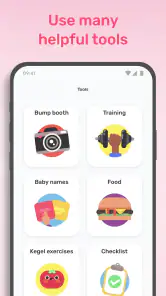
The first thing I noticed is that Preggers is designed for more than a single countdown. Its main appeal comes from the combination of a 3D baby-size view, fruit comparisons, a smart checklist, name ideas, and training content. Those elements serve different moods: sometimes I wanted a quick visual sense of progress, while at other times I needed something actionable, such as a reminder of what to prepare next. The app works best when I use it as a planning companion rather than as a replacement for professional medical care.
What to expect when you open Preggers
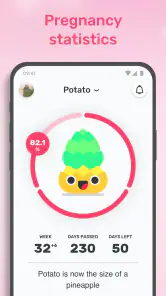
The experience is centered on pregnancy and early parenting preparation, so a first-time user can expect a mixture of progress information, visual explanations, planning tools, and lifestyle-oriented content. The 3D baby-size feature and fruit comparisons make development easier to picture than a plain week counter. I personally found that helpful on days when a number alone felt abstract. Seeing progress represented visually gives the experience a little warmth without making it feel like a game.
The visual comparisons are also a useful way to share the experience with a partner or family member. Someone who does not follow pregnancy terminology closely can understand a fruit comparison immediately, whereas medical wording may require explanation. I would still treat these comparisons as friendly illustrations, not as precise descriptions of a baby’s actual size. That distinction matters because pregnancy does not follow a perfectly identical pattern for everyone.
The smart checklist is the feature I would pay the most attention to after the initial novelty wears off. A general list of baby preparations can become overwhelming if it is presented all at once. A smarter, more structured list is valuable because it helps turn “prepare for the baby” into individual decisions. I recommend opening it early, scanning the full range of tasks, and then choosing only a few realistic items to focus on first.
Names and training content give the app a broader role. The name section is naturally more personal and entertaining, while training can help users who want gentle activity ideas as part of their routine. These sections are not equally important for every user. Someone who already has a clear preparation plan may use the visual progress tools often but ignore names. Another person may return mainly for ideas and organization.
Preggers has an average rating of 4.9 from around 1.9 thousand ratings, and it has passed 100 thousand installs. Those figures suggest that the app has found a strong audience among people looking for a friendly pregnancy companion. I would not interpret popularity as proof that every feature will suit every pregnancy, but it does make the app worth considering if you prefer an approachable, all-in-one experience.
The tone is reassuring, but it is not a medical service
For a first-time parent, the reassuring presentation is one of the strongest parts of the app. Pregnancy can make ordinary decisions feel urgent, and a calm interface can reduce that pressure. Still, the app should sit beside appointments and trusted healthcare guidance, not above them. If you have symptoms, concerns, or questions about your own health or the baby’s development, a clinician is the right source of advice.
This is also where I see a meaningful limitation. Visual comparisons and general training material can encourage curiosity, but they cannot account for your medical history, pregnancy complications, or personal recommendations. I would use Preggers to prepare questions for an appointment, organize non-medical tasks, or maintain motivation. I would not use it to decide whether a symptom is serious or to change care without professional guidance.
Setting up the app without making the process feel complicated
The best first setup is a short one. After installing Preggers, I would begin by entering only the information needed to personalize the pregnancy journey, then pause before exploring every section. First-time users often make the mistake of trying to understand the whole app in one sitting. That creates unnecessary mental work. The better approach is to establish the timeline, look at the current progress view, and leave the rest for when a specific need appears.
Because the app is aimed at pregnancy and parenting, the first useful question is not “Which feature should I try?” but “What do I need help with today?” If the answer is orientation, open the 3D and fruit comparison tools. If the answer is preparation, go directly to the checklist. If the answer is inspiration, browse names. If you want movement ideas, explore training. This simple choice keeps the app from becoming another source of information overload.
I also recommend treating the checklist as a personal workspace rather than a test. You do not have to complete everything immediately, and you should not feel behind because an item does not fit your circumstances. Some families prepare early, some wait, and some already own or have access to many of the things on a typical baby list. The checklist is most useful when it helps you notice decisions, not when it dictates a schedule.
The app is free to download, which makes it easy to try before deciding whether the optional purchases are worthwhile. The listed in-app purchase range goes from $0.99 to $84.99 per item, so I would pay attention to the purchase screen before confirming anything. A free starting point is a real advantage for cautious users, but the broad range means you should decide what value you expect from any paid addition instead of buying impulsively.
Preggers is rated for Everyone, which matches its general focus on family planning, baby preparation, names, and training. That age rating does not mean every piece of content will be equally relevant to every person. It simply makes the app accessible as a general family-oriented tool. The current version is 4.10.4, and it supports devices running Android 7.0 or later, so users with older phones should check compatibility before planning around it.
My recommended first-session routine
I would use this order for a calmer start:
Open the progress view and spend a minute understanding what the 3D and fruit comparisons are showing.
Move to the smart checklist and identify one preparation task that can be completed or researched this week.
Browse the name section only if it feels enjoyable, rather than treating it as another obligation.
Look at training content with your own comfort and healthcare advice in mind.
This sequence creates a first meaningful success quickly: you learn where you are in the journey and choose one manageable next action. That is more useful than opening every menu and remembering none of them.
The first successful action: turning information into one small decision
For me, the most satisfying first success is not simply viewing a baby-size comparison. It is using that view as a prompt to do something practical. After checking the current stage, I would open the checklist and select one item that matches the family’s immediate situation. It might be researching a product, discussing a name, or deciding which preparation topic deserves attention first. The important part is that the app moves you from passive reading to a concrete decision.
This workflow is especially helpful for first-time parents because “getting ready” is too broad to act on. A checklist can reveal that preparation is made up of separate questions: what is needed now, what can wait, what should be discussed together, and what is simply optional. I like that this makes the emotional side of preparation more manageable. You can finish one small task and stop, rather than feeling that you must solve the entire future in one evening.
A realistic everyday scenario would be using Preggers during a short break after work. Instead of scrolling through unrelated advice, I would check the current visual update, review the next checklist items, and save one topic to discuss with my partner later. If there is energy left, I might browse names or training content. If not, the session still has a clear result. That makes the app more practical than a feed that rewards endless browsing.
The name feature can also become more useful when treated as a conversation tool. Rather than trying to find the perfect name alone, I would use it to create a shortlist and discuss preferences with a partner. This approach avoids a common problem with name apps: collecting hundreds of ideas without making progress. Preggers is better suited to opening a discussion than to making the decision for you.
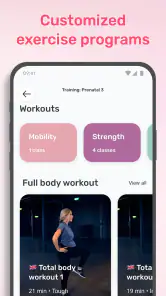
Training content needs a little more personal judgment. A pregnancy app can make movement feel approachable, but a routine that is comfortable for one person may not be suitable for another. I would use the section for inspiration and motivation, then adapt anything physical to my own circumstances and professional guidance. The app is valuable here as a prompt to maintain a healthy routine, not as a universal training prescription.
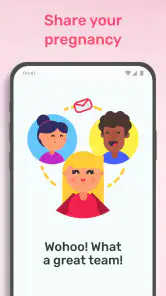
One non-obvious strength is the way these areas can support different people in the same household. One person may care about the visual progress view, another may prefer the checklist, and someone else may enjoy names. That makes the app easier to share informally than a tool built around only one type of user. It can give a partner who is not carrying the pregnancy a clearer way to participate in preparation.
How to avoid turning the checklist into pressure
I would not aim for a completely finished checklist. Instead, I would divide items into three mental groups: decisions that need discussion, purchases or preparations that can wait, and tasks that are not relevant to this family. This is a useful trade-off because a checklist can provide structure while still being imperfect for individual circumstances.
Another practical tip is to revisit the checklist after a few days rather than repeatedly refreshing it in one session. Pregnancy planning changes as conversations happen and priorities become clearer. A short review later is more likely to reflect real progress than an ambitious attempt to complete everything immediately. The app becomes a planning aid, not a source of guilt.
Where new users may become confused
The biggest possible confusion is the difference between an engaging comparison and a medical measurement. A fruit comparison is memorable, and the 3D view is visually appealing, but neither should be read as a precise prediction for an individual baby. I would enjoy these features for orientation and conversation, then rely on healthcare professionals for measurements and clinical interpretation.
Another point of friction is deciding what deserves attention first. Preggers places several kinds of content in one app, and that variety is both its strength and its weakness. If you want a single-purpose pregnancy tracker with almost no extra material, the name and training areas may feel unnecessary. If you enjoy having planning and lifestyle tools together, the broader design will feel convenient.
Optional purchases are another area where I would slow down. The app’s free entry point is helpful, but the presence of purchases means that not every part of the experience should be assumed to be included without checking the current screen. I would use the free features first, identify a specific limitation, and only then consider whether a paid item solves a problem I actually have. That is a better approach than paying simply because a feature looks attractive.
Some users may also wonder whether Preggers replaces a paper list, a calendar, or a dedicated medical tracker. In my view, it overlaps with each of those only partially. The smart checklist can reduce the need for a separate baby-preparation note, while the visual progress tools are more engaging than a basic calendar. However, families who already have a carefully organized system may gain more from the app’s visual guidance and name ideas than from moving all planning into it.
Compared with a plain pregnancy countdown, Preggers offers more ways to act on what you see. Compared with a general notes app, it gives the preparation process a pregnancy-specific structure. Compared with a medical resource, it is less personal and less authoritative. That comparison explains its proper place: it is a bridge between emotional orientation and everyday organization.
Who should use it, and who may be happier elsewhere
I would recommend Preggers to a first-time parent who wants a friendly starting point, especially someone who feels overwhelmed by the number of things to learn and prepare. It is also a good fit for couples who want a shared conversation starter, for users who enjoy visual progress, and for people who like combining planning with name browsing and training ideas.
I would be more cautious about recommending it to someone seeking detailed, personalized medical guidance. I would also suggest a simpler alternative for a user who dislikes lifestyle content, does not want name suggestions, or already has a trusted system for every preparation task. In those cases, the app may feel broader than necessary. A basic calendar, a personal notes system, or advice from a healthcare team could be a better match for the specific need.
The app is not the right choice if you expect every checklist item to reflect your family, budget, culture, or living situation perfectly. No general-purpose parenting tool can do that. Its value comes from giving you prompts that you can adapt. I found it most effective when I treated suggestions as starting points rather than instructions.
The next step after the first week
Once the initial curiosity fades, I would settle into a simple weekly rhythm. Check the visual progress section when you want an easy update, review the checklist when you are ready to make a practical decision, and use names or training only when they serve a current need. This keeps the app useful without allowing it to dominate the pregnancy experience.
A good second-week habit is to choose one checklist item that involves conversation rather than spending. Discussing preferences with a partner can prevent rushed purchases and reveal which preparations actually matter to both people. The app’s organization is most helpful when it improves those conversations, not when it encourages buying more things.
I would also keep a separate note for questions to bring to appointments. Preggers can help trigger those questions through its progress and preparation content, but a separate record makes it easier to remember personal concerns. This is one of the clearest ways to use the app responsibly: let it support preparation while keeping medical decisions in the right place.
Stroller AB has built Preggers as a broad parenting app rather than a narrow tracker. Its strongest qualities are the approachable visual progress tools, the practical checklist, and the ability to give both parents or partners something to engage with. Its main trade-offs are the breadth of content, the need to interpret comparisons sensibly, and the need to examine optional purchases carefully.
After using it as a first-time user, my honest view is that Preggers is worth trying if you want reassurance and structure without beginning with a complicated system. Start with the visual overview, complete one small checklist action, and let the other sections earn their place in your routine. Its best result is not making pregnancy feel perfectly predictable; it is making the next useful step easier to see.
Pros
- Week-by-week guidance makes pregnancy milestones easy to follow.
- Includes useful tools for tracking symptoms
- weight
- and appointments.
- Contraction timer can be helpful during labor preparation.
- Offers content for both pregnancy and the baby’s first year.
- Community features can provide support from other expecting parents.
Cons
- Many advanced features require a paid subscription.
- Some content may feel repetitive as pregnancy progresses.
- The amount of information can feel overwhelming for first-time parents.
- Personalized advice should not replace guidance from a healthcare professional.
- Certain features may vary depending on region or device.

- Category
- Parenting
- Version
- 4.10.4











