Pixel Studio PRO: editor
- 107.00
- 4.8
- Installs
- 5.00K
- Price
- $5.99

Screenshots
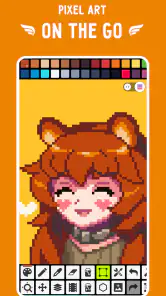
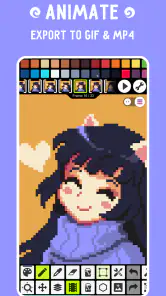
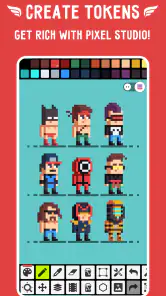
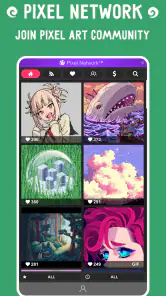
Analysis by Reviewed
When I first open a pixel-art editor, I want to know whether I can make something recognizable before I get bogged down in menus. Pixel Studio PRO is aimed at that kind of small, deliberate drawing: the image is built from individual pixels, so even a simple icon or character asks you to think about shape, contrast, and what will remain readable at a glance. I find that focus useful when I want to create a compact asset rather than paint freely across a large canvas.
What to expect from a focused pixel editor
Pixel Studio PRO is an art and design app by Hippo Games AM, built around making pixel-based images rather than trying to be an all-purpose painting studio. That focus matters: tiny, deliberate edits are the point, so the work feels closer to arranging colored squares than sketching with a broad digital brush. If you want to make a small character, icon, or scene, that constraint can be a creative advantage.
The app costs $5.99, and optional in-app purchases range from $0.99 to $17.99 per item. I’d treat the initial price as the main decision and check what any optional purchase adds before spending more. It is rated Everyone, has a 4.8 average from around 1.9 thousand ratings, and has passed 5 thousand installs. Those figures suggest a positive reception, though they don’t tell you whether its particular workflow will suit you.
Compared with a general drawing app, this one makes more sense when you want the grid-like discipline of pixel art, not a huge collection of brushes for painting and illustration. A broad graphics editor may be a better fit for posters, lettering, or loose sketches. Here, the appeal is that small images can be planned and adjusted in focused passes, without asking you to turn every project into a full illustration.
Getting Started with Pixel Studio PRO
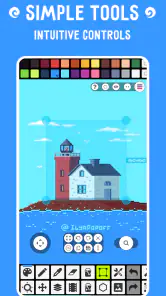
First things first, the installation process is a breeze. Just head over to your app store, and you'll have Pixel Studio PRO ready to go in no time. Upon opening, you'll be greeted with a user-friendly interface that's both inviting and straightforward. It's perfect for beginners and seasoned artists alike. And let me tell you, the learning curve? Practically non-existent!
Latest News
Make your first small image count
For a reassuring first session, keep the goal modest: build a tiny, readable object rather than starting with a complicated scene. Block in its main silhouette, then use a second color for one clear detail. Zoom in to place individual pixels, but zoom back out often; a shape that looks neat close up can become muddy at its intended size. This simple check is especially useful when making an icon or a little character for a personal project.
On a phone, a stylus can make individual placements feel more deliberate, while a finger is perfectly reasonable for broad color areas. I’d also save a working copy before experimenting with a new palette or animation. That habit gives you room to try alternatives without turning a successful first draft into a stressful cleanup job.
A useful first exercise is a simple object with a recognizable outline, such as a cup, fruit, or tiny house. Decide on the outer shape before adding small decorations. If the object is hard to identify when you zoom out, simplify it instead of adding more detail. That is a practical pixel-art lesson as much as an app tip: every extra mark competes for attention when the canvas is small.
For someone wondering whether a phone is enough, I’d say it depends on the size and length of the task. A quick sprite or a few edits fit naturally into a short session. Extended work that demands careful placement across many details is more comfortable with a larger display and a precise input method. You can still begin on a phone, but it helps to treat it as a portable workspace rather than assume it will feel identical to a desktop setup.
Features That Make It Stand Out
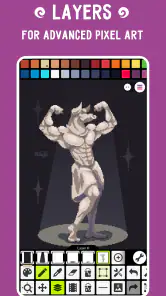
One of the standout features of this app is the layer system. It's robust yet simple, allowing you to create complex artworks without feeling overwhelmed. Whether you're working on a simple doodle or a detailed masterpiece, the layer system is your best friend.
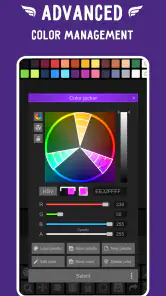
Another awesome feature is the color palette. With a plethora of colors at your disposal, you can mix and match to your heart's content. Plus, the app supports custom palettes, so if you've got a specific color scheme in mind, you're covered.
A practical way to keep those tools manageable is to decide what each layer is for before adding more: for example, separate a character from its background, or keep a highlight pass apart from the base colors. That makes revisions less fiddly, especially when you want to change one part without repainting the rest. A custom palette also helps maintain consistency across several small images; choosing a restrained set of colors first can prevent a sprite from becoming noisy.
There’s a useful trade-off here. Layers make it easier to revise parts independently, but they can become confusing if you add them without a plan. I’d name or mentally assign a purpose to each one as the image grows, then keep the structure as simple as the artwork allows. For a one-layer doodle, extra organization is unnecessary; for a character over a background, separation can save time when you revise the outline or color balance.
When designing a set of related icons, I would settle on a palette before drawing the second or third image. Reusing the same few colors creates a coherent family and makes later edits easier. This is more reliable than trying to match shades by eye each time. It also helps reveal when one icon is becoming more detailed than the others, a common problem when separate small pieces are made on different days.
Animation Capabilities
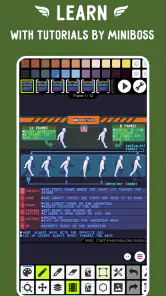
Now, let's talk about animation. Yes, you heard it right! Pixel Studio PRO isn't just for static images. The animation tool is intuitive and powerful, letting you bring your creations to life frame by frame. It's like having a mini animation studio right in your pocket.
Frame-by-frame work is rewarding, but it asks for patience: even a short movement can mean repeating much of a character’s shape while changing only a few pixels. Start with a simple action, such as a blink or a small bounce, and check the motion as a loop before adding details. This is where a phone editor is convenient for quick tests, but a larger screen may feel more comfortable when timing and tiny edits become the main job.
For a first animation, I’d choose a movement where most of the drawing stays still. A blinking face or a gently bobbing object lets you concentrate on the change between frames instead of redrawing an entire scene. If the loop looks uneven, compare the positions of the main shape from frame to frame before polishing tiny details. Consistency usually matters more than adding extra decoration.
Animation is also where expectations need to stay realistic. It is an approachable way to test a short, handmade motion, but frame-by-frame work is naturally repetitive. If you need a long sequence with complex timing, or your project depends on a broader animation production workflow, a dedicated computer tool may be more comfortable. For a quick loop or a playful experiment, the phone-first approach is much less of a commitment.
Community and Sharing
What I love about this app is the community aspect. You can easily share your creations with other users, get feedback, and even collaborate on projects. It's a fantastic way to stay inspired and keep those creative juices flowing.
Sharing your artwork is also a breeze. With a few taps, you can export your work in various formats, ready to be shared on social media or with your friends. Trust me, your work will look stunning no matter where you display it.
For an everyday use case, I can picture making a small avatar during a commute, then refining its outline later at home and sharing it once the silhouette reads clearly at normal viewing size. Before exporting, I’d check the image at the size where people will actually see it; crisp pixel art can lose its impact if it is displayed at an awkward scale. If you need to move a piece into a broader illustration or design workflow, export is a useful handoff, while a desktop-focused editor may be better for a long, precision-heavy session.
That export step is worth treating as a final review rather than an afterthought. I’d look for stray pixels around the outline, check whether the background suits the place I plan to share the image, and make sure the artwork still reads when viewed small. Pixel art often looks precise at high zoom but can feel visually crowded in a thumbnail. A quick scale check can catch that before the image leaves the editor.
For a casual routine, I’d keep a small idea list in mind: an avatar, a badge for a personal project, or a tiny scene inspired by something noticed during the day. These are achievable without needing a long uninterrupted session. Saving a draft and returning later also makes it easier to separate the fun of sketching an idea from the more careful task of cleaning its edges.
Who will enjoy it, and who may prefer another tool
I’d recommend this to someone curious about pixel art who wants to draw or animate in short sessions without setting up a full desktop workspace. It is also a natural fit for people who already think in sprites and limited palettes. If your main goal is freehand painting, complex page layout, or detailed work that depends on a large canvas and extensive desktop controls, a general illustration app or computer editor will probably be a better match. Pixel Studio PRO’s focused approach is useful precisely because it does not try to be every kind of art tool.
One point worth keeping in mind is that “easy to start” does not mean every project is effortless. Tiny canvases magnify stray pixels, and animation introduces repeated edits. I’d work in short passes, zoom out to judge readability, and save before trying a substantial change. The app is listed as version 5.42 and supports Android 6.0 or later, which gives older compatible devices a route to use it; as with any detailed touch work, screen size and input comfort still shape the experience.
The app has an Everyone age rating, so its subject matter is suitable for a broad audience. That does not automatically make it the right creative tool for every beginner, though. Someone who wants to paint with textured brushes or make polished page layouts will likely be happier elsewhere. I’d choose this when the intended result is unmistakably pixel-based and the process of placing and refining individual squares sounds enjoyable rather than restrictive.
The paid entry price also changes how I’d approach the decision: think about whether you expect to return to pixel art, not just whether you want to try one quick doodle. If you are unsure, compare the cost with the value of having a portable editor you will use for repeated projects. Optional purchases should be considered separately from the core purchase; I would check their purpose in the app before deciding whether any are relevant to my own workflow.
My practical recommendation for a first-time user is to finish one small static image before exploring every tool. That gives you a clear sense of how precise touch editing feels on your device. If you enjoy revising the silhouette and keeping a palette consistent, animation is a sensible next experiment. If the close-up editing feels tiring, a larger-screen drawing setup may be the better choice, even if the app itself is easy to begin using.
Final Thoughts
In conclusion, Pixel Studio PRO is a powerhouse app that offers a comprehensive suite of tools for both novice and experienced artists. It's packed with features that make creating pixel art and animations a joyful experience. If you haven't tried it yet, I highly recommend giving it a shot. Who knows? It might just become your new favorite app for artistic expression.
Happy drawing, and may your pixels always be perfect!
Pixel Studio PRO: editor Frequently Asked Questions
How much does Pixel Studio PRO cost, and are there additional purchases?
Pixel Studio PRO is a paid app, so you should account for the upfront purchase before downloading. It also offers in-app purchases, priced from $0.99 to $17.99 per item. The app’s core purpose is creating pixel art, while optional purchases may suit users who want additional offerings. Check the purchase details in your app store before confirming any transaction.
What is Pixel Studio PRO, and who is it for?
Pixel Studio PRO is an advanced pixel art editor designed for artists and game developers who want to create detailed pixel art graphics. It is suitable for both beginners who are just starting out in pixel art and experienced artists who need a robust tool for more complex projects. The app offers a variety of features that make drawing pixel art easy and enjoyable.
What features does Pixel Studio PRO offer to enhance pixel art creation?
Pixel Studio PRO comes packed with features such as layers, animation support, and a wide range of brushes and tools that make it easy to create and edit pixel art. The app also supports importing and exporting various file formats, allowing users to seamlessly integrate their work with other software. Additionally, it offers a user-friendly interface and customizable canvas sizes.
Is Pixel Studio PRO available on both Android and iOS platforms?
Yes, Pixel Studio PRO is available for download on both Android and iOS platforms. Users can access the app through their respective app stores. This cross-platform availability ensures that artists can work on their projects regardless of the device they are using.
Does Pixel Studio PRO require any in-app purchases or subscriptions?
Pixel Studio PRO may offer some in-app purchases for additional features or tools, but the core functionality of the app is fully accessible without any extra charges. Users should check the app store listing for any potential costs associated with premium features to make an informed decision before downloading.
Pros
- Robust layer support for detailed editing.
- User-friendly interface for beginners.
- Extensive brush and tool selection.
- High-resolution export options.
- Regular updates with new features.
Cons
- Premium version is relatively expensive.
- Learning curve for advanced features.
- Occasional app crashes reported.
- Limited free version capabilities.
- No vector graphic support.

- Category
- Art & Design
- Version
- 5.42












