Picta x Walgreens Photo Print
- 18.05K
- 4.8
- Installs
- 1.00M
- Price
- Free

Screenshots





Analysis by Reviewed
If you’re like me and love capturing moments, then you're probably on the lookout for an app that lets you print those memories effortlessly. Well, I stumbled upon Picta x Walgreens Photo Print, and I must say, it’s quite the catch for photography enthusiasts like us.
Easy Peasy Prints
First off, let’s talk about the user interface. It’s incredibly user-friendly. I mean, you don’t have to be a tech wizard to navigate through it. All you need is your smartphone, and you’re all set to print your fantastic photos. The app seamlessly connects to your phone’s gallery, making the selection process as smooth as silk. I even tried it with my grandma, and she managed to print her pictures without a hitch!
Features That Stand Out
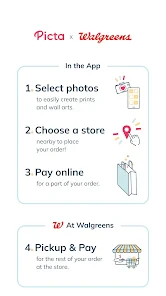
What’s cool about Picta x Walgreens Photo Print is its integration with Walgreens. You can select your photos, choose the nearest Walgreens location, and boom, your prints are ready for pickup in no time. Talk about convenience! The app offers various print sizes, which is a lifesaver when you’re hoping to frame a particular shot.
Moreover, the app supports multiple formats. Whether you’re looking to print a standard 4x6 or something larger like an 8x10, it’s got you covered. I tried ordering a bunch of sizes, and they all came out with excellent quality, capturing every detail brilliantly.
More Than Just Printing
Aside from the straightforward printing, the app also provides some nifty editing tools. You can tweak your photos to perfection before sending them off to print. Adjust brightness, contrast, or even add a filter for that extra touch. I found these tools handy for those quick edits when I was in a hurry.
Another feature worth mentioning is the app’s ability to create photo books. Yes, you heard me right! You can compile your favorite snaps into a lovely book, which makes for a great gift or keepsake. I made one for my friend’s birthday, and she absolutely adored it!
Final Thoughts
Overall, Picta x Walgreens Photo Print is a delightful app for anyone looking to bring their digital memories into the physical world. It’s straightforward, efficient, and offers a range of options that cater to different needs. Whether you’re a professional photographer or someone who just enjoys snapping pictures now and then, this app is sure to make your life easier. So, why not give it a shot? You might just fall in love with the convenience and quality it offers.
In a world where everything is digital, there’s something magical about holding a printed photo. And with this app, that magic is just a few taps away. Happy printing!
Pros
- Easy integration with Walgreens for photo printing.
- User-friendly interface for quick navigation.
- High-quality photo prints available.
- Convenient in-app photo editing tools.
- Fast processing and delivery options.
Cons
- Limited editing features compared to specialized apps.
- Requires stable internet for best performance.
- In-app ads can be intrusive.
- Photo upload can be slow at times.
- Limited support for non-standard print sizes.

- Category
- Photography
- Version
- 10.24.0











