

Picta x CVS Photo Print
- 2.36K
- 4.8
- Installs
- 100.00K
- Price
- Free

Screenshots
Analysis by Reviewed
Printing photos from a phone sounds simple until the pictures stay trapped in the camera roll for months. I tested Picta x CVS Photo Print as a way to turn selected images into physical prints through CVS Pharmacy, and my first impression was that it is built around a very practical habit: choose a few memories, send them out, and collect them the same day. It is a free photography app from Pictarine - Printing Photos, aimed at people who want something more immediate than ordering from a specialist photo lab.
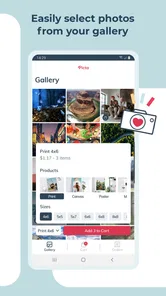
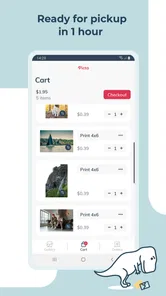
The app has a clear everyday purpose rather than trying to become a complete photo editor or social network. You pick images, select a print format, choose a CVS location, and arrange a pickup. That direct workflow is its main appeal. It also explains why the app can remain useful after the first enthusiastic experiment: it fits occasions when a digital image needs to become a card, a small gift, a school project, or a photo for the refrigerator.
My overall view is positive, but with an important qualification. Picta x CVS Photo Print earns lasting space when you regularly need quick local prints. It is less compelling if you mainly want sophisticated editing, premium archival output, large albums, or the lowest possible cost for a big batch. The right question is not whether it can print a picture; it is whether same-day convenience matches the way you actually use photos.
From first-week appeal to a repeatable photo habit
I find that a printing app becomes more useful when I decide what a finished print should do before I start browsing. This section looks at ways to turn an occasional order into a manageable routine, including choosing a theme and setting aside time to review pictures rather than ordering on impulse. That habit also makes it easier to judge what stays worthwhile over the longer term.
The first session is about reducing friction
The strongest part of the experience is the short distance between seeing a picture on the phone and deciding to print it. The service supports familiar sizes such as 4x6, 5x7, 6x6, 6x8, 8x8, and 8x10, so I do not have to think in unfamiliar product names. That range covers the usual snapshot, square social-media-style image, portrait enlargement, and a few display-friendly options.
For a first order, I would begin with a small group rather than selecting an entire album. This makes it easier to notice how different images behave in print. A phone screen can hide soft focus, clipped highlights, or an awkward crop. Choosing a handful of varied pictures lets me learn what the CVS output and the app’s crop choices do before committing to a larger order.
The square formats deserve special attention. Images made for social feeds often look natural in a square frame, while a standard phone photograph may lose part of the scene when cropped. I found it useful to check faces, hands, and text near the edges before confirming. A picture that looks balanced on the phone can become uncomfortable when the print shape changes.
More From Our News Desk

 Instagram
Instagram’s Power Comes From Its Place in Your Phone
A close look at how Instagram turns Meta’s reach, recommendation systems and everyday camera habits into durable platform power—and what that costs users.

 Gmail
GmailGmail in a Busy Inbox: Who Benefits Most?
From first account to crowded workday, Gmail earns its place through dependable search and flexible sorting—but its best fit depends on how much inbox maintenance you can tolerate.

 Prime Video
Switching to Prime Video: What Changes in Your Viewing Routine
Prime Video can make a compelling second home for streaming, but switching means learning a different catalog, rental layer, and route from browsing to playback.

 Universal TV Remote Control
Universal TV Remote Control Works Best as a Reliable Backup
A phone remote earns its place through quick setup and reliable habits. Here is how to get more from Universal TV Remote Control—and where its limits show.

 Weather - By Xiaomi
Weather by Xiaomi Review: Clear at a Glance, Less Clear Up Close
Xiaomi’s weather app makes everyday forecasts quick to scan, but its calm surface can leave useful details and recovery paths harder to find than they should be.

 X
XX Under Pressure: Can It Recover When Posting Goes Wrong?
A resilience-focused review of X, examining setup, mistaken posts, interruptions, weak connections, and the gaps that matter when recovery needs to be dependable.
Latest News



A realistic everyday use case
Imagine a family gathering on Saturday morning. I might have a dozen good pictures from the previous evening and want a few ready before visiting relatives arrive. Instead of waiting for shipping, I can select the strongest images, order modest prints for a small album, and use a larger format for a simple gift. The value here is not artistic control; it is having a physical result while the event still feels current.
The same workflow suits a child’s school presentation, a travel memory board, a last-minute birthday card, or a picture to place beside a handwritten note. In these situations, the app competes less with professional printing services and more with the familiar choice of doing nothing because transferring images to a computer feels like work.
That immediacy is also the first limitation. Same-day pickup depends on the selected CVS location and its ability to fulfill the order, so I would not treat the app as a guarantee for a time-critical ceremony. For an important deadline, I would place the order early enough to inspect the result and leave room for a backup plan.
What the app does better than the usual alternatives
Compared with sending photos to a specialist lab, Picta x CVS Photo Print is more convenient for small, urgent orders. A dedicated lab may offer more paper choices, advanced corrections, album construction, and stronger control over professional output, but that extra depth often makes sense only when I am preparing a substantial project.
Compared with printing at home, the app avoids keeping paper, ink, and a working printer ready. Home printing can be excellent for control and immediate experimentation, yet it brings maintenance and consumable costs of its own. For a few casual prints, local pickup is often easier than troubleshooting a printer that has not been used in weeks.
Compared with keeping everything in cloud storage, the app solves a different problem. Cloud albums are better for sharing with many people and preserving a large library, while a CVS print is useful precisely because it leaves the screen. I would not replace digital backups with it, but I do see it as a bridge between phone photography and physical memory keeping.
Small decisions that improve the first order
One useful habit is to make a temporary “print candidates” album before opening the ordering workflow. I can compare similar shots, remove duplicates, and check whether the selected images tell a coherent story. This is especially helpful for trips, where the first twenty pictures may include several versions of the same landmark.
I would also separate images by intended format rather than assuming one size suits everything. A landscape scene may benefit from a wide standard print, a portrait may work better in a taller option, and a graphic or social-style image may look strongest as a square. This is not a hidden editing feature; it is a planning step that prevents the print size from dictating the composition at the last moment.
Finally, I would inspect screenshots and images containing small lettering more carefully. Phone displays make text appear sharper than a casual print viewed at arm’s length. If the words matter, I would choose a larger format or use a cleaner original instead of relying on a compressed image saved from a messaging app.
Who will enjoy the first week
The app is a good match for someone who takes many phone photos but rarely prints them. It is also suitable for families that need occasional physical copies without learning desktop software, and for people who value local pickup more than a broad catalog of finishing options. Since it is free and rated for Everyone, the basic barrier to trying it is low, although an adult may still want to supervise orders and pickup arrangements for children.
I would be more cautious recommending it to a photographer who expects color-critical work, custom paper surfaces, extensive retouching, or a carefully designed book. The app’s strength is the ordinary print made conveniently, not the controlled production of a portfolio piece.
What remains valuable after the novelty fades
The lasting value is less about returning to the app often and more about whether the prints find a place in everyday life. I consider how a small, intentional selection can serve as a gift, a family record, or a simple display without turning photo printing into another chore. From there, the next section weighs that steady usefulness against the occasions when a different printing approach makes more sense.
Month-to-month value comes from occasions, not constant browsing
After the first order, the app’s usefulness depends on whether I create a repeatable reason to return. I do not think it is an app I would open every day. Its long-term value appears in small recurring moments: printing a few highlights after a trip, refreshing a family display, preparing a modest gift, or keeping a physical record of an event that would otherwise disappear into a camera roll.
That is a healthy pattern. A photo-printing service does not need daily engagement to be worthwhile. If it helps me complete a task I would otherwise postpone, it has earned its place. The danger is ordering impulsively just because selecting pictures feels satisfying, then ending up with prints that have no destination.
I get more value when I decide the purpose first. A small set for an album, a single enlargement for a frame, or several copies for relatives leads to better choices than scrolling through every image without a plan. This also controls the maintenance burden because the finished prints have somewhere to go.
A practical monthly workflow
For recurring use, I would create a simple monthly routine: review the previous weeks, mark only the images that still matter after a little time has passed, and order a restrained selection. Waiting briefly is a surprisingly useful filter. Pictures that seemed essential immediately after an outing may feel repetitive later, while a quiet candid image may become the one worth keeping.
I would organize the physical results at the same time. A dated envelope, a small album section, or a labeled storage box is enough. Without that step, prints can become another pile of photographs rather than a meaningful record. The app can make ordering easy, but it cannot decide how the physical collection will remain usable.
One non-obvious trade-off is that convenience can encourage quantity without improving selection. Because the process begins with images already on the phone, I may confuse availability with importance. A monthly limit on the number of chosen pictures is not a feature of the app, but it is an effective personal rule for keeping the habit intentional.
Same-day pickup versus a specialist order
For ordinary snapshots, the local CVS model is persuasive because speed changes the use case. I can print for an event that is still happening rather than planning weeks ahead. That is particularly valuable for gifts and family occasions, where a physical image feels more personal when it is current.
For a major vacation book or a wall display where matching tones matter, I would lean toward a specialist service. Such services are usually designed around a longer planning process and may provide more choices for paper, binding, layout, and finishing. Picta x CVS Photo Print is the better tool when the question is “How can I get a few usable prints soon?” rather than “How do I produce a carefully managed photographic project?”
Home printing remains the better alternative for someone who makes frequent small adjustments or needs a print immediately at home. The app wins when I do not want to own and maintain that equipment. Neither approach is universally superior; the trade-off is control and instant access at home versus convenience without printer upkeep.
The maintenance burden is modest, but real
The app itself is not demanding to maintain. It is free, and the current version is 10.46.0, with support for Android 8.0 and later. That makes it accessible on a range of devices, though I would still keep the phone’s operating system and the app reasonably current to reduce avoidable compatibility problems.
The larger maintenance task is managing the photo library before ordering. If the camera roll is crowded with duplicates, screenshots, edited copies, and downloads from messaging apps, selecting prints takes longer than expected. I get a smoother experience when I use albums, favorites, or a temporary folder to narrow the choices first.
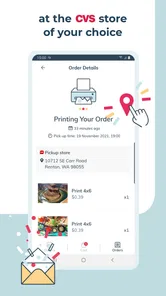
There is also the practical responsibility of checking the selected CVS location and pickup timing. A nearby store may be convenient geographically but not equally convenient for the moment I need the order. I would confirm the location details during checkout rather than assuming the closest store is automatically the best option.
Keeping the original digital files matters as well. A printed image is not a backup, and a print cannot replace the full-resolution original if I later want another size or a different crop. My preferred routine is to preserve the digital library separately, then use the app for the physical copies that have a clear purpose.
Where fatigue can appear
The first source of fatigue is repeated selection. If I use the service after every outing without a clear theme, the decision process can become tedious. The remedy is not to print more quickly but to reduce the number of candidates before opening the ordering flow.
The second is crop anxiety. Different print shapes can change the framing, and images captured for one aspect ratio may not translate perfectly to another. I would avoid assuming that every picture is equally suitable for every size. A little attention at selection time prevents disappointment when important subjects sit near the edges.
The third is expectation management. A phone’s bright screen is designed to look vivid, while a physical print is viewed under ordinary room lighting. I would judge a picture by its composition and emotional value rather than expecting it to look exactly like the display. For work where color accuracy is central, I would choose a more specialized workflow.
Pickup can also add friction if the order is needed at a precise hour. Same-day service is attractive, but it still requires travel and coordination. Someone who prefers delivery to the door, or who lives far from a participating CVS location, may find a shipped service more comfortable even if it takes longer.
How the public response fits my experience
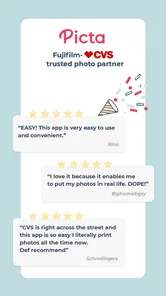
The app holds a 4.8 average from around 13 thousand ratings, with roughly 2.4 thousand written reviews, and it has passed 100 thousand installs. Those figures suggest that the straightforward local-printing idea resonates with many users. I see why: the app addresses a familiar gap between taking photographs and doing anything with them.
Still, a strong average does not remove the need to judge the workflow against personal priorities. A user who wants quick, ordinary prints may be delighted, while a user seeking professional consistency may find the same simplicity restrictive. I would read the rating as evidence of broad usefulness, not as a promise that every image, store, or occasion will produce the same result.
Who should skip it
I would skip this app for a large archival project where paper quality, color management, binding, and layout deserve careful attention. I would also look elsewhere if I need advanced image correction inside the same workflow or if shipping is more convenient than visiting a pharmacy.
It is not the best choice for someone who already has a reliable home printer and enjoys controlling every stage. Nor is it ideal for a person who mostly shares images digitally and has no interest in physical copies. In those cases, a cloud album, messaging service, editing application, or established home-printing setup may be more appropriate.
My long-term verdict
Picta x CVS Photo Print has lasting value because it turns an overlooked intention into a manageable errand. The novelty is selecting the first batch and seeing phone images become real objects. The durable benefit is having a quick option whenever a small physical print would make an occasion more personal.
I would keep it installed if I lived near a convenient CVS location and printed photos several times a year. I would use it selectively, with a prepared album, a clear print purpose, and a careful look at crops before ordering. That approach avoids the two biggest problems: mindless bulk selection and unrealistic expectations about what a phone image will look like on paper.
Developed by Pictarine - Printing Photos, the app is free and carries an Everyone age rating, which makes trying the workflow straightforward. Its release on November 9, 2019, also gives it a longer presence than a brand-new experiment, while the current version indicates that it continues to be maintained. For me, those details matter less than the central test: does it help me print the pictures I genuinely want to keep?
My answer is yes, provided the need is convenience rather than perfection. I would recommend it to a friend who has a full phone gallery and a small, immediate printing task. I would not recommend making it the only photo service in a more demanding workflow. Used as a practical bridge between digital memories and physical life, it is focused, easy to revisit, and useful well beyond the first week.
Picta x CVS Photo Print Frequently Asked Questions
What devices can run Picta x CVS Photo Print?
Picta x CVS Photo Print is an Android photography app, and its listed minimum operating system is Android 8.0. Before downloading, check your device’s software version and make sure it meets that requirement. The app is free to download, so you can install it and explore its ordering options before deciding which photo products you want.
Is Picta x CVS Photo Print suitable for children?
The app has an Everyone content rating, which makes its store classification suitable for a broad audience. Its purpose is ordering photo prints, so the main considerations for families are access to the device’s photo library and any purchase made when placing an order. An adult should review the print selection and checkout details before a child submits an order.
What is Picta x CVS Photo Print, and what can I use it for?
Picta x CVS Photo Print is designed to help you prepare and order printed photos from a mobile device through CVS Photo services. You can typically select images stored on your phone, choose print sizes and quantities, review your order, and send it to a participating CVS location for pickup. Availability, product selection, and ordering options may vary by location.
How do I upload photos and place an order in Picta x CVS Photo Print?
After opening the app, you generally grant access to your device’s photo library, select the pictures you want to print, and choose the available print format or product. Before checkout, carefully review cropping, orientation, quantity, pickup store, and estimated completion time. The exact screens may differ depending on your device, app version, account status, and the CVS location selected.
Can I pick up my photo prints at any CVS store?
Pickup is usually limited to CVS stores that support the selected photo-printing service and product. Enter your ZIP code or location in the app to see participating stores, available services, and estimated preparation times. A nearby store may not offer every print size or same-day option, so confirm the store and fulfillment details before submitting payment.
Pros
- Easy photo ordering directly from your phone
- Convenient CVS store pickup for faster collection
- Supports common print sizes and photo products
- Useful for printing photos from social media accounts
- Pickup availability helps avoid shipping costs
Cons
- Print quality can vary depending on the original photo
- Some products may be unavailable at nearby CVS stores
- Large orders can take longer to process
- App performance may depend on your internet connection
- Prices and promotions can change frequently











