PerfectPic-Photo Edit・Collage
- 112.00
- 4.1
- Installs
- 1.00M
- Price
- Free

Screenshots





Analysis by Reviewed
I reach for a mobile photo editor when I want to turn a camera-roll snapshot into something worth sharing, without getting drawn into a complicated desktop workflow. PerfectPic-Photo Edit・Collage is aimed at that kind of quick creative job: adjusting an image, giving it a more finished look, or bringing several photos together in one composition. I find the appeal is less about replacing a professional editing setup and more about having a single place to shape everyday pictures.
That makes it a practical fit for small, specific tasks: polishing a portrait before sending it to friends, assembling vacation highlights, or making a simple visual for a social post. If you want detailed control over every pixel, a more specialized editor may suit you better. But when convenience and a collage option matter more than a deep production pipeline, this is the sort of app I would consider trying.
Choosing a useful starting point
For me, a good mobile workflow begins before the first adjustment: I decide whether the finished piece is meant to be one expressive photo or a compact set of moments. That choice matters here because editing and collage-making serve different purposes. A portrait benefits from room to breathe, while a small collection can tell a fuller story when each frame adds something distinct.
When I am choosing photos for a collage, I look for variety in action or viewpoint rather than simply picking the sharpest images. Three pictures that show the same pose rarely add as much as one wide view, one detail, and one candid moment. I also avoid mixing a very dark image with several bright ones unless that contrast is intentional; otherwise, the collage can feel uneven before I have even touched a filter.
This approach makes the app especially useful for informal creative output: a birthday recap for a family chat, a set of before-and-after hobby shots, or a quick collection of favorite meals from the week. It is less suited to work that needs a precise template or a strict visual identity across many posts. I would use it to make a personal piece feel considered, not to build a whole publishing system around it.
From a camera-roll idea to a finished image
Let’s dive into the world of PerfectPic. From the get-go, the app welcomes you with an intuitive interface that makes editing feel less like a chore and more like a fun, creative escape. Whether you’re a seasoned photographer or a complete newbie, this app caters to all levels of expertise. It’s like having a mini Photoshop right in your pocket!
PerfectPic is a free photography app from WE CENTER, with a 4.1 average from around 5,400 ratings and over a million installs. It is rated for Everyone, and its current version is 1.4.3. I’d think of those figures as signs that it has found an audience, not a guarantee that every workflow will suit you. It is free to install, while in-app purchases range from $4.99 to $29.99 per item, so I’d check what is included before building a routine around a paid tool. It first appeared on February 27, 2024, and supports Android 7.0 and later.
More From Our News Desk

Clash of Clans Is Won Between the Battles

Android Auto Makes the Case for Quieter Car Software

MobiOffice: Transforming Mobile Productivity with Seamless Integration

EA SPORTS FC™ Mobile Soccer: Redefining Mobile Sports Gaming

How Microsoft OneDrive Became a Mobile Productivity Giant

How Google Translate Breaks Language Barriers Effortlessly
Starting with the right photo
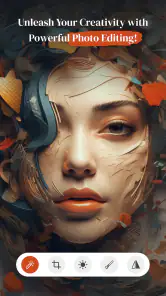
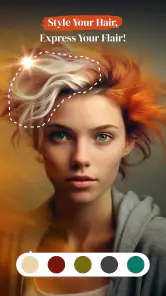
One of the first things I noticed was the impressive array of editing tools. You’ve got everything from simple adjustments like brightness, contrast, and saturation to advanced options like curves and overlays. Oh, and did I mention the filters? There’s a whole bunch of them, and they’re not your run-of-the-mill Instagram filters either. These are designed to bring out the best in your photos without making them look overly processed.
For a more consistent result, I’d choose the strongest image in a group first, then use it as the visual reference for the rest. A filter can help unify photos taken in different light, but it can also exaggerate differences in skin tone or brightness. I prefer to make basic corrections before settling on a look; that way, the effect does not have to compensate for an exposure problem. For portraits, a lighter touch usually keeps the result recognizable and avoids the overly polished feel that can make a casual picture seem artificial.
One useful habit is to judge an edit at two scales. I zoom in to check whether a face or important detail still looks natural, then zoom back out to see whether the whole frame has the mood I wanted. Curves and overlays can be tempting because their impact is immediately visible, but an adjustment that looks dramatic close up may make the complete photo too heavy. I would treat filters as a finishing choice, not as a substitute for getting brightness and contrast into a comfortable range first.
Building a collage with a purpose
Now, for those of you who love creating collages, PerfectPic has got some serious chops. With its drag-and-drop functionality, you can effortlessly arrange your photos into stunning collages. Plus, the app provides a variety of layouts and backgrounds, allowing you to customize your creations to your heart’s content.
I find a collage works best when I decide its job before choosing a layout. For a family update, a few related moments usually read more clearly than a crowded grid of every picture from the day. For a small product or hobby roundup, I’d keep the most important image visually dominant and use the others as supporting details. A background can tie the panels together, but a busy one competes with the photos, so I’d start with a restrained choice and add decoration only if the composition still feels plain.
A realistic use is sorting through a weekend outing on the way home: choose a handful of distinct moments, arrange them into one collage, and make a quick tonal adjustment so the set feels cohesive. That saves the recipient from scrolling through a long string of similar pictures. The trade-off is that a collage gives each photo less room, so it is not my choice when fine detail or a single image’s full impact matters.
For a small event recap, I would make the opening image carry the clearest moment and let the other panels fill in context, rather than giving every photo equal weight. This is a simple way to make a collage easier to read on a phone, where people often glance rather than study each panel. If the layout feels busy, removing one photo can improve the result more than adding another background effect.
Making edits without losing your rhythm
One of my favorite things about this app is how user-friendly it is. The developers clearly put a lot of thought into the design, ensuring that all the tools are easy to find and use. Even if you’re not particularly tech-savvy, you’ll have no trouble navigating through the app. And if you ever get stuck, there’s a handy help section to guide you through.
That approachable style is useful when I want to experiment rather than follow a strict editing recipe. I’d make one change at a time and pause to compare the image with its starting point; this is especially helpful when curves, overlays, and filters are all available, because a few small edits can add up quickly. If the photo begins to look less like the moment I remember, I’d back off instead of stacking on another effect. The app’s range gives room to play, but restraint is still what keeps an edit natural.
For anyone editing several related images, I would avoid trying to make them identical. Photos from a day out may have been taken under changing light, so the same treatment can leave one frame looking flat and another too intense. Instead, I would aim for a shared impression—similar warmth or contrast—while making small individual corrections. That takes a little more attention, but it usually looks more convincing than applying one strong look everywhere.
Compared with the usual alternatives, PerfectPic’s combination of photo adjustments and collage-making is convenient when I want both jobs in one mobile workflow. A dedicated editor can be a better fit for precise retouching or a repeatable professional look, while a social platform’s built-in tools may be faster for a one-off post. I’d choose this app when I want more room to arrange several images than a basic posting tool offers, but I would not assume that a broad toolset automatically replaces a specialist editor.
The practical trade-off is focus. A social app can take a picture straight toward publishing with fewer decisions, whereas a dedicated editor may give more deliberate control over a single image. This app sits between those approaches: it makes sense when I want to adjust a photo and arrange several together without switching tools. If my goal were detailed cleanup of a difficult portrait, consistent output for a client, or careful work on a large display, I would choose a more specialized setup instead.
Getting the result ready to share
Moreover, the app runs smoothly without any annoying ads popping up every few seconds, which is a huge plus in my book. It’s a refreshing change from other apps that bombard you with advertisements.
Before finishing a collage or edit, I’d check how it looks at the size where people will actually see it. Tiny captions or subtle differences between panels can disappear on a phone screen, and a layout that looks balanced while editing may feel cramped once viewed as a whole. I would also keep an untouched copy of an important original in my camera roll before experimenting; it is a simple habit that leaves me free to try a bolder treatment without worrying about losing the starting image.
For a quick handoff to friends, I would keep the composition legible and avoid relying on details that only make sense at full size. A collage is often viewed in a message thread or social feed, so the main subject should be apparent at a glance. I also prefer to review the finished image once outside the editing flow before sharing it; that final look helps catch an uneven crop or an effect that seemed subtle while I was adjusting it.
If you are wondering whether it is free, the app costs nothing to install, but optional in-app purchases are available. I’d explore the free workflow first and only pay if a specific paid item solves a need I actually have. It is a sensible approach for casual users who may only make collages now and then, and it helps avoid spending on tools that end up unused.
That is also the answer to whether it can be a regular tool: it depends on how often you need this particular mix. If I were making occasional personal edits, the free starting point would be enough to see whether the controls suit me. If a purchase becomes relevant, I would first identify the exact feature I keep reaching for and confirm that it is part of the item I am considering, rather than paying simply because the app has a broader set of options.
Who I’d recommend it to
In conclusion, PerfectPic-Photo Edit・Collage is a fantastic app for anyone looking to step up their photo editing game. Its wide range of features, coupled with a user-friendly interface, make it a must-have for photo enthusiasts and casual users alike. Whether you’re editing a quick selfie or crafting a masterpiece, this app has got you covered.
So, if you’re ready to transform your photos and create beautiful collages, give PerfectPic a try. You might just find yourself wondering how you ever lived without it!
My recommendation is strongest for someone who wants an approachable editor for personal photos and occasional collage work, and who is happy to make visual decisions by eye. I’d suggest skipping it if your work depends on tightly controlled retouching, a repeatable brand style, or detailed finishing on a large screen; a focused editing tool is likely a better match there. For everyone else, I’d start with one everyday image, make a modest adjustment, and see whether the collage workflow earns a place in your routine.
A sensible fit for personal creative work
I would also think about how the finished picture will be used before choosing this app over another option. For a family group chat, a compact collage can make a day’s highlights easier to enjoy than a stream of separate images. For a single profile photo, the adjustment tools are the more relevant part of the experience. If the picture is for a formal portfolio or a client who expects precise consistency, I would rather use software built around repeatable controls and careful review.
One question I would ask before relying on any mobile editor is whether the process feels comfortable for the size of the job. For one portrait or a small set of snapshots, editing on a phone is convenient and keeps the work close to the camera roll. For a large batch, detailed masking, or several rounds of approval, a phone-first workflow can become fiddly. PerfectPic makes more sense as a quick creative stop than as the center of a demanding production process.
My final take is that the app’s best value is the combination of accessible adjustments and collage composition, not the promise of professional finishing. It gives casual creators a straightforward place to shape a few photos into something more intentional, while leaving room to decide how restrained or playful the result should be. If that matches the kind of images you make, it is worth trying; if your work calls for exacting control, choose a specialist editor and use a collage tool only when that format is genuinely helpful.
PerfectPic-Photo Edit・Collage Frequently Asked Questions
What kind of photos can I create with PerfectPic-Photo Edit・Collage?
PerfectPic-Photo Edit・Collage is a photography app for transforming photos, beautifying images, crafting memories, and making collages. It may suit everyday pictures you want to enhance or combine into a layout. The app is free to download, while optional in-app purchases are available for users who want to explore paid features.
Is PerfectPic-Photo Edit・Collage suitable for children?
The app has an Everyone content rating, so it is classified for a broad audience. Parents may still want to review its editing tools and in-app purchase options with younger users, especially if a device is shared or purchases are enabled. PerfectPic-Photo Edit・Collage is a photography app rather than a game, with photo editing and collage creation as its focus.
What features does PerfectPic-Photo Edit・Collage offer for photo editing?
PerfectPic-Photo Edit・Collage offers a comprehensive suite of photo editing tools, including filters, effects, brightness adjustments, cropping, and more. Users can also create stunning collages with various templates and layouts, making it a versatile app for both beginners and advanced users seeking to enhance their photos.
Is PerfectPic-Photo Edit・Collage free to use or does it require a subscription?
PerfectPic-Photo Edit・Collage is free to download with access to basic editing features. However, it offers in-app purchases and a subscription model for premium features like advanced filters, ad-free experience, and additional collage templates, providing more options for users willing to pay for enhanced functionality.
Can I use PerfectPic-Photo Edit・Collage without an internet connection?
Yes, PerfectPic-Photo Edit・Collage can be used offline for basic photo editing tasks. However, some features like downloading new templates or accessing certain premium content may require an internet connection. It's designed to be functional for most tasks even when you're not connected to the internet.
Pros
- Intuitive user interface for easy navigation.
- Variety of editing tools available.
- Supports high-resolution photo exports.
- Frequent updates enhance functionality.
- Includes templates for quick collages.
Cons
- Contains ads that can be intrusive.
- Some features require in-app purchases.
- Occasional crashes during editing.
- Limited free version capabilities.
- Not available offline.

- Category
- Photography
- Version
- 1.4.3