PDF Reader – PDF Viewer
- 3.35K
- 4.2
- Installs
- 100.00M
- Price
- Free
Screenshots
Analysis by Reviewed
When I need to open a document away from my computer, I want to find the right file quickly and read it without fighting the screen. That everyday convenience is the main appeal of PDF Reader – PDF Viewer, a free productivity app from EZTech Apps. Its name sets a clear expectation: a phone-friendly place to handle documents. I’d consider it most useful for people who often receive PDFs and want a dedicated reader close at hand, rather than for someone who needs a full desktop publishing suite.
What the free option means
The app is free to download, with in-app purchases listed from $0.49 to $59.99 per item. That makes it possible to try the basic experience without paying upfront, while paid items may matter if you want more than the free access offers. I would check what a particular purchase unlocks inside the app before spending; the price range alone is not enough to judge whether an upgrade suits your needs. If you only read documents now and then, starting free is the sensible approach.
One practical way to judge the free option is to use it for your real routine rather than a quick test with a sample file. Open the kinds of documents you actually receive, try reading them at your usual screen brightness, and see whether the file tools fit the way you already save paperwork. If the app mainly serves as a convenient place to view occasional attachments, there may be no reason to buy anything. If you find yourself needing a paid item, pause to check the exact feature and whether you will use it often enough to justify that purchase.
Where a phone-based reader earns its place
A PDF reader is most valuable when it cuts down the little hassles around documents: locating a file, opening it when you are away from a laptop, and making it comfortable to read on a smaller display. For example, if a colleague sends a form while you are commuting, a mobile reader can let you review the pages before you get back to your desk. That is a practical reason to keep one installed, even if your computer remains the better place for detailed editing.
PDF Reader – PDF Viewer has a 4.2 average from around 525,000 ratings and has passed 100 million installs. Those figures suggest it is a widely used option, but they do not tell me whether it will suit every workflow. It is rated for everyone, and the current version is 3.3.0; the app requires Android 8.0 or later. I’d treat those details as useful checks before installing, especially if you use an older phone.
A realistic day with documents
Imagine getting a multi-page school handout in a message while you are out, then needing to check one section before a class discussion. I’d open it on the phone, adjust the view until the text is comfortable, and highlight the passage I want to revisit. Later, I could use that mark as a prompt when I’m back at my desk. This is the kind of short, focused task where a mobile reader earns its place: it helps me prepare without pretending that a phone is the ideal tool for rewriting a whole document.
For work paperwork, I’d use a similar routine with one extra check: before forwarding a marked-up file, I’d open it again and make sure the notes are appropriate for the recipient. A useful annotation can become an accidental disclosure if it contains a private thought or an unfinished comment. Keeping the original separate also makes it easier to return to a clean version if I need to share the document in a different context.
More From Our News Desk

Clash of Clans Is Won Between the Battles

Android Auto Makes the Case for Quieter Car Software

MobiOffice: Transforming Mobile Productivity with Seamless Integration

EA SPORTS FC™ Mobile Soccer: Redefining Mobile Sports Gaming

How Microsoft OneDrive Became a Mobile Productivity Giant

How Google Translate Breaks Language Barriers Effortlessly
Choosing it over a built-in viewer
Most phones already offer some way to open a PDF, so a separate app has to make document handling feel more convenient to justify its place. A built-in viewer can be enough if you open an occasional attachment and only need to read it. A dedicated reader becomes more appealing when you regularly revisit documents, want a consistent reading space, or need to work through files while away from your computer. The right choice depends less on the label “PDF reader” and more on how often your documents interrupt the rest of your day.
One useful habit is to give files clear names before saving them. Searching is much less helpful when several documents have vague or identical names, and that can turn a tidy reader into another crowded folder. I’d also keep a separate original copy before marking up anything important. That small step protects a clean version for later and makes it easier to share a document without accidentally passing along personal notes.
First Impressions and User Interface
When I first downloaded PDF Reader – PDF Viewer, I was pleasantly surprised by its clean and intuitive interface. It's like they took all the best parts of other PDF apps and rolled them into one. You know how some apps just feel right the moment you open them? This is one of those apps. It's super simple to navigate, and everything is laid out in a way that just makes sense.
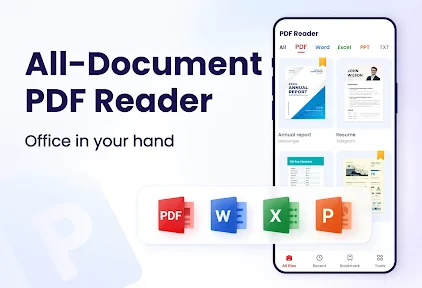
The home screen is minimalistic, which I appreciate. It shows your recent documents, and there's a handy search bar at the top if you need to hunt down a specific file. No clutter, no fuss, just straight to the point. I love that kind of simplicity in an app.
Features That Stand Out
Now, let's dive into the features because this is where the app really shines. First off, it supports a wide range of file formats, not just PDFs. Think Word, Excel, and even PowerPoint. So, it's not just a one-trick pony; it's more like a Swiss Army knife for your documents.
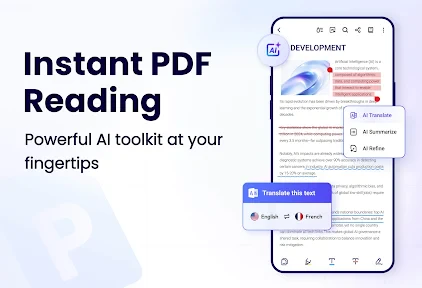
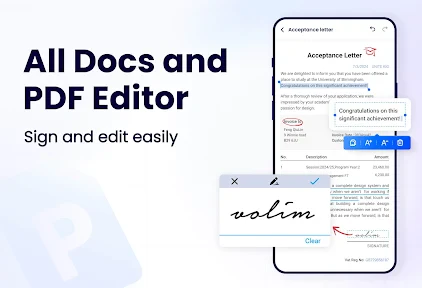
One feature I absolutely adore is the annotation tool. Whether you need to highlight text, add notes, or even draw on the document, this app has got you covered. It's perfect for students or professionals who need to mark up documents on the go. Plus, it syncs effortlessly across devices, so you can pick up right where you left off, no matter what device you're using.
To make that range of file support genuinely useful, I’d treat the app as a quick access point, not as a promise that every document will behave exactly like it does in its original office program. A presentation or spreadsheet is still best judged in a tool designed for editing that format. Here, the advantage is being able to check a file while away from a computer; if the layout matters, I’d verify it in the app that created it before relying on the display.
Making annotations useful
Annotations are most helpful when they serve a clear purpose. I’d use highlights to mark passages I need to revisit, and short notes to explain why they matter, rather than covering a page in markings that make it harder to read later. For a student, that could mean flagging a definition and adding a reminder to check it against lecture notes. For work, it might mean pointing out a clause to discuss with a colleague. Before sharing an annotated file, I’d review each mark so private comments do not travel with the document unintentionally.
There is also a practical distinction between reading and editing. Marking up a document on a phone is convenient for quick feedback, but it is not always the best way to make extensive changes or prepare a polished file. If I needed precise layout control, complex revisions, or a final document for formal distribution, I’d move to a computer-based editor. This app’s mobile convenience is strongest for review tasks, not as a replacement for every document tool.
Performance and Reliability
Performance-wise, this app is a beast. It opens PDFs quickly and handles large files without breaking a sweat. I tried loading a hefty 200-page document, and it breezed through it like it was nothing. No lag, no crashes—just smooth sailing all the way.
Reliability is key with any app, especially when it comes to managing important documents. I've never had an issue with the app crashing or losing my data. It gives me that peace of mind knowing my files are safe and sound. Plus, the app doesn’t drain my battery like some other resource-heavy apps tend to do.
Keeping a dependable document routine
For an important form, I would not rely on any single app as the only copy of the file. I’d keep the original in a place I already use for backups, then use the reader for convenient access and review. That is not a knock against this app; it is a sensible routine for anything important. Likewise, if a file looks wrong or fails to open, trying another viewer can help distinguish a problem with the document from a problem with the app.
When comparing readers, I’d focus on the tasks I actually do instead of counting features. A built-in viewer often wins for occasional, no-fuss reading. A dedicated app like this is a better fit if its document access and markup tools make repeated use easier. For heavy editing, collaboration, or carefully controlled formatting, a fuller office or PDF editor is likely a better match. Those alternatives are not automatically better for casual reading; they simply serve different needs.
One small workflow choice can save time when you return to a document later: use a short, consistent naming pattern that includes the subject and a useful date or version label. The recent-files area can help when you have just opened something, but clear names are more dependable once several similar forms or handouts accumulate. I’d avoid making duplicate copies with nearly identical names, too; it is easy to add notes to the wrong version when the distinction is only a character or two.
Customization Options
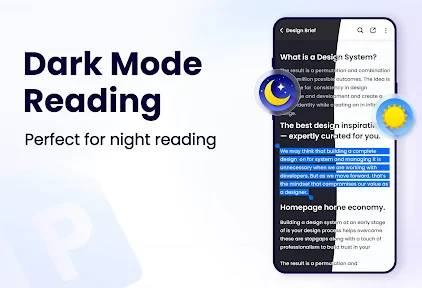
Customization is another area where this app scores big. You can tweak the reading mode to suit your preference—night mode for late-night reading or sepia for a softer look. Personally, I dig the night mode; it’s easier on the eyes, especially before bed.
The app also allows you to adjust the font size and choose different viewing modes, like single page or continuous scrolling. It's the little things like these that make reading PDFs a more pleasant experience.
Those display choices are more than decoration when the document is long or dense. I’d try continuous scrolling for reading several pages in sequence, then switch to a page-at-a-time view when I need to focus on a particular sheet or compare a page with a printed copy. If the page itself is a scanned image, changing font size may not improve the text in the same way it would for ordinary selectable text, so the viewing mode and screen comfort matter more than expecting every file to reflow.
Who will get the most from it
I’d recommend giving it a try if PDFs show up often in your study, work, or personal paperwork and you want to read or annotate them from your phone. Someone who checks a schedule, reviews a handout, or marks a document for later discussion can benefit from having a reader ready instead of waiting to reach a computer. The ability to tune the reading view is especially useful when a document is dense or when you prefer a different layout from the default.
I would skip it if you only open PDFs rarely and your phone’s existing viewer already handles that job comfortably. I’d also look elsewhere if your main requirement is advanced document production rather than reading and quick markup. The free entry point makes trying it straightforward, but paid items mean I would not assume every capability is included at no cost. Check the purchase details against the specific feature you need before deciding whether it offers enough value.
It is also a reasonable fit for someone who wants one familiar place to open several common document types rather than switching apps just to inspect a file. The trade-off is that a multipurpose reader should not automatically become the source of truth for a spreadsheet, a presentation, or a carefully formatted report. If you need to edit formulas, revise slides, or preserve exact typography, use the dedicated editor for that work and keep this app for checking and reviewing on the go.
When another tool is the better fit
If your normal pattern is tapping a single PDF attachment once in a while, a built-in viewer keeps the process simple and avoids adding another app to your routine. If you handle sensitive paperwork, choose your storage and sharing habits carefully regardless of which reader you use; a convenient recent-file list is not a substitute for a deliberate filing system. And if your work depends on advanced redaction, signatures, or precise page rearrangement, I’d first confirm that the exact operation you need is available before making this your main tool.
A useful test is to identify the one task that currently causes friction. Is it reading small text, finding a recent document, or leaving a note for later? Try the app specifically for that task, rather than assuming that installing a broader reader will fix every document problem. If the friction is actually about organizing a large archive or collaborating on revisions, a file manager or full-featured editor may address the root problem better.
Final Thoughts
All in all, PDF Reader – PDF Viewer is a solid choice for anyone who deals with PDFs regularly. It's user-friendly, packed with useful features, and performs like a champ. Whether you're a student, professional, or just someone who loves reading e-books, this app has something for everyone.
If you're tired of wrestling with PDFs on your phone, give this app a shot. Trust me, once you try it, you won’t want to go back to anything else. It's available for both Android and iOS, so no matter what device you're rocking, you're covered.
Ready to take your PDF reading to the next level? Download the app and see the difference for yourself. You won't regret it!
PDF Reader – PDF Viewer Frequently Asked Questions
Can PDF Reader – PDF Viewer handle different kinds of PDF tasks in one app?
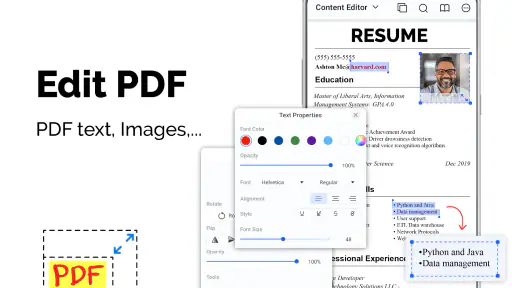
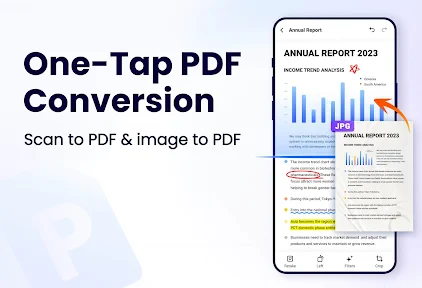
PDF Reader – PDF Viewer is presented as an all-in-one option for managing, reading, and editing documents. It offers viewing, editing, annotation, and organization tools, alongside text search, page navigation, and bookmarking. That mix may suit readers who want to do more than simply open a PDF, though the features you use most will depend on your document workflow.
Is PDF Reader – PDF Viewer suitable for students or everyday document reading?
The app is rated for Everyone and is designed around common PDF tasks, including reading, searching text, bookmarking pages, and adding annotations. Those tools can be useful for reviewing study materials, forms, or other documents. Whether it fits your routine depends on which features you need, but its combination of reading and document-management functions makes it relevant for general use.
Does PDF Reader – PDF Viewer let me annotate or fill out PDF forms?
Yes. PDF Reader – PDF Viewer includes annotation options such as highlighting text and adding notes, and it can fill forms. These tools can help when you need to mark important passages or complete a document without switching between separate apps. If a particular form or editing task is essential to your workflow, try it with a suitable document before relying on it for important work.
Can I find specific words or pages in a long document?
PDF Reader – PDF Viewer supports text search and page navigation, which can make longer PDFs easier to work through. Search helps locate text, while navigation lets you move between pages; bookmarking is also available for keeping track of useful spots. These features are especially handy when you revisit reference material or need to return to a particular section.
Is PDF Reader – PDF Viewer compatible with my device?
PDF Reader – PDF Viewer is a productivity app from EZTech Apps, and it requires Android 8.0 or later. Before downloading, check your device’s Android version so you know it meets that requirement. The app is rated for Everyone, making it suitable for a broad audience. It is available for Android; check the relevant app store for availability on your device.
Pros
- Intuitive user interface
- easy to navigate.
- Supports multiple file formats
- not just PDFs.
- Fast loading times for large documents.
- Annotation tools enhance productivity.
- Offline access to files is available.
Cons
- Advertisements can be intrusive at times.
- Limited free version features.
- Occasional crashes on older devices.
- Some tools require in-app purchases.
- Syncing across devices can be inconsistent.
- Category
- Productivity
- Version
- 3.3.0












