Lockscreen Drawing
- 150.00
- 4.2
- Installs
- 1.00M
- Price
- Free
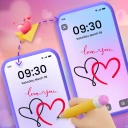
Screenshots
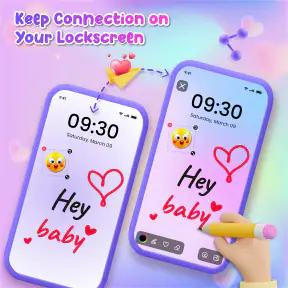
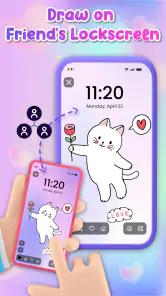
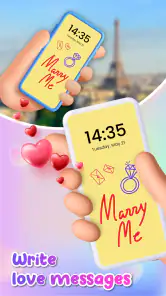
Analysis by Reviewed
I like the idea behind Lockscreen Drawing: turning a spare moment with your phone into a small chance to draw, rather than another invitation to scroll. It makes a better first impression on people who enjoy quick doodles than on anyone expecting a complete art studio. The question I’d keep in mind is not just whether it is fun on day one, but whether drawing this way fits naturally into your routine.
When the first-week novelty is useful
The appeal is easy to understand: a spare moment can become a quick sketch instead of another round of scrolling. I can imagine using it while waiting for a drink or sitting through a quiet stretch of a commute, when I want something more hands-on than browsing but do not have a notebook nearby. The low-pressure nature is the point; this is for quick marks and playful ideas, not a replacement for a full drawing workspace.
It is especially suited to people who already like doodling and want an easy prompt to do it more often. Parents may also find the simple premise approachable for a child, though I would keep an eye on a shared phone and make sure the child understands how to leave the drawing screen. If you mainly want polished illustrations, layers, or a serious sketching workflow, a dedicated art app is the better fit.
Unleashing Creativity Without Unlocking
Picture this: You're stuck in a meeting, your phone is on the table, and your mind is wandering. Instead of scrolling through social media or tapping away at your emails, you can whip out Lockscreen Drawing and start sketching right on your lock screen. No need to unlock your phone; just dive straight into your little world of creativity.
Easy to Use Interface
The app is designed with simplicity in mind. As soon as you install it, you'll notice how intuitive it is. Just double-tap on your lock screen, and you're ready to let your imagination run wild. The interface is clean and straightforward, making it easy for anyone to use, from kids to adults.
Plus, the app provides a variety of tools to choose from, including different brush sizes and colors. Whether you fancy doodling with a fine line or prefer a more bold approach, the drawing tools make room for both quick outlines and heavier marks.
Making a habit without making a chore
The real test is whether I would still reach for it after the first few days. Its strongest recurring use is as a tiny creative break that fits between other tasks, rather than an app I need to open for a long session. One practical trick is to start with a simple subject—a cup, a quick face, or a pattern—so a short pause feels complete instead of turning into a half-finished project I have to remember later.
More From Our News Desk

Clash of Clans Is Won Between the Battles

Android Auto Makes the Case for Quieter Car Software

MobiOffice: Transforming Mobile Productivity with Seamless Integration

EA SPORTS FC™ Mobile Soccer: Redefining Mobile Sports Gaming

How Microsoft OneDrive Became a Mobile Productivity Giant

How Google Translate Breaks Language Barriers Effortlessly
For a familiar everyday routine, imagine waiting for a coffee order: I could make a few loose lines, stop when my name is called, and decide later whether the sketch is worth saving. That is a more realistic rhythm than expecting a masterpiece from every spare minute. Because the app offers color and brush-size choices, I would settle on a small set of favorites rather than spend each break adjusting tools. The trade-off is that fewer choices keep the interaction quick, while more experimentation makes the drawing feel personal.
Customization Galore
Another cool feature is the level of customization it offers. You can save your drawings, set them as your lock screen background, or even share them with friends. The app also allows you to customize the brush opacity and size, so you have complete control over your creations.
Imagine sending a quick sketch to your friend or even creating a masterpiece to show off to the world. The possibilities are endless!
Keeping drawings useful, not cluttered
Saving, sharing, and using a drawing as a background give a doodle more than one possible destination. I would treat those as choices rather than steps every sketch needs to take: a quick throwaway mark can stay temporary, while a drawing with a personal meaning may be worth keeping or sharing. That small decision helps the app remain a casual tool instead of turning into another place to organize a growing collection.
There is a practical trade-off in making a drawing your lock screen background: the image becomes something you see repeatedly, so a bold or busy sketch may feel less appealing after a while. I would try a simple design first and keep the option to switch back if it starts competing with the information I want to see on the screen. Anyone who prefers a static, uncluttered lock screen may be happier drawing elsewhere.
Perfect for On-the-Go Creativity
Whether you're commuting, waiting for your coffee, or just chilling at home, the app is handy when a short pause leaves room for a few marks. It's convenient, fun, and a welcome alternative to getting pulled into an endless feed. I would still choose a notebook or a regular drawing app when I want to sit down and develop an idea, but for a tiny creative detour, the lock-screen concept has a distinct appeal.
The app is lightweight, so it won't hog your phone's resources, and it runs smoothly without any hiccups. Plus, it's a fantastic way to express yourself without the pressure of creating something perfect. Just draw, erase, and start over if you want!
Who will keep coming back?
Lockscreen Drawing is a personalization app from EZTech Apps. It is free to install, has an Everyone content rating, and is currently at version 1.1.1 for Android 7.0 and up. Its average rating is 4.2 from around 2,600 ratings, and it has over 1 million installs. Those figures suggest it has found an audience, but the more useful question is whether drawing on a lock screen fits your own habits.
Compared with a standard wallpaper customizer, this app is more interactive: its appeal is making a mark yourself, not choosing from a ready-made look. Compared with a conventional drawing app, it favors immediacy over a more elaborate workspace. That makes it a neat choice for casual doodlers, but a poor match for someone who wants detailed editing or relies on a lock screen for a clean, predictable glance at the phone.
There are also small frictions worth considering. A lock-screen interaction is only convenient if it feels natural on your device, and reaching for the phone in a meeting or public place may be distracting even when the intention is harmless. I would use it during genuine idle moments, not when I need to pay attention or keep my phone put away. If that quick access does not become part of your routine, the novelty may fade without much loss.
For ongoing use, I would keep the workflow simple: make a quick sketch, save only the ones I care about, and occasionally refresh a background if I have set one. The app is free, with optional in-app purchases ranging from $7.99 to $39.99 per item, so I would try the basic experience first and only consider a purchase if I know I want what it offers. That avoids paying for possibilities I may never use.
Keeping the interaction comfortable
A lock-screen drawing habit depends on where and when you reach for your phone. If I were trying to make it part of my day, I would attach it to moments that already involve waiting, such as standing in a line or sitting down before an appointment. I would not make it the default response whenever I pick up my phone; that can turn a playful tool into one more reflex competing for attention.
There is also a difference between a quick doodle and a drawing session that needs concentration. The former suits this format because I can stop without much ceremony. For the latter, a larger canvas and a more conventional drawing app are easier to manage. A useful test is whether I can leave a sketch unfinished without feeling that I have lost track of an idea. If not, a notebook or a dedicated art tool may serve me better.
Small choices that reduce friction
One way to keep the app from becoming fiddly is to decide what a drawing is for before I begin. If it is just a passing doodle, I can use a simple color and brush, make the mark, and move on. If I think it may become a background or something to share, I can spend more time on it deliberately. Separating those intentions keeps a casual break from turning into a string of decisions about saving, adjusting, and displaying every sketch.
I would also be selective about which drawings become part of the phone’s everyday appearance. A personal symbol or a sparse pattern may remain pleasant to see; a detailed sketch can feel busy when the lock screen is being used for quick checks. The ability to make the drawing yourself is the distinctive draw, but it does not mean every result belongs on the screen permanently. Keeping a few favorites and leaving the rest as momentary experiments makes the feature feel more useful over time.
Where it may not fit
This is not the right choice for someone whose priority is a highly organized art library, advanced editing, or a carefully controlled wallpaper setup. A dedicated drawing app is more appropriate for building a finished illustration, while a standard wallpaper tool is simpler if the only goal is changing the phone’s appearance. The lock-screen format is most compelling when the act of making a mark is part of the fun.
It may also be a poor fit if you prefer not to interact with your phone in public or want the lock screen to remain purely functional. Even a lightweight creative activity can feel out of place during a conversation, a work discussion, or a journey that requires attention. I would treat the quick-access idea as an option for suitable pauses, not as a reason to pull out the phone more often.
Maintenance without a project
Keeping the app useful does not need to mean maintaining a large collection. I would save a drawing only when I can name a reason to keep it—perhaps it captures an idea, makes a good background, or is something I want to send to someone. That simple filter reduces the chance of accumulating sketches I never look at again and keeps the occasional saved piece more meaningful.
If I set a drawing as a background, I would revisit that choice when it stops feeling fresh or makes the screen harder to read at a glance. That is a low-effort form of upkeep: make something, live with it, and change it when it no longer suits the phone. People who enjoy frequent visual changes may find this satisfying; anyone who wants to set a wallpaper once and forget it may not get much recurring value from the feature.
In conclusion, if you're looking for a simple yet engaging way to unleash your inner artist without the hassle of unlocking your phone, the app is your go-to app. It's fun, user-friendly, and offers just the right amount of features to keep you entertained wherever you are. So, why not give it a try and see where your creativity takes you?
Lockscreen Drawing Frequently Asked Questions
Who might enjoy using Lockscreen Drawing?
Lockscreen Drawing is a personalization app for people who like adding a creative touch to their phones. Its central idea is to make drawing part of the lock-screen experience, which may appeal to anyone who enjoys quick doodles or personal sketches. The app is free to download, and it is rated for Everyone, so it is presented as suitable for a broad audience.
What should I know about the cost before downloading Lockscreen Drawing?
Lockscreen Drawing is free to download, so you can try it without paying upfront. It also offers in-app purchases, with items priced from $7.99 to $39.99. If you plan to use the app, check any purchase prompts carefully and decide whether the available paid options suit your needs. The download itself and optional purchases are separate parts of the cost.
What is Lockscreen Drawing and how does it work?
Lockscreen Drawing is a creative app that allows you to draw directly on your device’s lock screen. Upon installation, it integrates with your phone's lock screen, providing various tools and colors to express your creativity without unlocking your device. Perfect for quick sketches, notes, or doodles, it transforms your lock screen into a personal canvas. Users can easily save or erase their drawings, making it an engaging way to personalize their devices.
Is Lockscreen Drawing safe to use?
Yes, Lockscreen Drawing is designed with user safety in mind. The app does not access personal data or compromise device security. It only requires minimal permissions to function correctly, such as overlaying on the lock screen. The developers ensure regular updates to address any potential security concerns and enhance user experience, making it a safe choice for users who want to add creativity to their lock screens.
What are the main features of Lockscreen Drawing?
Lockscreen Drawing offers a variety of features that make it an appealing choice for creative users. Some of the key features include a diverse palette of colors, multiple brush styles, and an easy-to-use interface. Additionally, users can undo and redo actions, save their artwork directly to their device, and customize the app's settings to suit their preferences. These features provide a comprehensive drawing experience right on your lock screen.
Pros
- Fun way to personalize your lock screen.
- Easy to use
- no technical skills needed.
- Wide variety of drawing tools available.
- Supports sharing your creations with friends.
- Minimal impact on battery life.
Cons
- Limited free features
- in-app purchases required.
- Occasional app crashes reported.
- Requires frequent updates for new features.
- Ads can be intrusive and distracting.
- Not suitable for professional artists.
- Category
- Personalization
- Version
- 1.1.1












