PDF Note Reader
- 74.00
- 4.1
- Installs
- 5.00M
- Price
- Free
Screenshots

Analysis by Reviewed
Ever found yourself scrambling for a decent PDF reader that doesn’t just read but also lets you scribble notes and highlights on the go? Well, let me introduce you to PDF Note Reader, the app that's been making waves among productivity geeks like myself. It's not just another PDF reader; it's like having a digital notebook right in your pocket.
First Impressions and User Interface
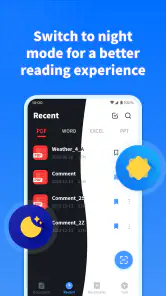
So, the first time I fired up the PDF Note Reader, I was struck by how clean and intuitive the interface was. It’s almost like the app was whispering, "Don’t worry, I got you!" Everything is laid out in a way that makes sense, which means no more getting lost in a sea of icons and options. The main dashboard is your command center with just the right amount of bells and whistles to get you started without overwhelming you.
Features That Stand Out
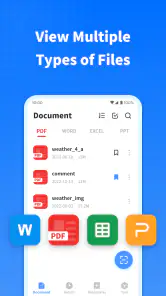
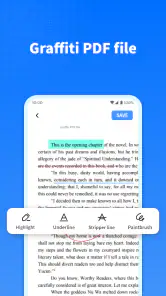
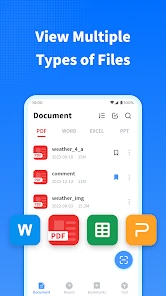
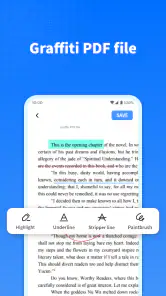
Let’s talk features, because this is where the magic happens. You can easily annotate your PDFs with highlights and text notes, which is a godsend for students and professionals alike. The app also supports a wide array of file formats, so you’re not just limited to PDFs. Feeling fancy? You can even doodle directly on the document with the built-in drawing tools. It’s like having a mini whiteboard with you at all times!
Another neat trick up its sleeve is the ability to sync with cloud services like Google Drive and Dropbox. I don’t know about you, but I live in the cloud, so having my documents accessible everywhere is pretty crucial. Plus, it saves everything automatically, so no more heart-stopping moments when your phone decides to restart out of the blue.
Performance and Usability
Performance-wise, smooth as butter is how I’d describe it. I was flipping through pages and zipping around different sections of my documents with zero lag. The search function is also pretty robust, letting you find keywords in a jiffy. It’s the kind of app that just works, you know?
Usability is another big win here. Whether you’re a tech-savvy guru or a tech newbie, navigating through the app is a breeze. Everything is pretty self-explanatory, and if you ever hit a snag, there’s a helpful guide to get you back on track.
Conclusion: Is It Worth Your Time?
In a world where everyone’s hustling and bustling with a thousand things to juggle, having an app like PDF Note Reader is a game-changer. It’s the trusty sidekick you never knew you needed but now can’t imagine living without. So, if you’re in the market for a reliable PDF reader with a few tricks up its sleeve, give this one a whirl. You might just find yourself wondering how you ever managed without it.
More From Our News Desk

Clash of Clans Is Won Between the Battles

Android Auto Makes the Case for Quieter Car Software

MobiOffice: Transforming Mobile Productivity with Seamless Integration

EA SPORTS FC™ Mobile Soccer: Redefining Mobile Sports Gaming

How Microsoft OneDrive Became a Mobile Productivity Giant

How Google Translate Breaks Language Barriers Effortlessly
PDF Note Reader Frequently Asked Questions
What is PDF Note Reader?
PDF Note Reader is a versatile mobile application that allows users to open, read, annotate, and manage PDF files directly from their devices. It offers functionalities such as highlighting text, adding comments, and drawing, making it ideal for students, professionals, and anyone who needs to work with PDFs on the go.
Is PDF Note Reader free to use?
PDF Note Reader offers a free version with essential features for reading and annotating PDFs. However, to unlock advanced features like cloud sync, additional annotation tools, and ad-free experience, users might need to opt for a premium subscription. It’s advisable to check the app store for detailed pricing information.
Can I use PDF Note Reader offline?
Yes, PDF Note Reader can be used offline for reading and annotating files that are already downloaded on your device. However, features such as cloud syncing and online backups will require an internet connection. This makes it convenient for users who need to work on their documents without continuous internet access.
What devices are compatible with PDF Note Reader?
PDF Note Reader is compatible with both Android and iOS devices. It supports a wide range of smartphones and tablets, ensuring users can access their PDF files seamlessly across different devices. It is advisable to check the app store for specific OS version requirements to ensure compatibility.
How secure is my data with PDF Note Reader?
PDF Note Reader implements robust security measures to protect user data, including encryption for files stored within the app and secure data transmission protocols. Users are encouraged to regularly update the app to benefit from the latest security enhancements. For additional data safety, it’s recommended to use cloud services with strong privacy policies.
Pros
- User-friendly interface
- Fast document loading
- Supports various file formats
- Annotations and markup tools
- Offline access mode
Cons
- Occasional ads
- Limited free features
- No cloud integration
- Lacks advanced editing options
- Can be slow with large files
- Category
- Productivity
- Version
- 1.1.5












