All Document Plus
- 20.00
- 4.1
- Installs
- 1.00M
- Price
- Free
Screenshots

Analysis by Reviewed
All Document Plus is a comprehensive app designed to handle a wide range of document formats, making it a versatile tool for both personal and professional use. Whether you're looking to read PDFs, edit Word documents, or manage Excel spreadsheets, this app claims to have it all.
Seamless Document Management
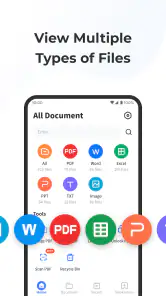
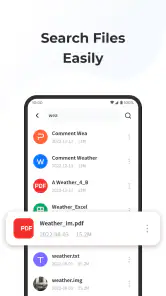
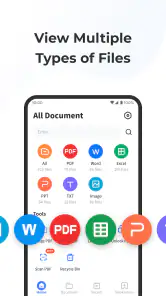
Have you ever found yourself juggling between different apps just to manage your documents? I have, and it can be quite a hassle. This is where All Document Plus comes into play. It's like having a Swiss Army knife for document management on your phone. The app supports an extensive range of file formats, including PDFs, DOCs, XLSs, PPTs, and even TXT files. I found it incredibly convenient to have everything in one place without the need to switch between multiple apps.
User-Friendly Interface
One of the first things I noticed about All Document Plus is its user-friendly interface. The intuitive design makes it easy to navigate through your documents. Whether you're a tech-savvy individual or someone who struggles with technology, you'll find the app easy to use. The layout is clean, and the features are well-organized, which means you can quickly find what you're looking for without any fuss.
Editing and Collaboration
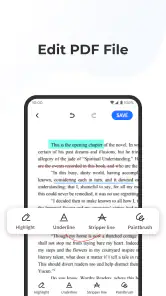
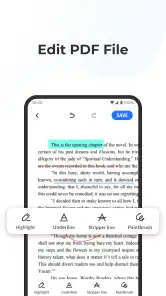
If you're someone who works on the go, the editing features of this app will be a lifesaver. I was impressed by the app’s ability to not only view but also edit Word documents and Excel spreadsheets. The editing tools are robust, allowing for text formatting, inserting images, and even adding comments. Plus, the collaboration features are a game-changer. You can easily share documents with colleagues and work on them in real time, which is perfect for team projects.
Security and Backup
In today’s digital age, security is paramount. I appreciated the app's focus on safeguarding user data. All Document Plus offers password protection for sensitive documents and has a reliable backup feature that ensures your files are safe from accidental deletions or device malfunctions. Knowing that my data is secure gives me peace of mind, especially when dealing with confidential information.
Conclusion
In conclusion, All Document Plus is a must-have app for anyone looking to streamline their document management process. Its comprehensive features, combined with an easy-to-use interface, make it an excellent choice for both personal and professional use. Whether you need to read, edit, or collaborate on documents, this app has you covered. So, if you're tired of switching between different apps for your document needs, give All Document Plus a try. It might just become your go-to app for all things documents.
More From Our News Desk

Clash of Clans Is Won Between the Battles

Android Auto Makes the Case for Quieter Car Software

MobiOffice: Transforming Mobile Productivity with Seamless Integration

EA SPORTS FC™ Mobile Soccer: Redefining Mobile Sports Gaming

How Microsoft OneDrive Became a Mobile Productivity Giant

How Google Translate Breaks Language Barriers Effortlessly
All Document Plus Frequently Asked Questions
What is All Document Plus?
All Document Plus is a comprehensive document management application designed for Android and iOS devices. It allows users to view, edit, and manage various document formats including PDFs, Word, Excel, and PowerPoint files. With a user-friendly interface, it aims to streamline document handling on mobile devices, making it an essential tool for professionals and students alike.
How does All Document Plus ensure file security?
All Document Plus prioritizes user privacy and file security by employing advanced encryption methods. Users can secure their documents with passwords and the app also offers biometric authentication options like fingerprint and face recognition. These features ensure that sensitive information remains protected from unauthorized access while stored or being transferred.
Can All Document Plus integrate with cloud storage services?
Yes, All Document Plus offers seamless integration with popular cloud storage services such as Google Drive, Dropbox, and OneDrive. This feature allows users to easily access, edit, and save their documents directly from the app to the cloud, facilitating efficient document management and collaboration across different devices and platforms.
What file formats are supported by All Document Plus?
All Document Plus supports a wide range of file formats, making it a versatile document management tool. Users can open and edit common file types including PDF, DOC, DOCX, XLS, XLSX, PPT, PPTX, TXT, and more. This extensive compatibility ensures users can handle all their document needs within a single application.
Is there a cost associated with using All Document Plus?
All Document Plus is available as a free download, offering basic features without any charge. However, for users who require more advanced functionalities, there is a premium version available through in-app purchases. The premium version includes additional features such as enhanced editing tools, ad-free experience, and priority customer support.
Pros
- User-friendly interface design.
- Wide range of document formats supported.
- Fast document loading and processing.
- Offline functionality available.
- Secure data encryption.
Cons
- Limited free version features.
- Occasional ad pop-ups.
- Requires regular updates.
- No real-time collaboration.
- Limited customer support.
- Category
- Productivity
- Version
- 1.1.3












