PayPal POS (ex Zettle)
- 1.10K
- 3.6
- Installs
- 1.00M
- Price
- Free

Screenshots
Analysis by Reviewed
I’d judge a point-of-sale app not just by whether it can take a payment, but by how comfortable I feel using it around customers and handling business information through it. PayPal POS (ex Zettle) is PayPal Mobile’s free business app, and its established payment-company identity may feel familiar if you already use PayPal. That familiarity is useful, but I wouldn’t treat it as a substitute for checking which account I’m signed into and what information I’m entering during setup.
Trust starts with the account you use
Because the app is tied to a PayPal account, I’d make account access part of my setup routine: use the account intended for the business, review its security and contact details, and avoid leaving a shared checkout device signed in when it isn’t being used. These are sensible habits rather than special features I’d assume the app provides. They also help separate a practical payment workflow from the wider question of who can access the account.
PayPal POS is aimed at businesses that need to take sales in person, not at someone looking for a general-purpose personal wallet. Its business focus matters when deciding whether it fits: a seller who needs to keep sales and stock in view may get more from it than a person who only wants to send money occasionally. I’d still try the setup and daily workflow before making it the centre of a busy checkout.
Where it fits in a working day
For a market stall, craft fair, or appointment-based service, a phone-based point of sale can be easier to carry than a full till. Picture a maker serving a customer at a weekend event: the app can keep the sale within the same small-device workflow as the rest of the day, while contactless acceptance can make checkout feel familiar to customers. The practical test is whether the phone, account, and any payment equipment you plan to use suit your actual setup; I wouldn’t assume the app alone replaces every piece of checkout hardware.
Before an event, I’d check that I can reach the right account, prepare the products I expect to sell, and understand how I’ll review the day’s activity afterward. That small rehearsal can reveal friction while there’s still time to adjust. For a temporary stall, it’s also worth deciding how you’ll handle a weak or interrupted connection rather than discovering a problem in front of a queue.
Making checkout smoother without rushing the setup
For a seller who takes varied orders, the most useful preparation is not merely installing the app; it is deciding how each sale should be recorded. I’d make a short practice run using a typical product and a less common one, then check whether the resulting entries are clear enough to recognize later. This catches catalog naming issues early and helps avoid a hurried checkout becoming a confusing end-of-day review.
A practical tip for event sellers is to keep a small written fallback plan for the parts of the sale the app cannot resolve for them: who handles a customer question, where to note an order that needs attention, and how to pause service if the device or connection becomes unreliable. That isn’t a special feature of the app; it is a way to avoid relying on a phone workflow as though it were infallible. I’d test the steps before the event, not invent them while customers are waiting.
More From Our News Desk

Clash of Clans Is Won Between the Battles

Android Auto Makes the Case for Quieter Car Software

MobiOffice: Transforming Mobile Productivity with Seamless Integration

EA SPORTS FC™ Mobile Soccer: Redefining Mobile Sports Gaming

How Microsoft OneDrive Became a Mobile Productivity Giant

How Google Translate Breaks Language Barriers Effortlessly
How it compares with other ways to take payment
Compared with a traditional till, PayPal POS is more appealing when portability and a compact workflow matter more than a fixed counter setup. Compared with a basic card reader and a separate spreadsheet, an app that brings sales, stock, and reports together may reduce the need to switch between tools. But a dedicated till or another point-of-sale system may suit a shop better if its staff, checkout equipment, or existing bookkeeping process depends on a more established in-store setup.
I’d also treat integrations as a decision to verify in practice, not a reason to assume every online shop or accounting package will connect in the way I want. Before migrating records or changing routines, check whether the particular tools you use work together and whether the resulting workflow saves effort. A feature that sounds useful on paper is only useful if it fits the way you reconcile sales and inventory.
Setting Up and Getting Started
Downloading and setting up PayPal POS (ex Zettle) is a breeze. Whether you're on Android or iOS, the app is ready to roll. Once downloaded, signing up is straightforward. Link it with your PayPal account, and you're set. It's like setting up a new toy; the anticipation builds as you go through the steps, and before you know it, you're ready to start selling.
User Interface and Experience
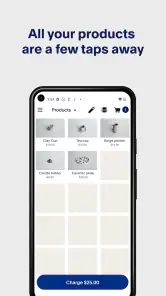
The user interface is clean and intuitive. Navigating through the app is as smooth as butter. Whether you're tech-savvy or not, you'll find it easy to use. The layout is customer-friendly, and all the features are just a tap away. It's like having a personal assistant who knows exactly where everything is, saving you time and effort.
That simplicity is most valuable when you are serving someone face to face, because you have less time to hunt through menus than you do while setting things up alone. I’d still judge the interface by repeating the same sale a few times, including finding a product and correcting an entry. A screen that feels obvious during a quiet test can feel different when someone is waiting, so familiarity with the actual path matters more than a quick first impression.
Features that Stand Out
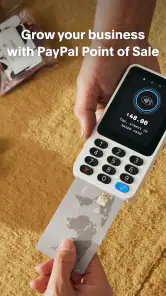
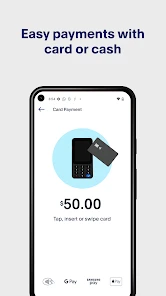
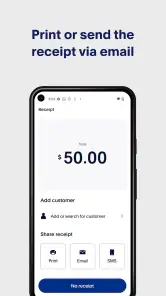
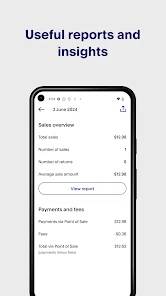
One of the standout features of PayPal POS is its versatility. You can manage sales, track inventory, and even generate reports. It’s like having a mini dashboard that gives you control over your business operations. The app also supports contactless payments, which is a big plus in today's world. It’s like future-proofing your business.
Sales and stock information are most useful when they reflect the way a business actually works. For example, if I sell the same item in different variants, I’d check how I can distinguish those entries before trusting a stock view to guide a reorder. Likewise, if a service business records appointments or custom work, I’d confirm that the sales record gives enough context for later review. The trade-off is straightforward: putting more activity into one tool can make routine checks easier, but only if the information is entered consistently.
Integration and Compatibility
Integration with other platforms is seamless. Whether you’re looking to sync with your accounting software or manage your online store, PayPal POS has got you covered. It plays well with others, making sure your business runs like a well-oiled machine. This compatibility is a game-changer, especially if you’re managing multiple channels.
I would not change a working bookkeeping or online-sales process on the strength of a broad compatibility impression alone. Before connecting tools or moving records, I’d identify what needs to pass between them: sales totals, product details, or stock changes, for instance. Then I’d try the exact workflow with a small amount of real activity and compare the result with the original record. That is a more reliable way to decide whether an integration reduces double entry or simply moves the checking work somewhere else.
What the store figures tell me—and what they don’t
The app has an average rating of 3.6 from around 43,000 ratings, with over 1 million installs and roughly 1,100 written reviews. I’d take that as a reason to test it against my own checkout needs rather than as a verdict: a short, quiet sales day is a very different test from a crowded counter. It is free, rated for everyone, and version 8.18.0 requires Android 8.1 or later. Those details make it accessible to many users, but they don’t guarantee that a particular phone, reader, or business workflow will suit it.
For someone deciding whether to try it, the practical questions are more revealing than popularity alone. Can I get through an ordinary sale using the device I plan to carry? Can I find the record afterward without guessing which entry is which? And can I keep the business account accessible only to the people who need it? I’d answer those questions during a low-pressure trial before making this the only route for taking payments.
Who is likely to benefit—and who may not
I’d consider it for a solo seller or small operation that wants sales, inventory, and reports close together, especially when transactions happen away from a permanent counter. It may be a poor fit if you need a highly customized register, several staff roles and approval steps, or a dependable offline process that you have not tested. In those cases, compare dedicated point-of-sale systems and confirm their exact equipment and account controls before switching.
A food vendor at a local event is one realistic fit: the seller can keep the payment process close at hand, then look back at sales activity when the rush has passed. A shop with multiple people sharing a fixed checkout has a different set of needs. It may care more about distinct staff access, a larger screen, peripherals, and a process that remains consistent across shifts. I would not assume a compact app is automatically the best choice just because it can handle in-person sales.
One useful habit is to keep product names and stock counts tidy before relying on reports to guide restocking. If the catalog is rushed or inconsistent, the app’s overview can look organized while still reflecting messy inputs. I’d also review a sample sale from entry through reporting before adding a large product range; that checks whether the detail you need is easy to find and whether the record makes sense for your bookkeeping.
Questions worth settling before a busy day
People often wonder whether a phone app can replace a reader or a full till. I’d treat those as separate decisions: the app is the business workflow, while the equipment depends on how you intend to accept payments and serve customers. Check the setup you plan to use rather than assuming the phone alone covers every checkout need. If you already have equipment, confirm that it suits the app and your routine before relying on it at an event.
Another common concern is what happens when a connection drops. I wouldn’t plan a business around an offline assumption without testing the exact situation and understanding the steps available to me. For a one-off event, a backup way to record what needs follow-up can prevent a technical interruption from turning into a lost note or an uncertain sale. The same caution applies to account access: decide who may use the checkout device and sign out when a shared device is no longer under your control.
Finally, the right choice depends on how much operational detail you need in one place. If a basic reader and a simple record-keeping method already serve a low-volume business, switching could add setup work without solving a real problem. If I’m moving between sales, stock checks, and post-sale review, having those tasks nearby may justify a trial. I’d compare the time spent entering and checking information, not just the moment it takes to accept a payment.
Making a cautious choice
PayPal POS was released on May 3, 2021, and its current version is 8.18.0. I’d use those details as context, not as a promise that every feature or device behaves the same way for every business. The more important questions are practical: can I complete a normal sale without slowing service, can I review activity afterward, and do the account and data choices feel appropriate for my business? If those answers are yes after a real-world trial, the app could be a sensible portable option. If not, a simpler reader or a more specialized till may be the better choice.
Why You Should Try It
If you're a small business owner looking for an efficient way to handle transactions, give PayPal POS (ex Zettle) a shot. It’s like having a reliable partner who’s always there to support your business operations. From accepting payments to managing inventory, it's packed with features that make your life easier.
In conclusion, PayPal POS (ex Zettle) is more than just a payment app; it’s a comprehensive business tool. Its ease of use, robust features, and seamless integration make it a must-have for anyone looking to streamline their business processes. So, why not give it a try and see how it can transform your business?
PayPal POS (ex Zettle) Frequently Asked Questions
What is the current name of Zettle, and is it the same app?
PayPal POS is the app formerly known as Zettle, so people familiar with the earlier name may recognize its point-of-sale purpose. It is a business app from PayPal Mobile, with the short description “PayPal POS” and a broader message about helping businesses grow with a point-of-sale system. If you are looking for Zettle, PayPal POS is the name to search for.
Who is PayPal POS intended for?
PayPal POS is aimed at businesses that need a point-of-sale app to support sales and payment handling. Its business focus makes it relevant to owners and staff who manage transactions, rather than to people looking for a general payment wallet. The app is free to download and has an Everyone content rating, but its main purpose is helping businesses with point-of-sale activity.
Is PayPal POS available for both Android and iOS?
PayPal POS is available for Android and iOS devices, so businesses using either mobile platform can look for the app in their device’s app store. Before planning to rely on it, check that your particular phone or tablet is supported and meets the relevant system requirements. For Android users, the stated minimum operating system version is 8.1.
Can PayPal POS be used without a card reader?
PayPal POS is a point-of-sale app for handling business payments, and the published description presents it as PayPal’s point-of-sale solution. Whether you can take a particular payment without a reader depends on the payment option and setup available to your business. Before downloading, consider how you plan to accept payments and check PayPal’s current guidance for your location.
Who develops PayPal POS, and what does the app offer?
PayPal POS is a business app developed by PayPal Mobile. Its short store description is “PayPal POS,” while its broader message is about helping businesses grow with a point-of-sale system. The app is free to download and is rated for Everyone, so it is intended for a broad audience, although its main purpose is supporting business sales.
Pros
- Seamless integration with PayPal account
- User-friendly interface
- Supports multiple payment methods
- Offers inventory management
- Real-time sales analytics
Cons
- Limited customization options
- Requires internet connection
- Monthly fee for advanced features
- Limited customer support
- May have transaction limits

- Category
- Business
- Version
- 8.18.0













