Parental Control App - Kidsee
- 54.00
- 4.3
- Installs
- 100.00K
- Price
- Free

Screenshots
Analysis by Reviewed
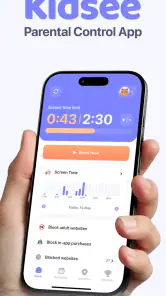
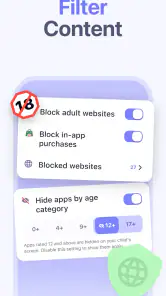
Managing a child’s phone is rarely just a matter of switching one button on or off. In a shared household, the real challenge is agreeing on when a device is available, what it is being used for, and how much supervision still feels respectful. I tested Parental Control App - Kidsee with that everyday tension in mind. It is a free parenting app from Artpoldev that brings app blocking, screen-time limits, usage schedules, and child-location viewing into one place.
That combination makes it more practical than a simple timer, especially when a child moves between schoolwork, entertainment, and family routines. At the same time, it is not a substitute for a conversation about boundaries. The app can enforce a plan, but adults still need to decide what the plan should be and explain it clearly. My overall impression is that Kidsee is most useful when a household wants consistent rules without checking a child’s phone manually every few minutes.
How Kidsee fits a shared-device household
The clearest use case is a family where a child has a personal Android device or regularly uses the same device for several purposes. A phone may be needed for calls and location awareness, yet it can also become a source of games, videos, and late-night distractions. Kidsee’s value comes from separating those situations instead of treating the entire device as either completely allowed or completely forbidden.
Imagine a weekday afternoon. A child comes home, needs a little time to relax, then has homework before dinner. Later, the phone may be available again for messaging or entertainment, but bedtime should not turn into another hour of scrolling. With usage schedules, I can think in terms of household routines rather than repeatedly negotiating each individual moment. That is a more sustainable approach than confiscating the phone whenever it becomes distracting.
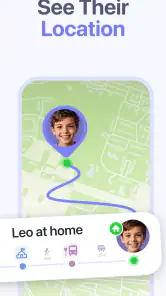
The location feature adds another dimension for parents who want reassurance while a child is travelling between school, activities, and home. I would treat it as a safety-oriented convenience, not as a replacement for communication. Location information can reduce unnecessary worry, but it should be part of an agreed family rule rather than a hidden form of surveillance.
Kidsee also makes sense when more than one adult helps care for a child. A parent, guardian, or another trusted adult can work from the same general set of expectations instead of giving conflicting instructions. The important point is not simply having control tools; it is making sure the child knows which rules apply and when.
The app is less compelling for a household that already has a simple, well-understood routine using built-in Android controls. If the only requirement is a basic daily limit, adding another parenting app may create unnecessary setup and maintenance. Kidsee earns its place when app-level blocking, schedules, and location awareness are useful together.
Starting with boundaries instead of restrictions
My advice is to decide the household rules before opening every setting. Write down the moments that cause the most friction: school hours, homework, meals, bedtime, travel, or mornings before leaving home. Then use Kidsee to support those decisions. This prevents the common mistake of experimenting with restrictions until the phone becomes frustrating for everyone.
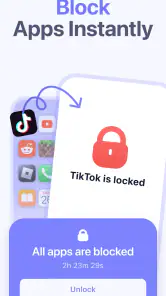
App blocking is especially helpful when the problem is specific rather than general. A child may need the phone for communication but not for games during homework. Blocking selected apps can be less disruptive than blocking the whole device, provided the essential apps remain usable. That distinction matters in families where the phone is also a practical safety tool.
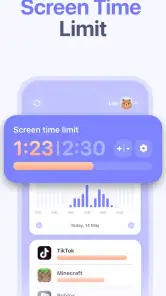
Screen-time limits work better when they are realistic. Setting an extremely strict allowance may look effective on paper, but it can lead to constant requests for exceptions. I prefer a limit that reflects the child’s age, school obligations, and normal downtime. The purpose should be to make use predictable, not to create a daily contest over minutes.
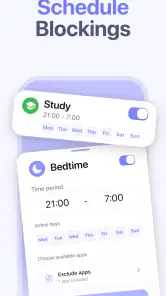
Schedules are the feature I would use most carefully. A schedule can turn a household rule into something automatic, which is useful when adults are busy or when different caregivers are involved. However, real life includes homework changes, travel, illness, and weekends. Before relying on a schedule, I would make sure every adult knows how the family handles an unusual day, rather than assuming the app alone will resolve it.
There is also a useful psychological advantage to scheduled boundaries: the parent does not have to be the person who ends every session. When the rule is agreed in advance, the device becomes the reminder. That can reduce arguments, although it will not remove them entirely. Children may still object to the rule, but the discussion can focus on the family agreement instead of a parent making an arbitrary decision in the moment.
What setup requires from the adults
Kidsee is not a hands-off product. A parent needs to spend time choosing the right restrictions and checking that they match the child’s actual routine. I would begin with a small number of important rules, observe how they work, and adjust them gradually. Trying to control every app and every hour from the start can make the system difficult to understand.
Because the app deals with a child’s device and location, I would also pay attention to account boundaries. The supervising adult should use the correct parent-side account, while the child’s device should remain clearly identified as the device being managed. In a shared household, unclear account ownership can create confusion about who is responsible for a setting or who should change it.
That matters when a child uses a device that sometimes belongs to an adult sibling or another family member. A control system designed for one child may be inappropriate for a shared phone. Before applying restrictions, I would confirm whose device it is, who needs access to it, and whether the same schedule makes sense for every person using it.
Another practical tip is to test the arrangement during a calm period rather than immediately before school or bedtime. Check that the intended apps remain available for necessary tasks and that the schedule reflects the household’s actual clock. A few minutes of preparation can prevent a child from being locked out of something important at the wrong time.
The free download makes trying this approach relatively approachable, but the app includes in-app purchases ranging from $2.99 to $99.99 per item. I would review the available purchase choices carefully before building a long-term routine around premium controls. The headline price is free, yet the useful question for a family is which functions are included for its particular needs and which may require payment.
Coordinating rules between parents and caregivers
Parental controls often fail because adults use them inconsistently. One person blocks games during homework while another quietly allows them, and the child quickly learns that the rule depends on who is nearby. Kidsee cannot solve that communication problem, but it can give the adults a shared framework to discuss.
I would create a short household agreement alongside the app: when the phone is restricted, which uses are considered essential, how exceptions are handled, and when the rules are reviewed. This is more useful than treating the settings as secret controls. If a child understands the reason for a schedule, the restriction is less likely to feel like an unexplained punishment.
Location viewing deserves the same coordination. Parents should agree on when it is appropriate to check it and what they will do if the location raises a concern. The feature can support a pickup plan or travel routine, but it should not encourage adults to monitor every movement without context. A quick message or call may still be the better response in many situations.
For households with separated parents or several caregivers, consistency becomes even more important. The adults may have different routines, but the child should not have to interpret a completely different set of digital expectations in each home. I would keep the core rules simple and leave room for household-specific differences, such as weekend use or travel days.
One non-obvious benefit of this approach is that it turns screen-time discussions into routine planning. Instead of asking, “Why are you on the phone again?” an adult can ask whether today’s schedule still fits homework, sleep, and transport. That shift does not make every disagreement disappear, but it produces a more useful conversation.
Age, trust, and the limits of control
Kidsee is marked for Everyone, but that label does not mean the same setup suits every child. A young child may need firm app boundaries and a predictable bedtime schedule. An older child may respond better to transparent limits, gradual independence, and a conversation about why location access is being used. The tool can be adjusted to a family’s approach, but the judgment remains with the adults.
I would avoid presenting the app as a secret monitoring system. Trust is easier to maintain when children know what is being limited and why location information may be viewed. This is particularly important as children become more independent. A control that feels reasonable for a younger child can feel intrusive to a teenager if it is never explained or revisited.
There is also a difference between safety and convenience. Knowing where a child is during a planned journey can be reassuring. Using location information to settle every small uncertainty may create anxiety for both sides. I would reserve it for clear family purposes and make sure the child knows how it fits into the broader safety plan.
The same principle applies to blocking. If an app is genuinely unsuitable during schoolwork or sleep, blocking it can be sensible. If every form of entertainment is treated as a problem, the child may focus on bypassing the system rather than learning self-management. Kidsee is strongest as a training aid: it creates structure while adults gradually teach responsible use.
Parents should also remember that restrictions do not address every digital risk. A time limit can reduce exposure, but it does not automatically teach a child how to handle unwanted messages, misleading content, or pressure from friends. Those subjects still require direct guidance. I would use Kidsee as one layer in a wider parenting approach, not as the entire safety strategy.
How it compares with built-in controls
Android already offers tools for screen-time management, so the decision to install Kidsee depends on what a family wants from a separate parenting app. Built-in controls can be enough for a parent who wants a basic daily allowance and prefers to keep everything inside the operating system. They may also feel simpler when one adult manages one device.
Kidsee becomes more attractive when the household wants a more focused parenting workflow around app blocking, schedules, and location viewing. Having those needs represented in one dedicated app can be easier to discuss than switching between unrelated device settings. The trade-off is another account, another layer of setup, and the need to understand how the app behaves alongside system-level controls.
I would not install both systems and immediately impose strict limits through each one. Overlapping controls can make it difficult to tell which rule caused a blocked app or unavailable period. A better approach is to choose one primary system for daily boundaries, then use the other only where it adds a clear benefit.
Kidsee is also different from a simple screen-time timer because its purpose is broader than counting minutes. Blocking individual apps and viewing a child’s location address household concerns that a timer alone does not cover. On the other hand, a timer may be preferable for an older child who already manages usage responsibly and does not need location supervision.
The app’s current version is 11.1 and it runs on Android 7.0 or later. That makes compatibility a practical point to check before planning a family rollout, especially if the child’s phone is older. A parent should also keep the app maintained and verify the arrangement after system updates, since parental-control tools depend on the managed device continuing to cooperate with them.
Who should use it, and who should skip it
I would recommend Kidsee to parents who want a single parenting-focused tool for several connected needs: limiting selected apps, organizing screen time around a schedule, and checking a child’s location during agreed situations. It is particularly suitable for families that are tired of repeating the same bedtime or homework instruction and want the device to apply a consistent routine.
It may also suit households where more than one adult needs to coordinate expectations. The app gives those conversations a concrete reference point, even though the adults still have to agree on the rules themselves. Families with children moving between school, activities, and home may find the location feature useful when it supports a clear travel plan.
I would skip it if the device is shared casually among several people and cannot be treated as one child’s managed device. I would also look elsewhere if the family wants only a very basic timer, dislikes location-related supervision, or expects a parental-control app to manage every aspect of online safety automatically. In those cases, built-in Android controls or a simpler routine may be less intrusive and easier to maintain.
Cost is another reason to pause and compare. The app itself is free, but optional purchases can range from a few dollars to nearly one hundred dollars per item. Before paying, I would identify the exact problem the purchase is meant to solve and decide whether the included tools already cover it. A family should not buy advanced controls simply because the phone routine feels difficult during one stressful week.
My household verdict
After looking at Kidsee as a real household tool rather than just a list of controls, I see a useful balance between structure and flexibility. App blocking handles specific distractions, screen-time limits make expectations measurable, schedules reduce repeated arguments, and location viewing can support agreed safety routines. Those features work best when they are connected to a family plan rather than activated independently.
The main friction is that the app cannot make the parenting decisions for you. Adults must define appropriate limits, keep account boundaries clear, coordinate with other caregivers, and adjust expectations as a child grows. That work is not a flaw unique to Kidsee; it is the unavoidable part of using any serious parental-control system. Still, families expecting a one-tap solution may find the setup more involved than anticipated.
Artpoldev’s app has earned a 4.3 average from around 7.3 thousand ratings, with over 100 thousand installs, which suggests that it has found an audience among parents looking for this kind of combined approach. I would read those figures as evidence of practical interest, not as a guarantee that every household will find the controls comfortable.
For me, the strongest reason to try it is the way it can turn vague rules into a visible routine without requiring the entire phone to disappear. The strongest reason to hesitate is the need to handle supervision openly and thoughtfully, especially when location is involved. If your family wants consistent boundaries around a child’s Android device and is willing to review those boundaries together, Kidsee is a sensible free starting point. If trust, privacy, or simplicity is the priority, begin with a lighter solution and add more control only when a specific household problem justifies it.
With its Everyone age classification and free entry point, it is approachable for families comparing options. Just remember that a good result depends less on how many restrictions are enabled than on whether the rules are fair, understandable, and updated as circumstances change. Use Kidsee to support a family agreement, not to replace one.
Pros
- Simple setup makes it easy for parents to start monitoring quickly.
- Location tracking can help families stay informed about a child’s whereabouts.
- Screen-time tools encourage healthier daily device habits.
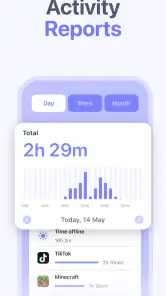
- Activity reports provide useful insight into app and device usage.
- Remote controls let parents adjust restrictions without using the child’s phone.
Cons
- Some advanced features may require a paid subscription.
- Monitoring can raise privacy concerns
- especially with older children.
- Location accuracy may vary indoors or in areas with weak GPS coverage.
- The app may affect battery life when tracking and monitoring run continuously.
- Children may try to bypass restrictions if communication and trust are lacking.

- Category
- Parenting
- Version
- 11.1











