Package Tracker, Flight Radar
- 38.00
- 4.0
- Installs
- 500.00K
- Price
- Free

Screenshots



Analysis by Reviewed
I usually reach for a tracking app when two small uncertainties start competing for my attention: a parcel is somewhere between the shop and my door, or someone I’m meeting is on a flight and I want a clearer sense of its progress. Package Tracker, Flight Radar brings those two jobs together. I find that combination useful when I want one place to check, though it helps to think of the app as a convenient tracker rather than a replacement for every courier or airline’s own updates.
When one delivery turns into several things to follow
The app makes the most sense when tracking numbers and travel plans are scattered across different messages. I might have an order confirmation in one inbox, a dispatch email somewhere else, and a friend’s flight details in a conversation. A shared tracking app can give me a simpler place to check those moving pieces, especially when I’m trying to make a quick decision rather than search through every message.
It is not a substitute for keeping the source details organized, though. I still save the dispatch email and flight information, because those are useful reference points if an update seems delayed or unclear. My practical approach is to treat the app as a convenient overview and the original sender or carrier as the place to resolve problems.
From a tracking number to a useful check-in
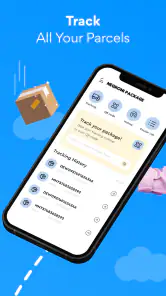
My parcel routine starts with the tracking number from an order confirmation or dispatch message. I enter it in the app and use the resulting status as a quick checkpoint instead of repeatedly opening the retailer’s order page. That can be especially handy when I have several purchases in flight: I can check which one has moved and which one still needs attention without searching through old emails first.
A practical tip is to keep the original dispatch message until the parcel arrives. If a status looks stale or unfamiliar, the message gives me somewhere to cross-check the number and the seller’s own wording. The tracker is most useful for reducing routine checking; for a delivery problem, a missed handoff, or a change of address, I would still go to the retailer or courier responsible for the parcel.
That distinction matters because tracking is a chain of handoffs. A shop sends an order, a carrier scans it, and another service may handle part of the journey. The app can make updates easier to follow, but the event still depends on information arriving from the delivery network. I treat a quiet stretch as a reason to check again later, not automatic proof that the package is lost.
For a realistic example, imagine I order a household item while also arranging to collect a friend from the airport. I can check the parcel’s latest progress when planning the day, then use the flight view to get a sense of whether the pickup timing may need adjusting. That does not remove the need to confirm the delivery window or airport arrangements, but it puts two separate bits of travel-related uncertainty within easy reach.
More From Our News Desk

Weather by Xiaomi Review: Clear at a Glance, Less Clear Up Close

X Under Pressure: Can It Recover When Posting Goes Wrong?

Clash of Clans Is Won Between the Battles

Android Auto Makes the Case for Quieter Car Software

MobiOffice: Transforming Mobile Productivity with Seamless Integration

EA SPORTS FC™ Mobile Soccer: Redefining Mobile Sports Gaming
Tracking Your Packages Like a Pro
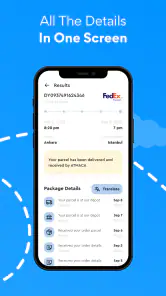
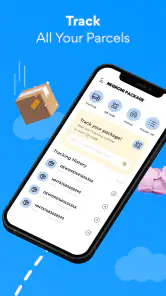
Let’s face it, waiting for a package can be like watching paint dry. But with Package Tracker, Flight Radar, the wait becomes a whole lot more manageable. Once you’ve got your tracking number, pop it into the app, and voilà! You can see exactly where your package is. It’s super intuitive—just enter the number, and the app does the rest, showing you everything from departure to doorstep.
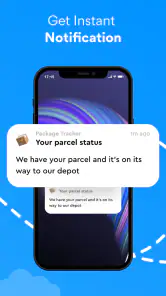
The app supports a huge range of couriers, so whether you’re waiting for something from UPS, FedEx, or even a lesser-known carrier, you’re covered. I particularly love the push notifications. They’re like little updates from a friend, letting you know the latest status of your package. No more anxious refreshing of browser tabs!
Flight Radar: What's Happening Up There?
Now, onto the flight radar feature. Even if you’re not a frequent flyer, this part of the app is seriously cool. Imagine looking up at the sky and wondering which flight is passing overhead. With this app, you can satisfy that curiosity. Just open the radar, and it’ll show you a real-time map of flights in the sky. Tap on any plane icon, and you’ll get details like the flight number, altitude, speed, and even the aircraft type.
For aviation enthusiasts, it’s a bit like having a tiny air traffic control center in your pocket. You can even track specific flights, which is handy if you’re picking someone up at the airport and want to know if they’ll land on time.
Making flight information practical
For a pickup, I would use the flight view as a planning aid rather than treating it as the airport’s final word. A flight’s progress can help me decide when to leave, but I’d still check the airline or airport’s own information before changing a firm meeting plan. That small cross-check is a good habit whenever timing has consequences: the radar offers a helpful picture, while the people coordinating the trip remain the best source for last-minute arrangements.
The two tools also suit different habits. Someone who only wants parcel updates may prefer a courier’s own app when they need delivery-specific actions or the most direct route to customer support. Someone who only follows aircraft may get more value from a dedicated aviation tracker. I like the convenience of having both together, but the trade-off is that a combined app may not be the deepest specialist choice for either task.
Keeping the checks useful, not constant
I get the most from a tracker when I decide what I actually need to know before opening it. For an ordinary order, that may simply be whether it has moved since my last check. For a pickup, it may be whether the flight’s progress suggests I should review my timing. This small habit keeps a status update in perspective instead of encouraging me to watch every scan or aircraft movement as if it demands an immediate response.
It also helps to separate curiosity from action. Looking at a plane on the map can be enjoyable in its own right, but a map view does not coordinate a pickup or communicate a change to the person travelling. I would message the person directly if plans need to change, then use the flight information as context. Likewise, a parcel status can tell me that something has progressed, but it cannot tell a courier where to leave it or arrange a redelivery.
User Interface: Simple and Sleek
One of the standout aspects of Package Tracker, Flight Radar is its user interface. It’s clean, sleek, and downright user-friendly. The design isn’t cluttered with unnecessary features, making it easy to navigate, whether you’re tech-savvy or still figuring out how to use your smartphone.
The main dashboard is straightforward. Want to track a package? There’s a tab for that. Curious about flights? There’s a tab for that too. Everything is where you’d expect it to be, which is a breath of fresh air in today’s world of overly complicated apps.
What to expect from a shared tracker
When several parcels are involved, I find it useful to make a quick check part of an existing routine—after placing an order or before heading out—rather than opening the app every few minutes. Notifications can reduce that urge, but they’re prompts, not a guarantee that every scan will appear instantly. If an update matters to a delivery decision, I compare it with the carrier’s own tracking page rather than assuming a third-party status is the final word.
That also answers a common practical question: can I rely on it for a precise arrival time? I would use it to follow progress and spot meaningful changes, not to promise that a parcel will arrive at an exact moment. Delivery schedules can shift as a package moves between services, and a tracking view cannot make that handoff more predictable. The same caution applies to flights: useful for awareness, but not a substitute for official trip changes.
There is a sensible audience for this setup. If you shop online often, keep an eye on parcels for other people, or enjoy checking aircraft as part of your day, one combined tool can save small bits of time and screen clutter. If you need delivery instructions, claim handling, or detailed support, I would start with the carrier or retailer. If flight status is central to a time-critical itinerary, I would pair the radar with airline or airport updates.
Choosing between one app and specialist tools
Compared with checking each retailer’s order page, a consolidated tracker is most useful when I have multiple shipments from different sellers and want a single place to review their progress. Retailer pages can be better for order-specific details, while a courier’s own app is the sensible next stop when I need to contact the delivery service or act on a failed delivery. The best choice depends less on which screen looks tidiest and more on whether I’m checking status or trying to change what happens next.
The same distinction applies to flights. A combined app is convenient for a quick look at aircraft and a traveller’s progress; airline and airport channels are better suited to official changes that affect a booking or terminal plan. If I only care about one of these activities, installing a dedicated alternative may feel more focused. If I regularly switch between parcels and flights, having both views together is a worthwhile convenience, provided I’m comfortable using official sources for decisions that need certainty.
Why You Should Download It
So, why should you download Package Tracker, Flight Radar? If you’re someone who frequently shops online or just loves keeping tabs on things, this app is a game-changer. It makes tracking packages a breeze and adds a fun layer of flight tracking that can keep you entertained for hours.
Plus, it’s a one-stop-shop for both services, so you don’t need multiple apps cluttering your phone. It’s efficient, reliable, and surprisingly fun to use. Not to mention, it’s a great conversation starter. Who knew tracking flights could be so captivating?
Negroni’s shopping app is free to install, rated for Everyone, and has a 4.0 average from around 1.1 thousand ratings, with over 500 thousand installs. It was released on September 22, 2022, and version 1.9.0 requires Android 6.0 or later. There are in-app purchases, so I’d check the purchase details before choosing anything beyond the free experience. Those basics make it approachable, but the right choice still depends on whether you value an all-in-one tracker or need specialist tools.
One detail I would check before relying on any tracking app is whether the experience fits my own routine: I want quick progress checks, not another place that requires constant attention. If I mainly receive occasional parcels, the carrier’s tracking page may already be enough. If I frequently juggle orders and want to glance at flight progress too, the combined format has a clearer purpose. The listed in-app purchases range from $4.99 to $29.99 per item, so I would look carefully at what a purchase offers before deciding whether it solves a need I actually have.
My bottom line is that I’d keep it in mind for everyday awareness: enter a parcel number, check for progress, and use the flight map when curiosity or a pickup plan calls for it. I would not make it my only source when a delivery needs intervention or a flight change could disrupt someone’s plans. Used with that boundary, Package Tracker, Flight Radar is a convenient way to follow two kinds of movement without turning either into a chore.
Package Tracker, Flight Radar Frequently Asked Questions
What does Package Tracker, Flight Radar do?
Package Tracker, Flight Radar is a shopping app for following parcel deliveries and viewing flight information. Its focus is practical: you can use it to keep an eye on packages and check flight details in one app. It is free to download, with optional in-app purchases available for users who want to explore paid features.
Is Package Tracker, Flight Radar free to download?
Yes, the app is free to download, so you can try its package and flight tracking tools without paying upfront. In-app purchases are also available, ranging from $4.99 to $29.99 per item. Check the purchase details shown in the app before confirming anything, and consider whether the available features suit your needs.
What features does the Package Tracker app offer?
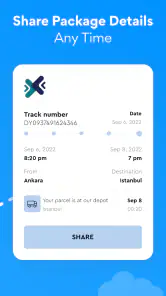
The Package Tracker app provides real-time tracking for shipments across multiple carriers. It offers notifications for delivery status updates, a user-friendly interface to manage multiple packages, and integration with your email for automatic tracking. Additionally, it supports barcode scanning for easy entry of tracking numbers.
Is the Flight Radar app suitable for casual users and aviation enthusiasts?
Yes, the Flight Radar app caters to both casual users and aviation enthusiasts. Casual users can easily track flights in real-time, while aviation enthusiasts can access detailed flight information, including aircraft type, altitude, speed, and route history. The app's intuitive design makes it accessible to all user levels.
Are there any subscription fees or in-app purchases for these apps?
The app is free to download and offers in-app purchases priced from $4.99 to $29.99 per item. These purchases are optional; review the purchase information in the app before buying. The app brings package tracking and flight information together, so it is worth checking which features are available without a purchase and which, if any, require payment.
Pros
- Real-time flight tracking is highly accurate.
- Intuitive interface makes navigation easy.
- Detailed aircraft information available.
- Customizable alerts for flight updates.
- Coverage includes most global airports.
Cons
- Free version has limited features.
- High battery consumption on prolonged use.
- Ads can be intrusive at times.
- Requires constant internet connection.
- Premium features are pricey.
- Category
- Shopping
- Version
- 1.9.0













