Oilfield Calendar
- 4.00
- 3.2
- Installs
- 1.00K
- Price
- $1.99

Screenshots

Analysis by Reviewed
For an oilfield household, a work rotation can shape far more than one person’s shifts: it affects rides, childcare, appointments, and the rare days everyone can plan together. I find a calendar built around that kind of schedule more relevant than a standard weekly planner, but trust matters too when a tool may sit at the center of family plans. Oilfield Calendar is a paid productivity app from Archimedes Workshop, and its straightforward purpose makes it worth considering if rotating work patterns are the main thing you need to organize.
Start with the schedule you actually live
Before buying a specialist calendar, I’d write down the rotation in the same terms the worker uses: which days are on, which are off, and where the next change falls. That simple preparation makes it easier to notice whether the calendar is reflecting the real pattern or merely looking tidy on screen. It also gives a partner a concrete way to check the setup instead of relying on memory or counting days across a month.
A realistic household test is to enter the work cycle, then add one ordinary week of commitments: a school pickup, a medical appointment, and a grocery run that needs to happen when someone is home. The value is not just seeing a day marked “off”; it is spotting whether that day is already carrying too many responsibilities. I’d use the view to start a conversation, not assume that every off day is automatically available for errands or family plans.
This focused approach is most useful when the rotation repeats consistently enough to plan around. If the worker’s schedule is frequently changed at short notice, the calendar can still help show the intended pattern, but someone needs to keep it current. A practical habit is to review the next few weeks whenever a change is confirmed, rather than trusting an older entry because it once matched the plan.
Make the setup easy to check
For a first-time setup, I’d enter a pattern and inspect several dates in different parts of the cycle, including the boundary where one rotation rolls into the next. Checking only the first few days can miss an off-by-one error that makes later plans misleading. If the dates look wrong, correcting the starting point early is less frustrating than discovering the mismatch after family members have arranged travel or care.
I’d also keep the first pass deliberately simple. Add the core work pattern before filling the calendar with every household task. That makes it easier to tell whether the rotation itself is correct and prevents a crowded screen from disguising a setup problem. Once the basic cycle checks out, personal events and reminders can be added where they genuinely help.
Reminders are best treated as prompts for specific decisions, not as a substitute for a complete family planning system. A reminder about an upcoming shift may be useful when someone needs to coordinate a handoff, while a reminder for every routine workday could become noise. I’d begin with only the dates that are easy to overlook, then adjust based on whether the alerts help or simply compete with other notifications.
More From Our News Desk

 Gmail
Gmail in a Busy Inbox: Who Benefits Most?
From first account to crowded workday, Gmail earns its place through dependable search and flexible sorting—but its best fit depends on how much inbox maintenance you can tolerate.

 Prime Video
Switching to Prime Video: What Changes in Your Viewing Routine
Prime Video can make a compelling second home for streaming, but switching means learning a different catalog, rental layer, and route from browsing to playback.

 Universal TV Remote Control
 Works Best as a Reliable Backup
A phone remote earns its place through quick setup and reliable habits. Here is how to get more from Universal TV Remote Control—and where its limits show.

 Weather - By Xiaomi
Weather by Xiaomi Review: Clear at a Glance, Less Clear Up Close
Xiaomi’s weather app makes everyday forecasts quick to scan, but its calm surface can leave useful details and recovery paths harder to find than they should be.

 X
X Under Pressure: Can It Recover When Posting Goes Wrong?
A resilience-focused review of X, examining setup, mistaken posts, interruptions, weak connections, and the gaps that matter when recovery needs to be dependable.

 Clash of Clans
 Is Won Between the Battles
Its raids are quick; its community is a long-term project of coordination, teaching, rivalry, and shared responsibility—with all the friction that entails.
Latest News



First Impressions
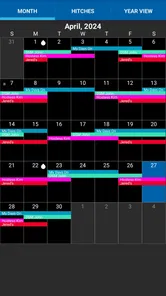
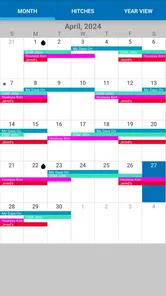
Upon launching the Oilfield Calendar app, the first thing that caught my eye was its clean and intuitive interface. It's got a straightforward design that makes it easy to navigate, which is a huge plus for someone like me who's not exactly a tech wizard. The app's main feature is its ability to input and track rotations, making it super convenient for those on varied schedules.
Where a rotation calendar earns its place
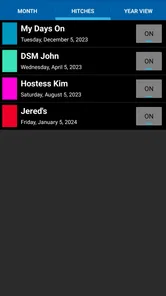
One of the standout features is the customizable rotation schedule. You can set your work and days off rotations, and the app takes care of the rest. No more flipping through paper calendars trying to figure out when your next day off is. Another handy feature is the ability to sync with your device's calendar, ensuring you never miss an important event or, more importantly, a day off!
Another thing I loved about this app is the reminders feature. You can set reminders for upcoming shifts or important deadlines, which is a real lifesaver when you're knee-deep in work. It's like having a personal assistant in your pocket, keeping you on top of everything.
The practical test is whether a rotation remains useful once other people’s plans enter the picture. Imagine a worker checking the next stretch of days off while a partner is arranging childcare and a family appointment. A shared view of the work pattern can make that conversation easier, while a reminder can help keep a shift or deadline from being overlooked. I’d still confirm any last-minute change directly with the person working: a calendar is a planning aid, not a substitute for communicating schedule changes.
Useful for families, with a few trade-offs
If you’re in the oilfield industry, this app is pretty much a must-have. It's specifically tailored for your unique schedule needs, and it does a fantastic job at it. Plus, the app's ease of use means you don't need to be tech-savvy to make the most of it. With just a few taps, you can plan out your entire month, giving you peace of mind and more time to focus on the job at hand.
For a household, one useful habit is to enter the rotation first, then add personal commitments around the work pattern. That gives everyone a stable starting point and makes it easier to spot when a day off is already spoken for. I’d also check a few upcoming rotation changes against the real work calendar before relying on the pattern for travel or childcare; a small setup mistake can carry forward into later plans.
What sets this app apart from others is its attention to detail. The developers clearly understand the oilfield industry's demands, and it shows in the app’s thoughtful design and features. The sync capability means you can access your schedule across multiple devices, which is perfect for those always on the move.
Compared with a paper calendar, a rotation-focused app can reduce repetitive counting and keep workdays visible alongside personal plans. A general-purpose calendar may be a better fit if you mainly need shared event editing, broad task management, or a single place for many kinds of appointments. I’d choose this one when the repeating work pattern is the central problem, not simply because I want another calendar on my phone.
Trust, cost, and control deserve a check
Because schedules can reveal when someone is working or off, I’d treat the calendar as personal information and think about who can see the device and its calendar. The app’s visible scheduling tools include rotation setup, reminders, and device-calendar syncing, but those functions alone don’t establish what information is collected or how it is handled. Before entering sensitive details, I’d review the app’s permission prompts and any privacy information available through the platform, and allow only access that makes sense for the feature I want to use.
Syncing is convenient, but it also changes where a schedule may appear: events added to a device calendar can be visible through that calendar’s own sharing settings. If you keep family plans private, check who has access to the connected calendar before syncing work dates. That small check can prevent a useful convenience from exposing more of a routine than intended.
Decide how much of the schedule to share
There is a useful middle ground between keeping every date to yourself and putting the entire household routine into a widely shared calendar. If the main need is coordination, consider which information other people need to act on: perhaps the work pattern is enough, while personal appointments and notes belong elsewhere. This is a general planning choice rather than a special control I’d assume the app provides, so I’d make it through the calendar and sharing options I already use.
That distinction matters if a phone or device is used by more than one person. A schedule can reveal predictable periods when someone is away or at home, so I’d avoid adding private notes that do not help with coordination. Keeping entries focused also makes them easier to read at a glance, especially when a family member is checking dates quickly while arranging transport or care.
Before turning on device-calendar syncing, I’d check whether the calendar receiving the entries is personal, shared with family, or connected to a broader account. If an entry appears in the wrong place, the issue may be the destination calendar’s sharing arrangement rather than the rotation itself. Starting with a small number of entries can help confirm that the workflow makes sense before relying on it for the full schedule.
The app costs $1.99, has an Everyone age rating, and is at version 1.4. It has a 3.2 average from six ratings, with four written reviews, and has reached over one thousand installs. I wouldn’t treat that small pool of feedback as a decisive verdict either way; instead, I’d weigh the focused purpose against the price and decide whether rotation planning is a recurring enough headache to justify a dedicated tool.
Who should choose it—and who should pass
In my view, the strongest fit is an oilfield worker or family member who wants a clear view of repeating shifts and days off without building a schedule from scratch each time. It is less compelling if your hours change unpredictably, you need several people to edit one shared calendar, or your main goal is managing projects and everyday tasks. In those cases, a flexible shared calendar or a simple paper planner may suit the routine better.
It may also be a poor match for someone who wants one app to handle a wide mix of responsibilities. A rotation view can answer “when is the next stretch off?” without necessarily replacing a task manager, family messaging, or a detailed appointment system. I would avoid buying it just because the household is busy; the case is stronger when repeating work dates are the specific source of confusion.
For a family that already relies on a shared calendar, the decision is less about replacing that system and more about whether entering the rotation separately makes planning clearer. If duplicate entries would create uncertainty about which calendar is authoritative, stick with the existing arrangement unless the rotation-focused view solves a real problem. A specialist tool should reduce mental bookkeeping, not add another place everyone has to check.
Before committing to it as the household’s only reference, I’d answer a few practical questions through a short trial of the setup: does the rotation match the real schedule, do reminders arrive at useful times, and does syncing place entries where the family expects to find them? Those checks matter more than a polished first impression, especially if plans depend on the dates being right.
A cautious recommendation
In conclusion, the Oilfield Calendar app is a robust tool for anyone working in the oilfield industry. It's user-friendly, efficient, and incredibly helpful in managing complex schedules. It’s a small investment for a huge return in terms of organization and sanity. Whether you're a seasoned worker or new to the field, this app is sure to make your life a whole lot easier.
So why wait? Give it a try and see how it can transform your scheduling woes into a seamless experience. Trust me, you won't regret it!
My bottom line
I’d consider this a focused convenience, not an automatic household essential. Its appeal rests on whether seeing a repeating oilfield rotation in a dedicated place makes planning noticeably easier than counting dates or adapting a general calendar. I’d start by checking the schedule carefully, deciding where synced entries should appear, and keeping reminders selective. If those steps fit the way your family plans, the modest paid entry point may be reasonable; if your needs center on unpredictable shifts or collaborative editing, a broader shared calendar is the more sensible choice.
Oilfield Calendar Frequently Asked Questions
Who developed Oilfield Calendar, and what kind of app is it?
Oilfield Calendar is a productivity app from Archimedes Workshop, built around the needs of oilfield families. Its focus is scheduling rather than general-purpose task management, so it may be a relevant choice if you want a calendar centered on coordinating work and home routines. It is priced at $1.99, which is worth considering before you download.
What is Oilfield Calendar and how does it help oilfield workers?
Oilfield Calendar is a specialized scheduling app designed for oilfield workers to efficiently manage their work shifts. It allows users to easily track their on and off days, set reminders for important tasks, and coordinate with their team. This app is specifically tailored to the unique scheduling needs of oilfield workers, making it an essential tool for managing their complex work-life balance.
Can I customize my work schedule in Oilfield Calendar?
Yes, Oilfield Calendar provides the flexibility to customize your work schedule according to your specific needs. Users can input their shift patterns, including rotating schedules, and the app will automatically generate an easy-to-read calendar. This feature ensures that workers have a clear view of their upcoming work commitments, reducing the likelihood of scheduling conflicts.
Is Oilfield Calendar available for both Android and iOS devices?
Yes, Oilfield Calendar is available for download on both Android and iOS platforms. Users can easily find the app on the Google Play Store or the Apple App Store. This cross-platform availability ensures that oilfield workers can access their schedules from any device, providing convenience and flexibility.
Does Oilfield Calendar send notifications and reminders for upcoming shifts?
Oilfield Calendar includes a robust notification system that sends reminders and alerts for upcoming shifts and important tasks. Users can customize these notifications to suit their preferences, ensuring they never miss a shift or crucial deadline. This feature helps in maintaining punctuality and staying organized amidst the demanding schedules of oilfield work.
Pros
- User-friendly interface for easy navigation
- Customizable reminders for important dates
- Syncs with other calendars seamlessly
- Offline access to calendar events
- Supports multiple languages
Cons
- Limited free features in basic version
- Occasional syncing issues reported
- Ads in the free version can be intrusive
- No dark mode option available
- Requires frequent updates for bug fixes