

Official E-ZPass NY
- 4.50K
- 4.4
- Installs
- 1.00M
- Price
- Free

Screenshots
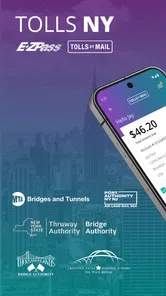
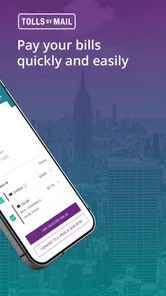
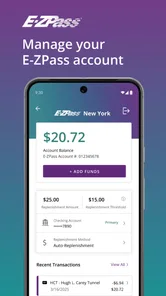
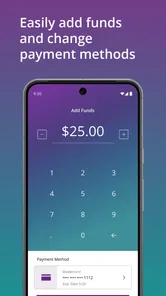
Analysis by Reviewed
For a New York drive that includes tolls, I find the most useful role of Official E-ZPass NY is keeping account management close at hand. Instead of treating tolls as something to sort out only after a trip, you can use the app to check your account and stay aware of activity. That can make a routine commute feel less uncertain, especially when you rely on E-ZPass regularly.
A practical check before setting off
A small habit makes the app more useful: check your account before a longer drive, rather than waiting until you are already on the road. If you use E-ZPass often, looking at the balance and recent toll activity can help you catch a payment concern early and decide whether you need to review your account. I would do this while parked or before leaving, not while driving; a toll account is worth checking, but it is never worth distracting yourself behind the wheel.
That kind of preparation is also handy when someone else in your household is planning a trip in a car associated with your account. You can review the account information ahead of time and make sure you understand what has been recorded. It is a modest task, but doing it before departure is less stressful than trying to piece things together after a busy day of travel.
Making a toll check part of trip planning
I find it helps to tie an account check to something I already do, such as reviewing the route or packing the car. That keeps the task from becoming a separate chore I forget until a payment question comes up. For a planned drive, I would check the account before leaving and then put the phone away; this is a practical preparation step, not something that needs attention during the journey.
There is also a useful distinction between checking for reassurance and trying to investigate every toll straight away. A quick look at recent activity can orient you, while a specific discrepancy deserves a calmer review when you have time to compare it with your own travel plans. The app is most useful when it supports that measured routine instead of encouraging constant checking.
Where it fits among travel tools
I would not treat this as a replacement for every road-trip tool. A general navigation app is usually the better choice when the main question is where to go or how to respond to traffic. This app has a narrower purpose: managing an E-ZPass NY account and, as the official E-ZPass NY and Tolls By Mail app, serving people who need to deal with New York toll travel. Keeping those roles separate makes the choice simple: use navigation for directions, and use this app when you need to check toll-account matters.
That distinction matters for occasional visitors. If you rarely drive on tolled roads, you may not need a dedicated account app sitting on your phone every day. But if tolls are part of your regular route, having an official place to review your account can be more convenient than relying on memory or searching through old trip details. The value is less about planning an entire journey and more about reducing uncertainty around toll administration.
More From Our News Desk

 Weather - By Xiaomi
Weather by Xiaomi Review: Clear at a Glance, Less Clear Up Close
Xiaomi’s weather app makes everyday forecasts quick to scan, but its calm surface can leave useful details and recovery paths harder to find than they should be.

 X
XX Under Pressure: Can It Recover When Posting Goes Wrong?
A resilience-focused review of X, examining setup, mistaken posts, interruptions, weak connections, and the gaps that matter when recovery needs to be dependable.

 Clash of Clans
Clash of Clans Is Won Between the Battles
Its raids are quick; its community is a long-term project of coordination, teaching, rivalry, and shared responsibility—with all the friction that entails.

 Android Auto
Android Auto Makes the Case for Quieter Car Software
The car interface is no longer judged by how much it can do, but by how quietly it helps. Android Auto shows what drivers now expect—and what still gets in the way.

 MobiOffice: Word, Sheets, PDF
MobiOffice: Transforming Mobile Productivity with Seamless Integration
MobiOffice: Word, Sheets, PDF is redefining mobile productivity with a surprising blend of functionality and innovation.

 EA SPORTS FC Soccer Mobile 26
EA SPORTS FC™ Mobile Soccer: Redefining Mobile Sports Gaming
Dive into EA SPORTS FC™ Mobile Soccer, where immersive gameplay and strategic depth transform mobile sports gaming.
Latest News



Planning for a shared car or an unfamiliar trip
A shared household car makes account checks more valuable because the person driving may not be the person who usually handles tolls. Before a relative borrows the car for a day out, I would check that the account is in order and agree on who will follow up if anything looks unexpected. That simple division of responsibility can prevent a vague “did the toll go through?” conversation later, without requiring the driver to manage the account from the road.
For an unfamiliar route, I would use a navigation tool to understand the journey and treat the toll app as a separate account check. That division is especially helpful when plans change: a route can be rerouted for traffic, while account administration remains a separate task to review once parked. Neither tool needs to do the other’s job, and keeping them separate makes each one easier to use for its intended purpose.
Getting Started: A Smooth Ride
So, first things first, downloading the Official E-ZPass NY app was a breeze. Available on both Android and iOS, it’s just a tap away from being your travel companion. Once downloaded, you’re greeted with a clean interface that’s pretty intuitive. Setting up my account took just a few minutes, no technical hiccups, and I was ready to hit the road.
Features That Make Life Easier
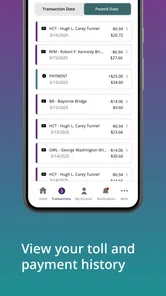
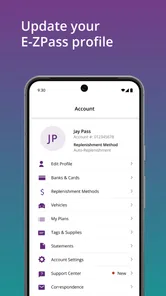
The app is packed with features that make managing your E-ZPass account as easy as pie. I mean, who knew paying tolls could be so seamless? You can view your account balance, check your toll history, and even update your payment options without breaking a sweat. One feature I particularly loved is the ability to receive real-time alerts. Whether it's a low account balance or an issue with a toll payment, you’ll be in the know instantly.
For me, the practical value of checking toll history is not just seeing that a trip appears in an account; it is having a reference point when I am trying to understand my toll activity later. I would review it after a drive if a charge caught my attention, then decide whether it needs further follow-up. That is more useful than relying on a fading memory of which road I took, but it still calls for a little care: an entry is a reason to examine the account, not a reason to assume every question has been answered.
Payment options and balance checks also make a sensible pre-trip pairing. If the balance looks lower than expected, I can review the account before setting out rather than discovering the concern during a busy week of driving. I would not make a last-minute change while moving or count on an alert as a substitute for preparation. The strongest workflow is simple: check while parked, address what needs attention, and leave the phone alone once the drive starts.
Another nifty feature is the map integration. It’s not just about tolls; it helps you navigate through the best routes, avoiding traffic like a pro. It’s like having a personal traffic guru in your pocket!
User Experience: Easy Peasy
Using the app is as straightforward as it gets. The menus are well-organized, and the response time is quick. Even if you’re not tech-savvy, you’ll find your way around without any fuss. I also appreciate the app’s design, which is easy on the eyes and doesn't overwhelm you with too many options at once.
That ease matters most when I open the app for one clear task, such as checking the balance or reviewing a toll entry. I would avoid turning a quick check into a long session of tapping through account details, especially close to departure. If something needs more attention, it is better to set aside time when parked than to rush through a decision just because the information is on a phone.
As with any account-based tool, I would also treat access details carefully and make sure I am signed in to the account I intend to review, especially if a device is shared. That is a small but worthwhile check before changing payment information or interpreting activity. The benefit of keeping account tasks on a phone comes with the ordinary responsibility of protecting access to personal account information.
Customer support is another area where the app shines. If you ever run into issues, the help section is comprehensive, and you can easily reach out for assistance. The responses are prompt, and they genuinely seem to care about resolving any issues.
What to expect from a dedicated toll app
Compared with the usual alternatives, this is best understood as an account companion, not a one-stop travel planner. A navigation app helps answer where to go, what route to take, or how traffic may affect the trip. A browser or general account portal can be useful when you need to handle a broader online task, while this app is the more direct choice when you want to check New York toll-account matters from your phone.
That focus is a strength for frequent users, but it is also a limit. A visitor who only wants to compare routes or avoid congestion will get more value from navigation software. Someone who does not manage an E-ZPass NY account may not have a reason to keep a dedicated toll app readily available. I would choose based on the task rather than expecting one app to cover directions, trip planning, and account administration equally well.
It is also worth separating what the app can help you review from what you should do on the road. Even if an alert arrives during a trip, I would wait until safely parked before opening it or deciding whether an account action is needed. The phone’s convenience should reduce the effort of managing tolls, not create another reason to look away from traffic.
A realistic day when it earns its place
Imagine a weekday when I have a regular commute in the morning and a longer drive planned after work. Before leaving home, I check the toll account and notice whether the balance or activity calls for attention. Then I use my usual navigation app for directions and traffic. The toll app has done its job before the car moves: it has helped me start the day with a clearer picture of the account, without competing with the tools I need while driving.
Later, if I want to understand a toll entry, I can review the account while parked at home rather than trying to remember details in the middle of the journey. If someone else used the household car, I can compare the timing with what we already know about that trip and decide whether a closer account review is needed. This is a modest convenience, but it turns toll administration into a small, manageable routine instead of an end-of-week guessing game.
For a visitor making a one-off trip, the balance is different. If the main concern is finding a route, the navigation app should lead. If the visitor already has a reason to manage E-ZPass NY or Tolls By Mail matters, the official app is relevant; otherwise, installing it may add little to the trip. The right choice depends on whether account access is part of the actual problem, not simply whether the drive crosses a toll road.
Wrapping It Up
In conclusion, the Official E-ZPass NY app is a game-changer for anyone who frequently travels through New York’s toll roads. It saves time, reduces stress, and makes managing your toll payments as easy as a Sunday morning. Whether you’re a daily commuter or an occasional traveler, this app is worth having on your phone.
So next time you’re planning a road trip, remember to have this app handy. Trust me, it’s one less thing to worry about, letting you focus on the journey and not the tolls. Happy travels!
Who benefits most, and what to keep in mind
For me, this is most useful for New York drivers who already manage an E-ZPass account and want a convenient way to check it between trips. A commuter can glance at account activity before the week begins; a family planning a drive can review things in advance rather than leaving toll questions until arrival. The app is free, and its Everyone content rating makes it broadly suitable, though the account-focused purpose is what really determines whether it belongs on your phone.
There is a trade-off: an account app can help you stay organized, but it does not remove the need to pay attention to your travel plans or verify account details when something looks unexpected. I would use alerts as a prompt to check, not as a guarantee that every account issue is already resolved. If you only need directions, a navigation app is a better fit; if your priority is E-ZPass NY account management, this is the more relevant tool.
A measured recommendation
Conduent Incorporated develops the app, which sits in the travel and local category. It has a 4.3 average from around 13,000 ratings, with about 4,200 written reviews, and has passed over a million installs. Those figures suggest that many people use it, but I would still judge it by whether you actually need access to your New York toll account. It is free, currently at version 3.10.4, and requires iOS 11 or later.
My practical recommendation is to install it if E-ZPass NY is part of your normal driving routine, then make account checks part of trip preparation rather than an afterthought. If you are only passing through once and do not expect to manage an account, its everyday value will be limited. For regular users, though, keeping toll-related account tasks together on a phone is a sensible convenience—not a substitute for safe driving or a dedicated navigation tool, but a useful companion for the toll side of the journey.
Official E-ZPass NY Frequently Asked Questions
Can the Official E-ZPass NY app help me manage my account while traveling?
Yes. The app is intended to give users a mobile way to manage E-ZPass-related account services, which can be useful when you are away from home. Its account features include viewing account information, checking a balance and transaction history, and replenishing an account. It is a Travel & Local app, published by Conduent Incorporated.
Is the Official E-ZPass NY app available for both Android and iOS?
Yes. The Official E-ZPass NY app is available for Android and iOS, so you can use it on a compatible device while managing your account on the go. Before downloading, check that your device runs Android 11 or later if you are using Android. The app is free, and its content rating is Everyone.
Who publishes the Official E-ZPass NY app, and is it the official service?
The app is published by Conduent Incorporated and is presented as the official E-ZPass NY and Tolls By Mail app. That makes it the relevant choice for users looking for a mobile way to access E-ZPass-related account services. As with any account app, download it from your device’s official app store and check the publisher name before installing.
What is the Official E-ZPass NY app used for?
The Official E-ZPass NY app is designed to provide users with a convenient way to manage their E-ZPass accounts directly from their mobile devices. Users can view and update account information, check their balance, view transaction history, and easily replenish their account balance. It aims to simplify toll payments for New York residents and frequent travelers.
Is the Official E-ZPass NY app free to download and use?
Yes, the Official E-ZPass NY app is free to download on both Android and iOS platforms. Users can access most of the app's features without any additional charges; however, they should ensure they have an existing E-ZPass account to fully utilize the app's services. Standard data rates may apply depending on your mobile carrier.
Pros
- Easy toll payments management
- Wide network coverage
- Real-time balance updates
- Secure payment options
- User-friendly interface
Cons
- Limited to participating states
- Requires internet connection
- Potential app glitches
- No offline mode available
- Region-specific features













