ConnectEBT
- 7.48K
- 4.6
- Installs
- 1.00M
- Price
- Free

Screenshots
Analysis by Reviewed
In the first few days, ConnectEBT earns its place by making a small but important task easier: checking where your EBT benefits stand without waiting until you reach the checkout. I find that kind of quick access most useful when it helps me make a calmer shopping plan, rather than when I’m already trying to pay. The app is free, and its focus is practical: keeping benefit information close at hand.
Ease of Use
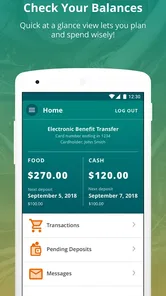
First things first, the user interface of the ConnectEBT app is pretty straightforward. As soon as you open it, you're greeted with a clean layout that’s super easy to navigate. Everything is where you’d expect it to be, so even if you’re not the most tech-savvy person around, you won’t find yourself getting lost. The design is simple, but that’s exactly what you need when you’re managing your benefits on the go.
For a new user, the key question is whether the app suits the way you actually manage your account. It is a finance app from Conduent Incorporated, built around EBT SNAP and Cash account information rather than broader budgeting or banking. That narrow purpose is a strength if you want a direct way to check benefits; it is not a replacement for a general money-management app, a bank app, or the official channel you need for tasks ConnectEBT does not cover.
Getting Through the First Week
My advice is to set it up when you are at home and not in a hurry. A grocery checkout is the worst place to discover that you need to sort out an account-access issue. Once you are signed in, take a moment to find the balance and recent activity, then confirm you understand which account information you are looking at. That small orientation makes later checks quicker and less stressful.
It is also worth deciding what you want the app to replace in your routine. If you currently wait until you are at the store to find out what is available, a phone check beforehand can change how you plan. If you already have a reliable way to check and rarely need the information while away from home, the app may add little beyond another sign-in to remember.
Features Worth Exploring
Now, onto the features. One of the standout functionalities of the app is its ability to display your EBT balance instantly. No more guessing games or paper statements; you can see exactly how much you have left at any time. This is a lifesaver, especially when you're at the grocery store trying to budget your spending.
A useful habit is to check the balance before making a shopping list, then look at it again after a trip if you want to reconcile what you expected to spend with what appears in the account. The transaction history can help you spot a purchase you don’t recognize, but it is a record to review, not a substitute for contacting the appropriate EBT support channel when an issue needs action. If a balance or transaction looks wrong, note the details and follow the official reporting process rather than relying on the app alone.
More From Our News Desk

 Weather - By Xiaomi
Weather by Xiaomi Review: Clear at a Glance, Less Clear Up Close
Xiaomi’s weather app makes everyday forecasts quick to scan, but its calm surface can leave useful details and recovery paths harder to find than they should be.

 X
X Under Pressure: Can It Recover When Posting Goes Wrong?
A resilience-focused review of X, examining setup, mistaken posts, interruptions, weak connections, and the gaps that matter when recovery needs to be dependable.

 Clash of Clans
 Is Won Between the Battles
Its raids are quick; its community is a long-term project of coordination, teaching, rivalry, and shared responsibility—with all the friction that entails.

 Android Auto
 Makes the Case for Quieter Car Software
The car interface is no longer judged by how much it can do, but by how quietly it helps. Android Auto shows what drivers now expect—and what still gets in the way.

 MobiOffice: Word, Sheets, PDF
MobiOffice: Transforming Mobile Productivity with Seamless Integration
MobiOffice: Word, Sheets, PDF is redefining mobile productivity with a surprising blend of functionality and innovation.

 EA SPORTS FC Soccer Mobile 26
EA SPORTS FC™ Mobile Soccer: Redefining Mobile Sports Gaming
Dive into EA SPORTS FC™ Mobile Soccer, where immersive gameplay and strategic depth transform mobile sports gaming.
Latest News



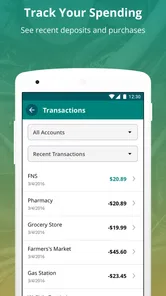
Another great feature is transaction history. The app keeps a detailed log of your past transactions, which is perfect for tracking your spending habits. Plus, if you ever notice something fishy, you can quickly spot it and report any discrepancies.
One practical way to use that history is to check it when a purchase total feels unfamiliar, rather than trying to remember every trip from memory. Look for the transaction that prompted your concern, record what you see, and compare it with your own receipt or notes if you have them. This makes the record more useful while keeping expectations realistic: reviewing an entry can help you identify a question, but resolving that question may require a separate official step.
I also love that it supports multiple languages. This makes it accessible to a wider audience, ensuring that language barriers don’t prevent anyone from managing their benefits effectively. It's small details like this that make the app inclusive and user-friendly.
Making It Useful Beyond the First Week
The lasting value here comes from repetition, not novelty. A quick balance check before shopping and a brief transaction review afterward can turn ConnectEBT into a dependable part of a routine without asking you to maintain another elaborate system. For a household sharing shopping responsibilities, checking the account before someone leaves can also prevent avoidable uncertainty at the register.
Imagine planning a grocery run after a busy day: you check the available balance at home, adjust the list to fit what you can spend, and review the latest activity later if the total surprises you. That small sequence is where the app is most useful. It cannot make a budget decision for you, but it can make the information behind that decision easier to reach.
For a household, a helpful boundary is to treat the app as a quick reference for the person who is authorized to access the account, not as a shared household ledger. If more than one person helps with shopping, agree on a simple routine for checking the available amount and communicating it. That avoids relying on someone else’s memory or leaving account access open on a shared phone.
Compared with paper records, the convenience is clear; compared with a general finance app, ConnectEBT is more focused on the EBT account itself. That focus also means it should not be your only source of help for every account question. I’d keep any official contact or account-recovery route you already use accessible, especially if you depend on the app for a time-sensitive check.
Where It Fits Among Other Options
Compared with checking through a browser or using paper notes, a dedicated phone app can make routine balance checks less cumbersome, especially when you are already away from home. A general budgeting app may be better for seeing several kinds of household spending together, but it will not serve as a substitute for the account-specific information ConnectEBT is designed to show. I see the choice as a matter of purpose: use this app for EBT account awareness, and use broader tools for the rest of your finances.
There is a trade-off in keeping those jobs separate. A focused app can make one task easier without asking you to build a complete budget inside it, but you may still need another method to plan bills, compare household expenses, or keep receipts. If your main need is a full picture of money coming in and going out, a general finance tool is likely the better companion. If the recurring question is simply what is available in your EBT account, ConnectEBT is the more direct fit.
Security and Reliability
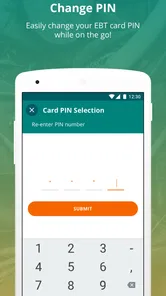
When it comes to apps dealing with financial information, security is a top priority. Thankfully, ConnectEBT doesn’t disappoint. It has solid security measures in place to protect your personal information. You can set up a secure password or use biometric authentication if your device supports it. This adds an extra layer of security, giving you peace of mind.
Because this is account information, I would avoid checking it on a device or network I don’t trust and would keep the phone’s screen lock enabled. If you share a device, sign out when appropriate and make sure another person cannot casually open your account. Those are sensible habits for any financial app, and they matter more than a quick convenience when benefits are involved.
For a phone that is used by several people, privacy deserves a little thought before the app becomes part of a daily routine. Avoid saving access in a way that makes it easy for someone else to open the account, and do not leave the screen displaying financial details in a public place. Convenience is valuable here, but it should not come at the cost of control over who can see account information.
In terms of reliability, the app performs well. I haven't encountered any major bugs or crashes, and updates seem to roll out regularly to keep things running smoothly. It’s always nice when an app just works without any fuss.
Maintenance, Friction, and Fatigue
The maintenance burden is modest if you use the app only when it answers a real question: check before shopping, review activity when something seems off, and keep your sign-in details secure. It does not need to become another daily chore. I would avoid opening it out of habit when you have no decision to make; that can turn a useful reference into unnecessary screen time without improving your planning.
The most likely source of frustration is dependence. If you expect the app to solve every account problem, a login difficulty or an unfamiliar transaction can feel like a dead end. I would treat it as a convenient window onto account information, while keeping the relevant official support route in mind for access issues or concerns that need follow-up. For an urgent purchase, check ahead rather than making the checkout line your test of whether everything is working.
Who It Suits, and When to Look Elsewhere
ConnectEBT is a good fit if you use an EBT SNAP or Cash account and mainly want convenient access to its information. Someone who shops in different places or needs to check a balance away from home may appreciate having that check on a phone. It is less suitable if what you need is a full household budget, account services beyond the app’s purpose, or a solution for someone who cannot safely or comfortably use a smartphone. In those cases, keep using the relevant official alternatives rather than expecting one focused app to do everything.
It can also be a poor fit if you rarely check your account and already have a method that feels simple and dependable. Installing an app is not automatically an improvement: it brings a sign-in and a device to maintain, so the convenience only matters if you use it often enough to outweigh that small overhead. For someone who prefers paper or does not want account information on a phone, sticking with an appropriate alternative is a reasonable choice.
Before relying on it for an important errand, make sure you can sign in and find the account information you need while you have time to troubleshoot. That simple first-use check reduces the chance of discovering a login problem in a checkout line. If the app is unavailable or does not resolve a concern, use the appropriate official support route; the phone view is convenient, but it should not be your only plan.
Final Thoughts
All in all, ConnectEBT is a must-have for anyone who uses EBT benefits. It offers a seamless experience with its easy-to-use interface and practical features. Whether you’re checking your balance or reviewing past transactions, everything is just a tap away. It's one of those apps that once you start using it, you wonder how you ever managed without it.
So, if you haven't already, go ahead and download it. It’s available for both Android and iOS, and trust me, it’s going to make managing your benefits so much easier. Give it a shot, and you might just find yourself recommending it to others too!
Its staying power depends on how often you need that focused access. With a 4.3 average from around 14,000 ratings and more than a million installs, it has reached many people, though those figures are context rather than a promise that it will fit every account or routine. The app is free, rated for everyone, and its current version is 2.3.5, released in October 2025; it supports Android 7.0 and later. I’d keep it if quick EBT checks regularly save you uncertainty, and skip it if you rarely use a phone for account management or need broader financial tools.
ConnectEBT Frequently Asked Questions
Is ConnectEBT available in my state or for my EBT program?
Before downloading ConnectEBT, check whether it supports the state and EBT program connected to your account. The app is designed for access to EBT SNAP and Cash account information, but account access depends on whether your program is supported. Confirming compatibility with your EBT account first can help you avoid installing an app that does not serve your needs.
What information should I have ready to set up or sign in to ConnectEBT?
Have the information associated with your EBT account available when you begin setting up or signing in. You will need to use the account credentials required for access, so make sure you can enter them accurately and keep them private. If you already use ConnectEBT, your existing sign-in details may be needed to return to your account on a device.
Who develops ConnectEBT, and what should I check before downloading it?
ConnectEBT is a finance app developed by Conduent Incorporated for accessing EBT SNAP and Cash account information. Before downloading, check that you are choosing the official ConnectEBT app and that your device meets its operating-system requirements. The app is free, and its age rating is Everyone, making it suitable for a broad range of users.
What is ConnectEBT and how does it work?
ConnectEBT is a mobile application designed to help users efficiently manage their Electronic Benefits Transfer (EBT) accounts. The app allows users to check their EBT balance, view transaction history, and receive important notifications about their benefits. It simplifies the process of managing SNAP and other benefits, ensuring users have easy access to their account information at any time.
Is ConnectEBT available for both Android and iOS devices?
Yes, ConnectEBT is available for download on both Android and iOS platforms. Users can easily find the app on the Google Play Store for Android devices and the Apple App Store for iOS devices. This ensures that a broad range of users can access their EBT accounts conveniently from their smartphones, regardless of their operating system.
Pros
- User-friendly interface
- Real-time balance updates
- Secure login options
- Multiple account support
- Easy transaction history view
Cons
- Limited state availability
- Occasional login issues
- No offline access
- Basic design aesthetics
- Customer support delays