Go Program Way2Go Card
- 24.40K
- 3.5
- Installs
- 1.00M
- Price
- Free

Screenshots
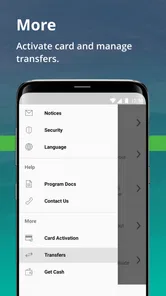
Analysis by Reviewed
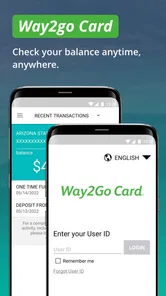
Way2Go Card is best understood as a practical companion for people who already use a Go Program card, rather than an all-purpose money-management app. I’d reach for it to check what is available and review card activity, especially when I’m away from a computer. That focused role is useful, but it also sets expectations: it is not a replacement for a budgeting tool or a broad bank account dashboard.
Readability and finding the essentials
When I’m checking a card balance, I want the answer quickly, without hunting through unrelated features. The app’s purpose is narrow, which can make routine checks feel more direct than opening a general finance app with accounts, budgets, and other tools competing for attention. It is a finance app from Conduent Incorporated, and its Go Program focus is clear from the name and intended use.
That simplicity matters for people who use the app only occasionally. A person who checks a balance before shopping, then reviews a transaction later, benefits from having those tasks gathered around the card rather than mixed into a larger financial picture. I would still take a moment during the first sign-in to learn where the balance and activity views are, so a quick check does not become a stressful search when time is tight.
Using the card app in everyday situations
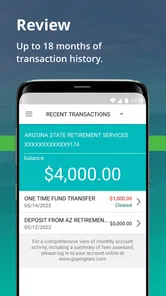
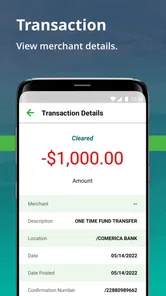
On a normal day, I can imagine checking the available amount before buying groceries, then looking at the activity afterward to confirm that a purchase appears as expected. That second step is more than bookkeeping: it can help me notice a transaction I don’t recognize while the details are still fresh. A useful habit is to check activity at a consistent time rather than repeatedly refreshing the app throughout the day.
Motor, sensory, and situational access
Using a phone can be easier than signing in on a computer for someone who already keeps their device nearby, but it can also be less comfortable for anyone who finds small touch controls difficult or needs extra time to read a screen. I would use the phone’s own display and accessibility settings to make text easier to see or reduce sensory strain, then test whether the main balance and transaction tasks remain comfortable. Those adjustments are practical starting points, not a guarantee that every screen or control will suit every person.
Access also depends on the situation. A quick check while seated at home is different from trying to review a transaction in a noisy shop, with one hand occupied or a weak connection. For an important purchase, I’d check the balance before getting in line and avoid relying on a last-second login. If someone else helps manage the card, it is better to agree on a safe way to share information than to hand over login details casually.
Where it fits—and where it doesn’t
The app is free, has an Everyone age rating, and is on version 3.3.3, with a minimum operating-system requirement of 7.0. It has an average rating of 3.7 from around 55,000 ratings, with more than 23,000 written reviews and over 1 million installs. Those figures suggest a sizeable audience, but they don’t tell me whether the app will fit a particular person’s device, card arrangement, or access needs.
More From Our News Desk

 Weather - By Xiaomi
Weather by Xiaomi Review: Clear at a Glance, Less Clear Up Close
Xiaomi’s weather app makes everyday forecasts quick to scan, but its calm surface can leave useful details and recovery paths harder to find than they should be.

 X
X Under Pressure: Can It Recover When Posting Goes Wrong?
A resilience-focused review of X, examining setup, mistaken posts, interruptions, weak connections, and the gaps that matter when recovery needs to be dependable.

 Clash of Clans
 Is Won Between the Battles
Its raids are quick; its community is a long-term project of coordination, teaching, rivalry, and shared responsibility—with all the friction that entails.

 Android Auto
 Makes the Case for Quieter Car Software
The car interface is no longer judged by how much it can do, but by how quietly it helps. Android Auto shows what drivers now expect—and what still gets in the way.

 MobiOffice: Word, Sheets, PDF
MobiOffice: Transforming Mobile Productivity with Seamless Integration
MobiOffice: Word, Sheets, PDF is redefining mobile productivity with a surprising blend of functionality and innovation.

 EA SPORTS FC Soccer Mobile 26
EA SPORTS FC™ Mobile Soccer: Redefining Mobile Sports Gaming
Dive into EA SPORTS FC™ Mobile Soccer, where immersive gameplay and strategic depth transform mobile sports gaming.
Latest News



Compared with a general banking app, Go Program’s advantage is its specific focus on the card; the trade-off is that people who want a complete view of savings, bills, budgets, and several accounts will likely prefer their bank’s app or a dedicated budgeting service. I’d recommend this one to someone who mainly needs card-focused account checks. I’d skip it as a standalone finance hub if I wanted to plan monthly spending or manage unrelated accounts in the same place.
Security and careful habits
For any finance app, I think about both the protection built into the service and the habits around the phone. I would use a private device when possible, lock the screen when I’m finished, and avoid checking sensitive account details where someone nearby can read them. If the phone is shared, keeping account access private is especially important. I would also verify account activity through the appropriate official support route if a transaction looks wrong, rather than assuming that an unfamiliar entry is harmless or that a quick app check resolves a dispute.
Getting to Know the Way2Go Card
First things first, the Way2Go Card is all about convenience. Think of it as your personal financial assistant, always ready to give you a helping hand. It's designed to make your life easier by providing a simple way to manage your Way2Go Card account on the go. Whether you're checking your balance, reviewing recent transactions, or transferring funds, this app has got you covered.
Smooth Sailing with User Experience
One of the first things I noticed about the app is its clean and intuitive interface. It's like the developers knew exactly what I needed and delivered it on a silver platter. The navigation is straightforward, and I didn't have to spend ages figuring out where everything was. Plus, the app is pretty fast, which is a huge plus in my book. No one likes to sit around waiting for screens to load, right?
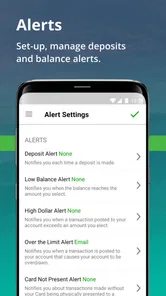
Another feature that stands out is the notification system. I love how the app sends alerts for transactions and balance updates. It's like having a mini financial advisor in my pocket, always keeping me in the loop. And hey, who wouldn't want that?
Security and Peace of Mind
In today's world, security is paramount, especially when it comes to your hard-earned money. The Way2Go Card app doesn't skimp on this front. With its robust security features, I felt reassured knowing that my information was safe and sound. The app uses encryption and secure login methods, which is always a relief.
Moreover, if you ever lose your card or suspect any suspicious activity, the app lets you report it instantly. It's like having a security team on standby, ensuring that your finances are always protected.
Wrapping Up
All in all, the Way2Go Card app is a fantastic tool for anyone looking to simplify their financial management. It's user-friendly, secure, and packed with features that make managing your funds a breeze. So, if you're tired of juggling multiple financial apps and want something that truly delivers, give this app a shot. Trust me, you won't regret it!
My inclusive verdict
For me, the strongest case for this app is straightforward access to card information without treating it as a full banking suite. Its usefulness for different abilities depends on whether the phone’s controls, screen presentation, and sign-in steps work comfortably for the individual; I’d try the core balance and activity tasks before relying on it for time-sensitive decisions. The app is free, and its focused role may suit a cardholder who values quick checks, while someone who needs broader financial planning or a different way to interact with account information may be better served elsewhere.
A practical routine for card checks
I find it helpful to separate a quick balance check from a more careful review of activity. Before leaving home, I would check the amount available and make a rough plan for the purchases I expect to make. Later, when I have a quiet moment, I would compare the activity with receipts or what I remember buying. This creates a useful rhythm without turning the app into something I feel compelled to open after every small transaction.
That workflow is especially useful for someone who relies on a card for planned, everyday spending. If a purchase is declined or the available amount seems different from what I expected, I would pause and review the account rather than repeatedly trying the same payment. The app can help me inspect the card activity, but it should not be treated as a substitute for keeping receipts or contacting the proper support channel when a charge needs investigation.
What to expect from alerts and history
Notifications can be convenient because they may bring activity to my attention without requiring me to open the app at a set moment. I would treat them as prompts, not as a complete record: a notification is useful for noticing that something happened, while the activity view is the place I would check when I want to understand the account more carefully. If alerts become distracting, I would review the phone’s notification settings and choose a level that supports awareness without interrupting every part of the day.
For anyone sharing responsibility for card-related tasks with a trusted helper, a simple routine can reduce confusion: agree who checks activity, when to discuss a questionable item, and how to reach official support. That is safer and clearer than passing around passwords or relying on a helper to make decisions without the cardholder’s agreement. The app may make information easier to reach, but good boundaries still matter.
Choosing it over other finance tools
The main alternative is not necessarily another card app; for many people it is the bank app they already use, a paper record, or a budgeting tool. Those options serve different jobs. A bank dashboard is more useful when I need to see several accounts together, while a spreadsheet or budget app can help plan spending across a month. A paper note may be easier for someone who prefers not to navigate a phone for every check. Go Program’s appeal is narrower: it keeps attention on its associated card, which can be a benefit when that is the information I need and a limitation when I need anything broader.
I would choose the app if card balance and activity checks are part of my regular routine and using a phone is comfortable for me. I would not choose it as my only money-management method if I needed household budgeting, bill tracking, or a combined view of unrelated accounts. Nor would I rely on it as my sole option when I cannot reliably access a phone or connection at the moment a purchase decision has to be made. In those cases, a backup routine—such as checking ahead or keeping a personal spending note—makes more sense.
Comfort, privacy, and access in different settings
There is a trade-off between quick access and privacy. At home, I can take time to read the screen and check details without feeling rushed. In public, I would keep the screen angled away from others, avoid saying account details aloud, and postpone a longer review until I can concentrate. Someone with low vision, tremor, limited reach, or sensitivity to bright displays may also want to test the app at a comfortable pace and adjust the phone itself before deciding whether the routine works for them.
These choices do not establish that every control is accessible to every user. They are ways I would assess the experience in my own circumstances: can I reach the necessary screens, read the information, and complete the task without pain or undue stress? If not, I would look for a supported alternative way to manage the card rather than assume that practice alone will solve the problem. A finance tool is only useful when the person who needs it can actually use it.
Who will get the most from it
I think the best fit is a Go Program cardholder who wants a convenient way to keep an eye on card activity and available funds, and who is comfortable doing those checks on a phone. It can also suit someone who prefers a focused screen over a general banking app crowded with accounts and services they do not need. The app’s modest scope is not a flaw for that user; it keeps the central task easy to understand.
Someone who needs detailed planning, extensive reporting, or a consolidated household view should look elsewhere for those jobs and use this app only for card-specific checks if it suits them. The same applies to anyone who finds phone-based sign-in or touch navigation difficult: trying the essential tasks first is more sensible than making it the only route to account information. I would make that decision based on comfort and reliability, not on the app’s popularity alone.
My inclusive verdict
For me, the strongest case for this app is straightforward access to card information without treating it as a full banking suite. Its usefulness for different abilities depends on whether the phone’s controls, screen presentation, and sign-in steps work comfortably for the individual; I’d try the core balance and activity tasks before relying on it for time-sensitive decisions. The app is free, and its focused role may suit a cardholder who values quick checks, while someone who needs broader financial planning or a different way to interact with account information may be better served elsewhere.
Go Program Way2Go Card Frequently Asked Questions
Can I download Go Program Way2Go Card on iPhone or Android?
Go Program Way2Go Card is a finance app for managing information connected to a Way2Go Card. Before downloading, check that you are choosing the version available for your device and that your operating system meets its requirements. The app is free, and its age rating is Everyone. It is intended for cardholders who want to monitor their account from a mobile device.
Do I need a Way2Go Card account to use the app?
Yes, the app’s features are centered on information related to a Way2Go Card account, so it is most useful if you already have a card or are expecting one. Its purpose is to help cardholders check account details such as their available balance and transaction activity. It is not a general-purpose banking app for managing unrelated accounts.
Is Go Program Way2Go Card free, and which devices can run it?
Go Program Way2Go Card is a free finance app from Conduent Incorporated. It is rated for Everyone and requires Android 7.0 or later, so checking your device’s operating system before downloading can help avoid compatibility problems. The app is intended for people who want a mobile way to monitor their Way2Go Card account.
What can I check in the Go Program Way2Go Card app?
The app is designed to help cardholders monitor their available balance, transaction activity and more. It can be useful when you want to review account activity on your phone rather than rely only on other ways of checking your card. Its focus is managing information related to the Way2Go Card, so you will need a card account to make use of those features.
What is the Way2Go Card and how does it work?
The Way2Go Card is a prepaid debit card issued by Go Program, designed to manage and access government benefits or payments conveniently. Users can receive payments directly onto the card and use it for purchases, ATM withdrawals, and online transactions. This system eliminates the need for checks or cash while providing a secure and efficient method to access funds.
Pros
- User-friendly interface enhances accessibility.
- Real-time balance updates for better financial management.
- Secure login system ensures data protection.
- Multiple language support broadens accessibility.
- Efficient customer service aids quick issue resolution.
Cons
- Limited features compared to other financial apps.
- Occasional app crashes disrupt user experience.
- Lacks offline functionality for balance checks.
- No fingerprint authentication for quick access.
- Notifications can be delayed at times.