

US Public Weather
- 289.00
- 3.7
- Installs
- 100.00K
- Price
- Free
Screenshots
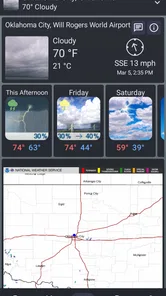
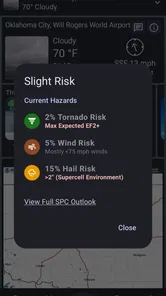
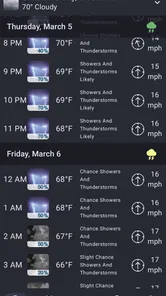
Analysis by Reviewed
I often check the forecast before deciding whether to walk, drive, or change plans, and I like having an option that focuses on weather information rather than lifestyle extras. NWS Weather is an unofficial app from MeteorologyMan for people who want to consult National Weather Service forecasts on a phone. Its appeal is straightforward: it brings that source into an app format, though the word “unofficial” matters. I treat it as a convenient way to view weather information, not as an official National Weather Service product.
What the app offers now
This is a free weather app, with optional in-app purchases priced from $0.99 to $9.99 per item. It is rated for Everyone and has reached over 100,000 installs. Its average is 3.9 from around 370 ratings, which suggests a mixed but substantial response rather than universal satisfaction. Those figures do not tell me whether it will suit your routine, so I would judge it by whether its presentation and forecast tools fit the way you actually make plans.
Using forecasts to make practical decisions
The useful question is not only whether rain is expected, but when it might affect something I have planned. For an ordinary commute, an hourly view can help me decide whether to leave earlier or carry a rain jacket. For a weekend walk, a broader forecast gives me a first check before I settle on a route or time. Radar can add context when precipitation is nearby, but I would still check the forecast details rather than treating a radar image as a guarantee about what will happen at my exact location.
Severe-weather alerts are another reason to keep a weather app within easy reach. I would set them around the places and conditions that matter to me, then make sure the phone itself is allowed to deliver notifications. Alerts are most helpful when they prompt a sensible next step—checking local guidance, adjusting travel, or moving an outdoor activity—not when they replace judgement. If I am planning something where changing conditions could put people at risk, I would use the app as one part of preparation, not my only source of information.
Where it sits among weather alternatives
Many general-purpose weather apps combine forecasts with polished maps, lifestyle recommendations, news, or other extras. This app’s stated connection to National Weather Service information gives it a more focused role: it may appeal to someone who would rather consult that source than rely solely on a broad commercial weather experience. The trade-off is that a source-focused app is not automatically the best fit for everyone. If you mainly want a quick glance at a home-screen forecast, prefer a particularly refined map experience, or depend on tools from another weather service, your usual app may be more convenient.
I would also keep the unofficial status in mind when deciding how to use it. The app is a separate product developed by MeteorologyMan, rather than the agency’s own app. That distinction is worth understanding if you expect agency branding, official support, or a direct line between an app feature and the agency’s own services. I would check the forecast source and alert details inside the app, especially before relying on them for travel or safety decisions.
Version history and what existing users should consider
The app was released on April 12, 2023, and its current version is 2.0.14. Those facts show that it has a versioned history, but they do not by themselves establish which features changed or how the interface has evolved. If you already use it, I would focus on whether the current build continues to show the locations, forecast views, and alerts you depend on. After an update, a quick check of saved places and notification settings is a useful habit for any weather app, particularly before a season when severe weather is more likely.
More From Our News Desk

 Gmail
GmailGmail in a Busy Inbox: Who Benefits Most?
From first account to crowded workday, Gmail earns its place through dependable search and flexible sorting—but its best fit depends on how much inbox maintenance you can tolerate.

 Prime Video
Switching to Prime Video: What Changes in Your Viewing Routine
Prime Video can make a compelling second home for streaming, but switching means learning a different catalog, rental layer, and route from browsing to playback.

 Universal TV Remote Control
Universal TV Remote Control Works Best as a Reliable Backup
A phone remote earns its place through quick setup and reliable habits. Here is how to get more from Universal TV Remote Control—and where its limits show.

 Weather - By Xiaomi
Weather by Xiaomi Review: Clear at a Glance, Less Clear Up Close
Xiaomi’s weather app makes everyday forecasts quick to scan, but its calm surface can leave useful details and recovery paths harder to find than they should be.

 X
XX Under Pressure: Can It Recover When Posting Goes Wrong?
A resilience-focused review of X, examining setup, mistaken posts, interruptions, weak connections, and the gaps that matter when recovery needs to be dependable.

 Clash of Clans
Clash of Clans Is Won Between the Battles
Its raids are quick; its community is a long-term project of coordination, teaching, rivalry, and shared responsibility—with all the friction that entails.
Latest News



For someone considering a switch, I would not assume that a newer version necessarily fixes a specific annoyance. Instead, compare the current app’s forecast presentation with the way you already check weather: can you find the information you need quickly, and does it help you decide what to do? That practical test matters more than a version number alone. The minimum operating-system requirement is version 11, so compatibility is also worth checking before installing.
Small habits that make the information more useful
A good workflow is to check the forecast at two different scales: first the hourly outlook for immediate plans, then the longer view for commitments later in the week. When radar is available, use it to understand the movement and spread of precipitation rather than zooming in on a single moment and assuming it predicts your street precisely. This distinction is easy to overlook, but it can prevent a map from creating more confidence than the forecast supports.
Location choice can matter just as much as the display. If your day regularly takes you away from home, check that the location you are viewing is the one relevant to your next activity. A forecast for home may not answer whether an afternoon errand across town will be wet. For a planned hike or outdoor event, I would look again shortly before leaving and keep a backup plan; a forecast is a planning aid, not a promise that conditions will stay fixed.
Limits, fit, and a sensible verdict
The app will make the most sense for people who specifically want a mobile way to consult National Weather Service information and who value forecasts, radar, and weather alerts in one place. It is less compelling if you need a particular interface style, want an app that is officially published by the weather agency, or already have a weather service that gives you everything you need. The optional purchases also mean I would not describe every possible part of the experience as necessarily free, even though the app itself is free to install.
There is also a difference between a clear forecast screen and a complete decision tool. Weather can vary by location and change over time, so I would avoid using any single app view as the sole basis for a high-stakes choice. For routine decisions—whether to take an umbrella, move a picnic, or check conditions before a drive—the focused approach can be handy. For a serious weather situation, I would read the relevant alert carefully and follow appropriate local instructions.
A grounded choice for everyday checking
Weather apps are a dime a dozen, aren’t they? But every now and then, one stands out from the crowd, and that’s exactly what NWS Weather does. If you’re like me and you want your weather updates to be both accurate and easy to digest, then buckle up, because I’m about to dive into why this app might just be your new best friend.
First things first, the NWS Weather app is built for those who crave real-time weather updates without the fluff. You know, no unnecessary bells and whistles—just straight-to-the-point forecast data. It taps directly into the National Weather Service, so you’re getting data straight from the horse’s mouth, so to speak. This means the info is not just accurate but also timely, which is crucial when you’re planning your day or week.
User-Friendly Interface
The app's interface is so intuitive that even my grandma could use it without calling me for tech support every five minutes. The layout is clean, with all your essential information just a tap away. It’s refreshing to see an app that doesn’t overwhelm you with ads and pop-ups every time you try to check the weather. Plus, the color-coded alerts are a nice touch, making it easy to identify severe weather warnings at a glance.
Features That Stand Out
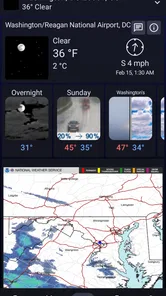
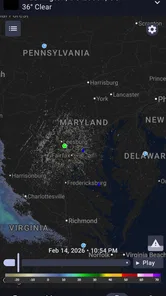
- Radar Imaging: The live radar feature is a personal favorite. It’s like having a mini weather station in your pocket. I can track storms and precipitation in real-time, which is super handy when deciding whether or not to grab that umbrella.
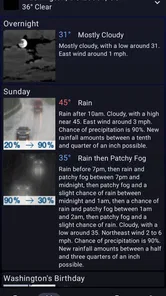
- Hourly and Weekly Forecasts: Whether you need to know if it’s going to rain in the next hour or if you should plan that weekend hike, the app’s got you covered. The detailed forecasts help you plan your activities with confidence.
- Custom Alerts: You can customize alerts for severe weather conditions, so you’re never caught off guard. It’s like having a personal weather assistant keeping an eye out for you.
The Little Things Matter
One thing that really makes NWS Weather stand out is its commitment to user experience. There’s no subscription model or premium version—everything is available for free. In an age where you have to shell out cash for every additional feature, this feels like a breath of fresh air. The app also runs smoothly without draining your battery or hogging your data, which is a big plus in my book.
In conclusion, if you’re tired of weather apps that promise the moon but deliver little more than a drizzle, give NWS Weather a try. It’s reliable, easy to use, and, most importantly, it gets the job done without any fuss. Download it, take it for a spin, and you might just find yourself checking the weather more often than you ever did before.
Making it part of a real day
For a practical test, I would use it during a day with several different plans rather than judging it from a single glance. Imagine leaving home for work, walking to transit, and then meeting a friend outdoors after work. I would check the hourly forecast before leaving, use the radar as a clue if rain is already nearby, and revisit the relevant location before the evening plan. That sequence is more useful than repeatedly opening the same screen without a question in mind.
It also helps to decide what information would actually change your plans. If a light shower only means carrying a jacket, a broad forecast may be enough. If you are driving a long distance or organizing an outdoor gathering, timing and changing conditions matter more, so I would check again closer to departure and have an alternative ready. The app can support those choices, but it cannot make a forecast certain.
Who is likely to appreciate it
I would point this toward someone who prefers weather information associated with the National Weather Service and wants a dedicated phone app rather than a general portal full of unrelated content. It may suit people who routinely check forecasts and alerts, especially if they are comfortable taking a moment to inspect the details rather than relying only on a single summary number or icon. Its focused purpose is a strength when that is what you want.
On the other hand, I would not switch just because the name suggests an official agency app. If your current weather app already gives you a clear local forecast, useful notifications, and a map you trust, changing may add little to your routine. Someone who needs extensive map controls or a highly customized visual layout should compare those specific needs before committing. The better choice is the one that makes the information you use easiest to understand.
Questions worth settling before relying on it
One natural question is whether it is genuinely the agency’s own app. It is not: MeteorologyMan develops this unofficial product. That does not by itself make the forecast information unusable, but it does mean I would distinguish the app’s interface and support from the National Weather Service itself. If official agency presentation is important to you, look for an agency-operated source rather than assuming the name means the app is official.
Another practical question is whether the app costs money. It is free to install, while optional in-app purchases are listed at $0.99 to $9.99 per item. I would check what an offer covers before buying and avoid assuming that every feature is included at no cost. For basic evaluation, you can first see whether the available forecast views fit your needs without making a purchase.
Compatibility is straightforward to check: the app requires operating-system version 11 or later. If your device meets that requirement, the next question is personal rather than technical—does the way it presents weather make it faster for you to decide what to do? I would try it alongside your usual source for a few ordinary checks, then keep the one that is clearer and more dependable for your own routine.
What I would watch as it develops
Version 2.0.14 is the current release, following the app’s launch on April 12, 2023. For an existing user, a version number is most useful as a point of reference, not proof of a particular improvement. I would watch for changes that affect practical basics: whether location selection remains clear, alerts are easy to manage, and forecast information is quick to reach. Those are the details that determine whether a weather app earns a regular place on a phone.
My overall view is that NWS Weather is worth considering if a focused route to National Weather Service weather information matches how you plan your day. I would keep expectations grounded because it is unofficial, and I would not treat radar or alerts as substitutes for judgement and local instructions. If its current presentation works for your locations and habits, it can be a useful everyday check; if you need a different map experience or prefer an official agency product, another option will make more sense.
US Public Weather Frequently Asked Questions
Who developed NWS Weather, and what kind of app is it?
NWS Weather is a weather app developed by MeteorologyMan. It is described as an unofficial app version of the National Weather Service’s Weather.gov service, so it is intended for people who want to check weather information through a separate mobile app. The Everyone content rating makes it suitable for a broad audience, including users who simply want forecasts and alerts close at hand.
What devices can I use NWS Weather on?
NWS Weather is available for Android and iOS devices that meet its minimum operating-system requirement. Before downloading, check your device’s software version in its settings to make sure it is compatible. Keeping your operating system current can also help with general app compatibility, though the main thing to consider is whether your device meets the stated minimum requirement.
What features does the NWS Weather app offer?
The NWS Weather app offers a comprehensive suite of features, including real-time weather updates, detailed forecasts, and severe weather alerts. Users can access radar maps, track storms, and receive personalized notifications for their specific locations. Additionally, the app provides insights into temperature, humidity, wind speed, and more to keep users informed about current and upcoming weather conditions.
Is the NWS Weather app free to use?
Yes, the NWS Weather app is free to download and use. However, some features may require a subscription or in-app purchases for enhanced functionalities. Users can enjoy basic weather updates and alerts without any cost, but exploring premium features might necessitate a one-time purchase or subscription plan. In-app purchases are listed at prices ranging from $0.99 to $9.99 per item, so review any purchase prompt before proceeding.
How accurate are the weather forecasts on the NWS Weather app?
The NWS Weather app leverages data from the National Weather Service, which is renowned for its accuracy and reliability. This ensures that the forecasts provided are highly precise, making it a dependable choice for users seeking accurate weather predictions. However, like all weather forecasts, there can be occasional variances due to unforeseen atmospheric changes.
Pros
- Accurate weather updates
- User-friendly interface
- Customizable alerts
- Real-time notifications
- Wide range of weather data
Cons
- Ads can be intrusive
- Some features require subscription
- Occasional location errors
- Limited offline functionality
- Can drain battery quickly











