

NightOwl Companion
- 2.03K
- 4.8
- Installs
- 100.00K
- Price
- Free

Screenshots
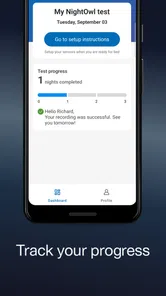
Analysis by Reviewed
I approached NightOwl Companion as a practical medical app rather than a general sleep tracker. Its job is closely tied to the NightOwl sensor, and that makes the experience more focused than apps built around bedtime reminders, phone movement, or broad wellness dashboards. If you are already using the sensor, the app is the place where that hardware becomes useful on your phone. If you do not have the sensor, there is little reason to install it just to browse around.
That narrow purpose is also its main strength. The app is made by Resmed and sits in the medical category, with an Everyone content rating. It is free to download, which removes an obvious barrier for people who need the companion software, although the app’s usefulness still depends on having the related NightOwl equipment. In my experience, that distinction matters: this is not a free substitute for a clinical assessment, and it is not trying to compete with lifestyle-focused sleep diaries.
How NightOwl Companion fits into a real sleep workflow
The most sensible way to use the app is as part of a repeatable routine. I would install it before the first evening, make sure the phone and sensor are ready, and then keep the process consistent rather than treating it like an app I open whenever I remember. A companion application works best when it removes uncertainty from using the physical device, and that is the standard I would apply here.
A realistic scenario is someone who has noticed persistent snoring, tired mornings, or disrupted sleep and has been asked to gather information at home. Instead of writing down impressions after waking, the person can use the NightOwl sensor with its companion app and review the resulting information through the same digital workflow. That can make a conversation with a healthcare professional more concrete, while still leaving diagnosis and treatment decisions to the appropriate professional.
I would not describe this as a replacement for a doctor, a sleep clinic, or a properly interpreted medical evaluation. The app’s role is narrower and more useful when understood that way: it connects the sensor experience with a mobile interface. That focus is reassuring for users who want a dedicated tool, but it may feel limited to anyone expecting a complete sleep-management platform with coaching, meditation, alarms, exercise tracking, and a large collection of lifestyle features.
The current release is version 4.2.0, and the app supports operating systems from version 9 onward. That gives it a practical place on many older phones, although compatibility is only one part of the experience. Sensor-based apps also depend on a stable connection, a charged phone, and a setup that is easy to repeat at bedtime. In other words, an older compatible phone may run the app, but the surrounding hardware routine still deserves attention.
The first setup deserves more care than the store summary suggests
With a sensor companion, the first session is not the moment to discover that the phone is too far away, the device is not ready, or the user is unsure what should happen next. I recommend doing a daytime test before relying on it overnight. This is one of the less obvious advantages of treating the app as part of a system rather than as an ordinary download: a few minutes of preparation can prevent a confusing morning.
More From Our News Desk

 Instagram
Instagram’s Power Comes From Its Place in Your Phone
A close look at how Instagram turns Meta’s reach, recommendation systems and everyday camera habits into durable platform power—and what that costs users.

 Gmail
GmailGmail in a Busy Inbox: Who Benefits Most?
From first account to crowded workday, Gmail earns its place through dependable search and flexible sorting—but its best fit depends on how much inbox maintenance you can tolerate.

 Prime Video
Switching to Prime Video: What Changes in Your Viewing Routine
Prime Video can make a compelling second home for streaming, but switching means learning a different catalog, rental layer, and route from browsing to playback.

 Universal TV Remote Control
Universal TV Remote Control Works Best as a Reliable Backup
A phone remote earns its place through quick setup and reliable habits. Here is how to get more from Universal TV Remote Control—and where its limits show.

 Weather - By Xiaomi
Weather by Xiaomi Review: Clear at a Glance, Less Clear Up Close
Xiaomi’s weather app makes everyday forecasts quick to scan, but its calm surface can leave useful details and recovery paths harder to find than they should be.

 X
XX Under Pressure: Can It Recover When Posting Goes Wrong?
A resilience-focused review of X, examining setup, mistaken posts, interruptions, weak connections, and the gaps that matter when recovery needs to be dependable.
Latest News



I would also keep the phone in a predictable place and avoid changing the routine from one night to the next. That is not a glamorous tip, but it is useful. When a user is trying to understand a health-related pattern, consistency makes the experience easier to interpret. Moving the phone, changing the setup, or interrupting the sensor process can create questions that have nothing to do with sleep itself.
Another practical habit is to check the app after a session instead of repeatedly opening it during the night. Constantly checking a phone can work against the goal of getting uninterrupted rest. A companion app should support the measurement process quietly, not turn bedtime into a technology troubleshooting exercise.
What the current version means for existing users
The presence of version 4.2.0 suggests a product that has continued through several iterations rather than remaining at its original release state. NightOwl Companion first appeared on June 11, 2018, so existing users have had a long-running mobile product to return to. I would view that history as a positive sign of continuity, but I would not confuse a version number with a promise that every part of the experience has been redesigned.
For someone upgrading from an earlier installation, the sensible expectation is stability and ongoing compatibility rather than a completely different app. Before an important recording, I would open the app, confirm that the sensor is recognized, and check that the normal workflow still feels familiar. This is especially worthwhile after changing phones or updating the operating system, because the most frustrating problem in a companion app is often not the medical function itself but the connection between phone and device.
Users who are comfortable with the existing process may appreciate not having to relearn a broad new interface. On the other hand, people hoping for a major expansion into general sleep coaching may find the focused design unchanged in spirit. The app’s evolution appears best understood as the refinement of a dedicated companion, not as a move into every part of the wellness market.
The public response is encouraging: the app holds a 4.8 average from around 24 thousand ratings and has more than 2 thousand written reviews. It has also passed over 100 thousand installs. Those figures do not prove that every setup is effortless, but they do show that the app has reached a substantial user base and that many people have found the overall experience worthwhile.
Where it is stronger than ordinary sleep apps
Most phone-only sleep apps infer behavior from movement, sound, schedules, or manual entries. That can be convenient, but it also means the phone is trying to interpret a night indirectly. NightOwl Companion is different because it is built around a dedicated NightOwl sensor. For a user who specifically needs that sensor’s workflow, a purpose-built companion is more appropriate than an app that merely estimates sleep from a handset placed beside the bed.
This difference also changes the kind of discipline required. A phone-only tracker may work after a quick installation, while a sensor companion asks the user to manage an additional piece of equipment. That is a fair trade-off when the hardware is the reason for using NightOwl, but it is unnecessary complexity for someone who only wants approximate bedtime trends.
Compared with a general wellness app, the medical focus is another meaningful distinction. I would choose NightOwl Companion when the goal is to work with the NightOwl sensor and keep the information tied to that device. I would choose a conventional sleep diary when I mainly wanted to record bedtime, wake time, caffeine, or how rested I felt. These tools answer different questions, and installing both does not automatically make the conclusions better.
There is also a privacy and attention advantage to a focused companion in everyday use: it gives me fewer reasons to browse, compare scores, or chase a daily wellness target. That can be helpful for someone who becomes anxious about sleep metrics. At the same time, a user who wants long-term lifestyle correlations may prefer a broader health platform that brings sleep together with exercise, nutrition, and other personal records.
Small workflow choices that improve the experience
I would create a simple pre-bed checklist: charge the phone, prepare the sensor, place the phone consistently, and open the app early enough to resolve any setup issue without rushing. This is more useful than relying on memory at the end of a tiring day. It also makes the app easier for another household member to use, because the process becomes a short sequence instead of a collection of assumptions.
If several nights are being recorded, I would avoid changing multiple things at once. Do not move the phone, alter the usual bedtime routine, and replace the sensor setup on the same night if the aim is to understand what happened. Keeping the surrounding conditions steady makes the information easier to discuss later. This is a general measurement principle, but it is particularly important when an app is connected to a physical sensor.
I would also write down unusual circumstances separately: travel, illness, an unusually late meal, or a night interrupted by children or noise. The companion app can support the sensor workflow, but personal context still matters. A single unusual night should not automatically become a conclusion about a health condition.
Finally, I would treat the app as a tool for organized communication. If a result or pattern concerns me, I would bring the relevant information to a healthcare professional rather than trying to interpret every detail alone. The practical value is not just seeing something on a screen; it is having a clearer starting point for the next conversation.
Where the experience can feel limited
The biggest limitation is dependence on the NightOwl sensor. Someone searching for a sleep app that works entirely from a phone will not get the right experience here. The free price may look attractive, but it does not turn the app into a standalone tracker. This is a companion product, and that should be the first question before downloading it.
The second limitation is scope. I would not expect a dedicated sensor companion to replace a full sleep diary, a meditation app, or a broader health dashboard. If I wanted reminders, journaling, bedtime coaching, or lifestyle charts in one place, I would probably look elsewhere or use an additional app. Adding tools can be inconvenient, but choosing the wrong all-in-one app can be worse when it hides the purpose of the measurement behind too many unrelated features.
There is also a human limitation: medical information can be easy to overread. A neat result on a phone may feel more definitive than it really is. Users who tend to self-diagnose from every fluctuation should be especially careful. The best use of NightOwl Companion is structured observation followed by appropriate professional guidance, not replacing that guidance with a personal verdict.
People who dislike hardware routines may also lose patience. A phone-only app is quicker to start, while a sensor-based process asks for preparation and consistency. That extra effort is justified only when the sensor’s purpose matches the user’s needs. If the goal is simply to remember when to go to bed, this app is more equipment than necessary.
Who should use it and who should choose something else
I would recommend NightOwl Companion to someone who already has access to the NightOwl sensor, wants a dedicated medical-oriented workflow, and is willing to follow a consistent overnight routine. It is also a reasonable choice for users who prefer a focused companion instead of a crowded wellness application. The strong average rating and sizable user community make it easier to approach with confidence, while the long release history suggests an established product rather than a brand-new experiment.
I would steer a different user toward another option if they only want casual sleep estimates, a manual diary, or lifestyle coaching. A general sleep app may be faster for those needs and may connect more naturally with other personal habits. Likewise, anyone looking for a diagnosis should skip the idea of solving the problem through an app alone and speak with a qualified healthcare professional.
Families should think about the workflow too. If more than one person may use the same phone or sensor, clear separation of sessions and careful attention to who is being recorded become important practical matters. The app’s value depends on matching the right person, device, and session; convenience should not lead to muddled records.
What I would watch in future updates
For future versions, I would pay attention to improvements that reduce friction around setup, connection, and reviewing a completed session. Those are the moments that determine whether a medical companion feels dependable in real life. I would also welcome clearer guidance that helps users understand the difference between collected information and a clinical conclusion, without turning the app into an overwhelming educational portal.
Existing users should watch how well the app keeps its core workflow stable as phone operating systems change. A companion application earns trust when the sensor is easy to recognize, the overnight routine remains predictable, and the user can return to the information without unnecessary confusion. New features would be welcome, but not if they make the essential path harder to find.
I would not judge future progress solely by adding more charts or broader wellness functions. For this product, a quieter improvement can matter more: fewer setup surprises, better continuity after changing phones, and a clearer handoff from home use to a professional discussion. Those changes would strengthen the app without diluting its medical purpose.
My final take on the NightOwl companion experience
NightOwl Companion makes sense when viewed honestly: it is a dedicated mobile partner for the NightOwl sensor, developed by Resmed, rather than a universal sleep app. I like that focused role because it gives the user a clear reason to open it and avoids pretending that a collection of lifestyle features can replace a purpose-built measurement workflow.
Its free availability, Everyone rating, support for operating systems from version 9, and current 4.2.0 release make it approachable for many users. The app’s 4.8 average from around 24 thousand ratings and its reach of over 100 thousand installs add useful reassurance, although personal compatibility with the sensor remains more important than popularity.
My recommendation is straightforward: use it if the NightOwl sensor is part of your plan, prepare the setup before bedtime, keep sessions consistent, and treat the information as something to discuss rather than a diagnosis to issue yourself. Skip it if you want a phone-only sleep diary or a broad wellness coach. For the right user, the strongest feature is the focused connection between dedicated hardware and a practical medical workflow; for everyone else, that same focus may feel like a restriction.
NightOwl Companion Frequently Asked Questions
What should I check before downloading NightOwl Companion?
First, consider whether you use or expect to use the NightOwl sensor, since the app is designed to interact with it. Also check that your phone meets the operating-system requirements and that NightOwl Companion is available in the app store for your device. These simple checks can help you decide whether the app fits your setup before you install it.
Is NightOwl Companion intended to diagnose or treat a medical condition?
NightOwl Companion is a medical app whose stated purpose is to let users interact with the NightOwl sensor. It should not be treated as a substitute for guidance from a qualified healthcare professional or for urgent medical care. If you have questions about what the sensor or app means for your health, ask your healthcare provider and follow the instructions provided for using the sensor.
Who develops NightOwl Companion, and what is it designed to connect with?
NightOwl Companion is a medical app developed by Resmed. Its purpose is to let users interact with the NightOwl sensor, so it is intended for people using that sensor rather than as a general-purpose nighttime companion. If you are considering downloading it, first make sure the NightOwl sensor is relevant to your needs and that you have the appropriate instructions for using it.
What is NightOwl Companion and what does it do?
NightOwl Companion is designed to let users interact with the NightOwl sensor through a mobile app. Its role is tied to that sensor, so the experience is centered on using the companion app with the device rather than providing general nighttime activities or relaxation tools. Before downloading, consider whether you have the sensor and whether this kind of interaction is what you need.
Is NightOwl Companion free to download and use?
NightOwl Companion is free to download. The app is designed to interact with the NightOwl sensor, so consider whether you will use it with that sensor when deciding if it is right for you. NightOwl Companion has an average rating of 4.8 from around 24,000 ratings, which can offer a broad sense of user feedback, though individual experiences may vary.
Pros
- Quietly filters notifications during scheduled nighttime hours.
- Simple setup makes it easy to create a personalized sleep routine.
- Can help reduce late-night screen interruptions and distractions.
- Useful for users who want more control over nighttime phone habits.
- A lightweight companion app with a focused
- uncluttered purpose.
Cons
- Some features may depend on Android or iOS system permissions.
- Incorrect schedules can cause important alerts to be muted.
- Limited value for users who already use built-in Focus modes.
- Battery and background restrictions may affect automatic operation.
- The app may require occasional adjustments when travel changes your routine.












