myAir™ by Resmed
- 11.17K
- 4.2
- Installs
- 1.00M
- Price
- Free

Screenshots
Analysis by Reviewed
My first recommendation to a new PAP user would be to treat the app as a quiet guide to the routine, not another task to master. myAir™ by ResMed is a free medical app from ResMed for people using compatible ResMed PAP equipment. Its role is to help you follow therapy and make sense of progress; it is not a replacement for the machine, a clinician, or your own experience of how you feel. That distinction makes the first steps less intimidating: you do not need to understand every result before the app can be useful.
What to expect from a PAP companion
The app is focused on therapy rather than trying to measure every part of sleep or general health. In practical terms, that means its feedback is most relevant when you are already using compatible equipment and want a simple way to review how the routine is going. ResMed has made a dedicated companion for that purpose, rather than a broad wellness diary that asks you to enter lots of unrelated details.
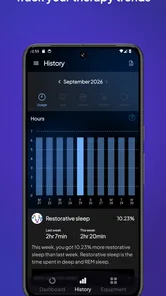
For a first-time user, it helps to expect a progress view, not an instant answer to every question about sleep. A daily summary can make patterns easier to notice, but a score cannot tell the whole story of a night. If you wake tired, the app may help you check therapy-related information; it cannot independently explain every cause of fatigue or decide what treatment change is appropriate.
That narrow focus is both the main attraction and the main limitation. People already using ResMed PAP equipment can get feedback connected to their therapy without manually rebuilding the information in a notebook. Someone who wants to track bedtime, caffeine, mood, or sleep across different devices may prefer a general tracker or a paper log alongside treatment instead.
Getting Started with myAir
So, what’s the deal with myAir? Essentially, it’s an app designed to work with ResMed’s CPAP machines, which are used to treat sleep apnea. If you’re like me and the term CPAP sounds like tech jargon, it stands for Continuous Positive Airway Pressure. These machines help keep your airways open while you snooze, making sure you breathe easy.
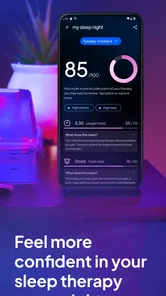
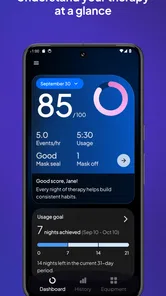
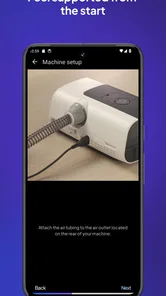
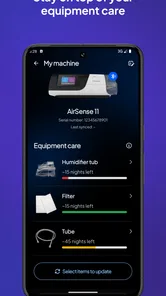
Installing the app is as easy as pie. Available on both Android and iOS, you just download it, sync it with your CPAP machine, and you’re good to go. The interface is super user-friendly, which is a big plus for those of us who aren’t tech-savvy. You’re greeted with a dashboard that shows your sleep data, and trust me, it’s more exciting than it sounds!
Before you connect your equipment
I would start by checking that the PAP equipment you use is compatible, then follow the in-app connection prompts at an unhurried pace. The app is not a general sleep tracker that can be paired with any machine, so confirming that fit is the most useful first check. If the first attempt does not feel obvious, it is better to revisit the prompts and equipment details than to assume that a generic phone sleep record will appear automatically.
More From Our News Desk

 Instagram
’s Power Comes From Its Place in Your Phone
A close look at how Instagram turns Meta’s reach, recommendation systems and everyday camera habits into durable platform power—and what that costs users.

 Gmail
Gmail in a Busy Inbox: Who Benefits Most?
From first account to crowded workday, Gmail earns its place through dependable search and flexible sorting—but its best fit depends on how much inbox maintenance you can tolerate.

 Prime Video
Switching to Prime Video: What Changes in Your Viewing Routine
Prime Video can make a compelling second home for streaming, but switching means learning a different catalog, rental layer, and route from browsing to playback.

 Universal TV Remote Control
 Works Best as a Reliable Backup
A phone remote earns its place through quick setup and reliable habits. Here is how to get more from Universal TV Remote Control—and where its limits show.

 Weather - By Xiaomi
Weather by Xiaomi Review: Clear at a Glance, Less Clear Up Close
Xiaomi’s weather app makes everyday forecasts quick to scan, but its calm surface can leave useful details and recovery paths harder to find than they should be.

 X
X Under Pressure: Can It Recover When Posting Goes Wrong?
A resilience-focused review of X, examining setup, mistaken posts, interruptions, weak connections, and the gaps that matter when recovery needs to be dependable.
Latest News



Once connected, give the process a simple goal: see whether the app displays information related to your therapy. You do not need to interpret all the figures immediately. The first successful action is simply confirming that the connection is working and returning to the daily view after a night of use. That small check prevents a common misunderstanding—opening an app before it has useful therapy information and thinking the empty or incomplete view is the whole experience.
For someone setting this up while tired, a little patience is worthwhile. I would avoid trying to troubleshoot connection questions at bedtime, when the priority should be getting comfortable and using the prescribed equipment. A calmer moment during the day makes it easier to read the instructions carefully and distinguish an account or connection step from the therapy itself.
Diving Into the Features
Now, onto the juicy part – the features. The app provides a plethora of data about your sleep patterns. From usage hours to mask seal and events per hour, it’s all there. One thing that really stood out to me was the Sleep Score. It’s like having a personal sleep coach! You get daily feedback that helps you tweak your habits to improve your sleep quality.
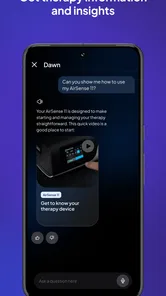
An amazing feature is the personalized coaching tips. These are little nuggets of wisdom tailored to your sleep data. They cover everything from adjusting your machine settings to lifestyle changes. I found these tips incredibly helpful, especially on days when my sleep wasn’t up to par.
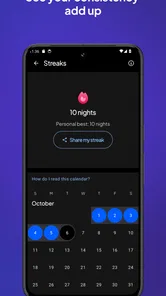
And if you’re a competitive soul, you’ll love the fact that you can earn badges for hitting sleep milestones. It's a fun way to stay motivated on your journey to better sleep.
Making the daily view useful
The most helpful way to use a daily summary is to connect it with one practical question. For example: did I get the machine on when I went to bed, and was the mask comfortable enough to keep using it? That keeps the dashboard tied to habits you can actually observe instead of turning it into a score to chase. If a result looks different from what you expected, note the context—an unusually late bedtime, a restless evening, or discomfort—before deciding what it means.
There is also a useful trade-off in having feedback arrive in a compact form. It can make it easier to keep checking in than a detailed journal, but it leaves out personal context unless you remember it yourself. I would jot down a brief note elsewhere when something unusual happens, then use the app for the therapy-related view. That gives you a more grounded picture without asking the app to become a full sleep diary.
What Makes it Stand Out
In a sea of health and wellness apps, myAir™ by ResMed holds its own by focusing on a specific issue: sleep apnea. The way it seamlessly integrates with the CPAP machine and provides actionable insights is commendable. It’s not just about tracking; it’s about improving.
One of the standout moments for me was when I noticed a significant improvement in my energy levels during the day. It felt like I had discovered some sort of magic trick, but in reality, it was just better sleep quality thanks to the app's guidance.
However, it’s worth noting that the app is primarily beneficial for those already using a ResMed CPAP machine. If you’re not in that camp, the app might not offer much value. But if you are, it’s a game changer.
Your First Nights: A Practical Starting Point
For a first-time user, I’d keep the goal modest: get the app connected, check that it is showing information from your PAP use, and then look at the daily summary after a night of therapy. That first clear view of your own routine is more useful than trying to interpret every number at once. If setup doesn’t immediately make sense, check that you are using compatible ResMed equipment and follow the connection prompts rather than treating the app as a general-purpose sleep tracker.
A realistic routine might be to open the summary over breakfast, notice whether you used the machine as intended, and then make one practical adjustment for the next night—such as giving yourself more time to settle into the mask. The useful trade-off is that daily feedback can keep therapy visible without requiring a detailed sleep diary. At the same time, a score is only a summary; it cannot explain every restless night or diagnose why you feel tired.
Reading Feedback Without Overreacting
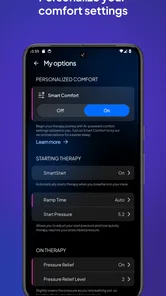
The app’s coaching is most helpful when you treat it as a prompt, not a prescription. If the dashboard points to a mask-seal issue, for example, it can remind you to check how the mask sits and whether the fit feels comfortable. It should not lead you to change prescribed machine settings on your own. For persistent discomfort, repeated poor results, or questions about treatment, I’d take the concern to a healthcare professional familiar with your therapy.
That distinction matters because sleep is affected by more than one night’s PAP data. A low score after an unusual evening is not, by itself, proof that treatment has stopped working. I’d look for a pattern across several days and bring specific observations to an appointment. In that role, the app can help turn a vague concern into a more useful conversation, while clinical advice remains the better choice for medical decisions.
A practical example is a user who sees mask-seal feedback several mornings in a row. Rather than repeatedly changing equipment or settings based on the score alone, I’d note when the discomfort occurs and whether the mask feels different at bedtime, then raise that pattern with the care team. This is a better use of the app than treating any single prompt as a diagnosis. It also keeps the focus on a manageable next step instead of making a rough night feel like a failure.
Who Benefits Most—and Who May Prefer Something Else
This is a particularly sensible fit for someone who has recently started PAP and wants a gentle way to build consistency, or for an established user who likes checking progress without manually recording each night. The badges may also help people who respond to small milestones. ResMed’s app has a narrower purpose than a broad sleep or wellness tracker, and that focus is a strength when you use its equipment and want therapy-related feedback.
If you do not use compatible ResMed equipment, or you mainly want to log bedtime, mood, or general sleep habits, a device-independent tracker or a simple journal may suit you better. Those options can cover wider routines, while this app’s value is tied to PAP therapy. It is also not the right tool for anyone expecting an app to diagnose sleep apnea, replace a clinician, or make treatment choices on their behalf.
It may also be a poor fit for someone who finds scores stressful or who is likely to check them repeatedly after every restless night. The badges and summaries are there to make progress easier to notice, but motivation works differently from person to person. If the numbers make you anxious, I would use the app less often or focus on practical therapy habits instead. A tool is only helpful when the way it presents information supports your routine.
How It Fits Alongside Other Tools
Compared with keeping notes in a phone or relying only on a machine’s basic display, myAir brings therapy-related feedback into one place and frames it in a way that can be easier to follow. A general sleep tracker may offer a wider picture of habits, but it cannot stand in for information connected to PAP use. I would not use two competing scores as if they measured the same thing; each tool answers a different question.
One practical tip is to use the app for the questions it can help organize—whether your routine is steady and what the summaries are highlighting—then keep a short note of anything the dashboard cannot capture, such as a late night or mask discomfort. That small bit of context can stop you from reading a single result too literally and can make a follow-up discussion more concrete.
For a person deciding between this and a general sleep app, the choice is less about which one is universally better and more about what needs tracking. A broad tracker is useful for habits that extend beyond treatment; a notebook can be more flexible when you want to record a specific symptom in your own words. The ResMed companion makes more sense when your main question is about the PAP routine itself. Using it alongside a brief note can be more informative than expecting either tool to cover everything.
What to Know Before You Commit
ResMed’s medical app has an average rating of 4.1 from around 34,000 ratings, and it has been installed over a million times. It is rated for Everyone and is available at no cost, which makes trying it a low-friction option if you already use compatible equipment. The rating is a useful sign of broad user experience, but your own benefit will depend much more on your device, connection, and whether you find daily feedback motivating.
The app is available for Android and iOS, and it was released on April 17, 2018. For Android users, the minimum operating system is Android 9. Those details are worth checking before you begin: an otherwise suitable therapy companion cannot help if your phone cannot run it. Since it is free, there is no purchase decision to make, but your time is still better spent confirming compatibility before building it into a daily routine.
People often wonder whether they must understand every dashboard item before the app is worth using. I would say no: start by checking that therapy information appears, then focus on the parts that connect to a real question or habit. Another reasonable question is whether a good score means you should change treatment; it does not. Use the feedback to notice patterns and to prepare better questions, while a clinician remains the right person for decisions about prescribed therapy.
MyAir is best approached as a companion for PAP users, not a promise of effortless sleep or a substitute for care. Start with the basic connection and first daily summary, then decide whether the feedback helps you stick with your routine. If you want a broad sleep diary, use another tool; if you want a clearer view of ResMed therapy, this focused approach is the reason to give it a try.
In conclusion, if you’re using a ResMed CPAP machine and want to make the most out of your sleep, myAir is a useful companion. It’s not a sleep expert in your pocket, but it can make your therapy easier to follow and give you a clearer starting point for questions about your progress. Sweet dreams!
myAir™ by Resmed Frequently Asked Questions
Can myAir™ replace advice from my doctor or sleep specialist?
No. myAir™ is a companion app for people using compatible ResMed PAP devices, not a replacement for guidance from a healthcare professional. Its feedback and coaching can help you follow your therapy, but decisions about treatment should be discussed with your care provider. If you have concerns about your therapy or whether the app is appropriate for you, ask your doctor or sleep specialist.
Is myAir™ free to download, and who publishes it?
myAir™ is free to download and is published by ResMed. It is a medical app intended to support people using compatible ResMed sleep therapy devices. You can use its therapy-support features without paying for the app itself, though the benefits depend on having a compatible device and connecting it so your therapy information can sync.
What devices and operating systems should I check before downloading myAir™?
myAir™ is a medical app from ResMed for people using compatible ResMed sleep therapy devices. Before downloading, check that your phone runs Android 9 or later and that your PAP device is supported. The app is free and is intended to help users start and succeed with PAP, but it is most useful when paired with a compatible device.
Who is myAir™ designed for, and is it suitable for every user?
myAir™ is designed for people who use compatible ResMed PAP devices and want support with their sleep therapy. It is categorized as a medical app and is rated for Everyone, but it is not a substitute for medical advice or treatment from a healthcare professional. If you are unsure whether the app or your device is appropriate for your situation, ask your care provider.
What is myAir™ by ResMed and how does it work?
myAir™ by ResMed is an app designed to support users of ResMed sleep therapy devices. It provides personalized feedback and coaching to improve your sleep therapy experience. The app syncs with your CPAP machine to track your progress, offering nightly scores that detail how well you slept. It helps users stay informed about their sleep patterns and make necessary adjustments for better therapy outcomes.
Pros
- Easy-to-use interface.
- Comprehensive sleep data tracking.
- Personalized sleep coaching.
- Syncs with ResMed devices.
- Data-driven insights for better sleep.
Cons
- Requires ResMed device for full features.
- Limited free features.
- Occasional sync issues.
- No integration with non-ResMed devices.
- Subscription required for premium features.