NickWatch: Parent App
- 49.00
- 3.2
- Installs
- 100.00K
- Price
- Free

Screenshots

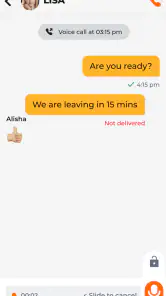
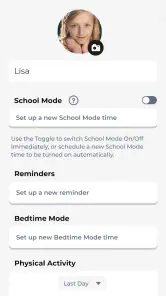
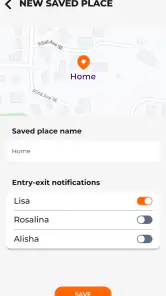
Analysis by Reviewed
I approached NickWatch: Parent App as a practical parenting companion rather than as a general family organizer. Developed by Watchinu by Trackimo, it is designed to activate and manage the features connected with NickWatch. That focus matters: this is not an app I would choose for broad household planning, school calendars, or everyday messaging on its own. Its usefulness depends on whether your family is already using the NickWatch ecosystem and needs a parent-facing control point.
The app is free to download and sits in the Parenting category, with an Everyone age rating. It was released on March 31, 2023, and the current version is 1.1.15. Those details make it easy to approach as a no-cost starting point, but “free” should be understood carefully here. The app itself does not create value in isolation; its purpose is to manage NickWatch-related features. In other words, the important question is not simply whether the download costs anything, but whether your household has a compatible NickWatch setup to manage.
How NickWatch: Parent App fits into family routines
In my view, the strongest part of the experience is its narrow purpose. Parents do not need another app trying to combine every possible family task. When a child’s connected watch is part of the routine, having a dedicated parent app can be more straightforward than searching through unrelated tools. The app gives the parent side of the experience a clear home, which is especially helpful when the child uses the watch independently and the adult needs to handle setup or management.
A realistic use case is a family preparing for a child’s first regular activity outside the home. Before leaving, a parent can use the parent app as the place to activate and manage the NickWatch features associated with the child’s device. Later, the same app becomes the adult’s reference point instead of requiring the child to operate the watch as if it were a miniature smartphone. That separation between the child-facing device and the parent-facing controls is the central reason to use it.
I also see value for families who want a dedicated parenting tool rather than a collection of improvised workarounds. A general messaging app, a phone’s built-in location tools, and a shared calendar may each solve one small problem, but they are not necessarily organized around NickWatch. This app is more relevant when the watch is already the family’s chosen device and the parent needs a companion interface that matches it.
That said, I would not install it expecting a complete digital parenting platform. The store summary positions it as essential for activating and managing NickWatch features, and that description accurately sets the scope. It is a companion app, not a replacement for every communication, scheduling, or safety tool a family might use. Its value comes from coordination with the NickWatch product, not from being a standalone app with broad usefulness.
Cost is simple, but the surrounding purchase decision is not
The download is free, which removes the usual barrier to trying the parent interface. That is a genuine advantage for parents who already have access to NickWatch and want to see whether the management experience suits them. You are not paying merely to open the app or evaluate its basic role. For a family already committed to the ecosystem, free access to the companion software is a sensible arrangement.
However, I would avoid treating the free listing as proof that the entire NickWatch experience is free. The app is built to activate and manage features connected with NickWatch, so the hardware or broader service relationship remains important to the buying decision. I would check the cost of the compatible NickWatch product and any associated service terms before making a purchase. That is the key distinction between free app access and free family tracking or communication overall.
This also affects how I judge value. If you already own the relevant NickWatch equipment, the app can feel like an expected part of the package rather than an extra expense. If you do not own it, downloading the app alone is unlikely to deliver the intended benefit. A parent looking for a free, standalone way to organize a child’s day would probably get more immediate use from a calendar, messaging app, or device-management tool that works without a dedicated watch ecosystem.
The app has passed the 100K+ installs mark and holds a 3.2 average rating from around 346 ratings, with 49 reviews listed. I read that as a sign to keep expectations measured. There is enough adoption to show that families are using the app, but the rating does not suggest a universally smooth experience. For me, that makes the free download worth trying when the NickWatch hardware is already part of the plan, while also making it unwise to buy hardware solely because the companion app sounds convenient.
What the parent experience does well
The first strength is clarity of purpose. I prefer a companion app that makes its relationship with the device obvious instead of presenting a crowded dashboard filled with unrelated family functions. NickWatch: Parent App is aimed at the adult responsible for managing NickWatch features, so the mental model is easier to understand: the child uses the watch, and the parent uses the app to oversee the connected experience.
The second strength is the potential reduction in handoffs. Without a dedicated parent interface, adults may end up configuring a child’s device directly, borrowing the child’s device repeatedly, or mixing settings with the child’s own activities. A parent app creates a more natural division of responsibility. That is a small design choice, but in a busy household it can prevent the setup process from becoming part of the child’s daily routine.
A useful habit is to treat the app as a preparation tool rather than something you only open during a problem. Before a school day, outing, or visit with relatives, I would review the relevant NickWatch setup from the parent side and make sure the family understands who is using which device. This workflow is more valuable than opening the app randomly, because it connects management with a specific event and reduces last-minute confusion.
Another non-obvious benefit is that the app can help parents keep the adult controls in one place. Even when a family uses other tools for calendars or communication, the NickWatch-specific management tasks have a logical home. That separation can make troubleshooting easier: if the issue concerns the watch’s connected features, I know to begin with the parent app instead of changing settings across several unrelated services.
The Everyone rating also makes the app approachable for households with different levels of technical confidence. That rating does not guarantee that every screen will feel effortless, but it does fit the app’s role as a family-oriented management tool rather than a service aimed at a specialist audience. I would still expect the adult to handle setup carefully, particularly when connecting the app with a child’s device.
Where the experience can create friction
The biggest limitation is dependency. If your family does not have NickWatch hardware or access to the associated ecosystem, the app has little practical reason to remain installed. This is a sharper limitation than the usual “some users may not need every feature” problem. The app’s purpose is tied to a specific product, so its usefulness is conditional from the beginning.
The second concern is that the store rating of 3.2 points to uneven satisfaction. I would not interpret that number as proof that the app fails, but I would take it seriously when planning around it. A parent who needs a mission-critical tool for a time-sensitive routine may want to test the complete setup well before relying on it. Do not wait until the first school trip or unsupervised activity to discover that the family’s workflow is not comfortable.
Version 1.1.15 shows that the app has an identifiable current release, but a version number alone does not tell me how well it will behave on every device. The minimum operating-system requirement is Android 10. That is important for families using an older Android phone: compatibility should be checked before assuming the free download will install and work normally. For a household with newer phones, this is less likely to be a concern, but it still belongs in the setup checklist.
I would also be cautious about confusing a parent management app with a substitute for conversation and family rules. Even if the NickWatch system supports useful connected functions, the app should not become the only plan for a child’s safety or independence. Parents still need to explain what the child should do when the watch is unavailable, when the battery is low, or when a situation falls outside the device’s intended role. The app can support a routine; it cannot replace one.
There is also a trade-off between specialization and flexibility. A dedicated NickWatch companion may feel more coherent than combining generic tools, but it ties the family’s workflow to one ecosystem. If you later switch to a different child device, the parent app’s relevance may disappear with that change. Families who value platform independence may prefer tools that work across phones, watches, and operating systems without being tied to one brand.
How it compares with ordinary alternatives
Compared with a shared calendar, NickWatch: Parent App is more device-specific and less useful for planning appointments, homework, meals, or household chores. A calendar is better when the main problem is coordinating several people’s schedules. This app is the better fit when the main problem is managing NickWatch features from the parent side.
Compared with ordinary messaging apps, it offers a more focused relationship between the parent and the NickWatch setup. A messaging app may be more familiar and flexible for conversations with relatives, teachers, or caregivers, but it does not automatically provide the same dedicated connection to a NickWatch device. If your priority is broad communication, I would not replace a messaging service with this app.
Compared with built-in phone location or family-management tools, the choice depends on the child’s device. Phone-based tools can be convenient when the child already carries a smartphone, while NickWatch is aimed at a different kind of family arrangement. For younger children or parents who intentionally want a watch-centered setup, the dedicated companion can make more sense. For older children who already manage a phone responsibly, a phone-native solution may be simpler and less dependent on extra hardware.
The practical trade-off is therefore easy to state: NickWatch: Parent App is more coherent inside its own ecosystem, while generic alternatives are more flexible outside it. I would choose the dedicated app when the watch is central to the family routine. I would choose a general tool when I want one solution that can continue working after changing devices or brands.
Who is most likely to get real value
This app is best suited to parents who already use NickWatch or are seriously considering it as a child-focused connected device. It is also a reasonable choice for adults who want the management side kept separate from the child’s watch experience. The free download makes the companion app easy to add to that setup, and the dedicated purpose can be helpful when several family members need to understand where NickWatch-related controls live.
I would be more cautious if you are only researching parenting apps and have no NickWatch device. In that situation, the app may not answer the questions you actually have. A general family organizer, a communication tool, or a phone-management app could offer more immediate value without requiring a specific ecosystem. Downloading this one first makes sense only if NickWatch itself is part of your shortlist.
It may also be a poor fit for families that dislike device-specific services. If you regularly change hardware, share management between different platforms, or want every caregiver to use familiar general-purpose tools, the dedicated approach could feel restrictive. The app’s strength—its connection to NickWatch—is also the reason it is not a universal parenting recommendation.
For a family with a child gaining independence, I would use it as one layer of a broader routine. The adult can manage the NickWatch side, the child can learn clear rules for using the watch, and caregivers can agree on what happens if the device is forgotten or unavailable. That combination is more realistic than expecting an app to solve every concern around a child being away from home.
My verdict on downloading and relying on it
I see NickWatch: Parent App as a practical companion rather than an app I would recommend to everyone. Its free access is a clear positive, especially for existing NickWatch users, but the value is inseparable from the compatible product and the family’s willingness to stay within that ecosystem. The app is not the purchase; it is the management layer that makes the NickWatch setup usable from the parent’s side.
My recommendation is to download it if you already have NickWatch, or if you are evaluating the complete NickWatch experience and want to inspect the parent workflow before settling into a routine. Test it on the actual parent phone, confirm that the device meets the Android 10 minimum, and practice the setup before depending on it during an important outing. That small amount of preparation is more useful than judging the app from its store summary alone.
I would skip it if you want a standalone parenting organizer, a general communication app, or a device-independent family safety solution. The 3.2 average and modest review history encourage a realistic approach: try it in your own household, keep a backup plan for essential routines, and decide based on how well it works with your NickWatch setup. For the right family, it can be a sensible free companion; for everyone else, its narrow purpose makes the download easy to pass over.
Pros
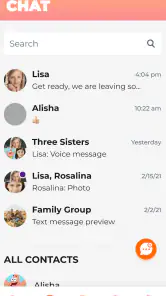
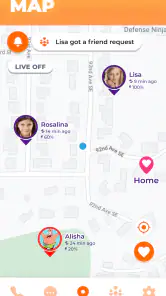
- Clear location tracking helps parents monitor a child’s whereabouts.
- Safety alerts can provide reassurance during independent outings.
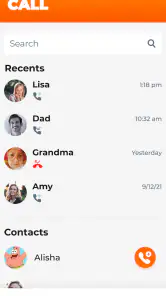
- Remote communication is convenient through the connected smartwatch.
- Activity and usage information supports better daily supervision.
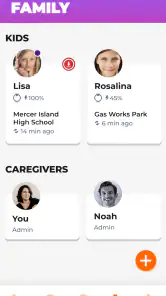
- Family-focused controls make the companion app easy to understand.
Cons
- Requires a compatible NickWatch device to provide meaningful functionality.
- Location accuracy may vary indoors or in areas with weak signal.
- Some features may depend on an active subscription or mobile plan.
- Frequent location updates can reduce the watch’s battery life.
- Parents should review privacy settings before enabling extensive tracking.

- Category
- Parenting
- Version
- 1.1.15











