National Car Rental
- 3.79K
- 4.4
- Installs
- 1.00M
- Price
- Free

Screenshots
Analysis by Reviewed
I judge a rental app by whether it helps me make a sound choice before a trip and keeps the practical details easy to find once plans are underway. National Car Rental is focused on that specific job rather than trying to be a general travel planner. It’s a free travel app from EAN Services, LLC, and I’d consider it most useful when I’m already thinking about renting through National and want to handle the reservation on my phone.
Start with the decision, not the download
Before installing any rental-company app, I’d first ask whether I’m choosing a provider or managing a booking I’ve already made. Those are different jobs. When I’m still comparing companies, I want to look across locations, availability, and terms. Once I’ve settled on National, I want a direct way to keep that reservation close and deal with the practical details without searching through email.
That distinction is the best way to judge this app. It is built around National rentals, rather than acting as a neutral marketplace for every car-hire option. That focus can make it convenient after I’ve chosen the company, but it also means the app is not the place I’d begin if I have no preference and want to survey the whole market.
Who will get the most from it
The app makes the clearest case for itself if you rent often, have an existing National account, or want your booking details close at hand while travelling. Its average rating is 4.4 from around 12,000 ratings, and it has over a million installs, so it has an established audience. It’s rated for Everyone, and its current version is 6.10.0.5877, with Android 8.0 or later required.
For an occasional renter, the key question is less whether the app is easy to open and more whether National’s location, vehicle choices, and rental terms fit the trip. I’d compare those details before booking rather than treating a familiar app as a reason to choose one company automatically. A car for an airport pickup, a replacement vehicle, and a weekend away can involve very different priorities.
Getting Started: The Setup
First things first, downloading the app is a breeze. Available for both Android and iOS, I had it up and running within minutes. The user interface is clean and straightforward, making it easy even for someone who's not particularly tech-savvy. Signing up or logging in is seamless, especially if you already have an account with them.
App Features at a Glance
One of the standout features of the National Car Rental app is its ease of navigation. Whether you're booking a car, checking your reservations, or managing your account, everything is just a tap away. The app also provides quick access to roadside assistance, which is a huge plus when you're out on unfamiliar roads.
More From Our News Desk

Clash of Clans Is Won Between the Battles

Android Auto Makes the Case for Quieter Car Software

MobiOffice: Transforming Mobile Productivity with Seamless Integration

EA SPORTS FC™ Mobile Soccer: Redefining Mobile Sports Gaming

How Microsoft OneDrive Became a Mobile Productivity Giant

How Google Translate Breaks Language Barriers Effortlessly
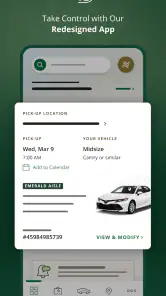
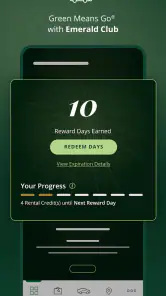
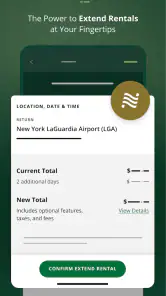
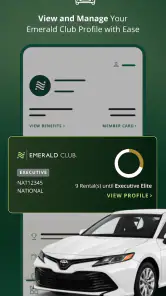
I found the app's ability to track rental history and upcoming reservations particularly useful. It keeps everything organized, and you can even modify your reservations directly through the app. Plus, the Emerald Club membership integration is a sweet touch for regular users, offering rewards and priority service.
Make the booking fit the journey
A useful way to compare a rental is to work backward from the day’s schedule. If I land late, I’d check whether the pickup location and timing fit that arrival, then consider how I’ll reach the rental counter or collection point. If I’m returning the car before an early flight, I’d think about the return location and the time needed to get to the terminal. A vehicle that looks suitable on its own can be a poor choice if the pickup or return adds stress to the trip.
I’d also decide what matters most before selecting a car: space for luggage, ease of parking, or simply getting from one place to another. For a group, I’d count bags as well as passengers; for city errands, a smaller vehicle may be easier to live with than a larger one. Those are practical trade-offs to check against the options shown, rather than assumptions to make from a vehicle label alone.
Making a booking work for your trip
When I’m comparing a rental, I’d settle the pickup and return locations and times before browsing vehicles. That helps me judge the whole plan, not just the car category that looks appealing on screen. I’d also read the terms shown for the selected option carefully, then check that the reservation in the app reflects the dates and location I actually need. Being able to review and modify a booking is handy, but it doesn’t remove the need to double-check the details after a change.
A realistic use case is a work trip where a flight arrives late and the next morning starts at a different address. I’d keep the reservation accessible in the app, verify the pickup location before leaving, and use the reservation details as a quick reference if plans shift. For a family weekend, I’d compare luggage needs and pickup convenience before settling on a vehicle; the lowest-looking option is not automatically the best fit if it makes the journey awkward.
Where National has an advantage
For someone who has already decided to rent from National, the main advantage is having a company-specific place to check a reservation, review rental history, and make a change. I find that more useful than a generic travel itinerary when the question is simply, “What did I book, and where do I need to go?” The app’s roadside assistance access can also be a practical shortcut when a rental problem happens away from home.
Frequent renters may get more value from the account connection and Emerald Club integration than someone booking a single trip. Keeping those pieces in the same app can make repeat rentals feel less scattered. Still, I wouldn’t treat membership as a reason by itself to book: I’d choose based on whether the location and terms suit the actual journey, then see the account conveniences as a bonus.
Where other rental options may suit you better
National’s app is a natural choice when you want to book with National and manage that rental in one place. If you’re still deciding among rental companies, a comparison app or a broader travel booking service may be a better first stop: it can help you weigh different providers and locations before you commit. That extra comparison step matters when price, availability, or pickup arrangements are your main concern.
Likewise, if you need a car only once and don’t expect to use National again, the account and membership conveniences may matter less than finding a suitable deal for that particular journey. I wouldn’t install another app simply for the sake of it if a browser booking already covers the need. The trade-off is straightforward: this app keeps National reservations and account tasks together, while a broader option can be more useful for shopping around.
There are also trips where a rental car is not the best answer at all. If I’m staying near transit and only need to make short local journeys, I’d compare the rental’s pickup and return effort with public transport or a taxi-style service. For a one-way itinerary, I’d verify that the intended return location works before committing. A dedicated rental app cannot make an inconvenient route or schedule convenient; it can only help manage the booking once that choice is made.
How it feels to use—and what to verify
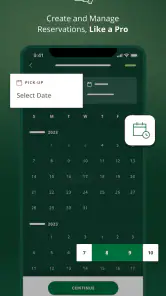
The app is designed with the user in mind. I never felt lost or confused while navigating through it. The booking process is straightforward. You select your dates, pick a location, and the app presents you with available cars. It's as simple as that. I also appreciated the detailed information provided about each vehicle, from mileage limits to fuel policies.
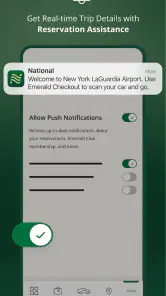
Notifications are timely and informative. Whether it's a reminder for an upcoming booking or a special offer, staying updated is effortless. The app even sends you a nudge when it’s time to return the car, which, let’s be honest, is a lifesaver for the forgetful among us.
One small habit I’d recommend is checking the reservation again after making a change, especially if that change affects timing or location. I’d avoid relying on memory for a revised pickup, and I’d keep the confirmation easy to reach before setting off. That simple check helps catch a mismatch while there’s still time to sort it out, rather than discovering it when I’m already travelling.
For a last-minute trip, I’d use the app to see whether National’s options fit, but I’d still compare them with other booking routes if flexibility or price is the deciding factor. A direct company app is convenient for the company’s own inventory; it is not automatically the best comparison tool. If I’m booking far ahead, I’d be deliberate about checking the selected dates and location before leaving the booking screen, since a small input error can turn into a much bigger travel-day nuisance.
Small checks that prevent rental-day hassle
I’d treat the app as a convenient place to manage the reservation, not as a substitute for reading the rental conditions or confirming the practical details that matter to me. Before travelling, I’d check the pickup and return information, save the reservation details where I can find them, and make sure notifications are enabled if I rely on reminders. If a change is important, I’d reopen the booking afterward and confirm it appears as expected rather than assuming a tap completed everything.
Roadside assistance access is a useful point of reassurance, especially somewhere unfamiliar, but I’d still keep the rental paperwork and relevant contact details available. That’s a sensible backup if a phone battery runs low or connectivity is poor. The app is most helpful when it reduces small bits of friction; it can’t make every rental issue disappear, and I’d contact the company directly if a time-sensitive problem needs a definite answer.
One question renters often have is whether an app removes the need to speak to anyone at pickup. I’d see it as a way to keep booking information and account tasks at hand, not as a promise that every part of collection happens without staff or paperwork. I’d arrive ready to follow the pickup instructions and bring whatever the rental terms require. For a complicated itinerary or a booking that needs a definite answer, contacting the company is still the sensible step.
Another practical question is whether I need to keep the app after returning the car. If I rent through National repeatedly, retaining it makes sense for reservation history and future bookings. If this is a one-off and I prefer not to keep extra apps, I’d save the confirmation and remove the app later if I no longer need it. The choice is about convenience, not a requirement to turn one trip into a long-term habit.
Ending Thoughts: Worth the Download?
So, should you download the National Car Rental app? In my humble opinion, it's a resounding yes. With its user-friendly interface, comprehensive features, and the backing of a trusted name in car rentals, it's a tool that not only makes renting a car easy but also enhances the overall experience.
Whether you're a frequent traveler or just need a car for a weekend getaway, this app is equipped to meet your needs. It's not just an app; it's like having a car rental assistant right in your pocket. So next time you're planning a trip, give it a go. You might just find it becomes an indispensable part of your travel toolkit.
My recommendation
I’d download it if National is already part of your rental plans, especially if you value having bookings, account details, and trip reminders together. If you’re choosing between providers, compare the actual locations and rental terms first; another booking route may suit you better when broad price-shopping is the priority. For an existing National customer, though, the app is a practical companion rather than an essential travel tool, and that’s the right expectation to bring to it.
National Car Rental Frequently Asked Questions
What information should I have ready before using the app?
Before getting started, it helps to have your travel plans and the details needed for a rental reservation nearby. The app is designed to support booking and rental management, so having your preferred dates, pickup location, and driver information ready can make the process smoother. You can then use it to review your plans and keep relevant reservation details accessible.
Can I use National Car Rental for travel planning and rental management?
Yes. National Car Rental is a travel app focused on helping users arrange and manage car rentals. Its store summary describes the experience as “Car Rental with Speed, Choice & Control,” and the app brings reservation tools and rental information together on a mobile device. It is a practical option for travelers who want to handle key rental tasks without relying only on a desktop browser.
What features does the National Car Rental app offer?
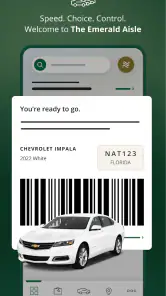
The National Car Rental app offers a variety of features designed to make the car rental process seamless and efficient. Users can quickly reserve vehicles, view upcoming reservations, modify bookings, and access rental history. Additionally, the app provides location details and directions, along with the ability to choose your vehicle through the "Emerald Aisle" feature, ensuring a customized rental experience.
Is the National Car Rental app free to download and use?
Yes, the National Car Rental app is free to download and use. It is available on both Android and iOS platforms. While the app itself does not charge fees for its features, users should be aware that standard rental rates and applicable fees apply when renting vehicles through the app. It’s a convenient tool for managing your rentals on the go.
How do I create an account on the National Car Rental app?
Creating an account on the National Car Rental app is straightforward. After downloading the app, you can sign up by entering your email address and creating a password. You will also need to provide some personal information, such as your name and driver’s license details. Once registered, you can easily log in to manage reservations and access member benefits.
Pros
- Wide selection of vehicles.
- Fast and efficient rental process.
- User-friendly mobile app.
- Excellent customer service.
- Flexible rental options.
Cons
- Higher prices than competitors.
- Limited locations in rural areas.
- Occasional vehicle availability issues.
- App glitches reported by users.
- Extra fees for additional drivers.
- Category
- Travel & Local
- Version
- 6.10.0.5877