

Alamo - Car Rental
- 1.64K
- 4.7
- Installs
- 500.00K
- Price
- Free

Screenshots

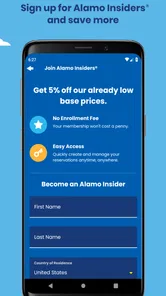

Analysis by Reviewed
When I need a rental car without turning the search into a desktop task, Alamo - Car Rental is the kind of app I would keep ready on my phone. It belongs to the Travel & Local category, comes from EAN Services, LLC, and is free to install. Its purpose is straightforward: help me look for Alamo rental deals and organize the early part of a car-rental decision from a mobile screen.
That simplicity is important. This is not an app I open for entertainment or casual browsing. I use it when a trip is taking shape and I need to think about dates, pickup arrangements, vehicle needs, and the practical cost of having a car. In my experience, the best travel tools are the ones that reduce small decisions without pretending to replace the whole planning process. Alamo’s app is useful in that role, although it is not equally valuable for every kind of traveler.
How the app feels during a real rental search
I find the rental search most useful when I treat it as a planning step, not a race to reserve: I can consider whether the pickup point, timing, and return plan fit the trip before committing. That also gives me a chance to think about what information I’m comfortable entering into a travel app and to make deliberate choices as I move through the process.
A quick starting point for comparing a rental plan
The first thing I notice is that the app’s value depends less on elaborate presentation and more on how quickly I can get from opening the app to a meaningful rental search. A car reservation usually has a few details that must be right: where I will collect the vehicle, when I need it, and when I will return it. If those basics are entered carefully, the app gives me a focused way to move forward instead of making me hunt through unrelated travel content.
I would not describe it as a complete trip planner. It is better understood as a dedicated mobile doorway into Alamo’s rental process. That distinction helps set realistic expectations. Someone who wants flights, hotels, maps, restaurant suggestions, and rental cars in one combined itinerary may prefer a broader travel service. Someone who already knows that Alamo is the company they want to consider will find the narrower focus more convenient.
The app has earned a 4.7 average from around 6,100 ratings, with roughly 1,600 written reviews, and it has passed 500,000 installs. Those figures suggest that it has found a dependable audience, but I still judge it by the moments that matter to me: whether the search is understandable, whether the app remains usable when I am in a hurry, and whether I can recover easily after entering something incorrectly.
Speed expectations: fast enough when the request is simple
For a normal search, I expect the app to feel reasonably direct because its job is narrower than that of a full travel marketplace. I am not asking it to manage an entire holiday in one screen. I am asking it to help me investigate a car rental. That focused purpose should make the experience feel less mentally demanding than switching between a browser, email, and several travel apps.
More From Our News Desk

 Weather - By Xiaomi
Weather by Xiaomi Review: Clear at a Glance, Less Clear Up Close
Xiaomi’s weather app makes everyday forecasts quick to scan, but its calm surface can leave useful details and recovery paths harder to find than they should be.

 X
XX Under Pressure: Can It Recover When Posting Goes Wrong?
A resilience-focused review of X, examining setup, mistaken posts, interruptions, weak connections, and the gaps that matter when recovery needs to be dependable.

 Clash of Clans
Clash of Clans Is Won Between the Battles
Its raids are quick; its community is a long-term project of coordination, teaching, rivalry, and shared responsibility—with all the friction that entails.

 Android Auto
Android Auto Makes the Case for Quieter Car Software
The car interface is no longer judged by how much it can do, but by how quietly it helps. Android Auto shows what drivers now expect—and what still gets in the way.

 MobiOffice: Word, Sheets, PDF
MobiOffice: Transforming Mobile Productivity with Seamless Integration
MobiOffice: Word, Sheets, PDF is redefining mobile productivity with a surprising blend of functionality and innovation.

 EA SPORTS FC Soccer Mobile 26
EA SPORTS FC™ Mobile Soccer: Redefining Mobile Sports Gaming
Dive into EA SPORTS FC™ Mobile Soccer, where immersive gameplay and strategic depth transform mobile sports gaming.
Latest News



There is a useful difference between visual speed and practical speed. A screen can open quickly while the overall task still feels slow if I have to repeat details or interpret unclear choices. With a rental app, practical speed comes from entering the trip once, checking the available direction of the search, and reviewing the result without losing the original plan. I recommend pausing before confirming anything, especially when the pickup and return locations are not identical.
My most useful speed tip is to decide the shape of the rental before opening the app. I would have the travel dates, approximate pickup area, and return plan in mind. That prevents the phone from becoming the place where I make every decision from scratch. It also makes it easier to spot an unexpected result, such as a location that is less convenient than the one I intended to use.
Heavy-use moments: where patience matters more than polish
The app becomes more demanding during the parts of a rental search where several choices interact. A simple local rental is one thing; a trip involving airport pickup, a different return point, changing dates, and a need to compare vehicle categories requires more attention. The challenge is not necessarily that the app is difficult. It is that rental decisions have consequences, and a fast tap is not always a good tap.
I would use it in stages. First, I would search with the most likely dates and location. Next, I would review the result with the actual travel plan beside me. Finally, I would revisit the search if the timing or return arrangement changes. This staged approach is more reliable than repeatedly changing several fields at once, because it makes it easier to identify which change affected the result.
A realistic example is a weekend visit where I arrive in one city, stay outside the center, and return home from the same general area. I might begin by checking whether a rental makes sense at all, then compare the convenience of collecting the car near my arrival point with collecting it somewhere else. The app is helpful for that initial investigation, but I would still consider travel time to the location, opening arrangements, and the final reservation details before treating the displayed option as settled.
For a longer trip, I would also avoid assuming that the first attractive result is automatically the best value. A lower-looking rental price can lose its advantage if the location is inconvenient or if the vehicle does not suit the luggage and passengers. The app can support the search, but I still need to make the judgment. That is one of the main trade-offs of a focused rental tool: it simplifies access, not the responsibility of choosing well.
Reliability and recovery when plans change
Travel plans are rarely motionless. Dates move, flights change, and a pickup point that looked convenient at home may be awkward once the itinerary is clearer. I value an app that lets me return to the task without making me feel that one wrong selection has ruined the entire process. In my use, I would treat every search as something I can refine rather than something that must be perfect on the first attempt.
The safest recovery habit is to recheck the complete rental outline after any major edit. If I alter the pickup date, I would also inspect the return date. If I change the location, I would confirm that the new place still fits my arrival and departure plans. This sounds obvious, but mobile interfaces encourage quick changes, and rental details are exactly the kind of information that can be overlooked when I am multitasking.
I also prefer using the app when I have a stable connection and enough time to read the result. A rental search is not the task I want to rush while walking through a crowded terminal. If the app needs to refresh information, the combination of movement, poor reception, and distraction can make a small delay feel much more serious. My practical approach is to research before departure and use the phone later for checking or managing the plan rather than relying on a last-second search.
That is where the app feels most dependable: as a focused planning companion, not as a substitute for preparation. I would keep the important reservation information available in whatever form I normally use for travel, rather than assuming that opening the app will be the only way to recover every detail. This is not a criticism unique to Alamo; it is sensible behavior for any travel app involved in a time-sensitive booking.
Device constraints and everyday comfort
The app supports devices running Android 8.0 or later, which makes it accessible on a broad range of Android phones while still excluding older hardware. If I am using an older phone, I would check compatibility before building my whole rental workflow around it. A device that cannot install or update the app is a poor surprise to discover immediately before a trip.
On a modern phone, I would expect the experience to be more comfortable when the display is clear and responsive, especially while reviewing dates and locations. Rental screens can contain enough information that a very small display or an aging device may make careful checking tiring. I would not call that a reason to avoid the app, but it is a reason to avoid making an important reservation while distracted or in a hurry.
Resource demands matter differently here than they do in a game or a video editor. I do not need the app to perform complex graphics or continuous background work. What matters is whether it opens without unnecessary friction and whether it remains usable while I move between search details and my travel notes. A focused rental app should feel lighter than a large all-purpose travel platform, although the actual comfort will still depend on the phone, connection, and current travel conditions.
My device-specific recommendation is simple: keep the operating system current enough for the app, install it before the trip, and perform one practice search before the dates become urgent. That test tells me more than a store page can. It confirms that the app launches comfortably on my phone, that I understand the search flow, and that I know where to look when I need to revisit the rental plan.
Where it beats the usual alternatives
The usual alternative is a mobile browser or a broad comparison service. A browser is flexible and useful when I want to inspect several rental companies at once. A comparison service can be better when my only goal is to find the lowest apparent price across many providers. Alamo’s dedicated app makes more sense when I have already narrowed my choice to Alamo and want a direct, repeatable way to search through that company’s rental offering.
That directness can reduce clutter. I am less likely to confuse one provider’s conditions with another’s when I am working inside a single brand’s channel. It also gives me a consistent place to return to if I am checking a trip more than once. On the other hand, the same focus is a limitation for travelers who are still deciding between companies. In that situation, I would start with a comparison tool and use Alamo’s app as a second step rather than the only source of information.
There is also a practical trade-off between convenience and independent checking. A dedicated app may make the familiar path easier, but it can encourage me to stop comparing too soon. I would use it to investigate and manage my Alamo option, then compare the overall travel convenience—not just the headline rental amount—with other choices if the trip is price-sensitive.
Who will get the most from it
I think the app is a good fit for travelers who already prefer Alamo, people who rent cars occasionally and want a mobile-first starting point, and anyone who values a dedicated rental workflow over a crowded travel dashboard. It is also useful for planning a trip from a phone when I do not want to open a laptop just to check whether a car fits the itinerary.
Families and small groups can benefit from using it early, before they arrive at the destination. A car decision affects luggage, daily distance, and the amount of time spent moving between places. Checking the rental plan in advance gives me a chance to question whether a vehicle is genuinely useful or whether public transport and occasional rides would be easier for that particular trip.
I would be more cautious about recommending it to someone who wants to search every rental company simultaneously, build a complete holiday package, or make decisions based only on the cheapest visible option. Those users may be better served by a broader travel marketplace, followed by a direct check with Alamo if its offer remains attractive. The app is strongest when its focused purpose matches the user’s intention.
Small workflow improvements that make a difference
One non-obvious advantage of using a dedicated app is that it can become part of a repeatable travel routine. I can check the same type of rental from the same phone, notice changes in my itinerary, and avoid starting from a completely unfamiliar interface each time. To make that useful, I would keep a short note with my intended pickup area, return plan, passenger count, and luggage needs before searching.
A second useful habit is to test two realistic location strategies rather than only one. For example, I might compare a location that is closest to my arrival with another that is more convenient for the first day of driving. The better choice is not always the one with the shortest distance from the airport or station. Time, traffic, and the direction of the trip can matter more than a simple map glance.
Third, I would use the app as a decision checkpoint instead of treating every displayed option as a final answer. After finding a suitable rental, I would ask whether the pickup timing works with my arrival, whether the return timing fits my departure, and whether the vehicle category is sensible for the people and bags involved. This extra minute is where the app becomes genuinely useful: it gives me a structured place to inspect the plan, while I supply the real-world judgment.
Finally, I would avoid making major changes during a rushed travel moment. If I need to alter a reservation or search again, I would stop somewhere quiet, check the dates twice, and keep my original plan visible. That approach improves recovery more than any promise of speed, because the most damaging travel mistakes usually come from hurried confirmation rather than from a slow screen.
Version, age rating, and overall fit
The current version is 7.18.0.6308, and the app is rated for Everyone. That combination makes it a straightforward option for general travel planning on compatible Android devices. The app was released on September 22, 2018, so it is not a brand-new experiment; it has had time to establish a recognizable place as a mobile rental tool.
Its free price is another reason I would install it before deciding whether to rent. I can use it as part of the research stage without paying for access to the app itself. The real financial decision remains the rental reservation, so I would still read the final details carefully and compare the complete plan with alternatives when cost is the main concern.
After using it as a focused travel utility, I see Alamo - Car Rental as a practical choice rather than an all-purpose travel companion. It is most convincing when I already want to consider Alamo, need a clean mobile route into the search, and have enough time to review the details. Its performance expectations are modest in a good way: it does not need to be a heavyweight app, and its usefulness comes from reducing the steps between a travel idea and a rental decision.
I would recommend it to a friend who is planning a car-based trip and wants a dedicated Alamo option on Android. I would not recommend using it alone for broad market comparison or for rushed last-minute decisions. Install it early, test the search with your real itinerary, compare locations thoughtfully, and treat the final details as something to verify rather than something to skim. Used that way, this free Travel & Local app offers a sensible balance of convenience, focus, and control.
Alamo - Car Rental Frequently Asked Questions
Can I browse Alamo rental options before creating an account or booking?
The app is designed to help you look for rental options by entering pickup and return locations and travel dates, then reviewing available vehicle categories and estimated pricing. Browsing is a useful way to see whether the app fits your trip-planning needs before you make a reservation. When you are ready to book or manage a reservation, the app may ask for booking or account details.
What is Alamo - Car Rental and what can I do with the app?
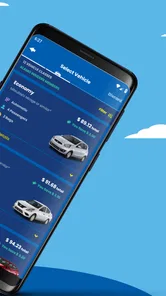
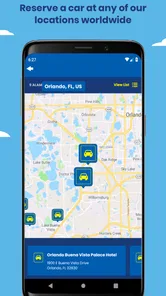
Alamo - Car Rental is the official mobile app for searching, comparing, and managing vehicle rentals from Alamo locations. After installing it, you can choose a pickup and return location, select rental dates, browse available vehicle categories, review estimated pricing, and make or manage a reservation. The app is also useful for checking reservation details and finding location information before your trip.
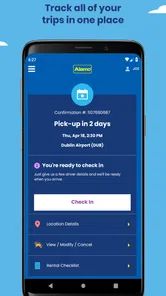
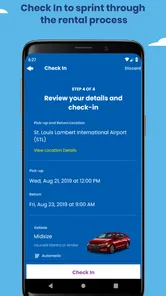
Can I make, modify, or cancel an Alamo reservation through the app?
In most cases, the app allows you to create a new reservation and access existing bookings using your confirmation details or account information. Depending on the reservation type, you may also be able to change dates, pickup details, vehicle preferences, or cancel the booking. However, modification and cancellation rules can vary by location, rate, payment method, and booking conditions, so always review the displayed terms before confirming changes.
What documents and requirements do I need to rent a car through Alamo?
Renters generally need a valid driver’s license, an accepted payment card, and confirmation that they meet Alamo’s minimum age and eligibility requirements. International customers may need a passport and, depending on their license and rental location, an international driving permit. Requirements can differ between countries, airports, and vehicle categories. The app helps you make the reservation, but it does not replace the documents required at pickup.
Does the Alamo app show the final rental price, including fees and extras?
The app normally displays an estimated rental price and lets you review optional products such as additional drivers, protection plans, child seats, toll programs, or other equipment. The final amount can still change because of taxes, location surcharges, fuel policies, deposits, age-related fees, optional coverage, or services selected at the counter. Carefully open the price and rental-terms sections before completing your booking.
Pros
- Wide selection of rental vehicles for different trip types.
- Convenient airport and neighborhood pickup locations.
- Mobile app makes reservations and itinerary management simple.
- Clear vehicle categories help compare options quickly.
- Loyalty benefits can improve value for frequent renters.
Cons
- Final prices may increase with taxes
- fees
- and optional extras.
- Some locations have limited vehicle availability during busy periods.
- Additional drivers and young-renter fees can be expensive.
- Pickup procedures may take time at crowded airport branches.
- Cancellation and modification terms vary by reservation type.













