Nanit
- 2.81K
- 4.1
- Installs
- 100.00K
- Price
- Free

Screenshots

Analysis by Reviewed
As a parent, I know the struggles of trying to catch a moment of peace while ensuring your little one is safely snoozing in their crib. Enter the Nanit app, a game-changer in the realm of baby monitors. If you’re like me, always searching for tech-savvy solutions to ease parenting challenges, this app might just be your next best friend.
Why Nanit Stands Out
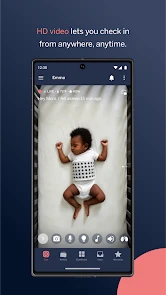
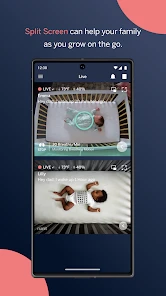
First off, the app pairs with the Nanit Pro Camera, offering a bird’s eye view of your baby’s crib. Unlike traditional monitors, this one gives you a crystal-clear HD live stream straight to your phone. It's like having a personal CCTV for your baby, and honestly, it feels like a superpower.
Features that Make Parenting Easier
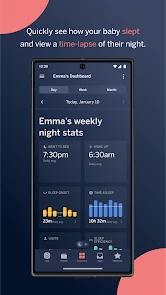
Let me tell you, the sleep tracking feature is an absolute lifesaver. The app not only tracks how long your baby sleeps but also provides insights on sleep patterns. You can finally understand whether the 3 a.m. wake-ups are a phase or a habit that needs addressing. Plus, the sleep coaching tips are like having a mini expert in your pocket.
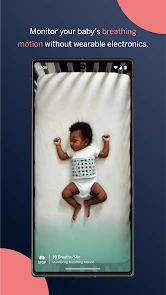
Another cool feature is the breathing motion monitoring. With a small band placed around your baby’s torso, the app monitors their breathing. It’s a huge peace of mind boost, especially for new parents. And the two-way audio? Perfect for those moments when you want to soothe your baby without entering the room and risking a full-blown wake-up.
Getting the Most Out of the App
Using the app is pretty straightforward. The setup takes a bit of time, but once you’re past that, it’s smooth sailing. The user interface is intuitive, and even sleep-deprived parents (like myself) will find it easy to navigate. One tip: make sure your Wi-Fi is strong, as the HD video can be a bit of a data hog.
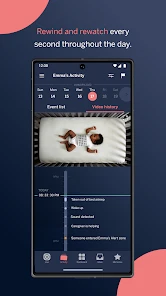
Also, the app offers a subscription service for additional features like video history and more detailed sleep analytics. Whether you want to go for it depends on how deep you want to dive into your baby’s sleep data. For me, the basic features are more than enough, but I can see the allure for parents wanting every bit of insight possible.
Final Thoughts
In a world full of baby gadgets, the Nanit app is a standout. It combines technology with practical parenting needs, making it a must-have for tech-loving parents. It's not just an app; it’s a parenting partner. If you’re on the fence, I’d say give it a go. After all, anything that makes parenting a tad easier is worth a shot, right?
Pros
- High-quality video monitoring
- Sleep tracking analytics
- Temperature and humidity sensors
- Two-way audio communication
- User-friendly mobile app interface
Cons
- Expensive compared to competitors
- Requires stable internet connection
- Subscription needed for full features
- Limited compatibility with older devices
- Can be challenging to set up initially

- Category
- Parenting
- Version
- 4.42.0