

Nanit Sound and Light
- 56.00
- 3.4
- Installs
- 10.00K
- Price
- Free

Screenshots
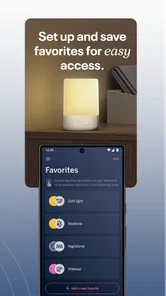
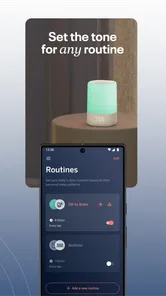
Analysis by Reviewed
Bedtime rarely fails because a child refuses one particular song. More often, the room is too bright, the transition is abrupt, or the adult has to return yet again to adjust something. I tested Nanit Sound and Light as a small parenting tool for that exact part of the routine: creating a calmer room with sound and a gentle light, then handing control back to the night without turning the process into another task.
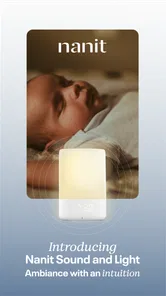
Developed by Nanit, this free parenting app is designed around a sound machine and night light rather than a full sleep-tracking experience. That distinction matters. I would not approach it as a complete replacement for a baby monitor or as a system that solves sleep by itself. Its value is narrower and more practical: it gives families a dedicated way to shape the bedroom environment during naps, bedtime, and nighttime wake-ups.
The app is available for everyone in the age-rating sense, and it runs on devices using operating system version 10 or later. It was released on March 22, 2023, and the current version is 1.11.0. With more than ten thousand installs and a 3.4 average from roughly one hundred forty ratings, it has found a modest audience, but the rating also suggests that the experience may not feel equally smooth for every household.
From a restless room to a repeatable bedtime routine
I look at bedtime as a chain of small handoffs: from the busy evening to a quieter room, and from the caregiver’s attention to a setup that can carry on without constant adjustments. This section follows that shift and considers how a sound-and-light routine can become repeatable without making a phone the center of the child’s attention. The key is choosing the setup before the room gets unsettled.
Starting with the room, not the app
My first useful observation was that the app works best when I treat it as the final part of a routine, not the routine itself. Before opening it, I would dim the main room light, finish the last drink or nappy change, and decide whether the child needed sound, light, or both. That small preparation prevents the common mistake of reaching for the phone while the child is already overtired.
The strongest use case is a child who settles more easily when the room feels consistent. A familiar background sound can soften sudden noises from another room, while a low night light makes it possible to check the cot without switching on a harsh ceiling lamp. Neither function guarantees sleep, but together they can remove two avoidable interruptions.
I also found the app more useful for parents sharing responsibility. One adult can establish the preferred bedtime setup, while another can repeat it later without guessing which physical device to adjust. This is a subtle advantage over a separate sound machine with unfamiliar buttons: the workflow can remain tied to the phone that is already being used for the evening routine.
More From Our News Desk

 Gmail
GmailGmail in a Busy Inbox: Who Benefits Most?
From first account to crowded workday, Gmail earns its place through dependable search and flexible sorting—but its best fit depends on how much inbox maintenance you can tolerate.

 Prime Video
Switching to Prime Video: What Changes in Your Viewing Routine
Prime Video can make a compelling second home for streaming, but switching means learning a different catalog, rental layer, and route from browsing to playback.

 Universal TV Remote Control
Universal TV Remote Control Works Best as a Reliable Backup
A phone remote earns its place through quick setup and reliable habits. Here is how to get more from Universal TV Remote Control—and where its limits show.

 Weather - By Xiaomi
Weather by Xiaomi Review: Clear at a Glance, Less Clear Up Close
Xiaomi’s weather app makes everyday forecasts quick to scan, but its calm surface can leave useful details and recovery paths harder to find than they should be.

 X
XX Under Pressure: Can It Recover When Posting Goes Wrong?
A resilience-focused review of X, examining setup, mistaken posts, interruptions, weak connections, and the gaps that matter when recovery needs to be dependable.

 Clash of Clans
Clash of Clans Is Won Between the Battles
Its raids are quick; its community is a long-term project of coordination, teaching, rivalry, and shared responsibility—with all the friction that entails.
Latest News



Setting up the first session
The first session should be approached slowly. I would place the phone where its sound can fill the room without being buried under clothing or bedding, then check that the device is not within a child’s reach. A phone is still a phone, so safe placement matters more than convenience. The night light should support visibility, not become a bright focal point that encourages a child to stay awake.
Rather than changing several things at once, I recommend starting with one sound choice and one light level, then observing the result over a few nights. If a child settles better, you will know which part of the setup deserves to stay. If the room becomes more stimulating, it is easier to identify the problem when the experiment has been controlled.
This is one of the app’s less obvious trade-offs. A dedicated machine is always ready in the room, whereas an app depends on a phone being available, charged, and positioned correctly. The phone also brings distractions for the adult. If I start checking messages after launching the bedtime sound, the technology has worked against the routine even if the audio itself is suitable.
The step-by-step flow during a normal evening
A realistic evening might begin after bath time. I open the app before carrying the child into the bedroom, choose the intended sound, and prepare the light for the final check. Once the child is settled, I keep the room visually boring and avoid making the phone part of the interaction. The goal is not to entertain the child with the app; it is to make the environment predictable enough that the adult can leave.
For naps, I would use the same sequence but with an extra check of the room’s natural brightness. A night light that feels gentle after sunset may be unnecessary in daylight. Using it automatically every time can make the setup less flexible, especially for children who sleep better in a darker room.
At night, the handoff is different. A parent waking to a cry may need just enough light to see what is happening without fully waking the child. This is where a controlled night light can be more useful than reaching for a ceiling switch. I would still keep the interaction brief: check the child, address the need, and avoid turning the phone into a source of stimulation.
One practical tip is to make the app part of the “last adult action” rather than the first child-facing action. I found that starting the sound before the final cuddle creates a smoother transition. The child hears the same background while the adult finishes the routine, instead of experiencing a sudden change after being left alone.
Where the handoffs happen
The most important handoff is between the caregiver and the room. Once the sound and light are running, the app should disappear from attention. That means the adult needs confidence that the phone will remain in place and that the selected setup will not require repeated adjustments. If a parent has to return to the room to correct the sound or light, the benefit is reduced.
There is also a handoff between caregivers. Nanit Sound and Light can fit families where one person handles bedtime and another handles an overnight wake-up, but only if both adults agree on a simple routine. I would write down the preferred sound and light approach in ordinary household terms, such as “quiet sound, dim light, no phone screen near the cot.” This avoids a tired caregiver making a completely different choice in the middle of the night.
The third handoff is between the app and other equipment in the nursery. If the room already contains a Nanit monitor or another sound machine, I would decide which device is responsible for audio before bedtime. Running multiple sources can create an unpleasant overlap, and the app should not be judged fairly if its sound is competing with another machine.
This is also the point where expectations need to stay realistic. The app is not a substitute for supervision. A sound machine can mask some background noise, but it does not replace checking on a child, following safe-sleep guidance, or responding to illness and distress. I see it as an environmental aid, not a monitoring solution.
What the result feels like in everyday use
When the setup is right, the result is pleasantly undramatic. The room feels more consistent, the adult can move around without using a bright overhead light, and the bedtime sequence becomes easier to repeat. That is the kind of improvement I value here: not a dramatic transformation, but fewer small decisions at the moment when everyone is tired.
The night light is particularly helpful for parents who need to check clothing, a comforter, or the general position of a child without flooding the room. It can also make the transition from a bright hallway to a dark bedroom less abrupt. I would keep it as subdued as possible, because a light intended for the adult can easily become interesting to the child.
The sound function makes more sense in homes with variable background noise. Apartment sounds, a running appliance, or an older sibling moving around can be less noticeable against steady audio. In a very quiet home, however, it may add no benefit at all. Some children prefer silence, and introducing sound simply because the app offers it is not a good reason to use it.
Another concrete insight is that consistency matters more than intensity. Turning the sound up when a child is already upset may feel logical, but it can make the room feel harsher. I would begin quietly and adjust only when there is a clear reason. The app is most useful when it supports a stable pattern rather than becoming a control panel for constant corrections.
Where the flow breaks
The main friction comes from the fact that this is an app performing a job that many families traditionally give to a dedicated device. A separate sound machine can stay beside the cot, use physical controls, and avoid phone-related distractions. Nanit Sound and Light is more appealing when you want both functions in one app and already keep your phone nearby, but less appealing when you want a completely independent nursery device.
Reliability also becomes more important than feature variety. A parent does not need a complicated bedtime interface; they need the chosen setup to be easy to start when tired. If launching the app, finding the right control, or handing the phone to another caregiver feels uncertain, the workflow loses its advantage. The average rating of 3.4 is a useful reminder to keep expectations measured rather than assuming the experience will be flawless for every device and household.
Another limitation is attention. A physical night light can be adjusted without exposing a parent to notifications, social media, or a bright display. With an app, the adult has to manage that temptation. I recommend enabling the bedtime setup before entering the room and placing the phone screen-down afterward, provided it remains safely positioned and does not interfere with any other nursery equipment.
The app is also not the right choice for someone looking for detailed sleep analysis, a live video feed, or a broad collection of parenting tools. Its store summary focuses on sound and light, and that focused purpose is both its strength and its boundary. If your priority is environmental control, it is relevant. If your priority is monitoring, logs, or developmental guidance, a different category of product will fit better.
How it compares with the usual alternatives
Compared with a basic sound machine, the app offers a more phone-centered workflow and combines sound with a night-light function. That can reduce the number of objects on a bedside table and make the routine easier for a caregiver who prefers app controls. The trade-off is that the phone becomes part of a task that many parents would rather keep separate from their personal device.
Compared with a standalone night light, the app is more flexible in the sense that it can be part of a broader bedtime sequence rather than just an always-on lamp. But a physical light is often faster for a midnight check. There is no unlocking, locating, or navigating involved, and that simplicity can matter more than integration when a child is crying.
Compared with a full baby-monitor ecosystem, this app is narrower. That is not automatically a weakness. Families who already have monitoring covered may appreciate a dedicated environmental tool without adding another large system. Families starting from scratch should be careful not to mistake a sound-and-light app for a complete nursery solution.
Who should use it, and who should skip it
I would recommend Nanit Sound and Light to parents who want a straightforward way to combine background sound and a gentle night light, especially when several caregivers share bedtime duties. It also suits families who already use a phone-based routine and want to reduce the number of separate nursery controls.
I would be more cautious for parents who value physical buttons, want the sound source permanently installed, or find phone use disruptive at bedtime. It is also a poor match for anyone expecting sleep tracking, video monitoring, or automatic answers to frequent night waking. The app can improve the setting, but it cannot identify why a child is awake or decide what care is needed.
Because it is free, trying it carries little financial risk. Still, the real cost is attention and reliability: you need a compatible device, a sensible place to keep it, and a routine that does not depend on repeated screen interaction. Its everyone rating makes it broadly approachable, but parents should still apply their own judgment about safe placement and appropriate sound levels.
My final take after following the full routine
After using it as a complete workflow—from preparing the room to handing the night back to the child—I see Nanit Sound and Light as a focused convenience rather than a nursery essential. It succeeds when the problem is small but recurring: too much darkness during a check, inconsistent background noise, or a bedtime routine that changes depending on which adult is present.
The best results come from keeping the setup boring and repeatable. Choose the sound before the child is in bed, use the light for visibility rather than entertainment, agree on the routine with other caregivers, and keep the phone away from the child’s attention. Those habits do more for the experience than constant adjustment.
My recommendation is simple: use it if you want an inexpensive, phone-based sound-and-light routine, but choose a dedicated machine or a full monitor when independence or supervision matters more. Nanit, the developer, has kept the idea focused, and that focus makes the app easy to understand. Just remember that its outcome is a calmer environment—not a guaranteed sleep solution.
Nanit Sound and Light Frequently Asked Questions
Can I use Nanit Sound and Light on my phone or tablet?
Nanit Sound and Light is a Parenting app from Nanit, designed for use on a compatible mobile device. It requires an operating system version 10 or later, so check your phone or tablet’s software before downloading. The app is free and is intended to help control a Nanit nursery sound and light device; it is not a standalone sound machine.
What is Nanit Sound and Light, and what is it used for?
Nanit Sound and Light is a companion app for the Nanit nursery sound and light device. It lets parents control features such as soothing sounds, gentle lighting, and sleep-friendly routines from a compatible mobile device. The app is designed to support bedtime, naps, and nighttime comfort, while working as part of the wider Nanit smart nursery ecosystem rather than as a completely independent baby monitor.
Does Nanit Sound and Light require a Nanit device to work?
Yes, the app is generally intended to be used with compatible Nanit hardware, so downloading it alone may not provide access to all of its functions. Before installing, check the product requirements and supported device list for your region. You may also need a Nanit account, a stable Wi-Fi connection, and appropriate permissions for Bluetooth, local network access, or notifications during setup.
What features can parents control through the app?
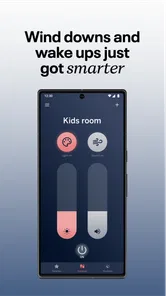
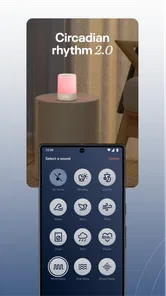
Depending on the connected Nanit product and software version, the app can provide controls for ambient lighting, calming sounds, volume, schedules, and other nursery settings. Some versions may also offer automation or integration with Nanit routines. The exact options can vary by hardware model, operating system, subscription status, and updates, so users should confirm which features are included with their specific device.
Is Nanit Sound and Light safe and reliable for babies at night?
The app is intended to help create a comfortable sleep environment, but it should not replace responsible adult supervision or safe-sleep practices. Parents should keep the physical device, cables, and accessories safely away from the crib and follow the manufacturer’s installation instructions. Sound levels should remain moderate, and lighting should be used in a way that does not disturb the child’s sleep.
Pros
- Gentle sound and light routines can help create a calming bedtime environment.
- Supports remote adjustments
- so parents can change settings without entering the room.
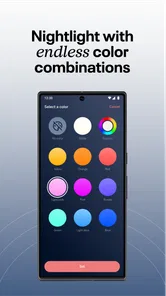
- Night-light colors and brightness can be tailored to suit different sleep preferences.
- Useful for establishing consistent bedtime routines for babies and young children.
- Compact design fits easily beside a crib or on a nursery shelf.
Cons
- Some features may require a compatible Nanit camera or additional Nanit equipment.
- Cloud-connected controls depend on a stable Wi-Fi connection to work reliably.
- Continuous use may increase electricity consumption compared with a basic night-light.
- The app and device setup can feel excessive for parents wanting simple controls.
- Sound and light preferences may need frequent adjustment as a child’s needs change.












