myPhonak
- 6.31K
- 4.5
- Installs
- 1.00M
- Price
- Free

Screenshots
Analysis by Reviewed
I find myPhonak most useful when the phone becomes a practical companion to hearing aids rather than something that has to be passed around. In a household, that distinction matters: the wearer can make everyday adjustments themselves, while a partner or relative can help with setup or troubleshooting when invited. I would treat the app as personal to the hearing-aid user, not as a shared family dashboard. That keeps changes and health information tied to the person who actually wears the devices.
A realistic day-to-day routine
Picture arriving at a busy café after a quiet morning at home. Instead of waiting until the next appointment to mention that conversation felt difficult, I can use the app’s available controls to make an immediate adjustment, then pay attention to whether it helps. Later, usage and hearing-performance information can give me a more concrete starting point for discussing patterns with my hearing care professional. That kind of small, timely feedback is more useful than trying to remember every listening situation from memory.
There is a trade-off, though: an adjustment that feels right in one room may not suit the next. I’d make changes deliberately and give myself a moment to judge them, rather than repeatedly changing settings whenever the sound shifts. The app can help me respond to a situation; it does not replace professional advice or guarantee that every difficult listening environment will become easy.
Keep setup and access personal
Getting started is described as straightforward, but the important household question is who should operate the phone. I’d have the wearer complete or supervise the connection process and learn the controls themselves, even if someone else is more comfortable with technology. That makes later adjustments less dependent on another person and reduces confusion about whose hearing aids or settings are being managed.
If a family member helps, I’d keep the help specific: sit together during setup, let the wearer choose the adjustments, and agree on who will contact the hearing care professional if support is needed. I would not assume that installing the app on a relative’s phone creates a shared account, family permissions, or remote control. A second person can still be useful as a calm helper without being treated as the owner of the hearing experience.
Getting Up Close and Personal with myPhonak
First things first, let's talk about how easy it is to get started with myPhonak. Once you've downloaded the app, connecting it to your hearing aids is a breeze. The intuitive interface guides you through every step, making sure that even the least tech-inclined among us can get things up and running in no time. And trust me, that's a big win!
Features that Make a Difference
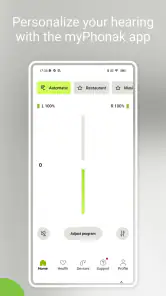
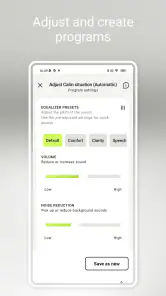
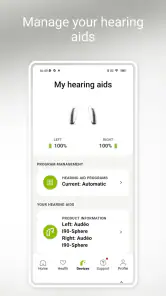
Now, onto the juicy stuff – the features! One of the highlights of the app is the ability to customize your hearing experience. You can adjust the volume, change programs, and even tweak the noise reduction settings to your liking. It’s like having a remote control for your ears! Plus, the app offers real-time adjustments, so if you find yourself in a noisy restaurant or a quiet library, you can quickly adapt without missing a beat.
More From Our News Desk

Weather by Xiaomi Review: Clear at a Glance, Less Clear Up Close

X Under Pressure: Can It Recover When Posting Goes Wrong?

Clash of Clans Is Won Between the Battles

Android Auto Makes the Case for Quieter Car Software

MobiOffice: Transforming Mobile Productivity with Seamless Integration

EA SPORTS FC™ Mobile Soccer: Redefining Mobile Sports Gaming
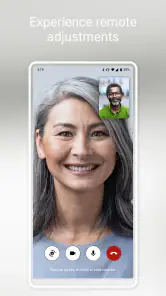
Another standout feature is the Remote Support. This is particularly handy if you have any issues or need adjustments that you can't quite figure out on your own. With this feature, you can connect with your hearing care professional directly through the app. It’s like having a personal audiologist in your pocket!
Choosing what to adjust—and when
I’d treat those controls as a way to fine-tune a listening situation, not as a reason to chase a perfect sound in every setting. In a meeting, for example, a small change may make it easier to follow the person speaking, while a different room or a change in who is talking may call for a different choice. I find it more practical to notice one specific difficulty, make one adjustment, and listen for a little while than to change several things at once. That makes it easier to tell whether the change helped.
There is also a useful distinction between immediate comfort and a lasting fit. A setting that feels better for a short conversation may not be the best choice for all-day use. If an adjustment repeatedly seems necessary, or if listening remains difficult, I’d make a note of the circumstances and raise them with my hearing care professional rather than assuming that more app changes will solve the problem. The app is most helpful when it supports that conversation, not when it becomes a substitute for it.
Keeping an Ear on Your Health
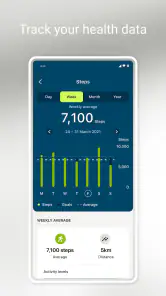
With health and wellness being a top priority for many of us, the app also offers insights into your hearing health. You can track your hearing aid usage, monitor your hearing performance over time, and even set goals for yourself. It’s a great way to take charge of your hearing health and stay proactive.
Oh, and did I mention the app is available for both Android and iOS? So, no matter your device preference, you can enjoy all these fantastic features without a hitch.
What to expect from the hearing data
I’d use the tracking as a prompt for reflection, not as a diagnosis. If a usage pattern changes or a particular setting seems consistently unhelpful, noting that before a professional conversation can make the discussion more focused. Goals may also suit someone who likes a gentle nudge to use their hearing aids regularly, but they are less compelling for a person who simply wants a basic control and has no interest in reviewing progress.
One practical tip is to connect the information to a real situation instead of treating the numbers as a verdict. I might remember that I used the aids less on a day with a long, tiring social event, or that a certain type of environment often led me to adjust the sound. That context can make a check-in with a professional more useful. I would not draw medical conclusions from a trend on my own, and I would not let a goal become a source of guilt if a day does not go to plan.
That distinction helps explain how this differs from a generic phone remote or a paper note about hearing-aid use. A simple remote may be enough if all I need is a quick volume change; the appeal here is having controls and hearing-related tracking together, along with a route to professional support. I would choose the simpler option if I didn’t use compatible Phonak hearing aids or didn’t want to manage settings through a phone.
When the phone is not the best tool
For someone who prefers to keep their phone in a bag or dislikes navigating menus, an app-based control can add friction to a task that should feel quick. A hearing-aid control that is already comfortable to use may be the better everyday choice in that case. The app’s advantage is not that every wearer needs to reach for a screen; it is that the wearer has another way to adjust settings and review hearing-related information when that suits them.
I’d also avoid treating the app as a general-purpose hearing solution. It is designed to work with Phonak hearing aids, so someone comparing hearing products should first focus on the devices and professional care that meet their needs. The app makes more sense as part of that setup than as a standalone answer for someone who has not been fitted with compatible aids or wants a hearing test on a phone.
Age, trust, and choosing the right helper
The app is rated for Everyone, but I wouldn’t read that as meaning every child should manage hearing settings alone. For a younger wearer, an adult can help with the phone and explain what each change does, while still asking the wearer how the sound feels. For an older adult who is less comfortable with apps, a relative can help with the first connection and then leave the everyday controls accessible to the wearer. The goal is support without quietly taking over.
Because the app brings together hearing adjustments and health-related information, I’d also be thoughtful about handing an unlocked phone to someone else. A family member may be trusted to help, but that does not mean every household member needs access. Keeping the phone with its owner and making changes together when help is needed is a sensible boundary, especially when the wearer is still learning which controls work best.
Coordinating help without taking control
Household support works best when the wearer remains the person who describes the problem and decides whether an adjustment feels right. If a partner notices that a conversation has become difficult, they can ask what the wearer is hearing rather than changing settings on their behalf. That small habit avoids guessing: the listener may be struggling with a particular voice, background noise, or fatigue, and those situations are not interchangeable.
When remote professional support is useful, I’d prepare a brief description before starting: what was happening, what felt difficult, and whether any adjustment helped. A companion can help the wearer remember those details or explain a technical issue, but the wearer should be included in the conversation. This is a simple way to make assistance more coordinated without assuming the app offers family accounts or shared management tools.
For shared phones, I would be especially deliberate about who opens the app and when. If the wearer does not have a personal phone, using a trusted person’s device may be convenient, but it can blur whose settings and information are being handled. I’d agree on a clear routine and avoid making changes casually when the wearer is not present. That is less about a special family feature and more about respecting a personal health tool.
Who will get the most from it
This medical app is most worthwhile for people who already use compatible Phonak hearing aids and want more hands-on control between appointments. Sonova AG is the developer, and the current version is 7.3.0. The app is free, has an average rating of 4.5 from around 102,000 ratings, and has been installed over a million times. It first became available on April 16, 2018, and supports devices running Android 8.0 or later. Those figures offer a sense of its established audience, but they cannot tell me whether its controls will suit a particular person’s hearing needs.
The size of its audience is reassuring in the limited sense that this is not an obscure tool, but popularity is no guarantee that it will fit someone’s routine. I’d judge it by whether the controls are comfortable to reach, whether the wearer actually wants to review hearing information, and whether professional support through the app is useful to them. It is a better match for someone who likes having options close at hand than for a person who prefers a set-and-forget approach.
I would skip it if I’m looking for a general hearing test, a substitute for hearing aids, or a tool to manage someone else’s care without their involvement. It also may not add much for a wearer who is already comfortable with the hearing-aid controls and rarely changes settings. The strongest reason to keep it is the combination of on-the-go adjustments, usage insights, and a way to connect with a hearing care professional when self-service stops being enough.
Final Thoughts
All in all, the app is a game-changer for anyone using Phonak hearing aids. Its user-friendly interface, plethora of customization options, and direct access to professional support make it a must-have for optimizing your hearing experience. It’s not just an app; it’s your new best friend when it comes to managing your hearing aids.
So, if you're ready to take your hearing to the next level, give it a try. It’s like having a personal, customizable hearing assistant right in your pocket. Trust me, you won't regret it!
A household verdict
For a household, I see myPhonak as most successful when it increases the wearer’s independence while making occasional help easier. It can give someone a way to adjust their hearing aids without handing over the phone, and it can help turn everyday observations into a clearer conversation with a professional. A relative’s role is best kept supportive: help with setup if asked, listen to the wearer’s feedback, and avoid treating access to the device as permission to manage it.
I’d recommend it to a Phonak hearing-aid wearer who wants practical control, is comfortable using a smartphone, and would benefit from keeping track of their hearing-aid use. I’d be less enthusiastic for someone who wants a shared family control panel, a diagnostic tool, or a replacement for an appointment. Used with those limits in mind, it feels like a helpful personal companion rather than another household task to manage.
myPhonak Frequently Asked Questions
Does myPhonak have a good user rating?
myPhonak has an average rating of around 4.5 from roughly 102,000 ratings, suggesting many users find it useful for managing their hearing experience. Individual experiences can still depend on a person’s hearing aids, phone, and needs. If you are considering downloading it, focus on whether your Phonak devices are compatible and whether the app’s features fit the way you want to manage them.
Who develops myPhonak, and what is it designed for?
myPhonak is a medical app developed by Sonova AG for a personalized hearing experience and health data tracking. It is intended to support people who use Phonak hearing aids by bringing hearing-related controls and tools to a smartphone. Before installing it, consider whether you use compatible Phonak devices and whether managing hearing settings from your phone would be convenient for you.
Is myPhonak free to download?
Yes, myPhonak is free to download. It is a medical app from Sonova AG, designed to support a personalized hearing experience and health data tracking. The app is intended for people using Phonak hearing aids, so it is worth checking that your hearing aid model and phone are compatible before installing it.
What is myPhonak and how does it work?
myPhonak is a comprehensive app designed to enhance the user experience of Phonak hearing aid users. It allows users to customize their hearing aid settings directly from their smartphone, offering features such as remote control, real-time adjustments, and personalized hearing profiles. By connecting via Bluetooth, users can also receive remote support from their hearing care professionals, making it a versatile tool for managing hearing health efficiently.
Is myPhonak compatible with all Phonak hearing aids?
While myPhonak is designed to work with a wide range of Phonak hearing aids, not all models may be compatible. To ensure compatibility, users should check the specific model of their hearing aids against the list of supported devices provided in the app’s details or on the Phonak website. Compatibility may also depend on the smartphone's operating system and version.
Pros
- Customizable sound settings.
- Real-time environment adjustment.
- Seamless Bluetooth connectivity.
- User-friendly interface.
- Remote support available.
Cons
- Limited features for free version.
- Battery consumption can be high.
- Occasional connectivity issues.
- Requires frequent updates.
- Not compatible with all devices.
- Category
- Medical
- Version
- 7.3.0












