

Easy Line Remote
- 784.00
- 4.4
- Installs
- 100.00K
- Price
- Free

Screenshots
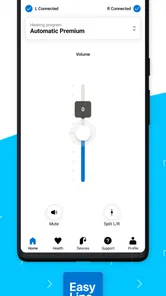
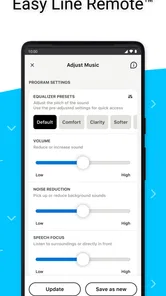
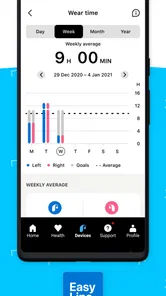
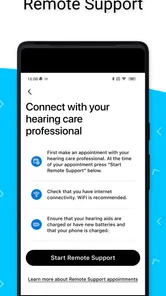
Analysis by Reviewed
I found Easy Line Remote most useful when I treated it as a personal control panel for compatible hearing equipment rather than as a general medical app. In a household where one person uses hearing aids and another person helps with day-to-day adjustments, that distinction matters. The app can make small changes easier to manage without turning every conversation into a technical session, while still leaving the wearer in charge of what feels comfortable.
Developed by Sonova AG, this free Medical app combines a personalized hearing experience with health-data tracking. It is available for users aged Everyone, has reached over 100K installs, and holds a 4.3 average from around 5K ratings. Those figures suggest a reasonably established user base, but they do not remove the most important question: whether it fits your particular hearing device and the way your household shares responsibility for it.
How Easy Line Remote fits into everyday hearing routines
I find Easy Line Remote most useful as a quiet support for the wearer’s existing routine, rather than something the whole household needs to check constantly. In this section, I’d focus on how a small, deliberate adjustment can make a real moment easier without turning hearing into a group project. That everyday rhythm also sets up the next practical question: how to begin in a way that leaves the wearer confident and in control.
A practical shared-device scenario
Imagine a family member getting ready for a busy morning. The wearer is heading out, a partner notices that the television was unusually loud the previous evening, and someone else in the home wants to help without taking the hearing aids away or making changes blindly. A remote-control app can reduce that friction. The wearer can keep the phone nearby, check the current experience, and make an adjustment while the other person offers help verbally.
That arrangement works best when the phone remains the wearer’s tool, even if another household member understands the settings better. I would not recommend treating the app as a shared dashboard that everyone edits casually. Hearing comfort is personal. A setting that helps one person follow a conversation may feel tiring or unpleasant to someone else, so “helping” should mean guiding the process, not taking ownership of it.
The health-data side also changes the conversation. Instead of relying only on memory—“I think I wore them more yesterday”—the wearer may have a clearer record to discuss with a hearing professional or family member. I see this as useful for noticing routines and preparing better questions, not as a replacement for clinical advice. Tracking can show patterns, but it cannot explain every reason behind them.
For a household, the strongest benefit is coordination. One person can say what is difficult, another can help locate the right control, and the wearer can decide whether the result is actually better. That is more respectful than handing a phone around and making changes without feedback.
More From Our News Desk

 Instagram
Instagram’s Power Comes From Its Place in Your Phone
A close look at how Instagram turns Meta’s reach, recommendation systems and everyday camera habits into durable platform power—and what that costs users.

 Gmail
GmailGmail in a Busy Inbox: Who Benefits Most?
From first account to crowded workday, Gmail earns its place through dependable search and flexible sorting—but its best fit depends on how much inbox maintenance you can tolerate.

 Prime Video
Switching to Prime Video: What Changes in Your Viewing Routine
Prime Video can make a compelling second home for streaming, but switching means learning a different catalog, rental layer, and route from browsing to playback.

 Universal TV Remote Control
Universal TV Remote Control Works Best as a Reliable Backup
A phone remote earns its place through quick setup and reliable habits. Here is how to get more from Universal TV Remote Control—and where its limits show.

 Weather - By Xiaomi
Weather by Xiaomi Review: Clear at a Glance, Less Clear Up Close
Xiaomi’s weather app makes everyday forecasts quick to scan, but its calm surface can leave useful details and recovery paths harder to find than they should be.

 X
XX Under Pressure: Can It Recover When Posting Goes Wrong?
A resilience-focused review of X, examining setup, mistaken posts, interruptions, weak connections, and the gaps that matter when recovery needs to be dependable.
Latest News



What the first setup should establish
The first step is to confirm that the hearing equipment is supported and ready to communicate with the phone. This is the boundary I would check before spending time exploring menus. Easy Line Remote is not a universal remote for every hearing aid, and installing it does not automatically make unrelated equipment compatible. If the connection is not available, the app cannot compensate for that limitation.
I would also do the initial setup with the wearer present, even if a relative is more comfortable with smartphones. That keeps the purpose clear: the app belongs in the wearer’s routine, not just in the helper’s phone habits. It also gives the wearer a chance to learn the controls instead of becoming dependent on someone else for every small adjustment.
On a shared device, account boundaries deserve special attention. I would avoid assuming that one phone should serve as the permanent control center for several people. A household can share practical assistance, but each wearer should know which hearing equipment is connected and who is making a change. Mixing devices or profiles can create confusion, especially when two people need help at the same time.
Before leaving the setup screen, I would test the arrangement in a quiet room and then in a normal conversation. A control that seems obvious while sitting at a table may be harder to use when the wearer is moving around, dealing with background sound, or trying to follow a discussion. This small rehearsal is more valuable than simply confirming that the app opened successfully.
Keeping control personal without making help difficult
One of the less obvious trade-offs is the difference between technical access and practical authority. A partner may know where every option is, but the wearer is the person who experiences the sound. I recommend agreeing on a simple household rule: the helper can suggest, the wearer confirms. That prevents well-intentioned experimentation from becoming an uncomfortable listening session.
This is especially important when a phone is passed between people. Before changing anything, say what problem you are trying to solve: speech sounds unclear, the television feels too loud, or the wearer wants a different experience for a particular situation. Making one change at a time keeps the result understandable. If several settings are altered together, it becomes difficult to know which adjustment helped and which one introduced a new problem.
I also prefer using the app as part of a short routine rather than checking it constantly. For example, the wearer might review the experience before leaving home, make a small adjustment if necessary, and then stop. Frequent tinkering can make normal variation feel like a fault. Hearing comfort is affected by the room, the speaker, fatigue, and attention, so not every difficult moment calls for a new setting.
When the app is used this way, it supports independence rather than replacing it. The wearer learns what feels useful, while relatives remain available for practical help. That balance is more sustainable than making one technically confident person responsible for every interaction with the hearing aids.
Coordinating around health data
The tracking element is most valuable when it turns vague recollections into a starting point for a conversation. A wearer might notice that use is more consistent on workdays than on weekends, or that certain routines are easier to maintain when the phone and hearing equipment are kept together. I would write down the question that the pattern raises instead of treating the record as a diagnosis.
For a caregiver or partner, this can make check-ins less intrusive. Rather than repeatedly asking, “Did you use them today?”, the conversation can focus on what made use easy or difficult. That shift respects the wearer’s privacy and avoids making the app feel like a monitoring tool. The data should support the person, not become a scorecard used by the household.
There is also a practical limitation: tracking is only useful when the wearer understands what is being recorded and how it will be interpreted. I would not use a single day as proof that a routine is working or failing. A busy day, a forgotten phone, or an unusual environment can distort the picture. Looking for repeated patterns is more sensible than reacting to every fluctuation.
When preparing for an appointment, the app may help the wearer describe experiences more clearly, but I would still bring specific examples in ordinary language. “Speech was difficult in a crowded restaurant” is more useful than pointing to a number without context. The app can organize part of the story; it cannot tell the whole story for you.
Age, trust, and the right level of assistance
The Everyone age rating makes the app approachable across a household, but age suitability is not the same as ease of use. An older adult may be perfectly capable of using the controls while still wanting help with pairing, navigation, or remembering a routine. I would separate those tasks. Let the wearer make the listening decisions, while a trusted person assists with the phone when needed.
For younger users or anyone who is not confident with technology, supervision should focus on understanding rather than restriction. There is no reason to invent a family-control system around an app that is meant to support hearing equipment. Instead, establish who may help, which phone is normally used, and what to do when a setting feels wrong. Clear expectations are more useful than pretending the app can manage household roles.
Trust also matters because hearing information is personal. If several people use the same phone, notifications, records, or visible settings may be seen by others. I would choose a private moment for setup and avoid discussing the wearer’s habits in front of guests. The app should make assistance less awkward, not expose more of the wearer’s routine than necessary.
A family member should also know when to step back. If the wearer says a change is uncomfortable, that feedback ends the experiment. The goal is not to prove that a setting is technically correct; it is to help the person hear comfortably and participate more easily. In my view, this human boundary is just as important as any connection step.
Where it is stronger than usual alternatives
Compared with relying only on physical controls, Easy Line Remote offers a more visible way to manage a personalized hearing experience and review health-related information in one place. A physical button can be quick, but it may be difficult to remember, especially when several controls feel similar. A phone interface can make the process easier to explain to a partner or caregiver.
Compared with generic phone accessibility tools, this app is more directly tied to the hearing experience it is designed to support. A phone’s built-in volume control is not the same as adjusting hearing equipment, and changing television volume may only make sound louder rather than clearer. The dedicated approach is therefore more relevant for someone already using compatible equipment from the Sonova ecosystem.
There is a trade-off, though. A physical control remains available when the phone battery is low, the phone is misplaced, or the user does not want to navigate a screen. Someone who wants the simplest possible interaction may prefer relying mainly on the hearing aid’s own controls. The app is better for people who value guided adjustment and tracking, not necessarily for those who want no phone involvement.
I would also distinguish it from a general health tracker. Easy Line Remote is not something I would install merely to collect wellness statistics. Its tracking makes sense in relation to hearing routines, and its usefulness depends on compatible hearing equipment and a wearer who wants that information. If your main need is broader medical monitoring, another category of app would be a better match.
Small frictions I noticed in the overall experience
The biggest potential frustration is not the interface itself but the number of moving parts around it. The phone, hearing equipment, connection, and user all have to cooperate. When something does not behave as expected, it may be unclear whether the issue comes from the app, the phone, the hearing aids, or the environment. That is why I would keep the app updated and perform a calm test before relying on it for an important outing.
The current version is 7.5.1, and the app requires at least OS 10. That makes the phone’s software age part of the decision. A household may have a newer main phone but an older spare device that someone hopes to use for the app. I would check that device first rather than assuming an old phone will provide a smooth experience.
Another friction is the temptation to use a single household phone for convenience. That can work for occasional assistance, but it is less comfortable as a permanent arrangement. The wearer may not have the phone nearby, another person may change a setting unintentionally, or two family members may need access at once. A dedicated personal phone is usually the clearer arrangement when regular use matters.
Finally, no app can remove the need for professional support when the problem is persistent. If sound remains uncomfortable, speech stays unclear, or the wearer is avoiding the equipment, repeated adjustments in the app may only postpone the right conversation. I would use the app to describe the problem more accurately, then seek appropriate hearing care rather than endlessly testing settings.
Who should use it and who should skip it
I think Easy Line Remote is a good fit for someone with compatible hearing equipment who wants more convenient control from a phone. It is particularly useful for an independent wearer who occasionally needs help from a partner, adult child, or caregiver. The combination of personalized listening support and health-data tracking gives the household something concrete to work with without requiring the helper to take over.
It is also a sensible choice for people who already keep their phone close and do not mind using an app as part of their hearing routine. The free price removes a financial barrier to trying it, and the Everyone rating makes it suitable for a wide range of household situations. I would still begin with a short, realistic trial rather than promising that it will solve every hearing challenge.
I would skip it if your equipment is not compatible, if you strongly dislike phone-based controls, or if you only want a basic switch with no tracking element. It may also be the wrong choice for a family that expects one person to manage several wearers from one shared device. That arrangement can become confusing, and the app should not be treated as a substitute for clear personal ownership.
People looking for diagnosis, emergency medical guidance, or a complete hearing-care service should choose a different tool or speak with a professional. This app is practical and focused, not a replacement for assessment. Understanding that limit prevents disappointment and keeps the app in its proper role.
My household verdict
After considering the app as both a hearing aid companion and a shared-household tool, I see its main strength in making everyday coordination calmer. The wearer can remain the decision-maker, relatives can offer informed assistance, and tracking can provide useful context for future conversations. That is a meaningful improvement over guessing, passing physical controls around, or relying only on memory.
My advice is to set it up with the wearer, keep account and device responsibilities clear, test it in the situations that matter, and make one adjustment at a time. Treat health information as a conversation aid rather than a judgment. Those habits make the experience more reliable and protect the wearer’s independence.
Sonova AG has positioned Easy Line Remote as a focused Medical app, and I think that focus is its advantage. It does not need to replace every hearing routine to be worthwhile. For the right compatible user, it offers a convenient bridge between personal control, family support, and better awareness of daily use. For someone who wants a completely phone-free solution, the usual physical controls may remain the better answer.
Overall, I would recommend trying it when the wearer wants a more manageable connection between hearing equipment and everyday life. The best results come when the app supports the wearer’s choices instead of making the household manage hearing on the wearer’s behalf. That is the difference between a useful companion and another piece of technology that creates extra work.
Easy Line Remote Frequently Asked Questions
Is Easy Line Remote suitable for someone who has never used a hearing-aid app?
Easy Line Remote is a companion app for controlling compatible hearing aids, so it is intended to be used alongside the hearing devices rather than as a standalone hearing tool. The app may make everyday controls more convenient, but getting started still involves pairing the phone and hearing aids and learning which controls are available for that model. If you are new to hearing aids, a hearing-care professional can help you understand the app and your device.
What phone requirements should I check before downloading Easy Line Remote?
Easy Line Remote is available for Android and iPhone, and the phone’s operating-system version can affect whether it installs and works correctly. Its minimum operating-system requirement is version 10. Before downloading, check your phone’s software version and confirm that your hearing aids are among the compatible models. Bluetooth support and device software can also affect pairing, so checking compatibility first can help avoid installation or connection frustration.
Who develops Easy Line Remote, and is it free?
Easy Line Remote is a Medical app developed by Sonova AG. It is free to download, and its content rating is Everyone. The app is focused on a personalized hearing experience and health data tracking, with its available controls depending on the connected hearing-aid model and supported features. Before installing, it is still sensible to review the permissions requested on your phone and the app’s privacy information.
What is Easy Line Remote, and what can it do?
Easy Line Remote is a companion app designed to work with compatible hearing aids and related devices. After pairing, it can let you adjust settings such as volume, listening programs, and other supported controls from an Android or iPhone. Its exact features depend on the hearing-aid model, firmware, and region, so checking compatibility before downloading is important.
Is Easy Line Remote compatible with my hearing aids and smartphone?
Compatibility is not universal across all hearing aids or phones. Easy Line Remote is intended for selected compatible models, while Bluetooth support, operating-system version, and manufacturer requirements can affect pairing. Before installing, identify the exact name of your hearing aids and compare it with the app’s official compatibility information. Keeping both the app and device software updated can also improve connection reliability.
Pros
- Simple remote-control setup for compatible Easy Line hearing aids.
- Conveniently adjust volume and programs from your smartphone.
- Useful for discreet changes in noisy or public environments.
- Clear interface makes everyday controls easy to find.
- Can reduce the need to handle the hearing aids directly.
Cons
- Works only with compatible Easy Line hearing aid models.
- Bluetooth pairing may require troubleshooting on some phones.
- Some features depend on the hearing aid firmware and model.
- Battery use may increase when Bluetooth remains active.
- Limited usefulness if you do not own Easy Line hearing aids.












