MyHyundai with Bluelink
- 18.41K
- 4.5
- Installs
- 1.00M
- Price
- Free

Screenshots


Analysis by Reviewed
I tend to judge a car companion app by what it is still useful for after the first week, not by how impressive its controls look on day one. MyHyundai with Bluelink is most appealing when you own a compatible Hyundai and want a quick way to check in on the vehicle between drives. It is a free productivity app from Hyundai Motor America, but its lasting value depends on whether its connected tools fit your routine—and on your car supporting Bluelink.
The first-week appeal: useful moments, not novelty
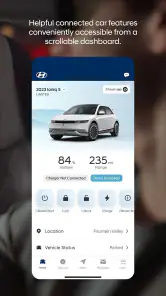
The immediate draw is convenience: you can use the app to interact with your car without being beside it. Remote start can matter on a cold morning, while remote locking offers a practical way to check the car after walking away. These are small tasks, but they remove a needless trip back to the parking spot or a moment of uncertainty.
A realistic routine might be checking the vehicle before leaving work, then using a remote control when conditions make it worthwhile. The benefit is not that every drive becomes different; it is that a few annoying tasks become easier. That is a better reason to keep the app than novelty alone.
Before you build it into your routine
The key question is whether your particular Hyundai is equipped for Bluelink and whether you can connect the vehicle through your Hyundai account. I would check that before planning around remote controls or alerts. Without a compatible vehicle, this is not a general-purpose parking or maintenance app, and its central advantage disappears.
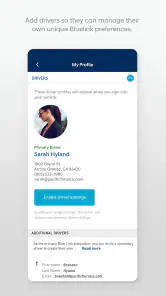
It also helps to think about who else uses the car. A household with one regular driver may only need occasional remote access, while a shared car can make location and alert tools more useful. If you are setting it up for a family member, agree on which alerts matter before enabling them; otherwise, notifications can quickly become noise rather than reassurance.
Getting Started with MyHyundai
The first thing you'll notice about MyHyundai with Bluelink is how sleek and user-friendly the interface is. Trust me, you don’t need to be a tech whiz to navigate through this app. Setting it up is a breeze. Once you've linked your Hyundai account, you’re good to go!
For a smoother first session, I would have the vehicle and account details ready, then test one everyday action rather than trying to configure everything at once. Confirm that the app can reach the car in the situation where you expect to use it, such as from home or before leaving work. That gives you a practical baseline and avoids mistaking an unfamiliar setup step for a problem with a feature.
More From Our News Desk

Clash of Clans Is Won Between the Battles

Android Auto Makes the Case for Quieter Car Software

MobiOffice: Transforming Mobile Productivity with Seamless Integration

EA SPORTS FC™ Mobile Soccer: Redefining Mobile Sports Gaming

How Microsoft OneDrive Became a Mobile Productivity Giant

How Google Translate Breaks Language Barriers Effortlessly
Features That Stand Out
So, let's dive into the features, shall we? One of the coolest things about this app is the remote start function. Imagine it’s a chilly morning, and you can start your car from the comfort of your bed. No more freezing your socks off while waiting for your car to heat up!
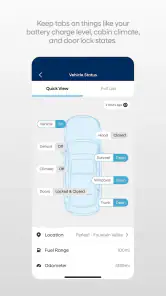
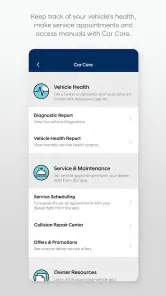
And that’s not all. You can lock and unlock your car remotely, which is perfect if you’re like me and constantly second-guess if you locked your car or not. The app also gives real-time diagnostics of your vehicle’s health. It’s like having a mechanic in your pocket 24/7!
In practice, I would use remote start selectively rather than as a reflex. If I am already heading outside, the extra step may not save me much time; if I am getting ready indoors and the weather makes the car uncomfortable, it is more valuable. Remote locking has a different rhythm: it is a quick check after parking, especially when I am not certain I pressed the button. Those distinct use cases make the controls easier to remember and less likely to become app clutter.
Month-to-month value: make checks purposeful
Once the controls feel familiar, the diagnostics are more useful as a prompt to pay attention than as a replacement for a mechanic. I’d treat a vehicle-health check as a way to notice a potential concern and decide whether to follow up, not as a complete explanation of what a car needs. If something seems wrong, a service professional is still the right person to assess it.
The practical tip is to open the app with a question in mind: did I lock the car, where did I park, or is there a vehicle alert I should review? That keeps checking deliberate instead of turning into a habit of refreshing an app with no clear purpose. It also helps separate a useful warning from reassurance that everything is fine at that moment.
A useful monthly habit is to review whether the features you set up still solve a real problem. If a parking-location check has helped you find the car in a large lot, keep it in your routine. If you enabled an alert for a one-off situation and no longer need it, turn it off. The point is not to monitor the vehicle constantly; it is to keep a small set of tools ready for the situations where they save effort.
Navigation Made Easy
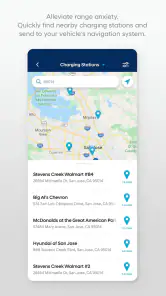
Getting lost is a thing of the past with the integrated navigation system. Simply input your destination, and the app will display the best routes right on your phone. Plus, it syncs seamlessly with your vehicle's navigation system, ensuring you’re always on the right track.
For someone who already relies on a familiar maps app, this is not automatically a reason to change navigation habits. The appeal is the connection to the Hyundai’s own system; the trade-off is that a driver who is happy with their existing phone-based directions may get more value from using those directly. I would choose based on which screen and workflow feel clearest before setting off, rather than assuming one option suits every trip.
That distinction matters on ordinary errands as much as on longer drives. If you mainly need turn-by-turn directions and already know how your preferred maps app behaves, switching just because a vehicle app offers navigation may add steps without improving the trip. If you want the destination to work with the car’s navigation setup, the connected route can be a more natural fit. I would decide before driving, not while moving between screens at the curb.
Security and Peace of Mind
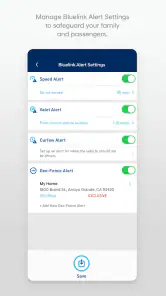
Security is a top priority with MyHyundai. The app provides a car finder feature, which, trust me, is a lifesaver in crowded parking lots. You can also set alerts for things like speed limits and curfews, which is great if you’re lending your car to family or friends.
Another neat security feature is the ability to set a geofence. This means you’ll get notified if your car leaves a designated area. It’s like having a virtual leash on your vehicle!
These tools are most useful when they answer a specific question. A car finder can be worth opening after a busy shopping trip when several rows of similar vehicles make the parking spot easy to forget. For a borrowed car, an agreed boundary or driving alert may be useful to a concerned owner. But I would not treat alerts as a substitute for talking with the person using the car; clear expectations are more helpful than a stream of notifications.
Maintenance burden and sources of fatigue
These alerts are most worthwhile when they answer a real concern. For example, if another household member is borrowing the car, a boundary or driving alert can give you a useful heads-up without requiring you to call repeatedly. For a driver who never shares a vehicle and has no reason to monitor its movements, configuring alerts may add more attention demands than value. I’d enable only the ones tied to a specific need, then review whether they remain helpful.
The app’s main limitation is also its defining condition: it is designed around a Hyundai equipped for Bluelink, so it is not a general car-management tool for someone driving another make. Connected functions also make most sense when the phone, account, vehicle, and service setup are all part of the same routine. If you mainly want directions, a standalone navigation app is likely simpler; if you want remote interaction with your Hyundai, this is the more relevant place to start.
There is also a difference between occasional convenience and dependable access. I would avoid making a time-sensitive plan that assumes a remote command will always be the quickest solution; keep the ordinary option in mind, such as walking back to the car or using its in-vehicle controls. That is not a reason to dismiss the app, but it is a sensible way to use connected features: helpful when available, not a replacement for basic preparation.
Notifications are another possible source of fatigue. A warning that relates to a real concern can be reassuring, but several alerts with no clear purpose can make the app feel like another inbox to manage. My approach would be to start with the smallest useful setup, then add a setting only when a recurring situation gives me a reason. That makes it easier to identify which notifications are genuinely useful and which ones I can live without.
Who will keep using it?
I see the strongest fit for Hyundai owners who regularly use remote controls, want a convenient way to locate a parked car, or share driving responsibilities and have a reason to set alerts. It is less compelling for someone who rarely needs those tasks, prefers to handle everything from the car itself, or does not have a Bluelink-equipped vehicle. The useful question is not whether the feature list sounds impressive, but which one you will actually reach for next month.
Hyundai owners may also wonder whether the app replaces a service visit or a separate maps app. I would not treat diagnostics as a substitute for professional inspection, and I would keep using whichever navigation setup is clearest for a particular journey. The app’s role is to add connected access to the vehicle, not to make every other driving tool unnecessary.
Compared with the usual alternatives, the choice is less about finding one app that does everything and more about choosing the right tool for each task. A standard navigation app can be the simpler option if directions are all you need. The car’s own controls are enough for a driver who is always beside the vehicle. This app makes more sense when you specifically want phone-based access to a compatible Hyundai between trips, alongside vehicle information and the connected controls you actually use.
It is also a poor fit if you do not want a vehicle account or connected app to be part of your driving routine. In that case, keeping the car’s controls and a familiar navigation tool may feel more straightforward. I would not install it simply because it exists; the strongest reason is having a recurring task that becomes easier when the phone can reach the vehicle.
Staying Connected
One of the best parts about using this app is the sense of connection it provides. Whether you’re planning a trip or just running daily errands, it keeps you connected to your car and enhances your driving experience in ways you didn’t think possible.
For context, it has been available since Jul 28, 2014, and its current version is 5.3.6. It has a 4.5 average from around 110,000 ratings, with over one million installs. The app is rated for Everyone. Those figures suggest a well-established option, but they cannot tell you whether its connected controls match your own driving habits; that is what I would use the first few weeks to judge.
With around 18,000 written reviews, it has a sizable base of people who have chosen to leave feedback, though a broad average cannot predict how it will feel with your vehicle or routine. I would use other owners’ experiences as context, not as a promise that every setup will behave the same way. The useful test is still whether the controls you need are easy to reach and dependable enough in your own everyday situations.
Long-term verdict: keep it if it earns its place
All in all, if you own a Hyundai, this app is a must-have. It not only makes managing your vehicle easier but also adds a layer of convenience and security that’s hard to beat. So, what are you waiting for? Give it a whirl and experience a smarter way to drive!
My more measured take is that it earns a lasting place when remote access, location help, diagnostics, or alerts solve recurring problems for you. If those needs fade, there is no reason to open it just for the sake of staying connected. I would install it, set up only the controls and notifications I expect to use, and let everyday experience decide whether it deserves a regular spot on my phone.
MyHyundai with Bluelink Frequently Asked Questions
Does MyHyundai with Bluelink work on both Android and iOS?
MyHyundai with Bluelink is a smartphone app for connecting to a Bluelink-equipped Hyundai. Before downloading, make sure you are choosing the version for your device’s platform and that your phone can install it. The app is intended to put vehicle access and information in one place, while the features available after setup depend on your vehicle and Bluelink connection.
Who is MyHyundai with Bluelink intended for?
The app is aimed at Hyundai owners whose vehicles are equipped with Bluelink and who want to connect with their car from a smartphone. It may be useful if you prefer having supported vehicle controls and information available through an app rather than only from inside the vehicle. If your Hyundai does not have Bluelink, the central purpose of the app may not match your needs.
Is MyHyundai with Bluelink compatible with every Hyundai vehicle?
MyHyundai with Bluelink is intended for Hyundai vehicles equipped with Bluelink, so having a Hyundai alone does not necessarily mean every app feature will be available. The experience depends on the vehicle’s equipment and its connection to Bluelink. Before downloading, check that your vehicle has Bluelink capability; this will help set expectations for connecting the car and using remote features.
What is MyHyundai with Bluelink?
MyHyundai with Bluelink is a comprehensive app designed for Hyundai vehicle owners. It allows users to remotely control various features of their car, such as locking and unlocking the doors, starting the engine, and locating the vehicle. It also provides detailed vehicle health reports and maintenance reminders, enhancing the overall driving experience.
How do I set up MyHyundai with Bluelink?
Setting up the MyHyundai with Bluelink app involves downloading the app from the Google Play Store or Apple App Store, creating an account, and linking your Hyundai vehicle to the app. You will need your vehicle's VIN and access to your Hyundai's infotainment system to complete the setup. Follow the in-app instructions for a step-by-step guide.
Pros
- User-friendly interface
- Real-time vehicle diagnostics
- Remote engine start feature
- Comprehensive vehicle status
- Easy-to-navigate menus
Cons
- Limited features in free version
- Occasional connectivity issues
- Battery drain on prolonged use
- Infrequent app updates
- Requires strong internet connection

- Category
- Productivity
- Version
- 5.3.6












