Hyundai Digital Key
- 715.00
- 4.3
- Installs
- 100.00K
- Price
- Free

Screenshots
Analysis by Reviewed
I’d start by treating Hyundai Digital Key as a companion to a compatible Hyundai, not as a universal replacement for every car key. Its appeal is easy to understand: when the phone and vehicle work together, one less thing has to be found before you can leave. The useful question is whether your particular car and Android phone support the setup you need; that compatibility check matters more than the promise of a key on your screen.
What to expect before installing
Hyundai Motor America’s free Auto & Vehicles app has an average rating of 4.3 from around 4,600 ratings, and it has been installed over 100,000 times. Those numbers suggest interest from Hyundai drivers, but they don’t guarantee a smooth experience on every vehicle. The app is rated Everyone, and version 1.0.29.1 requires Android 7.0 or later. Before relying on it for a trip, confirm that your specific Hyundai is compatible and that the phone you plan to use meets the requirements.
The key distinction is between having an app installed and having a working digital key. The app is intended to work with a compatible vehicle; downloading it alone won’t turn an ordinary Hyundai into a phone-key car. If your car isn’t supported, the conventional key remains the practical choice. I’d also keep the regular key available until you’ve tested the digital one in the situations that matter to you.
A first setup that feels less daunting
For a first-time user, I’d do the pairing while parked somewhere convenient, with the physical key close at hand and enough time to follow the in-app instructions without rushing. Check that the phone’s operating system is current enough, then use the app’s vehicle-pairing process. If it asks you to position the phone near the vehicle’s NFC reader, follow the prompt carefully rather than waving the phone around; placement and timing can matter with near-field communication.
Don’t make your first test the moment you’re late or standing in bad weather. Once setup appears complete, try the intended action while still beside the car, then confirm the vehicle responds before putting the physical key away. That small rehearsal separates a successful pairing from confidence that the whole routine works. If the process stalls, check compatibility and the app’s on-screen guidance first instead of repeatedly tapping or assuming the car is already linked.
What is Hyundai Digital Key?
In a nutshell, the Hyundai Digital Key app lets you use your smartphone as a car key. No more digging through your bag or pockets! It’s designed to make your driving experience smoother and more convenient. All you need is a compatible Hyundai car and an Android smartphone. Sorry iPhone users, this party's not for you... at least not yet!
Setting Up: Easy Peasy or Not?
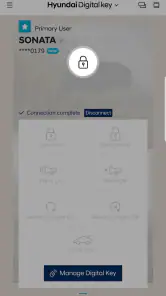
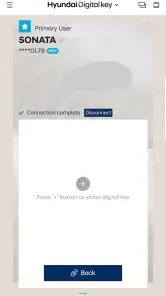
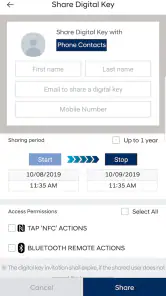
Setting up the app was surprisingly straightforward. After downloading the app, you need to pair it with your car. This involves placing your phone near the car’s NFC reader, usually located on the driver’s door handle. Once connected, you’re good to go! The app also allows you to share digital keys with family members or friends, which is a neat feature when you’re lending your car.
Features That Stand Out
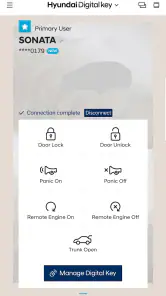
One of the coolest things about this app is the remote control feature. You can lock or unlock your car, start the engine, and even open the trunk using your phone. Imagine stepping out of a store with your hands full, and simply tapping your phone to load your groceries. Pretty slick, right?
Another feature I loved was the customizable user profiles. You can set up different profiles for different drivers. So, if you share your car with someone else, the car will automatically adjust to your preferred settings as soon as you unlock it. It’s like having your personal valet!
Making the convenience useful day to day
The benefit I’d look for first is a repeatable routine, not a dramatic tech trick. For example, if you regularly carry shopping from the car, try the phone-based access before unloading so you know what works with your own vehicle and phone. If you share the car, think through who needs access and when; a digital key may simplify a planned handoff, but it doesn’t remove the need to agree on who has the car or to keep a backup plan.
There’s also a practical trade-off: a phone is useful until it is misplaced, unavailable, or out of reach. I wouldn’t leave the conventional key at home just because the first test succeeds. Keep it as a fallback while you learn the digital routine, especially before a longer drive or a time-sensitive appointment. That isn’t a knock on the app; it’s sensible preparation when your phone is taking on a job normally handled by a dedicated key.
A useful test for shared-car households
For a household with two regular drivers, I’d make the first handoff deliberate rather than treating key sharing as an automatic shortcut. Decide who is setting up access, who will try the second phone, and when the other person can test it without needing to leave immediately. The app’s sharing option can help with lending the car, but the recipient still needs a compatible setup and a clear understanding of the handoff. A quick trial in the driveway is more useful than discovering a snag when one person is already waiting to go.
There is a trade-off between convenience and simplicity here. A shared physical key is familiar and easy to pass across a kitchen counter; a digital key may reduce that exchange, but it asks each driver to keep a suitable phone available and complete the relevant steps. If only one person regularly drives, adding a second digital user may be needless administration. I’d use sharing when it solves a real recurring problem, not just because the option sounds modern.
Where it fits among car-access options
Compared with carrying the usual physical key, a phone key can mean less rummaging and a more convenient way to manage access, particularly for Hyundai owners who already keep their phone close. But a physical key is simpler when you want an independent backup that doesn’t depend on your phone being available. The app also isn’t the right choice for someone with an unsupported vehicle or an iPhone-only setup. In those cases, the regular key is the straightforward option rather than a frustrating workaround.
It helps to separate a digital key from other phone-based vehicle services. This app’s central purpose is access through a compatible Hyundai and phone, rather than being a general-purpose solution for every make of car. If you’re comparing it with a physical key, the question is whether fewer items in your pocket outweigh relying on a charged, accessible phone. If you’re comparing it with a broad vehicle companion app, focus on whether you need this particular access function; installing another app won’t solve an incompatibility between your car and phone.
Questions worth settling before you depend on it
Readers often ask whether installing the app is enough, whether it will work with any Hyundai, and whether it replaces the physical key. My answer is: installation is only the start, compatibility is vehicle-specific, and I’d keep the physical key handy until I’ve tested the setup. If you’re sharing access, check the app’s actual options during setup instead of assuming every driver can be added in the same way. That quick check can prevent a last-minute surprise when someone else needs to take the car.
Another practical question is what to do if the phone is unavailable. My advice is not to make the digital key your only plan until you’ve learned how it behaves in your normal routine and kept a backup available. If you change phones, don’t assume the old setup will carry over without any work; check the app’s current instructions and confirm the new phone with the car before setting off. The same cautious approach applies when someone borrows the vehicle: establish their access beforehand rather than relying on a rushed setup at the curb.
Security Concerns: Should You Worry?
Now, I know what you're thinking: "Is it safe?" The app uses NFC technology, which is generally secure. Plus, there's an added layer of security with an authentication feature that ensures only authorized users can access the car. While no technology is foolproof, Hyundai seems to have put significant thought into keeping your car secure.
When a different option makes more sense
I wouldn’t recommend building your routine around this app if you use an iPhone, drive a Hyundai that isn’t compatible, or need one phone-based key to cover several vehicle brands. In those situations, the app’s main benefit doesn’t line up with what you need, and the regular key is likely the less frustrating choice. It is also a poor fit if you dislike depending on your phone for an essential task or often hand your car to someone who cannot complete the digital setup.
By contrast, it makes the most sense for an Android user with a supported Hyundai who already carries a phone and wants an easier way to access that particular car. A realistic example is coming back from a grocery run with bags in both hands: having the phone ready may make access more convenient than searching a pocket for a key. I’d still test the exact interaction first, because the app’s usefulness depends on your vehicle’s compatibility and the way you use it, not just on the idea of a phone replacing a key.
My recommendation for Hyundai drivers
I’d consider this app if you own a compatible Hyundai, use Android, and value having your phone available for vehicle access. It makes less sense if you need a phone key to work across different makes, rely on an iPhone, or aren’t comfortable keeping a physical backup nearby while you test it. The strongest first step is modest: install it, check your vehicle’s compatibility, pair while parked, and verify the basic action before depending on it. That gives you a clear answer about whether the convenience fits your own routine.
For the first meaningful success, don’t aim to master every option at once. Get the vehicle paired, confirm that the intended access action works beside the car, and repeat it once so you know what to expect. Then, if sharing matters to you, explore that separately and make sure the other driver can use the arrangement too. This order keeps setup manageable and gives you a sensible checkpoint before the app becomes part of a busy morning.
Final Thoughts
Overall, the Hyundai Digital Key app is a game-changer for Hyundai owners. It combines convenience with technology, making your driving experience a breeze. While it’s currently only available for Android users, I’m hopeful that an iOS version is in the works. So, if you’re tired of jangling keys and love the idea of a tech-savvy upgrade to your car, give this app a try. It just might revolutionize the way you drive!
Hyundai Digital Key Frequently Asked Questions
Does Hyundai Digital Key work on every Android phone?
The app is intended for compatible Android devices, so a phone that runs Android may not necessarily support every Digital Key feature. Check your device’s compatibility and software requirements before downloading, and confirm that your Hyundai supports Digital Key as well. The app is free and is intended to provide access to and control of a compatible Hyundai vehicle.
What should I check before installing Hyundai Digital Key?
Before installing, make sure your Android device meets the app’s minimum operating system requirement of Android 7.0 and that your vehicle is compatible with Digital Key. The app is in the Auto & Vehicles category and is developed by Hyundai Motor America. Checking these basics first can help you avoid downloading an app that does not match your phone or vehicle.
What is the Hyundai Digital Key and how does it work?
The Hyundai Digital Key is an innovative app that allows you to control and access your Hyundai vehicle using your smartphone. By using Bluetooth technology, the app enables you to lock, unlock, and even start your car without the need for a physical key. It's designed for convenience, providing a seamless way to manage your vehicle with just a few taps on your device.
Is the Hyundai Digital Key compatible with all Hyundai vehicles?
Not all Hyundai vehicles are compatible with the Digital Key. Currently, this feature is available for select models starting from certain production years. It's important to check the specific model and year of your Hyundai to ensure compatibility. The official Hyundai website or your local dealership can provide detailed information about which models support the Digital Key feature.
What security measures are in place for the Hyundai Digital Key?
The Hyundai Digital Key employs advanced security measures to ensure your vehicle's safety. The app uses a secure encryption protocol to protect data transmission between your smartphone and the vehicle. Additionally, you can set up personalized authentication methods, such as PIN codes or biometric verification, to further safeguard access to your car's features.
Pros
- Convenient keyless entry and start
- Easily share keys with family
- Enhanced security with encryption
- Seamless integration with Hyundai cars
- Customizable user settings
Cons
- Limited to compatible Hyundai models
- Requires smartphone to operate
- Can drain phone battery quickly
- May face connectivity issues
- Initial setup can be complex

- Category
- Auto & Vehicles
- Version
- 1.0.29.1












