

My Disney Experience
- 39.55K
- 4.5
- Installs
- 10.00M
- Price
- Free

Screenshots



Analysis by Reviewed
Have you ever fantasized about planning the perfect trip to Disneyland? Well, let me introduce you to the My Disney Experience app, your new best friend for organizing a magical visit to the happiest place on Earth. As someone who's always on the lookout for apps that make life easier, I decided to give this one a whirl, and boy, was I impressed!
Getting Started with Ease
The first thing you'll notice about the My Disney Experience app is its user-friendly interface. It feels like Disney magic right at your fingertips! Setting up an account was a breeze, and before I knew it, I was exploring all the features this app had to offer. From booking tickets to making dining reservations, everything is just a tap away.
Planning Your Disney Adventure
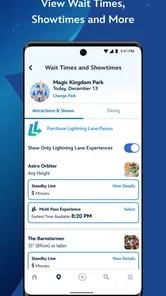
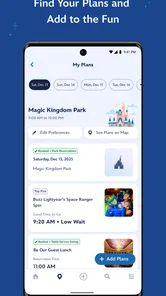
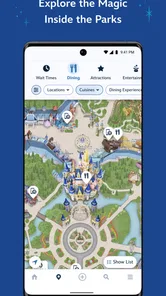
One of the features I loved the most was the ability to customize my itinerary. You can add all the attractions you want to visit, schedule FastPass+ experiences, and even get real-time updates on wait times. It’s like having a personal assistant who knows Disney inside out! I found the map feature particularly helpful; it’s interactive and helps you navigate through the parks without feeling overwhelmed.
Dining Delights
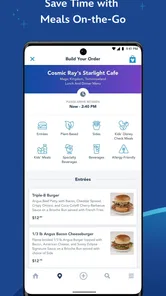
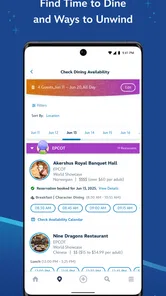
For all the foodies out there, this app is a game-changer. With the dining reservation feature, you can book a table at your favorite restaurant, or even order food directly from the app. The app provides a comprehensive list of all dining options, complete with menus, so you can plan your meals ahead of time. Trust me, skipping the line at lunchtime felt like a VIP experience!
Keeping the Magic Alive
Beyond just planning, the app enhances your Disney experience with its interactive features. You can view your photos taken by Disney photographers, check out showtimes, and even manage your hotel reservations. It’s like having a digital scrapbook of your trip that you can look back on anytime. Plus, the ability to link your MagicBand makes everything seamless and adds an extra sprinkle of magic to your visit.
In conclusion, the My Disney Experience app is an essential tool for anyone planning a trip to Disneyland. It takes the hassle out of planning and lets you focus on what really matters – enjoying every moment of your magical adventure. Whether you're a first-timer or a seasoned Disney enthusiast, this app is bound to make your trip smoother, more organized, and, most importantly, more magical!
More From Our News Desk

 Prime Video
Switching to Prime Video: What Changes in Your Viewing Routine
Prime Video can make a compelling second home for streaming, but switching means learning a different catalog, rental layer, and route from browsing to playback.

 Universal TV Remote Control
Universal TV Remote Control Works Best as a Reliable Backup
A phone remote earns its place through quick setup and reliable habits. Here is how to get more from Universal TV Remote Control—and where its limits show.

 Weather - By Xiaomi
Weather by Xiaomi Review: Clear at a Glance, Less Clear Up Close
Xiaomi’s weather app makes everyday forecasts quick to scan, but its calm surface can leave useful details and recovery paths harder to find than they should be.

 X
XX Under Pressure: Can It Recover When Posting Goes Wrong?
A resilience-focused review of X, examining setup, mistaken posts, interruptions, weak connections, and the gaps that matter when recovery needs to be dependable.

 Clash of Clans
Clash of Clans Is Won Between the Battles
Its raids are quick; its community is a long-term project of coordination, teaching, rivalry, and shared responsibility—with all the friction that entails.

 Android Auto
Android Auto Makes the Case for Quieter Car Software
The car interface is no longer judged by how much it can do, but by how quietly it helps. Android Auto shows what drivers now expect—and what still gets in the way.
Latest News



My Disney Experience Frequently Asked Questions
Can I use My Disney Experience to check park maps and ride wait times?
Yes. My Disney Experience is designed to put Walt Disney World Resort information in one place, including park maps and ride wait times. These tools can help you decide where to go and adjust your plans as the day unfolds. You can also use the app to explore tickets, dining, and other trip-planning features before or during your visit.
Is My Disney Experience suitable for families planning a Disney trip?
The app is focused on planning a Walt Disney World Resort visit, with features such as maps, wait times, tickets, and dining information that can be useful to families organizing a day together. Its content rating is Everyone, and the interface brings several parts of trip planning into one app. Families should still make choices based on their own plans and needs.
Does My Disney Experience work on my phone?
My Disney Experience is available for Android and iOS devices, and the current version is 8.16. Check that your device runs Android 10 or later before downloading. The app is free and is rated for Everyone, so it may suit a broad range of users planning a Walt Disney World Resort visit.
Do I need an account to use My Disney Experience?
An account is useful for managing the trip-planning features described in the app, such as handling tickets, linking a MagicBand, and arranging dining. Creating or signing in to an account lets you keep those plans together rather than treating the app as only a map and wait-time guide. The app is developed by Disney and focuses on Walt Disney World Resort.
What is My Disney Experience and what can I do with it?
My Disney Experience is a comprehensive mobile app designed to enhance your visit to Disney parks. With this app, you can view park maps, check ride wait times, make dining reservations, and even order food ahead. It also allows you to manage your park tickets, link your MagicBands, and enjoy Disney Genie services for personalized itinerary planning. It's essentially your digital guide to make the most out of your Disney adventure.
Pros
- Comprehensive Disney park maps.
- Real-time wait time updates.
- Easy dining reservation system.
- Personalized itinerary planner.
- Convenient ticket and pass storage.
Cons
- App can be slow at peak times.
- Battery drain issue during use.
- Limited offline functionality.
- Occasional login issues reported.
- Some features require internet.













