Bath & Body Works
- 31.93K
- 4.3
- Installs
- 10.00M
- Price
- Free

Screenshots





Analysis by Reviewed
I find shopping apps most useful when they help me make a decision without turning a quick browse into a chore. Bath & Body Works is aimed at people who already enjoy the brand’s lotions, soaps, candles, and seasonal scents, but it can also help a newcomer get a feel for the range before buying. It is a free shopping app from Bath & Body Works- Mobile, and its main appeal is having product discovery and shopping tools gathered in one place.
Where shoppers can get stuck
A bright product page can make browsing enjoyable, but it can also make it easy to lose track of what you meant to buy. I’d go in with a short list—perhaps a candle for home and a body wash to replace an empty one—and use search or categories to narrow things down. If you’re only browsing, save interesting items for later rather than treating every appealing scent as a must-buy.
Fragrance is personal, and a description or picture cannot tell you exactly how a scent will work for you. That is where the app’s user reviews can help: I’d look for comments that mention the product’s character and how the reviewer used it, rather than relying on a single glowing reaction. When scent is the deciding factor, visiting a store to smell a product in person may be the better choice.
Setup checks and a calmer shopping workflow
If the app seems confusing at first, I’d start with the basics: confirm that it is the Bath & Body Works shopping app, check that your device runs iOS 12 or later, and make sure you have a steady connection before trying to browse or check an order. The current version is 10.1.2. If a page does not load, closing and reopening the app or trying again after the connection improves is a sensible first step; there is little value in repeatedly tapping a button while a page is still waiting to load.
For a more deliberate shopping routine, I use the wish list as a holding area, then revisit it when I’m ready to compare options. That is especially handy for gifts: I can keep a few possibilities together, check reviews, and make a choice later instead of trying to remember product names. The app is rated for Everyone, and its 4.3 average from around 289,000 ratings suggests that many shoppers find it useful, though a rating cannot guarantee that every screen or purchase will suit you.
The App Experience: All About Convenience
From the moment you open the app, it's like stepping into a virtual store that's just as inviting as the physical locations. The layout is sleek and intuitive, making it super easy to navigate. Whether you're hunting for a specific product or just browsing, everything is right at your fingertips. The search function works like a charm, and the categories are well-organized, so you can find that perfect body lotion or candle without breaking a sweat.
Features That Stand Out
One of my favorite features of the Bath & Body Works app is the ability to create a wish list. I constantly find myself adding products "just to see" and then coming back to them later. It's like having a personal shopping assistant that remembers everything you love. Plus, the app offers exclusive deals and promotions that you won't find anywhere else. Who doesn't love a good bargain, right?
You May Like

Clash of Clans Is Won Between the Battles

Android Auto Makes the Case for Quieter Car Software

MobiOffice: Transforming Mobile Productivity with Seamless Integration

EA SPORTS FC™ Mobile Soccer: Redefining Mobile Sports Gaming

How Microsoft OneDrive Became a Mobile Productivity Giant

How Google Translate Breaks Language Barriers Effortlessly
Another neat feature is the product reviews. Before making a purchase, I always check out what other users are saying. It's reassuring to see real feedback from fellow shoppers, and it definitely helps in making well-informed decisions. The app also allows you to track your orders, so you're never left in the dark about when your delightful goodies will arrive at your doorstep.
User Interface: A Visual Treat
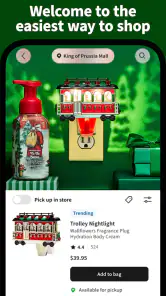
The visual appeal of the app is something that can't be overlooked. The design is vibrant and full of life, much like the products themselves. Each section is adorned with colorful images that make you feel like you're walking through a garden of floral wonders. It's a feast for the eyes, and it makes the shopping experience all the more enjoyable.
A practical fit for regular fans
In day-to-day use, I see the strongest case for the app when someone already knows the kinds of products they like and wants a convenient way to browse, save ideas, and follow an order. For example, if I notice my hand soap is nearly empty while getting ready for work, I can search for a replacement, compare a couple of options, and leave a candle I’m considering on my wish list until I’ve thought it over. That small pause helps keep browsing separate from impulse buying.
Compared with general shopping apps, this one is more focused: it is useful for exploring Bath & Body Works products, but it is not a broad marketplace for comparing unrelated brands. Compared with going straight to a physical shop, it makes browsing and reviewing products easier from home, while the store has the advantage when I want to experience a fragrance before choosing. If I’m shopping for a scent-sensitive person, I’d use online reviews to shortlist possibilities and avoid assuming that a popular scent will suit them.
When another option makes more sense
The app is less compelling if you rarely shop with this brand, prefer to compare products across many retailers, or make fragrance choices only after testing them in person. Its colorful presentation is pleasant, though shoppers who want a plain, utilitarian list may find the product imagery more decorative than helpful. I also treat promotions as a reason to check an item I already want, not as a reason to buy something I would otherwise skip.
If an order page appears to stall, I’d first check whether the rest of the app and my connection are working, then reopen the page and give it another try. If browsing works but an order detail does not, that points to a different problem from a general loading issue; I would avoid placing the same order again until I had checked what the app already shows. For a purchase decision, I’d compare the item details and reviews once more rather than relying on a saved image or memory alone.
Using saved items without losing track
A wish list works best for me when I treat it as a shortlist rather than a permanent cupboard of possibilities. I’d remove items once I have decided against them, so the remaining choices stay useful when I return. For a household restock, I can separate something I know I need, such as soap, from a fragrance I’m merely curious about. That distinction makes it easier to use the app deliberately and keeps a promotion from turning a casual browse into a larger basket.
It also helps to think about who the purchase is for before comparing scent reviews. A candle for a shared room, a personal lotion, and a gift all call for different kinds of confidence. Reviews may clarify whether shoppers describe a product as subtle or noticeable, but they cannot reproduce another person’s sense of smell. For a gift recipient whose preferences I do not know, I would choose a familiar product type or use the app to gather ideas before asking what scents they already enjoy.
Small checks that can prevent a mistaken order
Before confirming a purchase, I’d pause on the product page and check that I have the intended item and not just a similar-looking option. This matters when browsing quickly through colorful images or revisiting a saved choice after some time. I would also review the basket as a whole: it is an easy place to notice that a “maybe” item has joined the practical replacement I originally came for. That final check is more useful than trying to undo an impulsive decision later.
If the app is slow, I would change one thing at a time rather than repeatedly tapping controls or starting the same action again. First I’d see whether other pages load; then I’d check the connection and reopen the screen. If the problem is limited to an order detail while the rest of the app works, I’d wait and check again instead of assuming the purchase failed. This simple distinction can help avoid duplicate attempts and unnecessary confusion.
What the app can—and cannot—settle
The app is a handy way to narrow a choice, but I would not treat product photos, written descriptions, or crowd feedback as substitutes for every kind of shopping judgment. A returning customer who knows a favorite scent can use those details to find it again more confidently. Someone choosing a first fragrance, or buying for a person with strong preferences, may get more value from seeing and smelling options in person before committing. The best workflow depends on how familiar you are with the product, not just how easy the screen is to use.
For shoppers who mainly want to compare prices and products from several sellers, a general retailer or marketplace is the more natural starting point. This app’s narrower focus is a benefit when I want to browse this brand without unrelated results, but it also means it cannot replace a cross-store comparison. I’d use it as a brand-specific companion, then step outside it if the decision depends on alternatives the app is not designed to bring together.
Final Thoughts: A Must-Have for Fans
In conclusion, the Bath & Body Works app is a delightful extension of the brand's in-store experience. It's got everything you need to keep up with the latest products, deals, and trends. Whether you're a long-time fan or a newcomer looking to explore, this app makes it easy to indulge in all things Bath & Body Works. So, if you haven't downloaded it yet, what are you waiting for? Dive into this fragrant world and let your senses be your guide!
There is a substantial audience for it: the app has over 10 million installs and around 32,000 written reviews. For me, that scale is useful context, not a promise of a flawless experience. The practical verdict is simple: I’d keep it if I shop the brand often enough to use saved items, product feedback, and order tracking; otherwise, browsing the brand’s products in a regular web browser or visiting a store may be enough. Its strongest value is convenience for repeat shoppers, while the best way to choose a scent you have never tried remains personal testing.
Bath & Body Works Frequently Asked Questions
What can I expect when I first open the Bath & Body Works app?
The Bath & Body Works app is a shopping app built around the brand, with the store’s short description summed up as “Bath & Body Works” and its main message as “Shop. Earn. Redeem. Repeat!” You can use it to browse products and shop, while account-related features support rewards and purchase management. It is most relevant if you already shop with the brand or want to explore its products from your phone.
Is the Bath & Body Works app suitable for someone who only wants to browse?
Yes. You can browse the Bath & Body Works app and explore products without first committing to an account. Signing in becomes more useful when you want to connect your shopping activity with rewards or keep purchases organized. If you are still deciding whether the app suits you, browsing can give you a feel for its brand-focused shopping experience before you make an account or place an order.
Is the Bath & Body Works app free, and what devices can run it?
The Bath & Body Works app is free to download and is rated for Everyone. It is available for Android and iOS, making it a convenient option for shopping from a phone or tablet. The current version is 10.1.2, and the app requires Android or iOS 12 or later. Check your device’s operating system before downloading to make sure it meets that requirement.
Do I need an account to shop or use the app’s features?
You can browse the Bath & Body Works app to explore products, but signing in or creating an account is useful for features connected to your shopping activity. An account lets you manage rewards and view purchases in one place. If you plan to earn rewards or keep track of orders, signing in before you shop can make the experience more straightforward.
What is Bath & Body Works and what does the app offer?
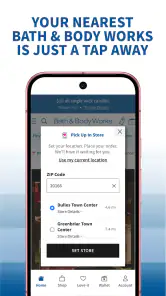
Bath & Body Works is a renowned retailer specializing in fragrant body care products, including lotions, candles, and perfumes. The app offers a convenient way to shop their extensive range of products, access exclusive deals, and manage your rewards points. Users can explore new arrivals, check out customer reviews, and even locate the nearest store. Essentially, the app enhances your shopping experience with personalized recommendations and easy access to your favorite scents.
Pros
- Wide variety of fragrances.
- User-friendly interface.
- Frequent discounts and offers.
- High product quality.
- Loyalty rewards program.
Cons
- Limited international shipping.
- Some items often out of stock.
- Higher price point for some products.
- App sometimes crashes.
- Notifications can be overwhelming.

- Category
- Shopping
- Version
- 10.1.2