

Moment Weather
- 5.00
- 4.4
- Installs
- 10.00K
- Price
- Free
Screenshots
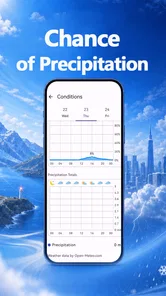
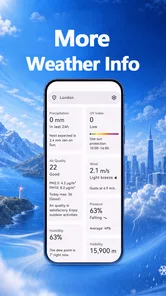
Analysis by Reviewed
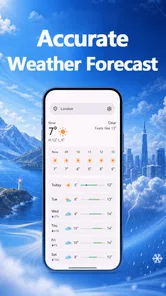
I tend to judge a weather app by whether it helps me make a decision quickly, then gives me enough detail to check that decision. Moment Weather is built around that useful middle ground: it brings hourly and daily forecasts together with more detailed weather information, rather than asking me to rely on a single current-condition reading. That makes it worth considering if you check the forecast as part of an everyday routine, especially before leaving home or planning time outdoors.
It is a free weather app from Odunaike, currently at version 1.0.4, and its straightforward focus is also its main promise. I would not treat it as a replacement for specialist tools when a precise forecast is essential, but it can serve as a convenient everyday reference. The key is to use its different forecast horizons deliberately: hourly information for near-term plans, and the daily view for the broader shape of the day.
Make the forecast part of a repeatable routine
I use the daily outlook as a starting point, then check the hours that matter when a plan is close enough to act on. In this section, I focus on making that sequence easy to repeat, so the forecast informs a choice without turning into a reason to keep reopening the app.
Start with the decision, not the screen
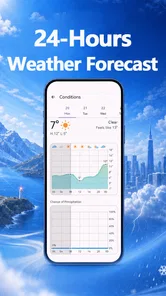
My most practical way to use Moment Weather is to open it with a question in mind. “Can I walk to the station now?” calls for a look at the near-term forecast. “Should I move the garden work to another day?” is a daily-planning question. Keeping those tasks separate makes the app’s combination of hourly and daily forecasts more useful than simply glancing at a weather number and closing it.
For a normal morning, I would check the day first, then use the hourly view to decide when to leave or whether to carry an extra layer. If the day looks unsettled, the hour-by-hour outlook helps me avoid assuming that the morning will represent the afternoon. That is a small habit, but it prevents a common mistake: treating a daily summary as if conditions will stay constant from breakfast to evening.
A realistic example is a commute followed by an outdoor errand. I would check the hourly forecast before heading out, then revisit it before the later trip rather than making the second decision from memory. The daily forecast gives context for the whole day; the hourly view is the better tool for timing. This is where Moment Weather’s central combination feels practical rather than merely descriptive.
Use detailed information to check your assumptions
The app also presents detailed weather data, which is valuable when the headline forecast does not answer the question you actually have. A general impression of the day may be enough to choose clothes, but someone deciding whether to spend several hours outside may want to examine more than the broad outlook. I would treat those details as a second pass: first get the overall picture, then inspect the information relevant to the plan.
More From Our News Desk

 Gmail
GmailGmail in a Busy Inbox: Who Benefits Most?
From first account to crowded workday, Gmail earns its place through dependable search and flexible sorting—but its best fit depends on how much inbox maintenance you can tolerate.

 Prime Video
Switching to Prime Video: What Changes in Your Viewing Routine
Prime Video can make a compelling second home for streaming, but switching means learning a different catalog, rental layer, and route from browsing to playback.

 Universal TV Remote Control
Universal TV Remote Control Works Best as a Reliable Backup
A phone remote earns its place through quick setup and reliable habits. Here is how to get more from Universal TV Remote Control—and where its limits show.

 Weather - By Xiaomi
Weather by Xiaomi Review: Clear at a Glance, Less Clear Up Close
Xiaomi’s weather app makes everyday forecasts quick to scan, but its calm surface can leave useful details and recovery paths harder to find than they should be.

 X
XX Under Pressure: Can It Recover When Posting Goes Wrong?
A resilience-focused review of X, examining setup, mistaken posts, interruptions, weak connections, and the gaps that matter when recovery needs to be dependable.

 Clash of Clans
Clash of Clans Is Won Between the Battles
Its raids are quick; its community is a long-term project of coordination, teaching, rivalry, and shared responsibility—with all the friction that entails.
Latest News



That sequence keeps the experience from becoming a hunt through numbers. It also helps avoid overreacting to one detail without considering the rest of the day. For example, a short outdoor task and a long trip are not the same decision. For a brief errand, a quick hourly check may be sufficient; for an outing with little flexibility, I would compare the wider daily picture with the nearer-term view before committing.
One useful discipline is to check at consistent moments instead of refreshing whenever the weather feels uncertain. A morning check and a later check before an important outing can establish a dependable routine without turning forecast-watching into a distraction. Moment Weather supports that style of use because its forecast views address different planning windows, but the judgment still comes from matching the view to the decision.
Build a habit that saves time
Experienced weather-app users often get more value from a repeatable workflow than from constantly exploring screens. With Moment Weather, I would make the daily forecast my planning baseline and use the hourly forecast only when timing matters. That avoids reading the same broad outlook repeatedly while still giving a way to refine a plan as the day approaches.
A second useful pattern is to check the forecast before making a commitment that is hard to change. If I am choosing between an indoor and outdoor activity, I would look at the daily view early enough to compare options, then check the hourly outlook closer to the start time. That two-stage approach is more reliable than checking once several hours beforehand and assuming the forecast will remain equally useful later.
For recurring activities, such as a regular walk or a weekly outdoor task, I would use the same decision rule each time: daily view for whether the plan makes sense at all, hourly view for when to go. This does not require a special feature or complicated setup. It is simply a way to make the information easier to act on, and it is especially helpful if you tend to open a weather app, see several details, and still feel unsure what to do.
Make the check fit the day you actually have
Not every plan deserves the same amount of forecast-checking. If I am stepping out for a brief local errand, I would keep the process short: look at the near-term conditions and decide whether a coat or umbrella is sensible. If I am organizing several stops, I would think about the order of those stops as well as the weather. A dry-looking start does not automatically make the whole outing comfortable, so the hourly view can help me decide whether to do the exposed part first or leave it until later.
This is also a useful way to avoid turning a forecast into a rigid schedule. I treat it as a planning aid, not a promise. When conditions are changeable, I can make a flexible plan and check again before setting off; when the plan is simple and nearby, one quick look may be enough. That distinction keeps the app useful without making me feel that every small decision needs a fresh forecast consultation.
Check the basics before relying on it
Because a weather app is only useful when it suits the device and the way someone plans, I would check compatibility before making it part of a daily routine. Moment Weather requires Android 9 or later. Its content rating is Everyone, so it is positioned for a general audience rather than a narrowly age-specific one. Those details make the basic decision straightforward: Android users on a compatible version can consider trying it without paying for the app.
The app has a 4.4 average from around 87 ratings, and it has passed 10,000 installs. Those figures suggest that people have tried it, but they do not tell me whether its forecast presentation will suit a particular person. With weather tools, personal usefulness depends heavily on location, habits, and how much detail someone wants to see. I would use the rating as a modest signal, not as a substitute for checking whether the hourly and daily views fit my own routine.
Moment Weather is currently version 1.0.4, so I would approach it as a focused option rather than assuming it has the long track record or extensive customization of a long-established weather platform. The free price lowers the barrier to trying it, but it does not remove the need to compare its style with the tools you already use. If a familiar app already gives you a clear forecast and the detail you need, switching only makes sense if Moment Weather’s presentation feels easier to act on.
Use settings as a practical first check
Before building a routine around any forecast, I would first make sure the app is showing the place I care about and that its information is easy for me to interpret. This is less about hunting for advanced controls and more about avoiding a basic planning error: reading a useful forecast for the wrong location or misunderstanding which time window matters. I would confirm the location context when I first start using the app, then return to that check whenever I travel or change the place I am planning around.
I would also take a moment to notice how the detailed information is presented before relying on it for a decision. People differ in what helps them most: one person may want a quick overall impression, while another prefers to compare several weather details. The practical test is whether the figures clarify the choice at hand. If I find myself scanning data without becoming more confident about the plan, I would step back to the daily and hourly outlook rather than treating more detail as automatically better.
Where it fits beside familiar alternatives
The usual alternatives in this category range from simple weather widgets and quick current-condition screens to larger services that combine forecasts with maps, alerts, and many extra controls. Moment Weather’s clearest role is as a forecast-focused companion: hourly and daily views, with detailed information for people who want to look beyond a brief summary. That focus may suit someone who wants more than a glance but does not want the weather screen to become a dashboard full of unrelated options.
On the other hand, if your planning depends on specialized map layers, severe-weather notifications, or tools tailored to outdoor navigation, a broader weather service may be the better choice. I would not choose an app simply because it offers more information; I would choose one because it answers the questions I ask most often. Moment Weather makes sense when those questions are mainly about how conditions change through the day and what the forecast looks like across several days.
There is also a trade-off between convenience and depth. A compact forecast workflow is easy to repeat, while a more feature-heavy alternative may give experienced users more ways to investigate conditions. If you like comparing multiple sources or need weather information to support safety-critical decisions, I would keep a specialist source in the mix rather than relying on a single general-purpose app. For everyday choices, however, using one clear forecast consistently can be more practical than juggling several apps without a defined reason.
Know when another tool is the better choice
Moment Weather is not the right fit for someone who expects a weather app to do every job at once. If your first question is about a detailed radar display, a particular alert system, or specialized planning tools, compare those specific needs before settling on it. I would also look elsewhere if you strongly prefer an app whose interface and forecasting workflow you already know and trust; a fresh download is not automatically an improvement.
It may also be less satisfying if you only want a tiny, instant glance and never use hourly or daily planning. In that case, a simple widget or a basic forecast screen may be faster for your routine. Conversely, people who enjoy examining detailed information may appreciate having more than a one-line summary, but should still check that the way the app presents its forecasts feels clear to them in everyday use.
For trips or plans where weather conditions could have a serious impact, I would avoid making a decision from one general forecast alone. Check the information close to the time, consider the full plan, and use an appropriate specialist source when the situation calls for it. That is not a flaw unique to Moment Weather; it is a sensible limit for any general weather app. The app is most useful when it informs an ordinary decision, not when it is asked to guarantee what the weather will do.
Questions worth answering before it becomes your default
If you are wondering whether it can replace your current weather app, I would decide based on the questions you ask most often. If you mainly need to choose when to leave, what to wear, or whether an outdoor plan still makes sense, its hourly and daily views give it a reasonable shot. If you routinely depend on mapping, dedicated alerts, or specialized tools, I would keep your existing service or compare another option that centers those needs.
It is also fair to ask whether a free app is useful enough to keep if you already have a basic forecast on your phone. My answer is that it is worth trying only if its way of bringing together near-term and day-level planning feels clearer to you. Give it a few ordinary days, using the same decision pattern each time, rather than judging it from one glance. You will quickly see whether the extra detail helps you make a better choice or just adds another screen to check.
For changing locations, I would make a deliberate habit of confirming the place before relying on a forecast for travel or an appointment. That simple check is particularly important when a day includes both home and a destination elsewhere. The forecast can only support the decision if it matches the place where the decision will happen; remembering this is more valuable than repeatedly checking the same screen without considering location.
A measured recommendation for daily planning
My recommendation is to try Moment Weather if you want a free, uncomplicated way to move between near-term and day-level forecasts, with detailed weather information available when a quick summary is not enough. Its strongest practical quality is the workflow it encourages: check the broad outlook, inspect the hours that matter, and return when a plan is closer. That routine gives the app a clear place in a morning or pre-outing check without requiring constant attention.
It is a more convincing choice for everyday planning than for specialist forecasting needs. I would keep it if its forecast views help me make decisions with less fuss; I would move to another option if I needed tools it does not center its experience around. That distinction matters more than the rating or install count. Weather preferences are personal, and a clean fit with your habits is what makes a forecast app worth keeping.
Overall, Moment Weather earns a place on my shortlist for people who want hourly and daily context in one weather app and are willing to make a simple checking habit out of it. It is not a universal answer for every weather question, but it can be a sensible daily companion when your needs are practical: decide what to wear, choose when to head out, and adjust plans before the day gets away from you.
Moment Weather Frequently Asked Questions
What is Moment Weather, and what can I use it for?
Moment Weather is a weather app designed to help you check current conditions and stay informed about what to expect. Depending on the features available in your version and region, it may provide details such as temperature, precipitation, wind, and forecasts. Before relying on it for travel or outdoor plans, explore its forecast screens and compare the information with local official weather services when conditions could be hazardous.
Is Moment Weather free to download, and does it include in-app purchases?
Pricing and available features can differ between the Android and iOS versions, as well as by country and app update. Check the app’s store listing before downloading to confirm whether it is free, contains ads, or offers subscriptions or one-time purchases. If premium options are presented after installation, review their price, renewal terms, and included features before starting a trial or purchase.
Does Moment Weather need location access to work?
Location access can make weather information more relevant by showing conditions and forecasts for your area, but the exact options depend on your device and the app version. You may be able to enter a city manually instead of granting location permission. Review the permission request and your phone’s privacy settings, and choose whether access is allowed only while using the app or disabled altogether.
Can I use Moment Weather to receive alerts for severe weather?
Weather alerts, if offered in your version, may depend on your location, notification permissions, and the availability of local warning data. Check the app’s settings to see which alert types and regions are supported, and make sure notifications are enabled if you want to receive them. For urgent or dangerous conditions, do not rely on one app alone; consult official emergency and meteorological sources.
Is Moment Weather available for both Android and iOS, and what should I check before installing?
Availability can vary by country, device, and operating-system version, so search for Moment Weather in the official Google Play Store or Apple App Store to confirm that it is offered for your device. Check the listing’s developer name, recent update date, compatibility requirements, and privacy information. Reading recent user reviews can also help you judge whether the app’s current features and performance meet your expectations.
Pros
- Clean
- easy-to-scan forecasts make key weather details quick to find.
- Useful weather information is presented without a cluttered layout.
- Convenient for checking conditions before planning everyday activities.
- Forecast views help you get a quick sense of upcoming weather changes.
- A focused weather app can be simpler to use than feature-heavy alternatives.
Cons
- Forecast accuracy can vary by location and weather provider.
- Some locations may have less detailed or less reliable forecast data.
- Weather updates depend on an internet connection and location access.
- It may lack advanced tools offered by specialist weather apps.
- The app’s usefulness depends on how often its forecasts are refreshed.











