MMGuardian Parental Control
- 9.68K
- 4.2
- Installs
- 1.00M
- Price
- Free

Screenshots
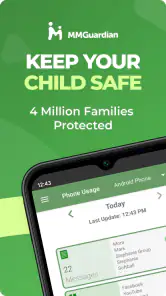
Analysis by Reviewed
When my child started using a phone to coordinate rides home and message friends, I wanted a way to set sensible boundaries without turning every conversation into a parental inspection. That is the question I’d bring to MMGuardian Parental Control: can it help a parent stay informed while leaving room for trust? Its focus on limits, app blocking and location makes it relevant to everyday family routines, though how well it fits depends on how much oversight both parent and child are comfortable with.
Keeping phone use within family boundaries
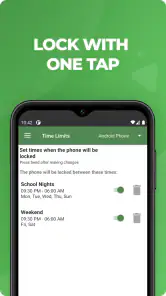
The capability I find most useful is the combination of screen-time limits and app blocking. Rather than relying on a reminder that a child can ignore, a parent can use controls to make phone rules more concrete. That can help with a familiar point of friction: agreeing that homework, meals or bedtime should not be swallowed by endless scrolling. I would treat these settings as support for a family rule, not as a substitute for explaining why the rule exists.
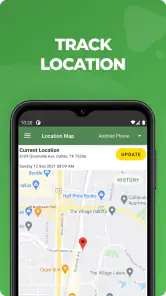
Location tracking addresses a different need. It can be reassuring when a child is travelling between school and home, or when plans change and a parent needs to check where they are. The practical value is strongest when location is part of an agreed check-in routine; it is less helpful if a family expects a map to resolve every worry or replace direct communication.
How the controls fit into an ordinary day
In a realistic routine, I might set expectations around recreational phone use before the school week begins, then use app limits to make those expectations easier to follow. If my child is late after school, location information could help me decide whether to call or simply wait a little longer. The point is not to watch continuously, but to have a practical tool for the moments when a clear boundary or a quick check is useful.
A useful tip is to discuss the rules before turning them on. Agree which activities need to remain available for school, travel or family contact, and explain what happens when a limit applies. This makes restrictions less likely to feel arbitrary. I would also review the arrangement as a child becomes more responsible; a setting that helps a younger phone user may feel unnecessarily strict later.
Making limits useful instead of disruptive
I would start with one clear problem, rather than trying to control every part of a child’s phone at once. If evenings are the sticking point, agree on what counts as necessary use during that period and focus the boundary on recreational habits. A narrower rule is easier to explain, easier to revisit, and less likely to block something the family genuinely needs.
It also helps to decide what the response should be when a child reaches a limit. If the rule is simply “put the phone away,” a control can reinforce it; if the child needs to contact a caregiver about a changed pickup plan, the family should agree how that situation is handled. The value of a limit is not just that it stops access, but that everyone understands the exception and can use a sensible alternative.
More From Our News Desk

Clash of Clans Is Won Between the Battles

Android Auto Makes the Case for Quieter Car Software

MobiOffice: Transforming Mobile Productivity with Seamless Integration

EA SPORTS FC™ Mobile Soccer: Redefining Mobile Sports Gaming

How Microsoft OneDrive Became a Mobile Productivity Giant

How Google Translate Breaks Language Barriers Effortlessly
For parents wondering whether location can replace a call or message, I would not treat it that way. A map can provide context when plans are uncertain, but it cannot explain why a child has stopped somewhere or whether they need help. A quick conversation remains the better choice when the situation calls for one. Location is most useful as a prompt for a calm check-in, not as a verdict on what is happening.
Where it sits among parental-control options
Compared with relying only on a phone’s built-in screen-time settings, this app is aimed at parents who want a more direct parental-control setup that brings limits, blocking and location into one family routine. Basic device controls may suit a household that only wants a simple time cap and prefers to keep management on the child’s phone. A dedicated app makes more sense when a parent values having these controls together and is prepared to take an active role in configuring them.
That extra oversight has a trade-off: controls work best when parents and children understand them, and a child may see monitoring as intrusive if it arrives without conversation. I would not choose this approach for a family whose main goal is to give an older teenager privacy and independence, or for parents who want a completely hands-off tool. In those cases, a lighter agreement or built-in settings may feel more appropriate.
There is also a difference between a parental-control app and a household rule that relies on trust alone. The app can help make a boundary consistent, but it cannot resolve disagreement about whether a rule is fair. When the main issue is a child feeling unheard, adding more controls may deepen the conflict; talking through the problem first is a better starting point. I see the app as a practical aid for a decision the family has already made, not a way to make that decision for them.
A school-day scenario worth planning for
Imagine a child whose usual ride home changes after school. A parent can use the location information to get a better sense of whether the child is still on the expected route, then contact them if the plan remains unclear. At home, agreed limits can help keep recreational app use from taking over homework time. Those are separate jobs: location supports a check-in, while limits support a routine. Treating them as separate tools keeps one from being asked to solve the other’s problem.
Before relying on that routine, I would make sure the child knows what a parent will do if their location or timing raises a question. A calm, predictable check-in is more useful than an unexpected confrontation. This is a small but important distinction: monitoring can reduce uncertainty, but the family’s response determines whether it builds reassurance or mistrust.
Who is most likely to benefit
I see the clearest fit for parents of children who are still learning to manage phone time and need consistent boundaries, especially when travel between school and home is part of the day. It may also suit caregivers who want to adjust app access rather than repeatedly negotiate every instance of phone use. Families should consider whether everyone is comfortable with location tracking and what it will be used for before relying on it.
It is less compelling for a household that only needs a basic time reminder, or for a teenager who already manages phone use responsibly and expects more privacy. In those situations, built-in device controls or a straightforward family agreement may be less intrusive and easier to maintain. I would also skip a dedicated control setup if no adult has time to discuss the rules and adjust them as routines change. Parental controls require some ongoing judgement; they are not a substitute for it.
As a parenting app from MMGuardian.com, it is free to install, with in-app purchases ranging from $1.99 to $99.99 per item. It has an average rating of 4.2 from around 27,000 ratings, and more than a million installs. Those figures suggest an established audience, but they cannot tell me whether its approach will suit a particular household. It is rated for Everyone, and version 3.7.36 requires Android 6.0 or later.
Features That Stand Out
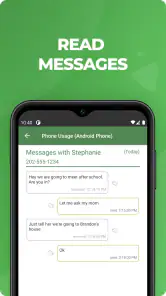
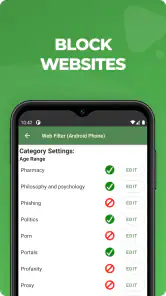
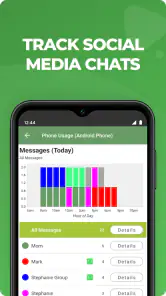
Now, you might be wondering what makes MMGuardian Parental Control any different from the plethora of parental control apps out there. For starters, it's packed with features that are both comprehensive and user-friendly. You get the usual suspects like screen time management, app blocking, and web filtering. But what really caught my eye was the text message monitoring feature. It’s not just about reading messages; it’s about understanding the context and keeping your child safe from inappropriate content.
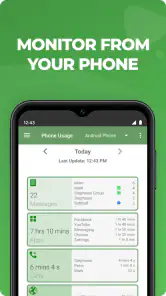
The app also provides detailed reports on your child’s phone activities. Think of it like a digital diary that keeps you in the loop without being overbearing. Plus, the location tracking feature is pretty spot on. It’s reassuring to know where your kid is, especially if they’re late coming home from school.
Ease of Use
Installing and setting up the app was a breeze, even for someone like me who isn’t exactly a tech wizard. The interface is intuitive and doesn’t require you to jump through hoops to get things going. Once you’ve set it up, managing the features is as easy as pie. Everything is just a few taps away, and the peace of mind it brings is worth every penny.
Even with a simple interface, I would resist switching on every available control during setup. Starting with a small set of agreed boundaries makes it easier to see whether the arrangement is helping or creating unnecessary friction. It also gives a child a clearer understanding of what has changed and why. If the first week goes smoothly, the family can decide together whether any other settings are needed.
Parents may also wonder whether the app suits a family with more than one child. The useful question is less about the number of devices and more about whether each child needs the same rules. I would avoid assuming that one set of limits fits everyone: age, school routines and trust differ. A parent who wants to use the app well should think in terms of individual agreements, not one household-wide restriction applied without discussion.
Security and Privacy
In today’s world, security and privacy are paramount, especially when it comes to our kids. MMGuardian takes this seriously. The app is designed to ensure that all data is encrypted and kept secure, so you don’t have to worry about sensitive information being compromised. Plus, they have a clear privacy policy, which is a relief in an era where data breaches are all too common.
It is worth deciding in advance what level of monitoring feels fair in your household. A child who knows which controls are active and why is more likely to understand the arrangement than one who discovers restrictions unexpectedly. I would make room for questions and revisit the agreement when routines change, rather than treating parental controls as a set-and-forget solution.
Privacy is not only a technical question; it is also about what a parent chooses to check and how often. I would use the least intrusive setting that addresses the actual concern, then tell the child what information will be used for. That approach keeps the focus on safety and routines instead of turning ordinary phone use into a constant audit. If a family cannot agree on that boundary, it is worth pausing before enabling more monitoring.
MMGuardian Parental Control also respects your child’s privacy while providing you the necessary tools to ensure their safety. It’s a delicate balance, but this app seems to manage it well.
Final Thoughts
After spending some quality time with MMGuardian, I can honestly say it’s a solid investment for parents who want to keep their kids safe in the digital world. It’s not about spying or invading privacy but about ensuring that your child is safe and making responsible choices online. The app is comprehensive, easy to use, and secure. If you’re in the market for a parental control app, this one should definitely be on your radar.
So, if you’re ready to take your parental controls up a notch and sleep a little easier at night, give MMGuardian a whirl. It just might be the peace of mind you’ve been searching for.
MMGuardian Parental Control Frequently Asked Questions
Is MMGuardian Parental Control free to download, and what might I pay for?
MMGuardian Parental Control is free to download, but it includes in-app purchases. Before setting it up, review the purchase options and decide which features or plan, if any, fit your family’s needs. The app is designed for parental oversight, so it is worth weighing the ongoing cost against the controls you expect to use rather than assuming every feature is included at no cost.
What does MMGuardian Parental Control help parents manage day to day?
The app is intended to help parents set boundaries around a child’s smartphone use. Its central tools include screen-time limits, app blocking, and GPS tracking, giving families ways to manage device access and check a child’s location. Think about which of these controls you actually need before downloading, since the value of a parental-control app depends on how well its tools match your household’s routines and expectations.
Can I use MMGuardian Parental Control on an iPhone or iPad?
MMGuardian Parental Control is a family parental-control app, but device compatibility should be checked before you install it. The minimum operating system listed for this version is Android 6.0, so that requirement applies to compatible Android devices. If you are considering an iPhone or iPad, check the relevant app store and device requirements before proceeding, rather than assuming the Android version will run on Apple hardware.
What age rating does MMGuardian Parental Control have, and what devices can it run on?
MMGuardian Parental Control is rated Everyone, so its store age rating is suitable for a broad audience. It is a parenting app for managing a child’s smartphone use, rather than an app intended for children to use independently. The listed minimum operating system is Android 6.0, which is worth checking against your device before downloading.
What is MMGuardian Parental Control and what features does it offer?
MMGuardian Parental Control is a comprehensive app designed to help parents manage and monitor their children's smartphone usage. It offers features such as app blocking, screen time management, location tracking, and web filtering. Additionally, it provides detailed reports on your child's phone activity, allowing you to ensure their safety and promote healthy digital habits. Its store summary highlights screen-time limits, app blocking, and GPS tracking as central tools for family oversight.
Pros
- Comprehensive monitoring features
- Easy-to-use interface
- Real-time alerts
- Customizable settings
- Cross-platform support
Cons
- Limited free version
- Occasional app crashes
- High battery usage
- Complex setup for some features
- Premium features can be pricey
- Category
- Parenting
- Version
- 3.7.36