MLB
- 32.36K
- 4.4
- Installs
- 10.00M
- Price
- Free

Screenshots

Analysis by Reviewed
I find MLB most useful when I want a quick, reliable way to follow baseball rather than juggle team pages, news sites, and scoreboards. The official app brings game information, scores, and reporting into one place, which makes it a natural home base during a busy season. It is free to install, though in-app purchases range from $0.99 to $219.99 per item, so I would check what a paid option includes before committing. MLB Advanced Media, L.P. is the developer, and the app has a 4.4 average from around 253,000 ratings.
Who benefits most from a connected baseball hub
I would recommend this sports app first to someone who follows at least one team closely and wants more than a final score. The useful difference is the combination of game tracking, baseball news, and a league-specific focus: I can use it to check what is happening, then stay in the same place to catch up on the wider story. Fans who follow several leagues may prefer a broad sports app for everyday score checks, but baseball tends to get more room in MLB’s own app.
It is also a good fit for fans whose routines change from day to day. If I have time to watch, I can explore the viewing options; if I only have a minute, a quick score check is enough. The app makes less sense for someone who rarely follows baseball or only wants an occasional result. In that case, a phone’s search or a general scoreboard may be faster and simpler than keeping a dedicated baseball app around.
A useful routine for game day
Imagine I am heading out just before a game starts. I can check the matchup while I still have a dependable connection, decide whether I want a live score or a longer viewing session, and narrow notifications to the team I actually care about. Later, while waiting in line or taking a break, I can reopen the app for a quick update rather than leave a stream running. That small distinction helps me match the app to the moment instead of expecting it to turn every spare minute into a full broadcast.
One practical trade-off is attention. Baseball unfolds over a long stretch, so enabling too many alerts can make a normal day feel dominated by updates. I would begin with only the most useful team notifications and adjust them after seeing how often they interrupt me. A focused alert setup is not just quieter; it makes the alerts I keep more meaningful when a game is close or I cannot check the screen.
Choosing between scores, news, and viewing
For a quick check, a lightweight scoreboard or a web search can be enough. MLB is more appealing when I want context alongside the score: league-specific reporting and game information are part of the reason to open the official app rather than a general sports feed. The alternative may win on simplicity, especially for a casual fan, while MLB is the stronger choice when baseball is the point rather than one item in a long list of sports.
Watching is a separate decision from following. Before relying on the app for a full game, I would inspect the viewing options and the terms attached to any purchase. The range of in-app purchase prices makes it sensible to understand exactly what an option provides before paying. If my goal is only to know whether my team won, I would not treat a viewing purchase as necessary; if I want a longer live experience, I would weigh that cost against how often I expect to use it.
More From Our News Desk

Weather by Xiaomi Review: Clear at a Glance, Less Clear Up Close

X Under Pressure: Can It Recover When Posting Goes Wrong?

Clash of Clans Is Won Between the Battles

Android Auto Makes the Case for Quieter Car Software

MobiOffice: Transforming Mobile Productivity with Seamless Integration

EA SPORTS FC™ Mobile Soccer: Redefining Mobile Sports Gaming
Questions worth settling before you rely on it
Can I use it when I am away from home? I would, provided my phone has service, but I would not plan around live information arriving reliably through a weak signal. If I know I will be moving between coverage areas, I would check the app when I have a stronger connection and avoid making a live stream the only way I can follow the game.
Do I need to pay to get value from it? Not if I mainly want to follow scores and news. The app is free to install, and paid choices are better treated as optional decisions tied to a particular viewing need. Is it suitable for a new or occasional fan? It can be, but the volume of baseball-centered material may be more than someone seeking only a result needs. Starting with one team and a small number of alerts keeps the experience approachable.
When a general sports app is the better choice
I would choose a multi-sport scoreboard if I wanted one compact place for results across several competitions and had little interest in deeper baseball coverage. I would also choose a simple search for an isolated score check rather than open a dedicated app. MLB earns its place when I expect to return for baseball information, not merely because it can display a number that other tools can show too.
For fans deciding whether to install it, the most useful question is how often they want to follow the sport between games. If the answer is often, the official focus and range of material can justify a spot on the phone. If the answer is rarely, a general alternative may serve just as well. The app is rated for Everyone, and its audience can include casual followers as well as committed fans, though each will get a different amount from its depth.
When a live connection matters
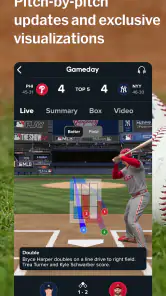
The experience is at its best when your phone has a steady internet connection. Live scores and Gameday-style updates are useful when you cannot watch a game, but they depend on timely information reaching the app. I like this setup for checking a close matchup between errands: a quick glance can tell me whether the score has changed, while a deeper look gives me a reason to stay with the game. If reception is unreliable, I would treat the app as a source to revisit when the connection improves rather than assume every update will arrive instantly.
That network dependence also shapes what I would use it for. A score check is a lighter commitment than keeping video or a stream on, and it suits a commute or a short break much better. For watching a full game, I would plan around a strong connection and check any viewing options and purchase terms in the app first. The distinction matters: following a game and watching one are different jobs, and not every fan needs to pay for the second to get value from the first.
Made for the in-between moments
On a phone, MLB makes most sense in short visits: before first pitch, during a lunch break, or after a game when I want to catch up on the result and news. The official source is a clear advantage over generic sports apps when I want baseball-specific coverage in one place. Those broader apps can be better if I follow several sports and want a single all-purpose scoreboard, but they may not be my first stop for a baseball-focused check-in.
A practical habit is to choose the teams and alerts I care about instead of enabling every notification. That keeps a busy schedule from turning every game into a stream of interruptions. I would also open the app before leaving Wi-Fi if I know I will want to check a matchup on the move, then make sure the phone has service when it is time to refresh. This is not a guarantee of offline access; it is simply a sensible way to reduce last-minute friction.
What to do when updates stall
If a score or page looks out of date, I would first check the phone’s connection, then reopen or refresh the app. A delayed update can be especially frustrating in a late inning, when a fan wants the current situation rather than a stale screen. Keeping notifications focused on a favorite team can help, but I would still use the app itself for a fuller view instead of relying on a single alert to explain what happened.
The app is not the right fit for someone who only wants an occasional final score and already gets that comfortably from a search or a general sports widget. Nor would I choose it as my only plan for watching live baseball if I have not checked which viewing features require a purchase. Its strength is the combination of official game-following tools and baseball news; its trade-off is that a richer, live experience asks more of both your connection and your attention.
Getting into the Swing of Things
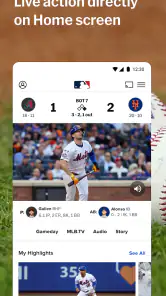
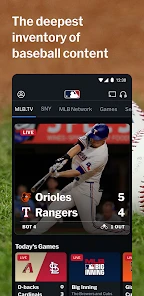
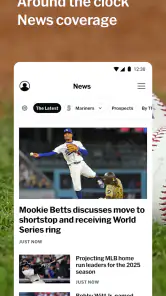
The first thing I noticed about the MLB app is its sleek and user-friendly design. From the moment you open it, you’re greeted with a barrage of vibrant colors and a layout that even a rookie could navigate with ease. The homepage is a smorgasbord of videos, live game scores, and news updates. I mean, it’s everything a baseball fan could want and more.
Features that Hit it Out of the Park
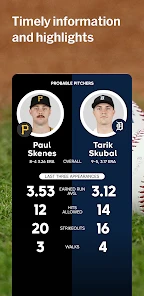
Now, I wouldn’t be doing my job if I didn’t tell you about all the amazing features packed into this app. You’ve got live game streaming, which is a game-changer (pun intended) because let’s face it, our schedules don’t always align with the first pitch. And if you’re like me and love to geek out on stats, the app offers a treasure trove of information. You can dive into player stats, historical data, and even get notifications for play-by-play updates. It’s like having a personal commentator in your pocket!
But wait, there’s more! The app also gives you access to exclusive content, including behind-the-scenes videos and interviews with your favorite players. It’s like having VIP access to the world of baseball. And for those who love a bit of nostalgia, the app features classic games from the archives. So, whether you want to relive the glory days or catch up on games you missed, the MLB app has got you covered.
Keeping You Connected
One of the things I love most about this app is how it keeps you connected with other fans. There’s a community section where you can chat with fellow fans, discuss game strategies, or just share your love for the sport. It’s a great way to make new friends and stay engaged with the baseball community.
Oh, and did I mention the notifications? You can customize them to ensure you never miss a moment of your favorite team’s action. Whether it’s a grand slam or a no-hitter, you’ll be the first to know.
Final Thoughts
So, if you’re a die-hard baseball fan or just someone who loves catching a game now and then, the MLB app is a must-have. It’s packed with features that cater to all types of fans, from the casual observer to the stat-obsessed enthusiast. With its easy-to-use interface and rich content, you’ll feel like you’re right there in the stadium, even if you’re just chilling on your couch.
In a world where staying connected to your favorite sport is more important than ever, the MLB app knocks it out of the park. So go ahead, download it, and let’s play ball!
MLB Frequently Asked Questions
Does the MLB app let me choose which teams I follow?
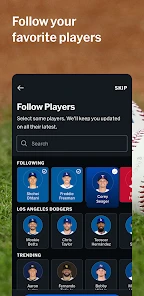
The official MLB app is built around following Major League Baseball, with Gameday, scores, news, and other baseball content in one place. That makes it useful whether you keep up with one team or follow the league more broadly. Team-focused news and updates are part of the experience, so fans can use it to stay connected to the baseball stories they care about.
Can I use the MLB app to follow games as they happen?
The app’s Gameday and scores features are designed for fans who want to keep up with games as they unfold. It also brings together baseball news and other content, giving users more than a simple score display. The app is free to download, though some features and purchases may involve additional costs, so check the details before making a purchase.
Is the MLB app suitable for someone who mainly wants scores and baseball news?
Yes. The official Major League Baseball app is a sports app for following Gameday, scores, news, and other baseball content. Its free download makes it possible to explore the app without starting with a paid subscription. The experience is aimed at fans who want baseball information on a phone, whether they follow one team closely or keep up with the league more broadly.
Who publishes the MLB app, and what do its store ratings suggest?
MLB Advanced Media, L.P. publishes the app, which is described as the official app of Major League Baseball. It has an average rating of 4.4 from around 253,000 ratings, with about 32,000 written reviews. Those figures offer a broad snapshot of user feedback, though individual experiences can vary depending on which features a fan uses and what they expect from a baseball app.
What is MLB and what features does it offer?
MLB, or Major League Baseball app, is a comprehensive platform for baseball enthusiasts. It offers live game streaming, real-time scores, stats, and personalized notifications. Additionally, users can access breaking news, team updates, and exclusive video content. The app also provides features like ticket purchasing and ballpark guides, enhancing both the digital and in-stadium experience for fans.
Pros
- User-friendly interface enhances experience.
- Real-time scores keep fans updated instantly.
- Detailed stats help analyze team performance.
- Customizable alerts for favorite teams.
- High-quality video highlights available.
Cons
- Ads can be intrusive during navigation.
- Occasional lag in live streaming.
- Limited content for non-subscribers.
- Frequent update notifications are annoying.
- Some features require premium subscription.
- Category
- Sports
- Version
- Varies with device





