MiLB
- 1.22K
- 4.6
- Installs
- 500.00K
- Price
- Free
Screenshots
Analysis by Reviewed
For a baseball fan, the useful question is often not just who won, but whether following a smaller-market team can fit into an ordinary day. I see MiLB as a focused way to keep up with Minor League Baseball: check in on scores and news, follow teams, and watch games when a stream and a good connection are available. It is a free sports app from MLB Advanced Media, L.P., rated for Everyone, and it makes the most sense when you want the minor-league picture rather than a broad sports dashboard.
Quick check-ins and longer viewing sessions
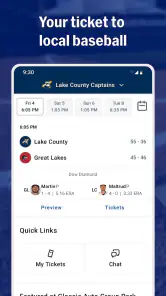
For a quick check between errands or during a break, scores and team updates are the app’s natural starting point. Following a team gives your visits a purpose: instead of scanning baseball news at large, you can go straight to the club and players you care about. I’d use it to keep an eye on a prospect’s progress or to see how a local team is doing, then decide whether a game is worth settling in for.
Live streaming changes the kind of visit. Watching on a phone is convenient when you’re away from a television, but it depends on having internet access and enough time to follow a game. If you’re on a weak connection or only have a spare minute, scores and highlights are a more sensible choice than starting a stream you can’t comfortably watch. That distinction helps set expectations: this is useful for following baseball in different ways, not a guarantee that every viewing situation will feel effortless.
Making the app work around your routine
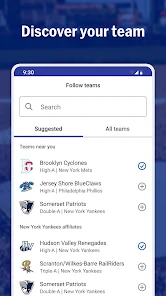
Team following and notifications can help narrow the flow of information to the clubs you actually care about. My practical advice is to choose your teams deliberately rather than turning on every update: a smaller set of alerts is easier to notice when something matters. If you follow several clubs, use the app for a quick scan when you have time, and keep notifications focused on the team you most want to track.
A realistic use case is checking a team’s score while waiting for a ride, then returning later for a highlight or a live game at home. That split is more comfortable than treating the app as a full-time scoreboard. It also suits fans who follow prospects across the season: team news and player stories add context to a score, while streaming gives you a closer look when you have time to watch.
Where it fits among sports apps
Compared with a general sports app, MiLB has a narrower purpose. Broad score apps are often the better pick if you want leagues and sports beyond Minor League Baseball in one place. A major-league-focused app is a more natural home if your attention is mainly on MLB teams. I’d choose MiLB when the minor leagues themselves are the point—especially if you care about a nearby club or want to follow developing players rather than only established stars.
That focus is also a limitation. If you rarely watch or follow Minor League Baseball, a dedicated app may not earn a regular place in your routine. And while the community feel and player stories can make following a club more personal, I wouldn’t rely on the app as a substitute for attending a local game or talking with fans in person. Its value is in making it easier to keep up, not in recreating the whole ballpark experience.
More From Our News Desk

Weather by Xiaomi Review: Clear at a Glance, Less Clear Up Close

X Under Pressure: Can It Recover When Posting Goes Wrong?

Clash of Clans Is Won Between the Battles

Android Auto Makes the Case for Quieter Car Software

MobiOffice: Transforming Mobile Productivity with Seamless Integration

EA SPORTS FC™ Mobile Soccer: Redefining Mobile Sports Gaming
The app has been available since April 4, 2014, and its current version is 25.11.1. It has an average rating of 4.6 from around 7,300 ratings, with more than 500,000 installs. Those figures suggest an established audience, but they don’t tell me how it will behave on every phone or connection. On a compatible device, I’d expect the basic score-checking workflow to be lighter than extended video viewing; streaming naturally asks more of your connection and battery than reading updates. If a screen stalls during a game, switching back to a score or news view is a practical way to keep following without depending on uninterrupted video.
Choosing what to follow first
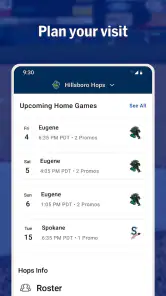
One useful way to avoid information overload is to decide what you want from the app before setting it up. If you’re following a prospect, start with the team he plays for and use the score as a quick marker of how the day went; then read team news when you have a few spare minutes. If your interest is local baseball, follow the nearby club and let the schedule shape your check-ins. These small choices make the app feel more purposeful than opening it without a particular question in mind.
For families or friends keeping tabs on different clubs, a shared routine can work better than expecting everyone to watch every game. One person might check the score during a commute, while another can settle in for a stream later. The trade-off is that notifications are personal and can become distracting if too many teams are selected. I’d begin with the one club that matters most, then add another only when I know I’ll actually use its updates.
When a stream is worth starting
I wouldn’t treat live video as the default way to use MiLB. A full game needs attention, a dependable connection, and enough battery for a longer session, so it’s best when you can sit down rather than squeeze it into a rushed moment. For a quick glance, checking the score first is a better decision: it tells you whether you want to invest more time without committing to video straight away.
There is also a practical difference between following a result and following the rhythm of a game. A score update is efficient when you only need to know how a team is doing; a stream makes more sense when you want to watch a player or experience the game as it unfolds. I like that these are distinct ways to keep up, but I’d choose based on the moment instead of assuming the video option is automatically better.
Why MiLB is a Home Run
First off, let's talk about what makes MiLB such a gem. It's not just an app; it's an experience for those who love the game beyond the glitz of MLB. This app gives you access to a treasure trove of information about all things Minor League. You can check scores, stay updated with news, and even stream live games directly from your device. And the best part? You get to follow up-and-coming players who might just be future MLB stars.
Features That Knock it Out of the Park
What I love about the MiLB app is its user-friendly interface. You don't need to be a tech wizard to navigate through it. The app is designed to make your experience as smooth as possible. Want to check the latest scores? Easy-peasy. Looking for game highlights? A few taps and you're there. It's all about bringing the Minor League experience to your fingertips.
Another feature that stands out is the ability to customize your experience. You can follow your favorite teams and get notifications about game updates and news. It's like having your personal baseball assistant! And for those who can't attend games, the streaming option is a lifesaver. You can watch games live, no matter where you are, as long as you have an internet connection.
The Community Vibe
One of the things that sets Minor League Baseball apart is the sense of community, and the MiLB app captures this beautifully. There's something special about supporting local teams and players, and the app fosters this connection. You can engage with other fans, share your thoughts, and even participate in discussions. It's a great way to feel like you're part of something bigger.
Plus, the app often features stories and interviews with players, giving you a glimpse into their journeys and aspirations. It's these personal touches that make the MiLB app more than just a sports app—it's a community experience.
Final Thoughts
In a world dominated by major league sports, the MiLB app is a refreshing change. It's perfect for baseball fans who appreciate the grassroots level of the sport and want to support the next generation of stars. Whether you're checking scores, streaming games, or just catching up on news, this app has got you covered.
So, if you're looking to dive into the world of Minor League Baseball, give the MiLB app a swing. Who knows, you might just discover a new favorite player or team along the way. Happy watching!
Who will get the most from it?
I’d recommend it to fans who already have a Minor League team in mind, people who enjoy tracking prospects, and anyone who wants scores and team news without wading through unrelated sports. It can also help a casual fan make a local club part of their routine: check a result after work, read a story when there’s time, and save live viewing for an evening when the connection is stable.
If you’re new to the sport, start by following one team rather than trying to keep up with the whole landscape. That gives the scores and player stories a thread to follow and makes notifications less noisy. If you mainly want national sports headlines, a wider sports app will probably serve you better; MiLB’s appeal is precisely that it stays close to this level of baseball.
Performance and everyday trade-offs
MiLB’s reputation is strong, with a 4.6 average across about 1,200 written reviews, but ratings are only one signal. The app is free, and it requires Android 10 or later on Android devices. I’d keep the app updated and leave room for the phone’s normal background needs, particularly if I planned to watch rather than just check scores. Video viewing is the most demanding part of the experience; for a short visit, text-based updates are the more practical choice.
My overall view is that this is a useful, specialized companion, not a must-have for every sports fan. It brings Minor League scores, news, team following, and live viewing together, while asking you to accept the usual trade-off between convenient mobile streaming and dependence on a solid connection. If that level of baseball is what you want to follow, it’s an easy app to try. If your interests are broader or you rarely check in on the minors, a general sports service—or simply watching a game in person—may fit better.
MiLB Frequently Asked Questions
Can I follow a particular MiLB team without keeping up with the entire league?
Yes. The app is built to let you focus on the parts of Minor League Baseball you care about, rather than follow every team equally. You can select favorite teams and use that choice to tailor the updates you see. This is useful if you support a local club, follow a prospect’s team, or simply want a more focused way to keep up with the season.
Who publishes the MiLB app, and what is it for?
MiLB is the official app of Minor League Baseball, published by MLB Advanced Media, L.P. Its focus is following Minor League Baseball, with team and player information, game coverage, and updates in one place. If you are primarily interested in Major League Baseball, this app’s subject is different: it is intended for fans who want to keep track of Minor League teams and players.
What is MiLB and what does it offer?
MiLB, or Minor League Baseball app, is designed to provide baseball enthusiasts with comprehensive coverage of the Minor League games. It offers live scores, team stats, player profiles, and game highlights. Users can also customize their experience by selecting favorite teams and setting alerts for game updates. It's a must-have for fans wanting in-depth analysis and up-to-date news on Minor League Baseball.
Is the MiLB app free to use?
Yes, the MiLB app is free to download on both Android and iOS devices. While many features are available for free, such as live scores and basic news updates, there may be premium features or in-app purchases for users who want an ad-free experience or access to exclusive content. Always check the app description for detailed information on any costs involved.
Does the MiLB app require an internet connection to function?
Yes, the MiLB app requires an internet connection to provide real-time updates, live game scores, and the latest news. While some content might be available offline, such as saved articles or player profiles, a stable internet connection ensures that you get the most out of the app's features and live updates.
Pros
- User-friendly interface for easy navigation
- Comprehensive stats and player profiles
- Live game streaming available
- Customizable notifications for games
- Exclusive content and highlights
Cons
- Requires subscription for full access
- Occasional app crashes reported
- Limited offline features
- Ads can be intrusive at times
- Large app size may affect storage
- Category
- Sports
- Version
- 25.11.1





