

MiChildSupport
- 10.00
- 4.1
- Installs
- 10.00K
- Price
- Free

Screenshots
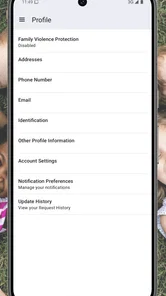
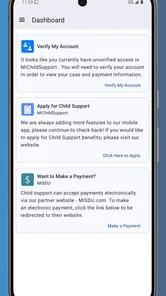
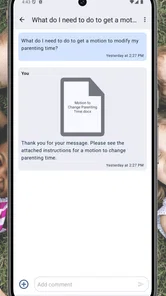
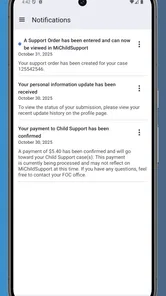
Analysis by Reviewed
When child support information is spread across letters, phone calls, remembered dates, and separate online accounts, even a simple question can become stressful. MiChildSupport is designed as a direct mobile connection to a child support case, and I found its strongest value in that focused purpose. It is not trying to be a general parenting planner or a broad family-management tool. It is an app from the State of Michigan for people who need a more convenient way to stay connected with their Michigan child support matters.
I would recommend approaching it as a case-access companion rather than expecting it to replace every conversation with a caseworker or every official process. That distinction matters. The app can make routine checking more manageable, but child support situations are often personal, time-sensitive, and complicated. A mobile screen is useful for staying oriented; it is not automatically the right place to resolve every unusual issue.
Getting from installation to a useful first check
I would make the first check a small, deliberate task rather than trying to explore the whole case at once. Before signing in, decide what you need to verify and keep the relevant notice or personal record nearby; that gives you a point of comparison and helps you leave with a clear next step. I also find it useful to choose a private moment, since case details are personal even when the phone itself is shared.
What to expect before you begin
The first thing I noticed about MiChildSupport is how narrow its audience is. The Parenting category can sometimes suggest broad advice, activity ideas, or family organization, but this app is much more specific. Its purpose is tied to a child support case, so it makes sense for a parent, guardian, or other person already dealing with Michigan child support services. If you are looking for feeding schedules, school reminders, custody calendars, or co-parenting messages, this is not the right kind of app.
The app is free, carries an Everyone age rating, and comes from the State of Michigan. That combination makes it approachable for households where more than one adult may need to check case-related information. I still would not hand a logged-in phone to a child simply because the age rating is broad. Child support details are private family information, and the responsible user should control access to the device and account.
MiChildSupport is a relatively focused tool rather than a crowded social platform. That is a strength when you want to get to case information without sorting through unrelated content. It is also a limitation if you expect a complete family-services hub. The app does not become a budgeting app, a legal adviser, or a replacement for official support channels just because it sits on your phone.
The public response is encouraging but not overwhelming: it holds a 4.1 average from around 150 ratings, with a smaller group of written reviews. I read that as a useful sign of general acceptance, not proof that every case or device experience will be smooth. Case-related apps are judged heavily by whether the right information is available at the right moment, so your own login and case situation will matter more than a star score.
More From Our News Desk

 Gmail
GmailGmail in a Busy Inbox: Who Benefits Most?
From first account to crowded workday, Gmail earns its place through dependable search and flexible sorting—but its best fit depends on how much inbox maintenance you can tolerate.

 Prime Video
Switching to Prime Video: What Changes in Your Viewing Routine
Prime Video can make a compelling second home for streaming, but switching means learning a different catalog, rental layer, and route from browsing to playback.

 Universal TV Remote Control
Universal TV Remote Control Works Best as a Reliable Backup
A phone remote earns its place through quick setup and reliable habits. Here is how to get more from Universal TV Remote Control—and where its limits show.

 Weather - By Xiaomi
Weather by Xiaomi Review: Clear at a Glance, Less Clear Up Close
Xiaomi’s weather app makes everyday forecasts quick to scan, but its calm surface can leave useful details and recovery paths harder to find than they should be.

 X
XX Under Pressure: Can It Recover When Posting Goes Wrong?
A resilience-focused review of X, examining setup, mistaken posts, interruptions, weak connections, and the gaps that matter when recovery needs to be dependable.

 Clash of Clans
Clash of Clans Is Won Between the Battles
Its raids are quick; its community is a long-term project of coordination, teaching, rivalry, and shared responsibility—with all the friction that entails.
Latest News



Installing it without creating confusion
Before opening the app, I would gather the information you normally use when dealing with your case. The most helpful preparation is not technical; it is organizational. Keep your case paperwork, recent notices, and any identifying details nearby so you do not have to close the app repeatedly while trying to remember which information belongs to which case.
That small preparation step is especially useful for people connected to more than one child support matter. A rushed setup can lead to uncertainty later, particularly when a household has changed addresses, more than one case reference, or a payment question involving a specific period. I recommend writing down the exact question you want answered before you sign in. “I want to check my case” is vague; “I want to verify whether the latest payment is reflected” gives you a much clearer destination.
The application supports devices running Android 5.0 or later, so compatibility should cover many older Android phones as well as current models. Its current version is 1.4. If you are using an older handset, keeping the operating system and app installation in a stable state is sensible before beginning a case-related task. I would avoid starting during a rushed moment when your phone is low on storage, your connection is unreliable, or you cannot safely read private information.
One practical habit makes the first session less frustrating: treat setup as a verification step, not a race. Read each screen carefully, check that the case context looks familiar, and avoid assuming that a general account screen answers a specific payment or order question. If something appears inconsistent, note what you see and when you saw it instead of repeatedly tapping through the same screens.
The first meaningful success
For a first-time user, success should be defined modestly. I would not begin by trying to understand every part of a child support case. The better first goal is to reach the relevant case information and confirm that you are looking at the matter you intended to access. That gives you a reliable starting point for future checks.
Once you are in the correct case context, take a moment to compare what you see with the most recent notice or record you have at home. This is one of the most useful workflows I can suggest because it turns the app from a passive viewing tool into a reference point. You are not relying on memory alone, and you are not treating a single screen as the entire history of your case. You are checking whether the mobile view matches the information you already have.
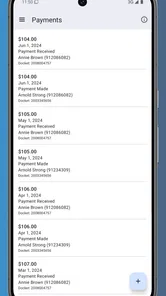
If your immediate concern is a payment, write down the relevant date and amount from your own records before opening the app. Then compare carefully rather than looking only for a reassuring total. A payment question may involve timing, processing, allocation, or a particular obligation. The app can help you identify what deserves attention, but a difference does not automatically explain itself.
My preferred first-session routine would be:
- Prepare the case details and the one question you need answered.
- Sign in slowly and confirm that the displayed case is the intended one.
- Review the relevant information against a recent notice or personal record.
- Write down any discrepancy in plain language, including the date you checked.
- Close the session once the task is complete rather than leaving private case information open.
This routine is more valuable than simply browsing. It gives you a repeatable method for future visits and reduces the chance that you will confuse an old paper record with a newer mobile update. The app is most useful when it supports a specific question, not when you open it without a clear purpose.
How it fits into everyday parenting responsibilities
Imagine a parent checking child support information during a lunch break before paying a bill or preparing for a conversation with the other parent. A quick case check can provide a calmer starting point than searching through a drawer of notices. The parent can confirm what they need to review, record the result, and return to work without carrying the entire question in their head.
Another realistic situation is preparing for a call with a support office. Instead of calling with a broad statement such as “something looks wrong,” you can first review the case information, identify the exact period or entry that concerns you, and keep your notes in front of you. That does not guarantee a faster resolution, but it can make the conversation clearer and reduce repeated explanations.
I also see value for users who travel between homes or workplaces. Paper records are easy to leave behind, while a phone is usually close at hand. That convenience is meaningful when a parent needs to check information away from home. At the same time, convenience should not become carelessness. Use a private setting when possible, and be thoughtful about who can see your screen.
Common points of confusion
The most important source of confusion is assuming that a mobile case view and an official decision are the same thing. They are not interchangeable concepts. If you need to challenge an amount, report a change, clarify an order, or handle a situation with legal consequences, use the appropriate official communication route as well. The app can help you understand what to ask about, but it should not be your only response to a serious dispute.
A second issue is timing. People often expect a payment or update to appear immediately after an action elsewhere. When the screen does not change at once, it is tempting to refresh repeatedly or assume something has failed. I recommend recording when the payment or change occurred and checking again at a sensible interval rather than treating every delay as an error. If the timing remains concerning, your notes will make an official inquiry more precise.
Another easy mistake is reading a number without checking its label or context. Child support information can contain several amounts that serve different purposes. A total, a recent transaction, an obligation, and an outstanding balance are not automatically the same thing. I would slow down whenever a figure seems surprising and read the surrounding wording before drawing a conclusion.
Shared devices create a separate privacy concern. Even though the app is rated for Everyone, the information inside a child support case is not casual family content. I would avoid saving screenshots in a shared photo gallery unless there is a clear reason, and I would close the app before lending the phone to someone. This is a simple but important trade-off: mobile access is convenient precisely because it is close by, and that also means it needs sensible privacy habits.
Users should also avoid treating the app as a communication record unless the screen clearly serves that purpose. If you speak with an office, receive a notice, or agree to an arrangement, keep your own dated notes and retain official documents. A good personal record can include the date, the question asked, the response received, and the next action. That extra discipline is especially helpful when a case has several moving parts.
Where it is stronger than usual alternatives
The usual alternative to a focused case app is a mixture of browser bookmarks, paper notices, phone calls, and memory. That mixture can work, but it places more responsibility on the user to know where the latest information is stored. MiChildSupport has a practical advantage because it puts the case connection in a dedicated mobile space rather than making you search through unrelated websites or old messages.
Compared with a general parenting organizer, its value is not breadth but relevance. A calendar may help you remember appointments, and a budgeting tool may help you plan household expenses, but neither one is a substitute for checking case-related information. I would use those tools alongside MiChildSupport rather than expecting one app to cover all family responsibilities.
Compared with calling an office for every routine check, the app may save effort when you only need to look at information already available through your case connection. That can be particularly helpful outside the moment when you would normally make a call. The trade-off is that an app cannot offer the same human explanation as a representative when your situation is unusual or the information needs interpretation.
Who should use it and who should skip it
I think MiChildSupport is a good fit for Michigan users who already have a child support case and want a convenient mobile way to stay oriented. It is also suitable for someone who prefers checking information independently before deciding whether a phone call or follow-up is necessary. The free price removes an obvious barrier, and the focused design makes more sense than a general parenting app for this particular task.
I would skip it if you are looking for custody scheduling, shared calendars, child expense tracking, messaging with a co-parent, or parenting advice. Those needs belong to different tools and processes. I would also avoid relying on it alone if you are dealing with an urgent legal problem, a disputed order, a major change in circumstances, or information that could affect an immediate decision. In those cases, use the app as preparation, not as the whole solution.
It may also be a poor fit for someone who does not want to manage private case information on a phone. A browser, paper folder, or direct official contact may feel more comfortable, especially for users who share devices or have limited confidence with mobile sign-in. The best tool is the one you can use consistently and securely.
A sensible next step after the first visit
After your first successful check, I would not spend time exploring without a reason. Instead, create a simple personal routine around the moments that matter to you: after receiving a notice, before contacting the support office, or when reviewing household finances. Keep the app as one part of that routine, alongside official documents and your own dated notes.
It is also worth deciding in advance what counts as a follow-up. For example, if the displayed information matches your recent record, you may simply note the check and move on. If it differs, write down the exact difference and gather the related notice before contacting the appropriate office. This approach prevents a vague worry from becoming a confusing conversation.
Because the app has more than ten thousand installs and is maintained by the State of Michigan, it has clearly reached a meaningful group of people without being a universal household app. I see that as consistent with its role: it is a specialized service tool for a specific audience. Its value depends less on entertainment or visual extras and more on whether it helps you reach the right case information with less friction.
My overall impression is positive, with realistic boundaries. MiChildSupport can make routine case checking feel more manageable, especially when paper records are not nearby or you want to prepare for a precise question. Its main weakness is not that it tries to do too little; it is that users may ask it to explain or resolve matters that require official help. Use it to stay informed, organize your next question, and confirm the case details in front of you—then choose the proper official channel when the situation goes beyond a routine check.
For a first-time user, that is the reassuring path: install the free app on a compatible Android device, prepare your case information, confirm the correct case, compare one relevant item with your own records, and keep notes about anything that needs attention. If that workflow matches your needs, this Parenting app from the State of Michigan is worth trying. If your needs are broader than child support case access, a general family organizer or direct support service will be a better companion.
MiChildSupport Frequently Asked Questions
Is MiChildSupport available for my phone?
MiChildSupport is an app for Android devices, and its minimum operating system requirement is Android 5.0. Before downloading, check your phone’s software version and make sure you have enough space for the installation. The app is free and is rated for Everyone. If your device meets the requirements, you can use it as a mobile connection to your child support case.
Who develops MiChildSupport, and is it an official state app?
MiChildSupport is developed by the State of Michigan and is intended to connect users with their child support case. That makes it relevant to people dealing with Michigan child support services, rather than a general parenting or family-management app. Before entering personal information, make sure you are downloading the app published by the State of Michigan and not an unrelated app with a similar name.
What is MiChildSupport, and what can I use it for?
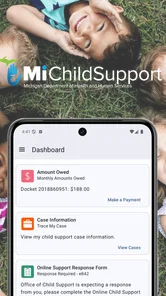
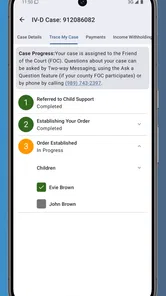
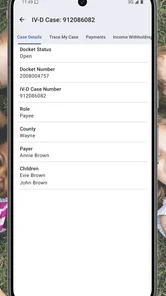
MiChildSupport is a mobile service designed to help users manage child support information and related case activities from a smartphone. Depending on your state and account status, you may be able to view payment details, check case information, review notices, update contact or employment details, and access agency messages. Available tools can vary, so the app should be treated as a companion to official child support services rather than a replacement for legal or agency assistance.
Do I need an existing child support case or account to use MiChildSupport?
In most situations, MiChildSupport is intended for people who already have a child support case or an account with the relevant child support agency. Registration may require identifying information, case details, or verification through an official portal. If you are new to child support services, cannot locate your case, or your information does not match agency records, you may need to contact the appropriate office before the app will provide full access.
Is MiChildSupport safe for viewing personal and payment information?
MiChildSupport handles sensitive information, including identity details, case records, and payment history, so users should protect access carefully. Use the official app listing or agency website when downloading, keep the application updated, and avoid sharing your password or verification codes. A secure device lock is also recommended. Although the service may use account security measures, no online service is completely risk-free, and users should report suspicious activity promptly.
Pros
- Clear access to child support case information in one place.
- Helpful payment details make it easier to track support activity.
- Official state-provided information can improve trust and accuracy.
- Mobile access is convenient when managing matters away from a computer.
- May reduce the need to contact support for basic case questions.
Cons
- Availability and features may vary depending on your state.
- Some users may experience login or verification difficulties.
- Sensitive family and financial data require strong account security.
- Notifications may not always arrive immediately after case updates.
- The app may offer limited help for complex support disputes.












