

Michigan DNR Hunt Fish
- 124.00
- 3.5
- Installs
- 100.00K
- Price
- Free

Screenshots
Analysis by Reviewed
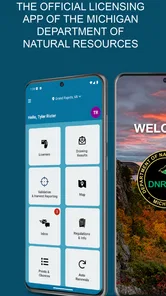
Michigan DNR Hunt Fish is the kind of sports app I would keep on my phone when a day outdoors depends on having the right state-issued information close at hand. It is the official licensing app from the Michigan Department of Natural Resources, aimed at people who hunt, fish, or spend enough time outdoors in Michigan to want a more convenient way to manage their licensing needs. I found its value less in entertainment and more in reducing the small bits of preparation that can otherwise be scattered across paperwork, memory, and separate web pages.
The app is free, rated for Everyone, and available for Android devices running version 7.0 or later. Its current version is 1.2026.0729.1. With over one hundred thousand installs and an average rating of 3.4 from a little over two hundred ratings, it has clearly found a practical audience, although the rating also suggests that not every user experiences it as perfectly smooth. That balance matters: this is a useful official tool, but I would treat it as part of my outdoor preparation rather than as the only thing I rely on.
How I would build a dependable routine around it
I’d make the routine dependable by pairing the app check with something I already do before every outing, such as packing tackle or checking the vehicle. That way, I’m less likely to remember it only when I’m already at the water or in the field. A consistent cue also gives me a natural moment to notice when the phone, account, or trip plan has changed.
Start before leaving home
My preferred workflow begins before I am standing at a boat launch, trailhead, or hunting area. I would open Michigan DNR Hunt Fish while I still have a stable connection, sign in or review the available account details, and make sure the information I expect to need is easy to reach. This simple habit makes the app more useful than opening it for the first time when the weather is poor and my phone battery is already low.
The important distinction is that the app is not merely a general outdoor reference tool. It is connected to the licensing side of Michigan outdoor recreation. That makes it especially relevant when I need to handle or display state-related hunting and fishing information, rather than when I am looking for trail maps, detailed species identification, weather forecasting, or navigation.
For a normal fishing morning, I would use it as one step in a short checklist. I would prepare the equipment, check the weather through a separate service, confirm the location and access details elsewhere if necessary, and then use the DNR app to review the licensing information that belongs to the trip. Keeping those jobs separate prevents a common mistake: assuming an official licensing app also replaces every other outdoor planning tool.
Use it as a preparation tool, not a last-second rescue
One of the most useful habits is to check the app when plans change. Suppose I decide on Friday evening to fish on Saturday instead of spending the day at home. Rather than waiting until I am parked beside the water, I would open the app, review the relevant account or license information, and resolve any sign-in or display problem while I still have time to react.
More From Our News Desk

 Gmail
GmailGmail in a Busy Inbox: Who Benefits Most?
From first account to crowded workday, Gmail earns its place through dependable search and flexible sorting—but its best fit depends on how much inbox maintenance you can tolerate.

 Prime Video
Switching to Prime Video: What Changes in Your Viewing Routine
Prime Video can make a compelling second home for streaming, but switching means learning a different catalog, rental layer, and route from browsing to playback.

 Universal TV Remote Control
Universal TV Remote Control Works Best as a Reliable Backup
A phone remote earns its place through quick setup and reliable habits. Here is how to get more from Universal TV Remote Control—and where its limits show.

 Weather - By Xiaomi
Weather by Xiaomi Review: Clear at a Glance, Less Clear Up Close
Xiaomi’s weather app makes everyday forecasts quick to scan, but its calm surface can leave useful details and recovery paths harder to find than they should be.

 X
XX Under Pressure: Can It Recover When Posting Goes Wrong?
A resilience-focused review of X, examining setup, mistaken posts, interruptions, weak connections, and the gaps that matter when recovery needs to be dependable.

 Clash of Clans
Clash of Clans Is Won Between the Battles
Its raids are quick; its community is a long-term project of coordination, teaching, rivalry, and shared responsibility—with all the friction that entails.
Latest News



This is particularly helpful for people who alternate between hunting and fishing. Instead of treating every outing as a new administrative task, I can make the app part of the same repeatable routine: open it before packing, verify what applies to the planned activity, and then leave the phone accessible but protected. That routine is more valuable than repeatedly searching for the app’s icon or trying to remember where a digital document is stored.
I would also avoid assuming that seeing the app installed means I am ready to go. A responsible check includes the correct account, the current information relevant to the outing, and enough phone power to access it if needed. The app can simplify access to official licensing information, but it cannot replace preparation, knowledge of regulations, or judgment in the field.
Where it fits beside familiar alternatives
The usual alternative is a browser, saved email, paper documents, or a mixture of all three. A browser can be more flexible when I need to read broad information from the Michigan Department of Natural Resources, while paper can be reassuring when electronics become inconvenient. The app’s advantage is focus: it gives me a dedicated place for the licensing side of hunting and fishing instead of making me search through unrelated pages.
That focus is also its boundary. If I want a broad guide to public land, a navigation route, a forecast, or a community-driven fishing report, I would choose another tool. Michigan DNR Hunt Fish is better understood as an official administrative companion than as an all-purpose outdoor super-app.
Settings and phone habits worth checking
I would begin with the phone itself. Notifications, battery restrictions, screen timeout, and permission prompts can all affect how comfortable an official field app feels, even when the app’s core purpose is straightforward. I would not grant permissions automatically; I would read what the app requests and allow only what makes sense for the way I plan to use it.
Battery management deserves special attention. Outdoor days often involve cold temperatures, weak signal, long drives, and extensive camera or navigation use. I would charge the phone before leaving, carry a power bank when practical, and avoid treating the app as if it guarantees access in every remote location. If the app displays information that I may need away from reliable service, I would check that information in advance rather than discovering a connectivity issue at the worst moment.
I would also check whether the app remains signed in and whether the displayed account details are the ones I expect. This is a small but important distinction for households where more than one person uses the same phone, or for anyone who has changed devices. A few minutes spent confirming the account at home can prevent confusion when a license or record is needed outdoors.
On a shared device, I would be especially deliberate. I would not hand my unlocked phone to another person simply because they want to see a license-related screen. Instead, I would open the relevant information myself and keep control of the device. This is not a criticism of the app; it is a sensible habit for any application that may contain personal account details.
Make the display easy to use outdoors
A bright screen, wet fingers, gloves, and direct sunlight can turn a simple digital document into an awkward object. I find that the best approach is to open the needed screen before I am moving around, increase readability through the phone’s normal display controls if necessary, and keep the device in a protective case. I would not wait until I am balancing fishing gear or standing in a crowded launch area to navigate through menus.
For hunters, the same principle applies in a different setting. Quiet movement and limited light make unnecessary tapping frustrating. Preparing the app before entering the field reduces the need to unlock, search, and troubleshoot when attention should be elsewhere. The app is most effective when it supports a prepared routine rather than demanding constant interaction.
Faster patterns that save real time
The fastest pattern I found conceptually is repetition. I would place the app where it is easy to reach, open it during the same preparation stage for every trip, and review the same categories of information in the same order. This may sound basic, but consistent behavior is what turns a government service app from something I remember only when I need it into a dependable part of my kit.
A second useful pattern is separating “before the trip” from “during the trip.” At home, I have time to sign in, inspect the account, handle any prompts, and verify that the phone is ready. In the field, I want the fewest possible steps. That division reduces the temptation to solve administrative problems beside the water or in a parked vehicle with poor reception.
A third pattern is keeping a backup mindset without duplicating everything unnecessarily. I would carry the normal physical essentials for the activity and know where my important information is, while still using the app as the convenient official access point. This is especially sensible on long outings, where a damaged phone, drained battery, or connectivity problem can affect any digital tool.
Families and groups can benefit from assigning responsibility clearly. If one person manages the household’s phones and licenses, that person should review the app before the outing and explain what each participant needs to carry or know. If everyone has separate accounts, each person should check their own information rather than assuming one screen covers the whole group.
What experienced users should not assume
The official nature of the app gives it credibility for its intended licensing role, but it does not make every outdoor question an app question. I would still consult the appropriate Michigan DNR information for rules, seasons, locations, and other requirements, and I would not infer permission from a screen that merely shows account or license information. The app helps me manage access to official records; it does not replace reading the rules that govern an activity.
I would also avoid using the app as my primary navigation system. A licensing application is not the same thing as a mapping application, and relying on it to guide me through unfamiliar terrain would be a poor trade-off. The better setup is to use Michigan DNR Hunt Fish for its official administrative purpose and another suitable tool for navigation, weather, emergency planning, or local conditions.
Where the experience can feel limited
The average rating of 3.4 indicates a mixed reception, and I can understand why an app in this category may frustrate some people. Government service applications are often judged during stressful moments: a trip is about to begin, a login needs attention, or the phone is not behaving as expected. Even a small delay feels significant when the user expected a quick official record.
The app’s narrow purpose may also disappoint anyone expecting a complete digital guide to Michigan hunting and fishing. Its strength is being tied to the Michigan DNR licensing experience, not offering every planning feature an outdoor enthusiast might want. If I mainly need maps, forecasts, regulations explained in depth, or social reports from other anglers, I would add other resources rather than expecting this one app to cover them.
There is also a practical limitation to depending on any phone-based record. A cracked screen, forgotten passcode, low battery, or unreliable connection can make access harder. That does not make the app a poor choice; it means I would use it with the same backup awareness I apply to digital tickets, travel documents, and other mobile records.
Who should use it, and who should skip it?
I would recommend Michigan DNR Hunt Fish to Michigan residents and visitors who regularly need the state’s official hunting or fishing licensing tools and prefer having them organized in a dedicated app. It is also a sensible choice for people who dislike searching through browser tabs or carrying more paperwork than necessary. The free price removes the main barrier to trying it, and the Everyone age rating makes it suitable for a broad audience, with normal adult supervision and account responsibility where appropriate.
I would be more cautious about recommending it to someone who only wants general fishing advice, trip planning, or outdoor entertainment. That person may get more value from a mapping service, a weather app, a regulation reference, or a specialized fishing application. Likewise, anyone who strongly prefers paper and rarely uses a smartphone in the field may not gain much from installing it, although it can still serve as a convenient preparation check.
It is also not the right single solution for a group that expects one phone to handle every person’s licensing needs without careful review. I would first understand how the individual account information is organized, then decide whether each participant should have the app ready on their own device or whether a designated person will manage the administrative side.
My verdict after building a repeatable habit
Michigan DNR Hunt Fish earns its place by solving a specific problem: giving Michigan hunters and anglers an official mobile route to their licensing needs. I like it most when I treat it as a quiet preparation tool, open it before leaving, check the relevant information, and then combine it with separate tools for weather, navigation, and broader regulations.
The version number, 1.2026.0729.1, shows that the app is actively maintained as a current product rather than an abandoned download, while its install base of more than one hundred thousand suggests that it is not an obscure experiment. Still, the modest average rating is a useful reminder to keep expectations realistic. I would install it because the official purpose is relevant, not because I expect a flawless replacement for every outdoor resource.
My strongest recommendation is to make it part of a checklist, not a last-minute rescue. Open it at home, confirm the account and information you need, keep the phone charged, and carry sensible backups for a long or remote outing. Used that way, it is a practical free sports app from the State of Michigan that can remove unnecessary friction from hunting and fishing preparation. Used as a map, a complete rulebook, or the only backup for an important trip, it is simply the wrong tool.
For the right user, that focused role is enough. I would keep it installed if I regularly hunt or fish in Michigan, especially because a dedicated official app is easier to work into a repeatable routine than a collection of saved browser pages. I would skip it only if my needs are entirely outside state licensing or if I already prefer a paper-first workflow and have no interest in managing these details on a phone.
Overall, Michigan DNR Hunt Fish is a useful, purpose-built companion rather than a feature-packed outdoor platform. Its best quality is practical access to the Michigan Department of Natural Resources licensing experience; its main weakness is that users must still bring other tools and good preparation habits to the trip. That is a fair trade-off, and for Michigan hunters and anglers, it makes the app worth trying.
Michigan DNR Hunt Fish Frequently Asked Questions
Who develops Michigan DNR Hunt Fish, and is it the official state app?
Michigan DNR Hunt Fish is developed by the State of Michigan and serves as the official licensing app of the Michigan Department of Natural Resources. That makes it a relevant option for people who want to handle Michigan hunting and fishing credentials through a mobile app. It is listed as a sports app, with an Everyone content rating, so its intended audience includes a broad range of users.
What is the Michigan DNR Hunt Fish app used for?
Michigan DNR Hunt Fish is the official mobile companion for Michigan hunters and anglers. It helps users access and manage licenses, permits, and related documents, review regulations, and keep important information available while outdoors. The app is designed to reduce the need for paper documents, although users should still check current Michigan DNR requirements before relying on a digital record in the field.
Can I buy or display Michigan hunting and fishing licenses in the app?
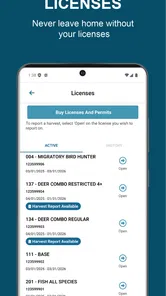
The app is intended to help Michigan residents and visitors manage their hunting and fishing credentials through a mobile device. Depending on the license or transaction, you may be able to purchase items, view active licenses, access permits, or present documentation when requested. Availability can vary by license type and current DNR rules, so verify the details shown in the app before heading out.
Does Michigan DNR Hunt Fish work without an internet connection?
Some information may remain accessible after it has been loaded, which can be useful in remote areas with weak cellular coverage. However, not every feature should be expected to work offline. Purchases, account verification, updates, and certain online services may require an internet connection. It is best to open the app and refresh your documents before leaving home, especially for trips far from reliable service.
What devices and accounts are required to use Michigan DNR Hunt Fish?
Michigan DNR Hunt Fish is available for supported Android and iOS devices, but compatibility depends on your phone model and operating system version. Many features may require creating or signing in to a Michigan DNR-related account and providing personal information during registration or checkout. Install the latest version from the official app store and allow necessary updates to avoid access problems.
Pros
- Official Michigan DNR information keeps regulations and seasons reliable.
- License and permit details are conveniently available on mobile.
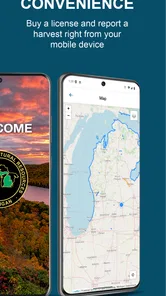
- Useful maps help identify public hunting and fishing opportunities.
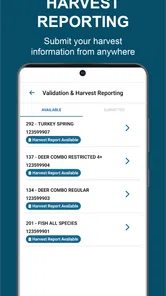
- Harvest reporting features can simplify required activity records.
- Works as a practical field reference without needing several separate apps.
Cons
- Some features may require an internet connection in remote areas.
- The interface can feel dense for first-time users.
- Location and map data may consume considerable battery during trips.
- Users must still verify regulations
- as rules can change during the season.
- Not all hunting or fishing planning tools may be equally useful to every user.





