

Metar-Taf - Visual decoder
- 50.00
- 4.8
- Installs
- 10.00K
- Price
- $5.99

Screenshots
Analysis by Reviewed
When I first looked at Metar-Taf, I wanted to know whether its visual approach would genuinely help me make sense of aviation reports or simply add another layer between me and the weather. It is a specialist weather app, and its value depends on whether METAR and TAF reports are part of your routine. The key question is not whether it replaces a full forecast service, but whether it makes these coded reports easier to inspect, learn from, and revisit.
Finding your way through a coded report
Ever found yourself squinting at a pile of weather data and wishing for a magic wand to untangle it all? Well, that's where Metar-Taf comes swooping in like a superhero with its cape flapping in the wind. This app is all about decoding those cryptic METAR and TAF reports, making it a breeze for aviators and weather enthusiasts alike. Let’s dive into how this app can transform your weather-reading experience.
Who benefits most from a visual decoder?
I find this tool most useful when I already have a reason to look up aviation weather but don’t want to lose time translating every abbreviation by hand. A student pilot checking a route, an instructor explaining a forecast, or a weather enthusiast learning how reports are structured can all benefit from seeing the decoded meaning alongside the original message. Keeping both views available is especially helpful: I can read the plain-language interpretation, then return to the coded line and connect the two instead of treating the translation as a black box.
There is a practical learning trick here. When I’m studying, I would first read a report in its raw form, make a quick guess about the conditions, and then use the visual explanation to check which parts I understood. That makes the app useful beyond a one-tap translation: it can support a repeatable practice routine. It is less compelling if I only want a general answer to “Will it rain later?” because ordinary weather apps are built around local forecasts and familiar icons, not aviation report formats.
Decoding Weather Like a Pro
So, what’s the big deal with METAR and TAF anyway? For those not in the know, these are weather reports used by pilots and meteorologists to get a grip on current and forecasted conditions. And trust me, reading these reports without a tool like Metar-Taf can feel like deciphering an ancient language. The app beautifully translates this complex data into a visual format that’s not just easy to read but also easy to understand.
Features That Stand Out
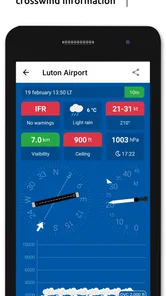
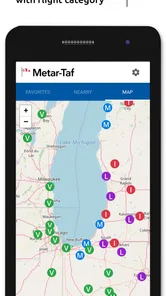
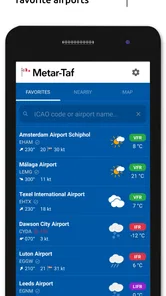
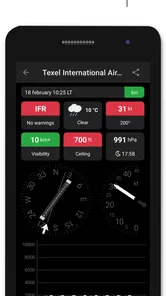
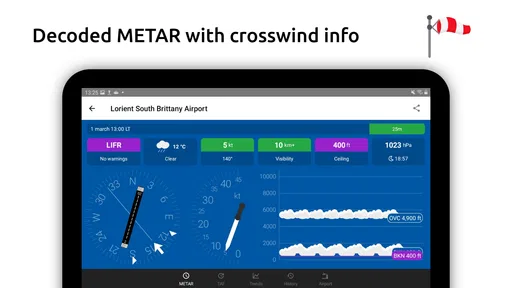
First off, the app’s interface is as smooth as butter. You’re welcomed with a sleek design that’s intuitive and doesn’t require a PhD to navigate. Once you input the ICAO code of the airport you’re interested in, the app does its magic and presents the weather data in both decoded and raw formats. This dual-format presentation is a lifesaver whether you’re a seasoned pilot or a newbie just getting your feet wet.
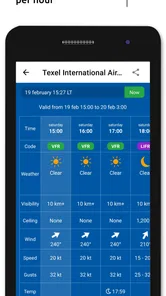
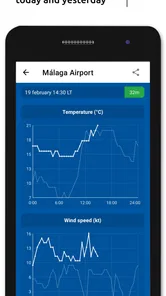
One of the standout features is the visual decoder. It’s like having a weather expert whispering in your ear, explaining each element in the report. The app breaks down complicated terms and offers interpretations that are easy to digest. Plus, it updates in real-time, ensuring that you’re always in the loop with the latest weather changes.
More From Our News Desk

 Gmail
GmailGmail in a Busy Inbox: Who Benefits Most?
From first account to crowded workday, Gmail earns its place through dependable search and flexible sorting—but its best fit depends on how much inbox maintenance you can tolerate.

 Prime Video
Switching to Prime Video: What Changes in Your Viewing Routine
Prime Video can make a compelling second home for streaming, but switching means learning a different catalog, rental layer, and route from browsing to playback.

 Universal TV Remote Control
Universal TV Remote Control Works Best as a Reliable Backup
A phone remote earns its place through quick setup and reliable habits. Here is how to get more from Universal TV Remote Control—and where its limits show.

 Weather - By Xiaomi
Weather by Xiaomi Review: Clear at a Glance, Less Clear Up Close
Xiaomi’s weather app makes everyday forecasts quick to scan, but its calm surface can leave useful details and recovery paths harder to find than they should be.

 X
XX Under Pressure: Can It Recover When Posting Goes Wrong?
A resilience-focused review of X, examining setup, mistaken posts, interruptions, weak connections, and the gaps that matter when recovery needs to be dependable.

 Clash of Clans
Clash of Clans Is Won Between the Battles
Its raids are quick; its community is a long-term project of coordination, teaching, rivalry, and shared responsibility—with all the friction that entails.
Latest News



Readability across settings and abilities
The visual approach can reduce the effort of scanning dense strings, particularly when I’m new to a code or checking a report quickly between other tasks. Still, a visual explanation is not automatically easier for everyone: some readers prefer the compact raw text, while others need larger text, stronger contrast, or screen-reader-friendly navigation. I would try the display in the setting where I plan to use it rather than assume it suits every eyesight or reading preference. The raw report also gives experienced users a direct route when they would rather scan familiar codes than step through explanations.
For motor and sensory comfort, the value is mostly in reducing mental decoding work, not in making weather decisions hands-free. I would check reports while stationary and give myself time to read them, especially in a noisy cockpit, bright sunlight, or a bumpy environment where small controls and detailed text can be harder to manage. If I rely on a particular phone accessibility setting, I’d test whether it remains comfortable with the app before depending on it during a time-sensitive task. That is a sensible check for any specialist weather tool, not a reason to treat a decoded summary as a substitute for careful interpretation.
A practical workflow, not a general forecast
For a realistic use case, imagine planning a lesson or flight and checking an airport’s conditions before leaving home. I’d enter the airport’s ICAO code, compare the raw report with its decoded view, and use the forecast report to think through the expected changes rather than look only at the current observation. If I’m comparing more than one airport, I’d keep the identifiers written down first; that small habit helps avoid mixing up locations when switching between reports. The app’s focus is aviation weather, so I’d pair it with a regular local forecast when I also need everyday details such as what to wear or whether a neighborhood shower is likely.
That distinction is the main trade-off against mainstream weather apps. Those are usually faster for a glance at temperature, rain, and a map; this one is more valuable when the METAR or TAF itself matters and I want help understanding its components. It is also not a reason to skip official briefing procedures or personal training. For pilots, the decoder can make information easier to read, but the responsibility to assess the full report remains with the user.
Using it as a study aid, not just a lookup tool
For a learner, I’d make each lookup do a little more than answer the immediate question. First, identify the report type and airport, then read the raw message once before looking at the visual explanation. After that, I’d try to explain the important changes in my own words. This sequence helps reveal whether I understood the report or only recognized a familiar symbol. It also makes the app more useful between lessons, when there may be no instructor beside me to walk through every abbreviation.
There is a trade-off to that approach: a clear translation can make a complicated report feel simpler than the decision really is. I would use it to build familiarity with the parts of the report, not to shortcut the broader process of assessing conditions. If a report raises a question I cannot resolve, the right next step is to consult appropriate aviation guidance or a qualified person rather than assume the visual presentation has answered everything.
Why You’ll Love It
Imagine having a handy pocket companion that makes your pre-flight planning a lot less stressful. That’s Metar-Taf for you. It’s perfect for pilots who need quick and reliable weather information to make informed decisions. The app also caters to weather geeks who simply enjoy the thrill of understanding weather patterns. It’s like having a mini weather station right in your pocket.
Another cool aspect is its offline capabilities. Even when you’re out of network range, the app allows you to access previously downloaded data. This feature is especially useful during flights when connectivity can be iffy. You can still pull up essential weather information without breaking a sweat.
For example, I’d check and save the relevant information while I still have a dependable connection, then treat it as a reference rather than assume it will stay current once offline. A previously downloaded report can help me revisit what I saw, but it cannot tell me that conditions have changed since the download. That makes offline access handy for study, review, or a patchy signal, while fresh checks are still important before making a decision based on changing weather.
That offline distinction is worth thinking through before relying on the app away from a connection. I’d use the connected moment to confirm that I have the reports I intend to review, and I’d keep track of when I retrieved them. This is a simple way to avoid confusing a useful saved snapshot with a live update. It also answers a practical question for people who study on the ground: downloaded material can support later review, but it should not be mistaken for a newly checked observation or forecast.
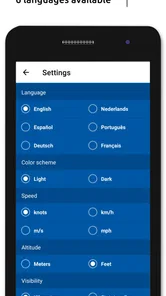
And let’s not forget about the customization options. You can tailor the settings to suit your personal preferences, making your weather checks more personalized and efficient. The app supports multiple languages too, broadening its usability across different regions.
Cost, platform fit, and remaining barriers
This is a paid weather app from Van den Boom Makelaardij SL, priced at $5.99, so I’d judge the purchase by how often I actually read aviation reports. For someone who checks METARs and TAFs regularly, paying for a focused decoder may make more sense than repeatedly wrestling with raw text in a general-purpose tool. If I only need a forecast now and then, a standard weather app may be the better fit. It has a 4.9 average from around 945 ratings, with over 10K installs, but those figures don’t remove the need to decide whether its specialist purpose matches my routine.
I’d also think about what I expect a weather app to do before paying. If my usual question is whether to take an umbrella, a conventional forecast is a more direct answer and may be easier to use at a glance. If I regularly encounter aviation reports and want help understanding their structure, the specialist focus is the point. The price is easiest to justify when the app becomes part of a repeated learning or planning habit, rather than a download I open once out of curiosity.
The app is rated for Everyone and runs on operating system version 7.0 or later; version 2.8.0 is the current release. I’d check that my device meets that requirement before buying, then spend a little time learning the report layout while I’m not under pressure. The developer is Van den Boom Makelaardij SL. A specialist decoder still asks users to know which airport they mean, understand why aviation reports matter, and distinguish a stored report from a current one. Those are meaningful barriers for casual users, even if the visual explanations soften the learning curve.
Those barriers matter for access as well as expertise. Entering the correct airport identifier is a specific task, and the visual layout still requires time and attention; a decoder cannot remove the need to read carefully or decide what information is relevant. Someone who finds small text tiring, uses assistive settings, or needs a completely hands-free interaction should test the app in a calm setting before depending on it. I would not choose it as my only weather tool if I needed an immediate, broad overview of local conditions or if aviation reports were unfamiliar and not something I wanted to learn.
Who should choose another kind of weather app?
If you are a casual weather checker, the main drawback is not that the app is difficult to learn; it is that its central task may not match yours. A familiar forecast app can put temperature, rain chances, and a location overview in front of you with less interpretation. Metar-Taf is a better fit when the coded aviation report is the material you need to understand. For occasional curiosity, I’d try a free general-purpose source first and consider this paid specialist option only if I found myself repeatedly looking up METARs or TAFs.
For people who already work with aviation weather, I see a different balance. The raw format remains valuable, and a visual explanation can be a useful second view rather than a replacement for knowledge. I would still compare what the decoder presents with the underlying report, especially when learning or when the conditions could affect a consequential decision. That habit keeps the app in its most sensible role: a reading aid that supports understanding, not an authority that removes the need for judgment.
The Final Verdict
If you’re someone who frequently deals with METAR and TAF reports, this app is nothing short of a game-changer. Metar-Taf makes weather data accessible, understandable, and dare I say, enjoyable. Whether you’re in the aviation industry or just have a keen interest in weather phenomena, this app is definitely worth checking out. It takes the hassle out of reading complex weather reports and gives you the power to make informed decisions with confidence.
In a nutshell, if you’re on the lookout for an app that turns you into a weather decoding wizard, Metar-Taf is your go-to. With its user-friendly interface, real-time updates, and offline access, it’s designed to make your life a whole lot easier. So go ahead, give it a whirl, and see how it transforms your weather-watching experience!
My recommendation is strongest for someone who regularly reads aviation reports, wants to learn how their pieces fit together, and is comfortable checking the coded message alongside its explanation. The visual decoding, raw view, and saved information give that kind of user several ways to work with the same report. I’d be more cautious if accessibility depends on a particular display or navigation behavior, or if the goal is simply a quick neighborhood forecast. In those cases, testing it first—or choosing a general weather app—makes more sense than expecting one specialist tool to suit every context.
Metar-Taf - Visual decoder Frequently Asked Questions
Who is Metar-Taf - Visual Decoder designed for?
Metar-Taf - Visual Decoder is a weather app focused on aviation reports, so it may interest pilots, aviation students, and others who want to make sense of METAR and TAF information. Its visual approach is intended to make report details easier to scan than raw coded text. The app is listed for Everyone, though aviation weather still requires careful interpretation.
What is Metar-Taf - Visual Decoder and how does it work?
Metar-Taf - Visual Decoder is an innovative application designed for aviation enthusiasts and professionals who need to decode METAR and TAF weather reports quickly and accurately. The app transforms complex meteorological data into easy-to-understand visual formats, making it accessible for users with varying levels of experience. It uses a user-friendly interface to display real-time weather conditions and forecasts, which are essential for flight planning and safety.
Is Metar-Taf - Visual Decoder suitable for beginners in aviation?
Yes, Metar-Taf - Visual Decoder is suitable for both beginners and seasoned aviation professionals. The app simplifies complex meteorological reports into visual representations, making it easier for users to understand and interpret weather conditions without extensive training. It provides educational resources and tutorials to help users, especially those new to aviation, grasp the fundamentals of METAR and TAF reports.
Can Metar-Taf - Visual Decoder be used offline?
Metar-Taf - Visual Decoder primarily relies on real-time data to provide accurate weather forecasts and conditions, which means it requires an internet connection to function optimally. However, users can download specific reports for offline access, allowing them to review critical information even when not connected to the internet. This feature is particularly useful for aviators planning routes in areas with limited connectivity.
What platforms is Metar-Taf - Visual Decoder available on?
Metar-Taf - Visual Decoder is available for both Android and iOS devices, ensuring wide accessibility for users across different mobile platforms. The app is optimized to work seamlessly on smartphones and tablets, providing a consistent and feature-rich experience regardless of the device used. Users can download it from the Google Play Store and Apple App Store.
Pros
- Intuitive user interface for easy navigation.
- Provides real-time weather updates.
- Supports multiple languages.
- Customizable alerts for weather changes.
- Detailed weather data presentation.
Cons
- Requires a stable internet connection.
- Limited offline functionality.
- No dark mode available.
- Can be overwhelming for new users.
- Premium features require a subscription.











